



1. Introduction
Automation test failures often feel like black boxes—scripts fail with minimal clues, leaving testers to dig through logs, inspect the DOM, and debug selectors manually. That’s why it’s become crucial to capture test failure context. What if your framework could collect this failure context automatically and make it AI-ready?
In this blog, we’ll show how to:
- Hook into test failures
- Capture the stack trace
- Snapshot the DOM and generate diffs
- Track locator attempts
- Package this data for AI-based debugging or healing
2. Why You Need Runtime Failure Context
- Helps in faster debugging by giving complete visibility.
- Enables AI agents to make decisions based on real data.
- Improves test self-healing by understanding locator failures.
- Essential for dashboards and reporting.
3. How It Works: An Overview of Architecture
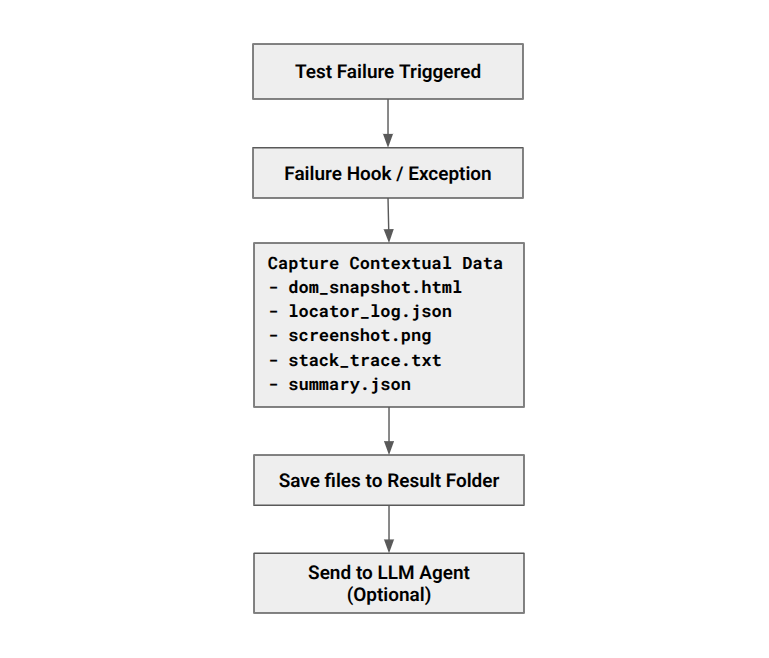
4. Step-by-Step Implementation
Let’s walk through the implementation steps with sample code.
We’ll assume a Python automation framework with Selenium and Behave (BDD).
Step 1: Set Up the Basic Test Framework
1.1 Recommended Folder Structure
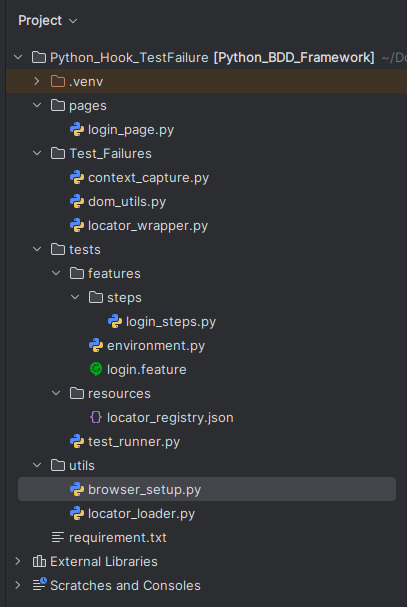
1.2 Define the Feature File
features/login.feature
Feature: Login Page Functionality

  Scenario: login into Swag Labs
    Given I launch the browser
    When I enters username and password
    Then I should see the inventory page
This defines a basic scenario to test the login functionality of Swag Labs.
1.3 Implement Step Definitions using safe_find
features/steps/login_steps.py
import time

from behave import given, when, then
from langsmith import expect

from Test_Failures.context_capture import capture_failure_context
from pages.login_page import LoginPage
from utils.browser_setup import get_driver


@given("I launch the browser")
def step_open_login_page(context):
    context.driver = get_driver()
    print("Launching browser and opening login page.")
    context.login_page = LoginPage(context.driver)
    context.login_page.open()

@when("I enters username and password")
def step_enter_credentials(context):
    print("Entering credentials and clicking login.")
    context.login_page.enter_username("standard_user")
    time.sleep(2)
    context.login_page.enter_password("secret_sauce")
    time.sleep(2)
    context.login_page.click_login()

@then("I should see the inventory page")
def step_verify_login(context):
    assert context.login_page.is_logged_in(), "Login failed!"
    context.driver.quit()
This maps the steps from your feature file to Python functions that interact with the web application.
1.4 Create the Page Object
pages/login_page.py
from utils.locator_loader import load_locators
from Test_Failures.locator_wrapper import safe_find, log_locator_attempt


class LoginPage:
    def __init__(self, driver):
        self.locators = load_locators("/home/nashtech/Documents/Python_BDD_Framework/tests/resources/locator_registry.json")
        self.driver = driver

    def open(self):
        self.driver.get("https://www.saucedemo.com/")

    def get_title(self):
        return self.driver.title

    def enter_username(self, username):
        safe_find(self.driver, "id", "user-name").send_keys(username)

    def enter_password(self, password):
        safe_find(self.driver, "id", "password").send_keys(password)

    def click_login(self):
        safe_find(self.driver, "id", "login-button").click()

    def is_logged_in(self):
        return "inventory" in self.driver.current_url
Step 2: Define Utility to Capture Test Failure Context
Create a context_capture.py file in a folder like Test_Failures/:
import os
import json
import traceback
from datetime import datetime
from Test_Failures.dom_utils import capture_dom_snapshot
from Test_Failures import logger

def capture_failure_context(context, step):
    print("Creating folder as test failed")
    test_name = step.name.replace(" ", "_")
    timestamp = datetime.now().strftime("%Y%m%d%H%M%S")
    folder = f"test_results/{test_name}_{timestamp}"
    try:
        os.makedirs(folder, exist_ok=True)
        print(f"Created folder: {folder}")
    except Exception as e:
        print(f"Error creating folder: {e}")
        return  # Exit early if folder creation fails

    # Save screenshot or other context info
    try :
        screenshot_path = os.path.join(folder, "screenshot.png")
        context.driver.save_screenshot(screenshot_path)

    # 1. Save stack trace
        if hasattr(step, "exception") and hasattr(step, "exc_traceback"):
            stack_trace = "".join(traceback.format_exception(type(step.exception), step.exception, step.exc_traceback))
        else:
            stack_trace = "".join(traceback.format_stack())
        with open(os.path.join(folder, "stack_trace.txt"), "w") as f:
            f.write(stack_trace)

    # 2. Save DOM snapshot
        dom_path = capture_dom_snapshot(context.driver, folder)

    # 3. Save locator attempts
        data = logger.get_all()
        print("Locator Data:", data)
        with open(f"{folder}/locator_log.json", "w") as f:
            json.dump(logger.get_all(), f, indent=2)

    # 4. Bundle everything into one JSON
        summary = {
            "test_name": test_name,
            "timestamp": timestamp,
            "stack_trace_path": f"{folder}/stack_trace.txt",
            "dom_snapshot_path": dom_path,
            "locator_log": f"{folder}/locator_log.json"
        }

        summary_path = os.path.abspath(os.path.join(folder, "summary.json"))
        with open(summary_path, "w") as f:
            json.dump(summary, f, indent=2)

    except Exception as e:
        print(f"Error capturing failure context: {e}")
Step 3: Track Locator Attempts with safe_find
When locating elements, maintain a log of all attempts (like fallback selectors) and safe_find function to log every locator usage:
Test_Failures/locator_wrapper.py
from selenium.common.exceptions import NoSuchElementException

log_locator_data = []

def log_locator_attempt(by, value, success, error=""):
    log_locator_data.append({
        "by": by,
        "value": value,
        "success": success,
        "error": error
    })

def get_all():
    return log_locator_data

def safe_find(driver, by, value):
    try:
        element = driver.find_element(by, value)
        log_locator_attempt(by, value, True)
        return element
    except NoSuchElementException as e:
        log_locator_attempt(by, value, False, str(e))
        raise
Step 4: Hooking into Test Failures after_scenario
Modify your environment.py to detect failures and call capture_failure_context() when a scenario fails. This allows real-time failure logging without interrupting execution.
In your environment.py file, hook into the test failure:
# features/environment.py
from Test_Failures.context_capture import capture_failure_context

def after_step(context, step):
    print("Running after_step hook...")
    if step.status == "failed":
        print(f"Step failed: {step.name}")
        capture_failure_context(context, step)
Step 5: Final Output Per Failure
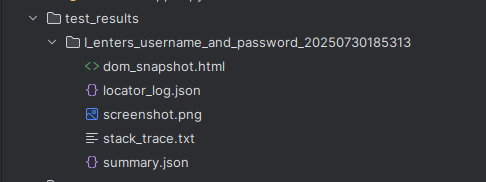
To verify that everything works, intentionally break a locator—for example, change the login button’s ID to something incorrect. When the test fails, the framework will automatically generate a folder inside /test_results/ containing all the relevant failure details—such as the stack trace, DOM snapshot, locator logs, and a screenshot like:
5. Conclusion
Hooking into test failures isn’t just about logging — it transforms your test framework into a self-aware system. You’ve now:
- Captured detailed failure artifacts
- Logged dynamic locator attempts
- Saved structured output for AI-based debugging
- Integrated everything into a Behave BDD framework