



Introduction
Chaos Monkey is a component of Netflix’s Simian Army, a collection of tools that evaluate the robustness and dependability of cloud infrastructures by randomly shutting down instances in a live environment. This approach mimics real-world failures, allowing organisations to verify that their systems can manage unforeseen interruptions. The following is a straightforward guide to illustrate the functionality of Chaos Monkey.
The Simian Army is a collection of failure injection tools developed by Netflix to address certain limitations inherent in Chaos Monkey’s functionality.
The Genesis of Chaos Monkey
Netflix, a leading global streaming service, depends significantly on cloud infrastructure to provide seamless entertainment experiences. Additionally, recognising that failures are a natural occurrence, Netflix has adopted a proactive approach by viewing these challenges as opportunities for growth.
Moreover, this mindset culminated in the development of Chaos Monkey in 2010. This tool was created to intentionally disrupt the cloud environment, ensuring that systems are resilient against unforeseen interruptions, facilitating Netflix’s shift from traditional on-premises data centres to Amazon Web Services.
Why Consider Chaos Engineering?
Before exploring Chaos Monkey in detail, it is essential to grasp the overarching concept of chaos engineering. This practice is founded on the principle of proactively uncovering weaknesses within a system before they emerge as tangible issues.
The primary advantages of chaos engineering include:
1. Enhanced Resilience: By deliberately introducing failures in a controlled setting, vulnerabilities can be identified and rectified before they lead to outages.
2. Improved Incident Response: Thus, Chaos engineering enables teams to practice their responses to failures, ensuring preparedness for real incidents.
3. Greater Confidence: Consistent testing fosters assurance in the system’s capacity to manage failures, alleviating stress during critical situations.
4. Superior User Experience: Finally, a reduction in disruptions results in more satisfied customers and an improved reputation for the brand.
How does it work?
Chaos Monkey operates on a straightforward principle. Subsequently, the tool randomly identifies instances within the production environment and deactivates them. Basically, this process compels us to verify that our applications can withstand such interruptions without incurring substantial downtime.
The following outlines the operational steps of Chaos Monkey:
1. Instance Identification: Chaos Monkey recognises all instances within our cloud environment, including virtual machines, containers, and microservices.
2. Random Selection: Next, Chaos Monkey randomly chooses one or more instances for termination.
3. Termination: Then the chosen instances are deactivated, mimicking a failure scenario.
4. Monitoring: Moreover, monitor the system’s response. Is it the traffic rerouted? Do backup instances assume control? Is there any observable downtime?
5. Analysis: The information gathered during these tests is scrutinised to pinpoint vulnerabilities and implement enhancements.
Overview of deploying Chaos Monkey
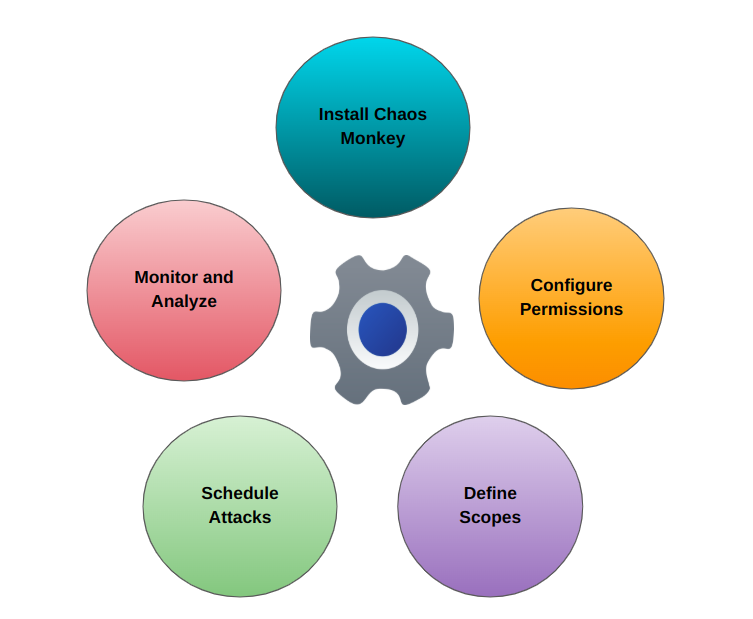
Installation
- To start the process, one must obtain the most recent version from the official GitHub repository and confirm that it is executable.
- Subsequently, position the binary within a system path to facilitate convenient access.
Configuration
- Next, establish the required permissions for Chaos Monkey to engage with the environment.
- Then confirm the tool possesses the necessary access to terminate instances or interrupt services within the infrastructure.
Scope
- Furthermore, define the extent of Chaos Monkey’s activities, including the specific services, instances, or geographical regions it will affect.
- Additionally, utilise configuration files to tailor the selection of systems or applications that may be influenced.
Schedule Attacks
- Adjust Chaos Monkey to perform disruptions, such as terminating instances at designated intervals.
- Implement a scheduling system to ensure a balanced approach to testing chaos engineering scenarios while minimising excessive disruption.
Monitor and Analyse
- Following the execution of attacks, it is essential to observe the system’s performance and gather relevant metrics.
- Subsequently, evaluate the findings to enhance system robustness and pinpoint any vulnerabilities.
Real-World Scenarios of Chaos Monkey
It is not exclusively utilised by Netflix; numerous organisations have embraced this tool to enhance their system reliability. Below are several notable scenarios:
1. Netflix: As the originator of the tool, Netflix employs Chaos Monkey extensively to evaluate its streaming service. The company attributes its exceptional reliability to the principles of chaos engineering.
2. Gremlin: This chaos engineering platform, inspired by Chaos Monkey, provides additional functionalities such as network latency simulation and CPU stress testing.
3. Uber: The ride-sharing leader implements chaos engineering to ensure that its microservices can effectively manage unforeseen failures, including data centre outages.
Challenges and Constraints
Although Chaos Monkey is an effective tool, it presents several challenges:
1. Cultural Resistance: Teams might be hesitant to embrace the concept of intentionally inducing failures.
2. Learning Curve: Implementing and operating Chaos Monkey necessitates a comprehensive understanding of our system and its interdependencies.
3. Risk of Overreach: Inadequately designed experiments can result in unforeseen outcomes, including extensive outages.
4. Tool Integration: Integrating Chaos Monkey with the monitoring and alerting systems may be necessary.
Installation process of Chaos Monkey
The basic necessity to install Chaos Monkey is Mysql. To download Mysql’s latest version, please visit the website or install it manually.
curl -OL https://dev.mysql.com/get/mysql-apt-config_0.8.10-1_all.debInstall Mysql Server by using the dpkg command.
sudo dpkg -i mysql-apt-config_0.8.10-1_all.debUpdate the MySQL packages-
sudo apt-get updateInstall the MySQL server from the available packages.
sudo systemctl status mysql
Note - It command is used to check the current status of the MySQL service on a Linux system.
Configure Mysql for Chaos Monkey
Use Mysql as the root user. In the terminal –
mysql -u root -p and enter the password.
Establish a database for Chaos Monkey to utilise.
CREATE DATABASE chaosmonkey;Verify if the database was created or not?
SHOW DATABASES;
Create a new MySQL user –
CREATE USER 'chaosmonkey'@'localhost' IDENTIFIED BY 'password';Given full access, including the ability to SELECT, INSERT, UPDATE, and DELETE –
GRANT ALL PRIVILEGES ON chaosmonkey.* TO 'chaosmonkey'@'localhost';To ensure all system modifications are retained, log into Mysql first and run the command –
mysql -u root -pSave the changes
FLUSH PRIVILEGES;Implementing Chaos Monkey
First, install go –
curl -O https://dl.google.com/go/go1.11.linux-amd64.tar.gzUnzip the go1.11.linux-amd64.tar.gz tarball and move its contents into the /usr/local folder.
sudo tar -C /usr/local -xzf go1.11.linux-amd64.tar.gzTo integrate Go’s binary, add the following path directory in the bashrc:
echo 'export PATH=$PATH:/usr/local/go/bin' >> ~/.bashrcSet GOPATH:
export GOPATH=$HOME/go
echo 'export GOPATH=$HOME/go' >> ~/.bashrc
Set GOBIN:
export GOBIN=$HOME/go/bin
echo 'export GOBIN=$HOME/go/bin' >> ~/.bashrc
To incorporate the Go’s binary directory, execute the following command:
export PATH=$PATH:$GOBIN
echo 'export PATH=$PATH:$GOBIN' >> ~/.bashrc
Setting up the Chaos Monkey Binary
Certainly, we can typically find these binaries on GitHub releases or similar repositories to obtain the most recent Chaos Monkey binary. The latest binary can also be downloaded from the official Chaos Monkey release page or a suitable URL.
Next, begin by navigating to the Chaos Monkey GitHub Releases or an appropriate link. Copy the URL corresponding to the latest release (for instance, for Linux).
Subsequently, utilise curl or wget to perform the download. Ensure to substitute <url-to-latest-binary> with the actual URL of the latest binary compatible with the system (such as a .tar.gz file).
// utilize curl
curl -LO <url-to-latest-binary>
// utilize wget
wget <url-to-latest-binary>// extract the Binary
tar -xvzf chaosmonkey-latest-linux.tar.gz// relocate the binary file to the directory.
sudo mv chaosmonkey /usr/local/bin/chaosmonkey// installation confirmation
chaosmonkey --version// Convert the binary to an executable file
sudo chmod +x /usr/local/bin/chaos monkey// run the Chaos Monkey
chaosmonkeyConclusion
In conclusion, Chaos Monkey and Chaos Engineering focus not on indiscriminate destruction but rather on fortifying systems to endure genuine challenges encountered in the real world. By welcoming controlled chaos, organisations can convert failures into valuable opportunities for development and resilience. Whether we are a startup or a large corporation, Chaos Monkey aids in the gradual enhancement of system reliability. Basically, begin with small-scale tests, glean insights from each experience, and observe the strengthening of our infrastructure. Engage with chaos engineering to revolutionise the strategy towards reliability.