


I. RobotEyes Library introduction
RobotEyes is a Visual Regression Library for Robot Framework
It uses ImageMagick to Compare Images and create a diff image. Custom Report to view baseline, actual, and diff images. View passed and failed tests.
About ImageMagick see here: GitHub – ImageMagick/ImageMagick: 🧙♂️ ImageMagick 7
II. How to install RobotEyes
- The first, we need to install Imagemagick: ImageMagick – Download
- And install
robotframework-eyeslibrary inpip
pip install robotframework-eyes
III. RobotEyes Keywords
| Keyword | Arguments | Comments |
|---|---|---|
| Open Eyes | lib, tolerance, template_id, cleanup | Ex open eyes lib=AppiumLibrary tolerance=5 cleanup=all_passed |
| Capture Full Screen | tolerance, blur, radius, name, redact | Ex capture full screen tolerance=5 name=homepage blur=<array of locators> radius=50(thickness of blur) |
| Capture Element | locator, tolerance, blur, radius, name, redact | |
| Capture Mobile Element | locator, tolerance, blur, radius, name, redact | |
| Scroll To Element | locator | Ex scroll to element id=user |
| Compare Images | Compares all the images captured in the test with their respective base image | |
| Compare Two Images | first, second, output, tolerance | Compares two images captured in the above steps. Takes image names, diff file name and tolerance as arguments Ex: Compare Two Images img1 img2 diff 10 |
IV. Code sample
Firstly, we define libraries in Setting and use Test Teardown to close the Browser
Then we declare all variables and Keywords that were applied in TestCase
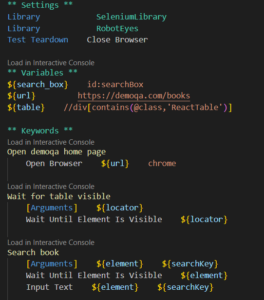
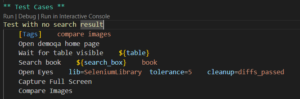
Finally, we create a Test Case to compare images.
To compare the images, the following needs to exist in the Test Case code:
- The
Open Eyeskeyword after theOpen Browserkeyword. - Any of the images capture keywords. E.g
Capture Full Screen - The
Compare Imageskeyword after capturing the desired images.
To Compare images, we need to add "-v","images_dir:.\\baselineImage" into launch.json or run by the command line
-d results -v images_dir:<baseline_images_directory> <test_file>
V. Demo
– Compare images by running application
The original, baseline image directory does not exist, RobotEyes will create it. If baseline image does not exist, RobotEyes will move the captured image into the baseline directory. For example, when running tests the first time all captured images will be moved to baseline directory passed by you (images_dir)
It is mandatory to pass baseline image directory, absence of which will throw an exception.
[videopress hAOfz0x1]
Once done running the tests, report with the name visualReport.html will be generated
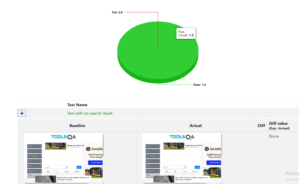
– Do comparison tests for non-web/mobile images
[videopress SEDatofs]
VI. Conclusion
RobotEyes is a good library for testing images in Robot Framework. It provides simple keywords and some arguments like tolerance that allow dissimilarity between images, blur out unwanted elements (dynamic texts, etc) from images to ignore them from comparison.