


In the realm of event streaming and real-time data processing, choosing the right platform is critical to the success of your project. Two of the most popular options available today are Azure Event Hub and Apache Kafka. Both platforms offer robust solutions for handling large volumes of streaming data, but they are designed with different architectures, features, and use cases in mind. This blog post will delve into the key differences between Azure Event Hub and Kafka, helping you determine which platform is best suited for your specific needs.

What is Azure Event Hub?
Azure Event Hub is a fully managed, real-time data ingestion service offered by Microsoft Azure. It is designed to handle large-scale event streaming, making it ideal for collecting, transforming, and storing data from various sources. With Azure Event Hub, you can ingest millions of events per second from multiple sources and easily process this data with other Azure services.
Key Features and Capabilities of Azure Event Hub:
- Fully managed service with high availability and disaster recovery options.
- Seamless integration with other Azure services for comprehensive data processing.
- High scalability, allowing it to handle millions of events per second.
- Built-in security features, including encryption and access controls.
- Support for multiple protocols, including AMQP, HTTP, and Kafka.
What is Apache Kafka?
Apache Kafka is an open-source event streaming platform that has become the really a standard for large-scale, high-throughput data pipelines. Originally developed by LinkedIn and later open-sourced, Kafka is known for its robust architecture, fault tolerance, and ability to handle real-time data feeds with low latency.
Key Features and Capabilities of Apache Kafka:
- Open-source platform with a large and active community.
- Distributed architecture that ensures fault tolerance and scalability.
- High throughput with low latency, making it ideal for real-time data processing.
- Extensive ecosystem with connectors for a wide range of data sources and sinks.
- Flexibility to deploy on-premises, in the cloud, or in hybrid environments.
Core Architecture Comparison
The architecture of a data streaming platform significantly influences its performance, scalability, and reliability. Both Azure Event Hub and Kafka are designed with different architectural principles that serve to their respective use cases.
Azure Event Hub Architecture:
Azure Event Hub operates as a partitioned, event streaming service where events are ingested into specific partitions. Each partition acts as a commit log, storing events in the order they are received. Consumers can read from these partitions independently, enabling parallel processing of data. This architecture is highly scalable and can handle large volumes of data. Event Hub also offers features like Capture, which allows automatic data archiving to Azure Blob Storage or Azure Data Lake.

Source: Overview of features – Azure Event Hubs – Azure Event Hubs | Microsoft Learn
Kafka Architecture:
Kafka’s architecture is built around the concept of a distributed, partitioned, and replicated commit log. Like Event Hub, Kafka organizes data into topics, which are further divided into partitions. Each partition can be replicated across multiple brokers, ensuring data availability and fault tolerance. Kafka’s distributed nature allows it to scale horizontally, adding more brokers to the cluster as needed. This architecture is particularly advantageous for high-throughput applications that require strong durability and fault tolerance.
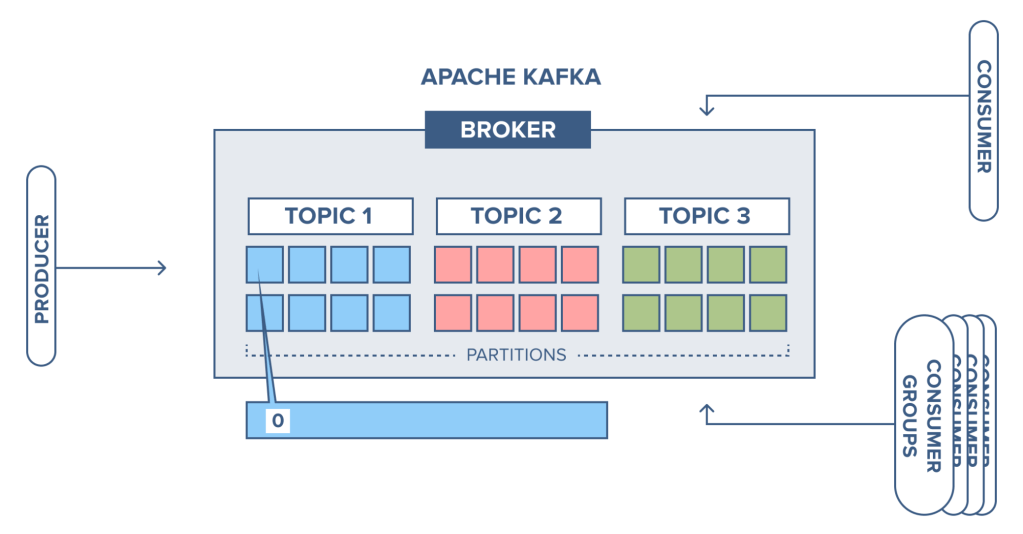
Source: CloudKarafka blog – CloudKarafka, Apache Kafka Message streaming as a Service
Real-World Performance Comparisons:
In practice, both Azure Event Hub and Kafka can handle high-throughput scenarios effectively. However, Kafka’s ability to scale horizontally and its optimized architecture often give it an edge in ultra-low-latency and high-performance use cases. On the other hand, Azure Event Hub’s managed nature and seamless integration with Azure services make it a strong contender for enterprises already invested in the Azure ecosystem.
Learning Curve for Each Platform:
For teams new to event streaming, Azure Event Hub offers a gentler learning curve due to its managed nature and integration with other Azure services. Kafka, while powerful, has a steeper learning curve, especially for those unfamiliar with distributed systems and cluster management. However, once mastered, Kafka’s capabilities offer unmatched flexibility and performance.
Integration and Ecosystem
The ability to integrate with other systems and the breadth of the ecosystem surrounding a platform are key factors that influence its adoption and effectiveness.
Azure Event Hub Integration:
Azure Event Hub is deeply integrated with the Azure ecosystem, making it an excellent choice for organizations already using Azure services. It seamlessly connects with tools like Azure Stream Analytics, Azure Functions, and Azure Data Lake, enabling end-to-end data processing and analysis within the Azure cloud. Additionally, Event Hub supports the Kafka protocol, allowing Kafka clients and applications to communicate with Event Hub without significant changes to existing codebases. This hybrid compatibility provides flexibility for teams transitioning from Kafka or those who require Kafka’s client libraries.
Kafka’s Extensive Integration Options:
Apache Kafka’s ecosystem is one of its most significant strengths. As an open-source platform, Kafka offers a vast array of connectors and integrations, allowing it to connect with numerous data sources, processing frameworks, and storage solutions. Kafka Connect, a tool for integrating Kafka with external systems, supports a wide range of connectors, from databases and messaging systems to file systems and cloud services. This extensive integration capability makes Kafka highly versatile, enabling it to serve as a central data hub in complex, multi-system environments.
Cross-Platform Compatibility:
While Azure Event Hub excels within the Azure cloud, Kafka’s cross-platform nature allows it to be deployed in various environments, including on-premises data centers, public clouds like AWS, Google Cloud, and Azure, or in hybrid setups. This flexibility ensures that Kafka can fit into a broader range of enterprise architectures, particularly for organizations that operate across multiple platforms or those seeking to avoid vendor lock-in.
Cost Considerations
Cost is always a critical consideration when choosing a data streaming platform, as it directly impacts the total cost of ownership and the overall budget of the project.
Azure Event Hub Pricing:
Azure Event Hub pricing is based on the number of throughput units (TUs) used, which represent a combination of ingress and egress operations. Additional costs may arise from data retention, network traffic, and integration with other Azure services. However, the managed nature of Event Hub simplifies budgeting, as operational overheads like maintenance, scaling, and updates are included in the service fee.
Costs Associated with Kafka:
The cost of deploying and managing Kafka can vary significantly depending on the deployment model. For on-premises or self-managed cloud deployments, costs include infrastructure, storage, and networking, as well as the human resources required for setup, monitoring, and maintenance. Additionally, enterprises may opt for managed Kafka services like Confluent Cloud or AWS MSK (Managed Streaming for Kafka), which offer similar benefits to Azure Event Hub in terms of reducing operational overhead. However, these managed services often come with a premium price, which needs to be factored into the overall cost assessment.
Security Features
Security is paramount in any data streaming platform, particularly when dealing with sensitive or mission-critical data.
Azure Event Hub’s Security Model:
Azure Event Hub offers robust security features, including end-to-end encryption, role-based access control (RBAC), and integration with Azure Active Directory (AAD) for identity management. All data in transit and at rest within Event Hub is encrypted using industry-standard protocols. Additionally, Azure’s compliance certifications ensure that Event Hub meets various regulatory requirements, making it suitable for use in highly regulated industries such as finance and healthcare.
Security Mechanisms in Kafka:
Kafka provides a comprehensive set of security features, though they require manual configuration. Kafka supports encryption of data in transit using SSL/TLS and authentication via SSL, SASL (Simple Authentication and Security Layer), or Kerberos. Access control can be managed through the use of ACLs (Access Control Lists), which restrict access to topics, consumer groups, and other resources within the Kafka cluster. For enterprises, Kafka’s security can be enhanced with the use of additional tools like Confluent’s security plugins or third-party solutions for monitoring and compliance.
Use Cases for Azure Event Hub
Understanding the specific scenarios where Azure Event Hub excels can help determine if it’s the right fit for your project.
Scenarios Where Event Hub Excels:
Azure Event Hub is particularly well-suited for organizations that are heavily invested in the Azure ecosystem. Its seamless integration with Azure services like Stream Analytics, Azure Functions, and Data Lake makes it an excellent choice for end-to-end data processing and analytics pipelines. Event Hub is also ideal for scenarios that require high throughput, real-time data ingestion, and event-driven architectures, such as IoT telemetry, log and data ingestion for real-time analytics, and cloud-based applications that need to process large volumes of streaming data.
Industry-Specific Use Cases:
- Finance: Real-time processing of financial transactions and market data.
- Healthcare: Ingesting and processing health monitoring data from IoT devices.
- Retail: Tracking customer interactions and sales data for real-time analytics.
- Manufacturing: Monitoring and analyzing data from industrial IoT devices for predictive maintenance.
Use Cases for Apache Kafka
Apache Kafka is known for its versatility and is often the preferred choice for organizations requiring robust, scalable, and flexible event streaming solutions.
Scenarios Where Kafka is the Better Choice:
Kafka excels in scenarios that demand high throughput, low latency, and strong durability. It is particularly well-suited for distributed systems where data needs to be processed in real-time across different geographical locations. Kafka’s ability to handle large-scale, event-driven architectures makes it a top choice for use cases such as log aggregation, real-time analytics, stream processing, and event sourcing. Kafka is also favored in environments where an open-source solution is preferred, or where the flexibility of deployment across different infrastructures is crucial.
Industry-Specific Use Cases:
- E-commerce: Real-time processing of customer interactions, recommendations, and order tracking.
- Telecommunications: Handling high volumes of streaming data for call detail records and network performance monitoring.
- Banking and Financial Services: Processing and analyzing transaction data in real-time for fraud detection and compliance.
- Media and Entertainment: Streaming data for content delivery networks, video streaming, and real-time analytics.
Conclusion
hoosing between Azure Event Hub and Apache Kafka depends largely on your project’s specific requirements, the existing infrastructure, and your team’s expertise.
Recommendations Based on Project Needs:
– If your project requires a managed service with minimal operational overhead and integrates well with Azure, Azure Event Hub is likely the better choice.
– If you need a platform that can scale horizontally, offers greater flexibility, and can be deployed across different environments, Apache Kafka is probably the better fit.
Final Thoughts on Choosing the Right Platform:
Ultimately, the decision between Azure Event Hub and Kafka should be guided by the specific needs of your project, including factors like performance requirements, budget, infrastructure, and your team’s expertise. Both platforms are robust and capable, but their differences in architecture, scalability, and management make them suitable for different types of applications. Careful consideration of these factors will help ensure that you choose the right platform for your event streaming needs.