


1. Robot Framework introduction
Robot Framework is a Python-based, extensible keyword-driven automation framework for acceptance testing, acceptance test driven development (ATDD), behavior driven development (BDD) and robotic process automation (RPA).
As a keyword-driven automation framework, Robot framework itself includes a lot of built-in keywords (often referred to as methods or function in other frameworks), along with additional keywords that can be added by importing other libraries like SeleniumLibrary, DateTime, etc which can support user in most of common tasks.
However, based on my real experience while working with Robot FW in real projects, we sometimes need to create and use our own keywords for specific purposes. As we know, Robot Framework is a Python-based library so we can implement customized keywords in Python.
2. How to create customized keywords for Robot Framework
- Create a Python file (Eg: common.py) which contains the code for implementing customized frameworks

In the above script, we’ve created a customized function whose name are function_1.
- Then, import this file to the Robot framework scripts as a library.

- Using the customized keyword as below picture

Then “function_1” function 1 will be used as “Function 1” keyword in Robot FW script. We don’t need to worry about using uppercase or lowercase letters when calling this keyword. In the example above, we can use Function 1, function 1 or FUNCTION 1. All of them will work fine.
We can import keyword from robot.api.deco package into the python to set the specific name for customized keyword.

After that, place the @keyword decoratoron top of the Python function and define the name of the keyword you want.

In the test script we can update the keyword with the new name

3. Some useful custom keywords
In this section, I’d like to share some custom keywords which could be useful in real projects.
3.1. Replace multiple spaces between characters with a single space
In our application, there’re many elements whose text contains multiple spaces as below picture.

Therefore, we’ll need to create a customized keyword for normalizing the text to validate it correctly. Here is the script for this customized keyword.

The output of this keyword is

3.2. Convert Date Time
We have many use cases related to convert the date time we get to its different format. For example, when we get the current time and want to convert it to the date-time format used on the UI to verify it. Another use case is retrieving the date-time from the previous page and converting it to the format used on the page we want to verify.
Here is a sample of converting date-time code by Python:
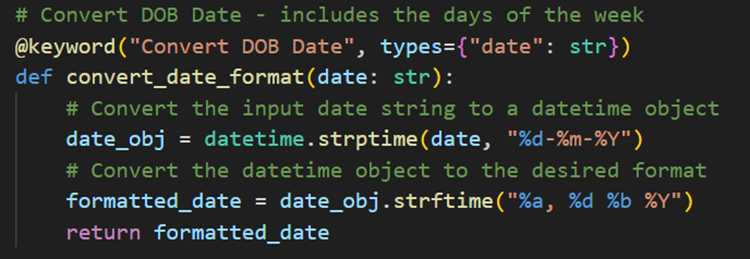
We can use the keyword as below picture

The output of this keyword is

There are still some more cases to format, such as converting to dd-month-yy but without weekday format, or include time to the output date, etc.
3.3. Sort json list by its values
For example, we have a json list like below

If we want to sort this json list by the key like “product_name” or “unit_price”, we actually don’t have a good solution to do that in Robot framework. But we could handle this thing easily with Python function.
Here is a sample of sorting code by Python

If we want to sort by its product name, we can use the keyword as below

Then, the output of this keyword is

We can also sort it by the unit price

Then, the output of this keyword is

3.4. Working with AWS
Sometimes, the project requires us to work with AWS services such as DynamoDB or log streams. Therefore, in this section, I will use Python code to work with these services via Boto3.
Firstly, install the RPA library by PyPI Package Manager in Python (pip)

Then, import it into the script

After that, create an access client by AWS access key and AWS access secret key
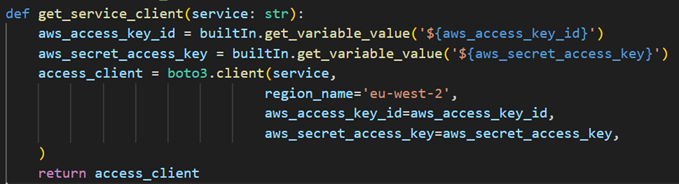
Now we can use this access_client object to work with AWS.
For example, we can get item data in database by query.

We can use this keyword in Robot Framework script as below

Another example is we can get the log stream from AWS.
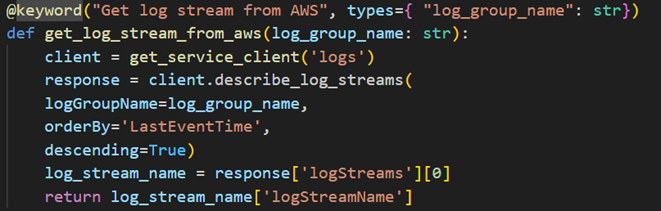
We can use this keyword in Robot Framework script as below

CONCLUSION
The implementation for customized keywords written in Python is an essential part of Robot Framework. They greatly help us a lot in the process of implementing automation code. While there are now many third-party libraries for Robot Framework that provide additional keywords not available in the built-in set, it is still important to know how to create and use our own customized keywords to flexibly customize solutions for specific situations.