


In today’s digital landscape, safeguarding sensitive data is paramount as its mishandling can result in disastrous consequences. As technology continues to advance, preventing such calamities becomes increasingly crucial. Conducting security assessments on your web application can help identify vulnerabilities, ensuring the protection of your data against potential attackers when it’s in production.
One of the common security vulnerability that you might see in your application is cross-site request forgery. In web applications, an attacker tricks an authenticated user into unknowingly taking an unwanted action on a different site, and this constitutes a type of security vulnerability. Let us look at the vulnerability in more detail.
What is Cross-Site Request Forgery?
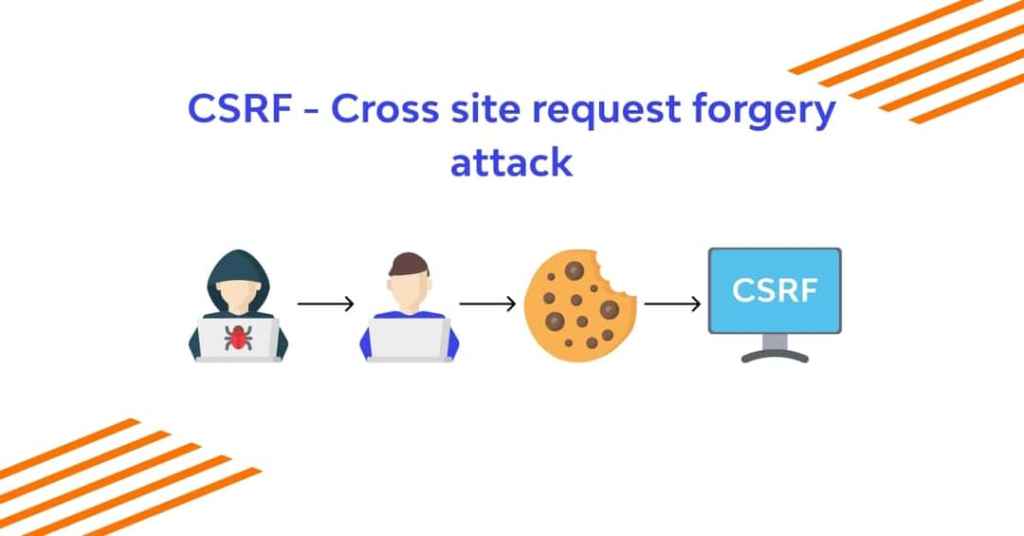
Cross-Site Request Forgery (CSRF) is a type of web security vulnerability that occurs when an attacker tricks a user into unknowingly making an unwanted request to a web application in which the user is authenticated. This attack takes advantage of the trust that a web application has in the user’s browser, as well as the fact that many web applications use cookies or other authentication tokens to determine the user’s identity.
Here’s how a CSRF attack typically works:
- The web application authenticates the user, generating a session cookie or token to identify them.
- The attacker creates a malicious website or sends a link that, when clicked by the victim, sends a request to the target web application. This request can be a form submission or a scripted HTTP request.
- The user includes their session cookie or token in the malicious request because they are already authenticated to the web application.
- The web application, trusting that the request is legitimate because it comes from an authenticated user’s browser, processes the request.
CSRF attacks can lead to various malicious actions, such as changing the victim’s account settings, making unauthorized purchases, or even performing actions on behalf of the victim without their knowledge or consent.
Example Of Cross-Site Request Forgery
Let us have a look at an example of cross-site request forgery. Suppose you have an online banking application that allows users to transfer money to other accounts using a simple HTTP GET request. The application uses the following URL for transferring funds :-
https://bank.example/transfer?amount=100&destinationAccount=attackerAccountAn attacker sets up a malicious website and tricks the victim into visiting it. On the attacker’s website, there’s an image tag that has the URL of the money transfer request as its “src” attribute:
<img src="https://bank.example/transfer?amount=100&destinationAccount=attackerAccount">When the victim is already authenticated on the bank’s website and visits the attacker’s website, the browser automatically sends a request to the bank’s server to transfer $100 from the victim’s account to the attacker’s account. Since the browser includes the victim’s session cookies, the bank’s server assumes the request is legitimate.
To detect such injection attacks manually, we can look at the following methods :-
- Implement anti-CSRF tokens in forms.
- Check the “Origin” or “Referer” header to ensure requests are from the same origin.
How To Prevent It?
Preventing cross-site request forgery is essential to ensure that your application is not attacked with malicious code. Let us look at some of the best practices that you can follow to prevent it from happening.
- Use Anti-CSRF Tokens: Generate and include unique anti-CSRF tokens in each form rendered in your application. You should tie these tokens to the user’s session.
- Same-Site Cookies: Use the SameSite attribute for cookies to control when they are sent. Configuring it as “Strict” or “Lax” can help mitigate CSRF attacks by restricting the sending of cookies in cross-origin requests.
- Use the “POST” Method for Sensitive Actions: Ensure that sensitive actions (e.g., changing passwords, making payments) are only performed using the HTTP POST method. This prevents CSRF attacks using simple image tags or GET requests.
- Check the Referrer Header: Validate the Referer or Origin HTTP headers on the server side to ensure that requests are coming from the expected sources. However, note that this is not a foolproof method, as some browsers may not send these headers or may allow attackers to manipulate them.
- Implement Same-Origin Policy: Adhere to the Same-Origin Policy, which is a fundamental web security concept that restricts web pages from making requests to a different domain than the one that served the web page. Modern web browsers enforce this policy.
- Use Content Security Policy (CSP): Implement Content Security Policy headers to control which scripts can be executed on your web pages. This can help prevent unauthorized code execution.
- Secure Session Management: Ensure that your session management is secure. Implement strong authentication and authorization mechanisms to minimize the risk of CSRF attacks.
- Regularly Update Software: Keep your web application framework, libraries, and server software up to date to address any known security vulnerabilities.
- Security Testing: Perform regular security testing, including penetration testing and code reviews, to identify and mitigate potential CSRF vulnerabilities.
By implementing these practices and staying vigilant about security, you can significantly reduce the risk of cross-site request forgery vulnerabilities in your web applications
Detect Security Vulnerabilities Using OWASP ZAP
Let us see how we can detect these with the help of a security testing tool. The most widely used security test tool, OWASP ZAP, allows you to identify and fix vulnerabilities in web applications during the development and testing stages. You can also integrate it with Selenium to automate your security testing.
Before we start detecting vulnerabilities with OWASP ZAP, let us fulfil some prerequisites for using this security test tool :
Prerequisites
- You have installed OWASP Zap on your machine. You can use the following URL to install it based on your requirements – OWASP Zap installation.
How to start the scanning with OWASP ZAP to detect vulnerabilities?
You can easily detect the vulnerabilities added above with OWASP ZAP scanning. Let us look at the steps that we need to follow to do the same.
Step 1: Configure your browser to use ZAP as a proxy
We will use Firefox for this demo. You can choose another browser of your choice.
- Open Firefox and click on the menu icon (three horizontal lines) in the top-right corner.
- Select “Options” or “Preferences,” depending on your Firefox version.
- In the left sidebar, click on “General” (Firefox Options) or “Privacy & Security” (Firefox Preferences).
- Scroll down to the “Network Settings” section.
- Click the “Settings” button next to “Configure how Firefox connects to the Internet.”
- In the Connection Settings window that appears, select the “Manual proxy configuration” option.
- In the “HTTP Proxy” field, enter localhost and the port number ZAP is listening on (usually 8080 by default).
- Click “OK” to save the proxy settings
Step 2 : Launch OWASP ZAP and click on browser
Open your OWASP ZAP and click on the browser that you have chosen to proxy through ZAP

Step 3: Go to the “Sites” tab in ZAP and right click on the website and choose “Attack” > “Active Scan”
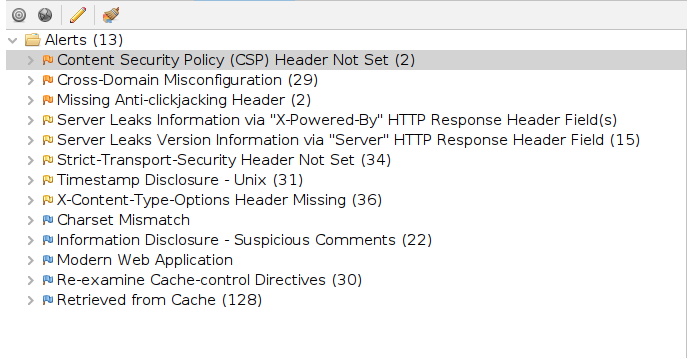
Step 4: After the scan completes, review the results in the “Alerts” tab
Also read : OWASP Top 10 Vulnerability
Featured Image : https://www.wallarm.com/what/what-is-cross-site-request-forgery