


In today’s fast, dynamic world of cloud-native applications, ensuring data integrity and availability is paramount. Kubernetes, as the widely used container orchestrator, introduces a number of challenges when it comes to data protection. This is exactly where Velero comes into play: with powerful backup and restore features for Kubernetes resources and persistent volumes. However, the need for customization arises as every organization has unique requirements and workflows. Today, in this article we will dive into customizing Velero backups, empowering you to tailor your data protection strategy effectively.
Understanding Velero
Before getting into customization, let’s understand in brief what Velero is. Velero is an open-source tool designed to safeguard Kubernetes resources and persistent volumes. It provides the capability to back up whole clusters or selected namespaces and restore them. It even allows the migration of resources across clusters. Velero also uses Restic for volume snapshots, which brings a complete backup and migration solution.
Why Customize Velero Backups?
Velero backup customization is important for a number of reasons:
- Selective Backup: All data does not need to be protected equally. This allows you to customize a backup by specifying which resources are important to back up.
- Resource Optimization: By customizing backups, you can optimize storage use and save on costs not only for retaining redundant data but also for additional loads on system resources, including storage systems.
- Compliance and Security: Different organizations have their own compliance requirements that determine the specific data that they need to protect and how. Customization ensures adherence to these regulations.
- Recovery Objectives: Various kinds of data can have different recovery time objectives (RTO) and recovery point objectives (RPO). Customization helps to align the objectives of the backup strategies.
Customization Options in Velero
Velero offers several avenues for customization, enabling fine-grained control over backup processes:
1. Include and Exclude Resources
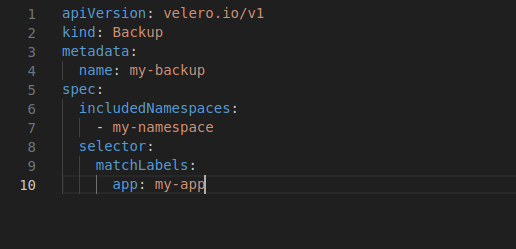
Velero provides an option to define resources that will be included or excluded from backups with labels or selectors. This granularity ensures that only relevant data is saved to the backup, lowering the storage overhead while speeding up both backup and restoration. For example, you can use the following snippet to backup the resources of a specific namespace only:
2. Volume Snapshots with Restic
Velero uses Restic under the hood for persistent volumes. You can also customize the Restic operations by specifying additional flags to be passed in the backup command. It supports operations like encryption, compression, and excluding specific directories in the snapshot.
velero backup create my-backup –restic-blob-url s3://mybucket/backups –use-restic –restic-cache-dir /tmp/cache –restic-extra-args=”–exclude=/var/log”
3. Hooks for Pre and Post Backup Actions
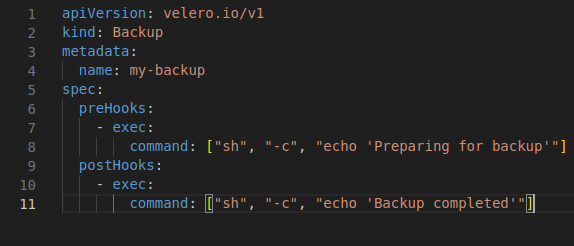
Velero supports hooks that can be run before and after operations. It’s possible to prepare application states before backups or clean up afterward. Here is a quick snippet to run any bash command before and after the backup using Velero
4. Backup Scheduling
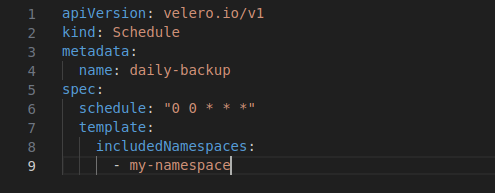
One of the most important aspects of data integrity is that you can schedule backups with Velero. The scheduled backup feature lets you configure a backup at certain times or intervals with cron syntax, providing automation of the process. This is how you can schedule your backups:
5. Encryption and Storage Location
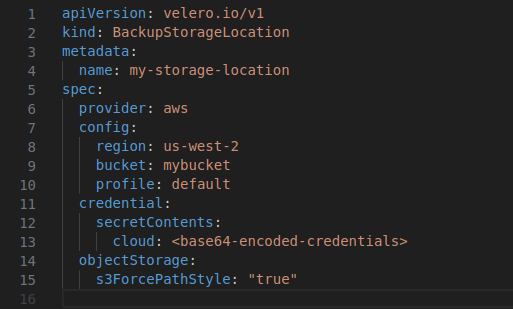
Security is one of the critical aspects of backups. Velero supports encryption at rest for backup data and enables setting the storage location, like S3, Google Cloud Storage, or Azure Blob. For an instance if you want to store your backups on Amazon S3 you need to create an object of kind “BackupStorageLocation” and define the credentials. Here is a snippet for the same:
Conclusion
It is possible to make Velero backup and restore highly customizable, allowing an organization to create an individual strategy to protect data that meets its own needs and compliance requirements. Using that flexibility, businesses can ensure an efficient, secure, and cost-effective backup and restore process for Kubernetes environments. With this, in the days to come, it will be great to see how the cloud-native landscape evolves further and how tools like Velero are mainstream to keep the resilience and reliability of modern applications as one of the most important attributes.
This piece presents an overview of the customization options available with Velero, starting from selective resource backup to encryption and scheduling. Understanding and using these features helps to empower your Kubernetes data protection strategy to ensure that applications are always safe, compliant, and recovery-ready.