



Continuing from part 1, this section will focus on establishing a medallion architecture ETL pipeline: Raw -> Bronze -> Silver -> Gold using Glue notebooks. Additionally, we will create a Glue workflow that outlines the complete process for the initial data workflow. To explore insights from the data model in the gold layer, we will utilize Athena to conduct several ad-hoc queries. Furthermore, to comprehend why Apache Iceberg is favored in contemporary Lakehouse architectures, we will examine the metadata it generates in S3 buckets.
Understand data model and raw data structure in this article
To fully understand the logic that will be implemented in the notebooks below, we need to understand the structure of the raw JSON data, as well as the target data model that the entire workflow is aiming for.
Explain the JSON structure from the source
Here is an example of the raw JSON file as the resource to feed the data pipeline:
[
    {
        "category": [
            {
                "category_id": "11035567",
                "category_name": "Thời Trang Nam",
                "parent_id": -1
            },
            {
                "category_id": "11035572",
                "category_name": "Áo Vest và Blazer",
                "parent_id": "11035567"
            }
        ],
        "url": "https://shopee.vn/B%E1%BB%99-Vest-Nam-Cao-C%E1%BA%A5p-M%C3%A0u-Tr%E1%BA%AFng-B%E1%BB%99-suit-nam-H%C3%A0n-Qu%E1%BB%91c-m%C3%A0u-tr%E1%BA%AFng-(-V%E1%BA%A3i-X%E1%BB%8Bn-2-L%E1%BB%9Bp-)-i.568109992.29951402391?sp_atk=229a485e-86c7-4bcd-afb5-8e69d368acd9&xptdk=229a485e-86c7-4bcd-afb5-8e69d368acd9",
        "image": "https://down-vn.img.susercontent.com/file/sg-11134201-7rd4n-lvxh4rvz0mpo36_tn",
        "title": "Bộ Vest Nam Cao Cấp Màu Trắng, Bộ suit nam Hàn Quốc màu trắng ( Vải Xịn 2 Lớp )",
        "promotions": [
            "Giảm ₫5k"
        ],
        "price": {
            "current_price": "609.000",
            "original_price": "₫870.000",
            "discount_rate": "-30%"
        },
        "sold": "",
        "location": "Hưng Yên"
    },
    {
        "category": [
            {
                "category_id": "11035567",
                "category_name": "Thời Trang Nam",
                "parent_id": -1
            },
            {
                "category_id": "11035572",
                "category_name": "Áo Vest và Blazer",
                "parent_id": "11035567"
            }
        ],
        "url": "https://shopee.vn/B%E1%BB%99-%C4%91%E1%BB%93-Slim-Fit-B%E1%BB%99-%C4%91%E1%BB%93-m%C3%A0u-tr%C6%A1n-B%E1%BB%99-%C4%91%E1%BB%93-2-m%C3%B3n-s%C3%A0nh-%C4%91i%E1%BB%87u-B%E1%BB%99-%C4%91%E1%BB%93-nam-Slim-Fit-Ve-%C3%A1o-kho%C3%A1c-gi%E1%BB%AFa-cao-Qu%E1%BA%A7n-m%C3%A0u-tr%C6%A1n-b%E1%BA%A3o-h%E1%BB%99-lao-%C4%91%E1%BB%99ng-i.130953959.29901695241?sp_atk=565680b3-eaac-4ebc-9631-274373ffc143&xptdk=565680b3-eaac-4ebc-9631-274373ffc143",
        "image": "https://down-vn.img.susercontent.com/file/sg-11134201-7rd6d-lw3brv77afmmac_tn",
        "title": "Bộ đồ Slim Fit Bộ đồ màu trơn Bộ đồ 2 món sành điệu Bộ đồ nam Slim Fit Ve áo khoác giữa cao Quần màu trơn bảo hộ lao động",
        "promotions": [
            "Giảm ₫27k"
        ],
        "price": {
            "current_price": "327.145",
            "original_price": "₫467.350",
            "discount_rate": "-30%"
        },
        "sold": "",
        "location": "Nước ngoài"
    }
]
These source files are taken from an e-commerce site. Their JSON structure is quite clean; it is simply a string of many objects, each representing product information:
- Product Code (need to be extracted from the URL)
- Product URL
- Product Title
- Product Image
- Price (including original price, discounted price and discount percentage)
- Quantity sold (as of the date crawled)
- Location of the seller
- Product category (multi-level)
From the original data, it will be cleaned and processed through a designated pipeline. The cleaned data will then populate a data model to facilitate data analysis.
Overview of the final data model
The Data model is located at the gold layer and is designed according to the Kimball methodology. Let’s have a look at it:

The explanation of the schema above:
dim_date: keeping the rolling date information.dim_products: relevant product information.dim_locations: all separated seller’s locations.dim_categories: holding products’ categories in hierarchy format.fact_sales: storing all facts of sales.
Configuration updates from Part 1
We did some core services configuration in Part 1. To align with the new part, we will add some modifications to the existing setting.
1. Add a new Permission to the existing Glue role (help the jobs have sufficient authorities on resources)
- Navigate to IAM service.
- Click on
Roles-> Seach forEcomLakehouseGlueRole–> Click on it. - Click
Add permission->Create inline policies–> ChooseJSON. - Paste the content below and then Click
Next
{
	"Version": "2012-10-17",
	"Statement": [
		{
			"Sid": "AllowPassSelfToGlue",
			"Effect": "Allow",
			"Action": "iam:PassRole",
			"Resource": "arn:aws:iam::058432329112:role/EcomLakehouseGlueRole",
			"Condition": {
				"StringEquals": {
					"iam:PassedToService": "glue.amazonaws.com"
				}
			}
		}
	]
}
- Name the new policy as
AllowPassSelfToGlue–> ClickSave.

2. Register new locations for new databases (we need to create a separate database for each layer: bronze, silver, and gold).
2.1 Grant administrator permission for EcomLakehouseGlueRole.
- Navigate to
AWS Lake Formation–>Administrative roles and tasks-> onData lake administratorssection clickAdd. - In
IAM users and roles–> ChooseEcomLakehouseGlueRole. - Click
Confirmto addEcomLakehouseGlueRoleas a Lake Formation admin.
2.2 Register new locations for all medallion layers
- On the sidebar of Lake Formation UI, click on
Data lake locations - Choose
Register location - Configure:
- Amazon S3 path:
s3://ecom-analyzer-lakehouse/bronze/ - IAM role:
EcomLakehouseLakeFormationRole - Description:
Bronze layer data location for ecom lakehouse
- Amazon S3 path:
- Click
Register location - Repeat from step 1 to 4 for
silverandgoldlayers. - On the Data lake locations screen, we will see three locations corresponding to three layers.


Create notebooks as jobs & implement logics for all layers
Finally, it’s time to dive into the practical aspects. To ensure our jobs run as efficiently as possible, we’ll leverage Glue Notebooks, which allow for executing code blocks individually. This capability is invaluable for data exploration, process development, and iterative refinement.
1. Create `raw_to_bronze` notebooks
1.1. Create a notebook in AWS Glue Studio
- Navigate to AWS Glue –> Select ETL jobs.
- On Create job section –> Choose Notebook –> A pop-up will show up.
- Next, select Start fresh option –> choose EcomLakehouseGlueRole IAM role.
- Click on Create Notebook –> Rename the title to raw_to_bronze
- Wait for a few minutes for the notebook to start.
The default capacity of a notebook is 5 workers. We can change the notebook configurations by adjusting the arguments of %magic commands inside each one.
TIPs: Notebooks are charged based on how long they run (per minute). So click Stop Notebook when not in use to save costs.
1.2. Implement the raw to bronze logic, cell by cell
# initial configuration
%%configure
{
  "--datalake-formats": "iceberg",
  "--conf": "spark.sql.extensions=org.apache.iceberg.spark.extensions.IcebergSparkSessionExtensions --conf spark.sql.catalog.glue_catalog=org.apache.iceberg.spark.SparkCatalog --conf spark.sql.catalog.glue_catalog.warehouse=s3://ecom-analyzer-lakehouse/ --conf spark.sql.catalog.glue_catalog.catalog-impl=org.apache.iceberg.aws.glue.GlueCatalog --conf spark.sql.catalog.glue_catalog.io-impl=org.apache.iceberg.aws.s3.S3FileIO"
} # the important config to make the following code use modern iceberg APIs

%idle_timeout 2880 # time out value, in minutes
%glue_version 5.0 # glue version, use the latest
%worker_type G.1X # worker type, could increase
%number_of_workers 5 # number of spark workers, could increase
# Initialize Spark with optimizations for 2GB+ JSON processing
import sys
from awsglue.transforms import *
from awsglue.utils import getResolvedOptions
from pyspark.context import SparkContext
from awsglue.context import GlueContext
from awsglue.job import Job
from pyspark.sql import SparkSession
from pyspark.sql.functions import (
current_timestamp, lit, col, input_file_name, to_date,
explode, regexp_extract, split, trim, concat_ws, concat, size, expr,
coalesce, when
)
from datetime import datetime
# Initialize Glue Context
sc = SparkContext.getOrCreate()
glueContext = GlueContext(sc)
spark = glueContext.spark_session
job = Job(glueContext)
print("🚀 Initializing optimized Spark session for bronze layer...")# Global variables init
BUCKET_NAME = "ecom-analyzer-lakehouse"
RAW_PATH = f"s3://{BUCKET_NAME}/raw/"
# Bronze Layer Database Configuration
BRONZE_DATABASE = "ecom_bronze"
BRONZE_LOCATION = f"s3://{BUCKET_NAME}/bronze/"
BRONZE_TABLES = {
"raw_data": {
"partitions": ["ingestion_date"]
},
"products": {
"partitions": ["ingestion_date"]
},
"categories": {
"partitions": ["ingestion_date"]
}
}
# Get job parameters
try:
args = getResolvedOptions(sys.argv, ['JOB_NAME', 'raw_path', 'bucket_name'])
RAW_PATH = args.get('raw_path', RAW_PATH)
BUCKET_NAME = args.get('bucket_name', BUCKET_NAME)
job.init(args['JOB_NAME'], args)
# Update all paths if bucket changed
if BUCKET_NAME != "ecom-analyzer-lakehouse":
BRONZE_LOCATION = f"s3://{BUCKET_NAME}/bronze/"
for table_name in BRONZE_TABLES:
BRONZE_TABLES[table_name]["location"] = f"{BRONZE_LOCATION}{table_name}/"
except:
print("Running in notebook mode")
print(f"🗂️ Bronze Database: {BRONZE_DATABASE}")
print(f"📍 Database Location: {BRONZE_LOCATION}")
print(f"📁 Raw Data Source: {RAW_PATH}")
print(f"📊 Tables: {len(BRONZE_TABLES)} bronze tables configured")
# Create a new database for bronze layer using spark SQL
print(f"🗄️  Creating bronze database: {BRONZE_DATABASE}")
spark.sql(f"CREATE DATABASE IF NOT EXISTS {BRONZE_DATABASE} LOCATION '{BRONZE_LOCATION}'")
spark.sql(f"USE {BRONZE_DATABASE}")
print(f"✅ Bronze database ready at: {BRONZE_LOCATION}")
# The first way of saving files (Use native Spark API)
def create_iceberg_table_v1(df, table_name, config):
"""Create table with Iceberg format using legacy API"""
partitions = config["partitions"]
print(f"\n📋 Creating table: {table_name}")
try:
# Write data first
writer = df.write.format("iceberg").mode("overwrite")
if partitions:
writer = writer.partitionBy(*partitions)
# Use full catalog path
full_table_name = f"glue_catalog.{BRONZE_DATABASE}.{table_name}"
writer.saveAsTable(full_table_name)
print(f"✅ Iceberg table created successfully!")
return True
except Exception as e:
print(f"❌ Error: {str(e)}")
return False# The second way of creating a table in Iceberg format (Use iceberg API)
def create_iceberg_table_v2(df, table_name, config):
"""Create table with Iceberg format using morden API"""
partitions = config["partitions"]
print(f"\n📋 Creating table: {table_name}")
try:
# Use full catalog path
full_table_name = f"glue_catalog.{BRONZE_DATABASE}.{table_name}"
# Drop table if exists
spark.sql(f"DROP TABLE IF EXISTS {full_table_name}")
# Write data first
writer = df.writeTo(full_table_name).using("iceberg")
table_properties = {
# Format version 2 - support row-level operations (UPDATE, DELETE, MERGE)
"format-version": "2",
# File size optimization (128MB optimal cho S3 + Athena)
"write.target-file-size-bytes": "134217728", # 128MB
# Metadata cleanup - for cost optimization
"write.metadata.delete-after-commit.enabled": "true",
"write.metadata.previous-versions-max": "15"
}
# Apply table properties
for key, value in table_properties.items():
writer = writer.tableProperty(key, value)
if partitions:
writer = writer.partitionedBy(*partitions)
writer.create()
print(f"✅ Iceberg table created successfully!")
return True
except Exception as e:
print(f"❌ Error: {str(e)}")
return False# Read raw JSON files from raw layer
print("Reading raw JSON files...")
raw_df = spark.read \
.option("multiline", "true") \
.json(f"{RAW_PATH}/products-2024-06-26*.json")
# Add metadata columns
raw_df = raw_df \
.withColumn("ingestion_timestamp", current_timestamp()) \
.withColumn("source_file", input_file_name()) \
.withColumn("ingestion_date", to_date(current_timestamp())) \
.withColumn("job_run_id", lit('raw_to_bronze_' + datetime.now().strftime("%Y%m%d_%H%M%S")))
print(f"Total records read: {raw_df.count()}")
raw_df.printSchema() # for profiling or schema checking# transform the JSON format to an iceberg table
# then we can use Athena for fast and convenient queries
print("\n=== Raw Data Table ===")
create_iceberg_table_v1(raw_df, "raw_data", BRONZE_TABLES["raw_data"])# Extract the products related only to the separated table
# Make it easier to clean data in the silver layer
products_df = raw_df.select(
# Extract shop_id and product_code from URL using improved regex
regexp_extract(col("url"), r'i\.(\d+)\.(\d+)', 1).alias("shop_id"),
regexp_extract(col("url"), r'i\.(\d+)\.(\d+)', 2).alias("product_code"),
# Product information
col("url").alias("product_url"),
col("image").alias("product_image"),
col("title").alias("product_name"),
col("promotions"),
# Price information (keep as strings for bronze layer)
col("price.current_price").alias("current_price"),
col("price.original_price").alias("original_price"),
col("price.discount_rate").alias("discount_rate"),
# Sales and location
col("sold"),
col("location"),
# Category information (preserve nested structure)
col("category"),
# Metadata
col("ingestion_timestamp"),
col("source_file"),
col("ingestion_date"),
col("job_run_id")
).filter(
# Filter out records without valid product codes
col("product_code").isNotNull() &
(col("product_code") != "") &
col("product_name").isNotNull()
)
products_df.printSchema()print("\n=== Products Table using v2 ===")
create_iceberg_table_v2(products_df, "products", BRONZE_TABLES["products"])# Create an isolated table for all product categories also
categories_df = raw_df.select(
explode(col("category")).alias("category_data"),
col("ingestion_timestamp"),
col("ingestion_date"),
col("job_run_id")
).select(
col("category_data.category_id").alias("category_code"),
col("category_data.category_name"),
col("category_data.parent_id").alias("parent_code"),
col("ingestion_timestamp"),
col("ingestion_date"),
col("job_run_id")
).filter(
# Filter out invalid categories
col("category_code").isNotNull() &
col("category_name").isNotNull()
).dropDuplicates(["category_code"])
categories_df.printSchema()print("\n=== Categories Table v2===")
create_iceberg_table_v2(categories_df, "categories", BRONZE_TABLES["categories"])You could find the complete notebook flie here: raw_to_bronze.ipynb
2. Create `bronze_to_silver` notebooks in the silver database
The processing logic of bronze_to_silver has much in common with raw_to_bronze at the beginning. However, the difference comes from the data cleaning part, where you need to create a few user-defined functions to handle the junk data.
# Define UDFs for data transformation
def extract_sold_number(s: str) -> int:
    """Extract sold number from string, handling 'k' notation"""
    if not s:
        return 0
    s = str(s).strip()
    if not s:
        return 0

    # Extract numeric part
    match = re.search(r'(\d+[.,]?\d*)[kK]?', s)
    if not match:
        return 0

    num_str = match.group(1)
    # Handle 'k' notation
    if 'k' in s.lower():
        if '.' in num_str or ',' in num_str:
            # For values like "1.5k" or "1,5k"
            num_str = num_str.replace('.', '').replace(',', '')
            return int(num_str) * 100
        return int(num_str) * 1000

    # Regular number
    return int(num_str.replace('.', '').replace(',', ''))

def clean_location(location_str: str) -> str:
    """Clean and normalize location strings"""
    if not location_str:
        return None

    # Remove special characters and normalize
    cleaned = location_str.replace("|", "").replace("TP.", "").replace(" - ", " ")
    cleaned = cleaned.strip()

    # Convert to uppercase for consistency
    return cleaned.upper() if cleaned else None

def clean_price(price_str: str) -> float:
    """Clean price strings and convert to float"""
    if not price_str:
        return 0.0

    # Remove currency symbols and dots (thousand separators)
    cleaned = str(price_str).replace('₫', '').replace('.', '').replace(',', '.')

    try:
        return float(cleaned)
    except:
        return 0.0

def clean_discount_rate(rate_str: str) -> float:
    """Clean discount rate strings and convert to decimal"""
    if not rate_str:
        return 0.0

    # Remove percentage sign and minus
    cleaned = str(rate_str).replace('%', '').replace('-', '').strip()

    try:
        # Convert to decimal (e.g., 30% -> 0.30)
        return float(cleaned) / 100.0
    except:
        return 0.0

# Register UDFs
extract_sold_number_udf = udf(extract_sold_number, LongType())
clean_location_udf = udf(clean_location, StringType())
clean_price_udf = udf(clean_price, FloatType())
clean_discount_rate_udf = udf(clean_discount_rate, FloatType())
# Get bronze products df
bronze_products_df = spark.table(f"glue_catalog.{BRONZE_DATABASE}.products")

# Enrich bronze products with processed date time and job run id
bronze_products_df = bronze_products_df \
            .withColumn("processed_timestamp", current_timestamp()) \
            .withColumn("processed_date", to_date(col("processed_timestamp"))) \
            .withColumn("job_run_id", lit('bronze_to_silver_' + datetime.now().strftime('%Y%m%d_%H%M%S')))

# Create silver products df from bronze products df
silver_products_df = bronze_products_df.select(
    col("product_code"),
    trim(col("product_name")).alias("product_name"),
    col("product_image"),
    col("product_url"),
    # Clean prices
    clean_price_udf(col("current_price")).cast(DecimalType(10, 2)).alias("price"),
    clean_price_udf(col("original_price")).cast(DecimalType(15, 2)).alias("original_price"),
    clean_discount_rate_udf(col("discount_rate")).cast(DecimalType(5, 2)).alias("discount_rate"),
    # Extract sold quantity
    extract_sold_number_udf(col("sold")).alias("units_sold"),
    # Clean location
    clean_location_udf(col("location")).alias("location_name"),
    # Category array for later processing
    col("category"),
    # Metadata
    col("processed_timestamp"),
    col("processed_date"),
    col("job_run_id")
).filter(
    # Filter out records with invalid product codes
    col("product_code").isNotNull() &
    (col("product_code") != "") &
    col("product_name").isNotNull()
)

# Remove duplicates based on product_code
silver_products_df = silver_products_df.dropDuplicates(["product_code"])

silver_products_df.printSchema()

# Create silver products table
create_iceberg_table(
    silver_products_df,
    SILVER_DATABASE,
    "products",
    SILVER_TABLES["products"]
)
You can find the rest of the
bronze_to_silvernotebooks here.
3. Create `silver_to_gold` notebooks to populate data in dim and fact tables
A notable feature of the gold layer compared to other layers is the creation of additional satellite dimensional tables, such as dim_date. Additionally, surrogate keys are incorporated into dataframes, and raw data is retrieved from the silver layer to align with natural keys in dimension tables, thereby generating the fact_sales table.
# Create dim_date table
print("Creating dim_date...")

def create_rolling_date_dimension(start_date, end_date):
    """
    Create a comprehensive rolling date dimension with multiple date attributes
    for dimensional modeling
    """
    dates = []
    current_date = start_date

    while current_date <= end_date:
        # Calculate additional date attributes for dimensional analysis
        day_of_week = current_date.weekday() + 1  # Monday = 1, Sunday = 7
        week_of_year = current_date.isocalendar()[1]
        is_weekend = day_of_week in [6, 7]  # Saturday, Sunday

        dates.append({
            'date': current_date.date(),
            'day': current_date.day,
            'month': current_date.month,
            'year': current_date.year,
            'quarter': (current_date.month - 1) // 3 + 1,
            'day_of_week': day_of_week,
            'week_of_year': week_of_year,
            'is_weekend': is_weekend,
            'month_name': current_date.strftime('%B'),
            'day_name': current_date.strftime('%A')
        })
        current_date += timedelta(days=1)

    return dates

current_year = datetime.now().year
start_date = datetime(current_year, 1, 1)  # Start of current year
end_date = datetime(current_year, 12, 31)  # End of current year

dates = create_rolling_date_dimension(start_date, end_date)

# Create DataFrame with enhanced date attributes
date_df = spark.createDataFrame(dates)

# Add surrogate key using YYYYMMDD format for easy sorting and lookup
date_df = date_df.withColumn("date_id",
    (year(col("date")) * 10000 + month(col("date")) * 100 + dayofmonth(col("date"))).cast(IntegerType())
)

# Reorder columns for dimensional table structure
dim_date_df = date_df.select(
    "date_id",
    "date",
    "day",
    "month",
    "year",
    "quarter",
    "day_of_week",
    "week_of_year",
    "is_weekend",
    "month_name",
    "day_name"
)

dim_date_df.printSchema()
# Create fact_sales table
print("\nCreating fact_sales...")
silver_products_df = spark.table(f"glue_catalog.{SILVER_DATABASE}.products")
# Generate date_id for current date in YYYYMMDD format
date_id_df = spark.range(1).select(date_format(current_date(), "yyyyMMdd").alias("formatted_date"))
# Extract the date_id value as integer for fact table
date_id = int(date_id_df.first()["formatted_date"])
# Get all dim table names in gold database
dim_product_table = f"glue_catalog.{GOLD_DATABASE}.dim_products"
dim_location_table = f"glue_catalog.{GOLD_DATABASE}.dim_locations"
dim_category_table = f"glue_catalog.{GOLD_DATABASE}.dim_categories"
dim_date_table = f"glue_catalog.{GOLD_DATABASE}.dim_date"
# Extract raw data from silver layer (using the second level category)
fact_prep_df = silver_products_df.select(
col("product_code"),
col("units_sold"),
col("price"),
col("location_name"),
# Extract the leaf category (last in the array)
element_at(col("category.category_id"), -1).alias("category_code")
)
# Join with dimension tables to get surrogate keys
# 1. Join with dim_product
fact_with_product = fact_prep_df.alias("f") \
.join(
spark.table(dim_product_table).filter(col("flag") == True).alias("p"),
col("f.product_code") == col("p.product_code"),
"inner"
).select(
col("p.product_id"),
col("f.units_sold"),
col("f.price"),
col("f.location_name"),
col("f.category_code")
)
# 2. Join with dim_location
fact_with_location = fact_with_product.alias("f") \
.join(
spark.table(dim_location_table).alias("l"),
col("f.location_name") == col("l.location_name"),
"left"
).select(
col("f.product_id"),
col("f.units_sold"),
col("f.price"),
col("f.category_code"),
coalesce(col("l.location_id"), lit(-1)).alias("location_id")
)
# 3. Join with dim_category
fact_with_category = fact_with_location.alias("f") \
.join(
spark.table(dim_category_table).alias("c"),
col("f.category_code") == col("c.category_code"),
"left"
).select(
col("f.product_id"),
col("f.units_sold"),
col("f.price"),
col("f.location_id"),
coalesce(col("c.category_id"), lit(-1)).alias("category_id")
)
# Create final fact table
fact_sales_df = fact_with_category.select(
monotonically_increasing_id().cast(IntegerType()).alias("sale_id"),
lit(date_id).cast(IntegerType()).alias("date_id"),
col("category_id").cast(LongType()),
col("product_id").cast(LongType()),
col("location_id").cast(IntegerType()),
col("units_sold").cast(LongType()),
(col("units_sold") * col("price")).cast(DecimalType(30, 2)).alias("total_sales_amount")
)
fact_sales_df.printSchema()Find the complete
silver_to_goldcodebase here.
Use Glue workflow to automate notebook flows
Glue notebooks are known for their convenience, as they can be run in parts and print results immediately to support debugging or data profiling. It is beneficial that we can utilize them as nodes in the glue workflow without the need to create separate script jobs.
Step-by-Step guide to create a new glue workflow
1. Create a empty workflow
- Navigate to AWS Glue dashboard, then click Workflows (orchestration)
- Choose Add workflow
- Enter the name
- Click on Create workflow
2. Add init trigger
- Next, click on the workflow you just created.
- On Graph tab –> Add trigger –> Add new
- Name the trigger Start –> Choose On demand as the trigger type –> Click Add
3. Add notebook nodes
- On the graph UI click Add node –> Choose raw_to_bronze job
- Next, select the raw_to_bronze node –> Click on Add trigger
- Name the new trigger to_silver –> Choose Envent as trigger type –> Choose Start after ALL watched event as trigger logic
Repeat the same steps as above to create
bronze_to_silvernode,to_goldtrigger andsilver_to_goldnode.
4. Review the result
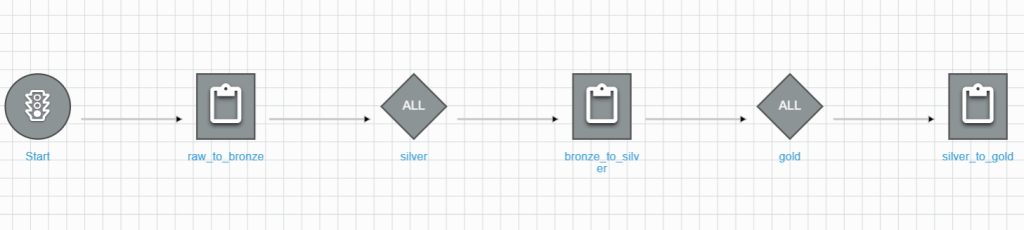
Run the created workflow and monitor the run result
1. Run the workflow.
- On the workflow detail screen –> Click Run workflow on the top.
- Wait for the response on the History tab.
2. Monitor the run result.
- On History tab –> Choose the run detail
- Choose View run details
- You can see the details of each step.

Ad-hoc queries using Athena – best way to explore the data insights
After successfully executing the glue workflow, you will see the databases and tables inside the default catalog.
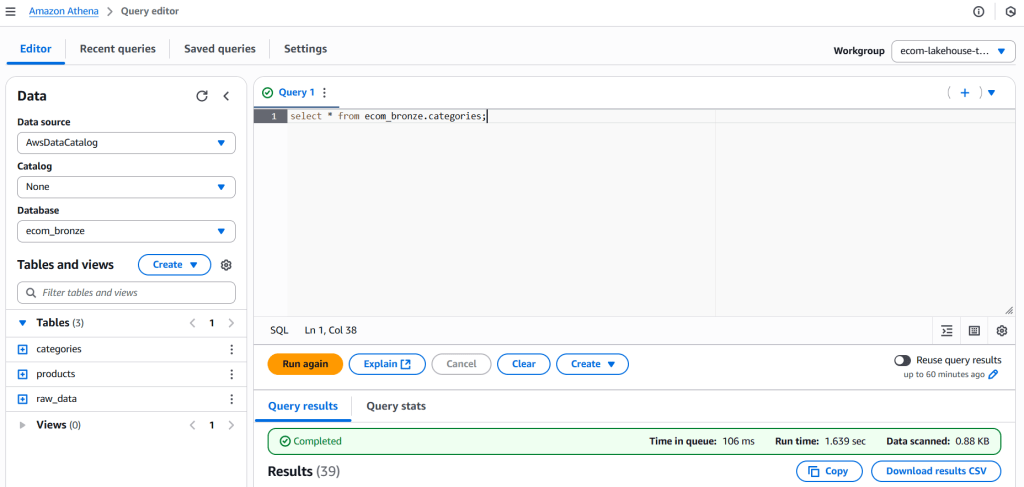
As a Data Engineer who works with SQL daily, Athena is a great tool for exploring data and executing ad-hoc queries. Let’s try on a few to test the data quality in the gold layer.
# Query I: Sales performance monitoring
WITH daily_sales AS (
    SELECT
        d.date,
        d.day_name,
        d.is_weekend,
        SUM(f.total_sales_amount) as daily_revenue,
        SUM(f.units_sold) as daily_units,
        COUNT(DISTINCT f.product_id) as products_sold,
        AVG(f.total_sales_amount) as avg_order_value
    FROM ecom_gold.fact_sales f
    JOIN ecom_gold.dim_date d ON f.date_id = d.date_id
    GROUP BY d.date, d.day_name, d.is_weekend
)
SELECT
    date,
    day_name,
    CASE WHEN is_weekend THEN 'Weekend' ELSE 'Weekday' END as day_type,
    daily_revenue,
    daily_units,
    products_sold,
    avg_order_value,
    -- Performance vs average
    daily_revenue / AVG(daily_revenue) OVER() as revenue_vs_avg,
    -- Running total
    SUM(daily_revenue) OVER(ORDER BY date) as cumulative_revenue
FROM daily_sales
ORDER BY date DESC;
-- Result:
# date day_name day_type daily_revenue daily_units products_sold avg_order_value revenue_vs_avg cumulative_revenue
1 2025-08-15 Friday Weekday 11826422566803.00 134821851 130802 90414692.18 1.00 11826422566803.00# Query II: Category performance & Trending
WITH category_hierarchy AS (
    SELECT
        c.category_id,
        c.category_name,
        CASE WHEN c.parent_id IS NULL THEN c.category_name
             ELSE parent.category_name END as parent_category,
        c.level
    FROM ecom_gold.dim_categories c
    LEFT JOIN ecom_gold.dim_categories parent ON c.parent_id = parent.category_id
),
category_performance AS (
    SELECT
        ch.parent_category,
        ch.category_name,
        ch.level,
        COUNT(DISTINCT f.product_id) as unique_products,
        SUM(f.total_sales_amount) as category_revenue,
        SUM(f.units_sold) as category_units,
        AVG(f.total_sales_amount) as avg_sale_amount,
        -- Category metrics
        SUM(f.total_sales_amount) * 100.0 /
            SUM(SUM(f.total_sales_amount)) OVER() as revenue_contribution_pct
    FROM ecom_gold.fact_sales f
    JOIN category_hierarchy ch ON f.category_id = ch.category_id
    GROUP BY ch.parent_category, ch.category_name, ch.level
)
SELECT
    parent_category,
    category_name,
    level,
    unique_products,
    category_revenue,
    category_units,
    revenue_contribution_pct,
    avg_sale_amount,
    -- Performance classification
    CASE
        WHEN revenue_contribution_pct >= 20 THEN 'Top Category'
        WHEN revenue_contribution_pct >= 10 THEN 'Major Category'
        WHEN revenue_contribution_pct >= 5 THEN 'Significant Category'
        ELSE 'Niche Category'
    END as category_importance,
    -- Efficiency metrics
    ROUND(category_revenue / unique_products, 2) as revenue_per_product,
    ROUND(category_units * 1.0 / unique_products, 2) as avg_units_per_product
FROM category_performance
ORDER BY category_revenue DESC;
# Query result:
# parent_category category_name level unique_products category_revenue category_units revenue_contribution_pct avg_sale_amount category_importance revenue_per_product avg_units_per_product
1 Thời Trang Nam Áo Khoác 1 3058 1187049355877.00 3373429 10.037264854792783 388178337.44 Major Category 388178337.44 1103.15
2 Thời Trang Nữ Áo 1 7140 1153800931195.00 13325874 9.756128065588843 161596769.07 Significant Category 161596769.07 1866.37
3 Thời Trang Nam Áo 1 4080 883033349352.00 6491892 7.466614222213672 216429742.49 Significant Category 216429742.49 1591.15
4 Thời Trang Nữ Đồ lót 1 8998 824948314063.00 24818417 6.975467935490873 91681297.41 Significant Category 91681297.41 2758.21
5 Thời Trang Nữ Quần 1 3059 627160546201.00 6797490 5.303045300964063 205021427.33 Significant Category 205021427.33 2222.13
6 Thời Trang Nam Quần Dài/Quần Âu 1 4838 586612546195.00 3893613 4.960185913207878 121251043.03 Niche Category 121251043.03 804.8
7 Thời Trang Nữ Áo khoác, Áo choàng & Vest 1 6060 558800593463.00 3288175 4.725017986686559 92211319.05 Niche Category 92211319.05 542.6
8 Thời Trang Nữ Đồ tập 1 10199 544270819147.00 4475557 4.602159411035919 53365116.10 Niche Category 53365116.10 438.82
9 Thời Trang Trẻ Em Trang phục bé gái 1 11220 439234854605.00 5356523 3.714012856583874 39147491.50 Niche Category 39147491.50 477.41
10 Thời Trang Trẻ Em Quần áo em bé 1 10080 423106165417.00 5930642 3.5776344285605632 41974818.00 Niche Category 41974818.00 588.36
11 Thời Trang Nữ Bộ 1 4080 359366447063.00 2444757 3.0386741640007746 88080011.54 Niche Category 88080011.54 599.21
12 Thời Trang Nam Áo Hoodie, Áo Len & Áo Nỉ 1 3985 355766574249.00 1865083 3.008234926829384 89276430.18 Niche Category 89276430.18 468.03
13 Thời Trang Trẻ Em Trang phục bé trai 1 10290 352913187935.00 4020415 2.9841077125523507 34296714.09 Niche Category 34296714.09 390.71
14 Thời Trang Nam Quần Short 1 454 351132103014.00 4485185 2.969047495390827 773418729.11 Niche Category 773418729.11 9879.26
15 Thời Trang Nam Quần Jeans 1 480 346927339969.00 2489927 2.933493522739766 722765291.60 Niche Category 722765291.60 5187.35
16 Thời Trang Nữ Quần đùi 1 2811 323510612720.00 4113270 2.735490051134319 115087375.57 Niche Category 115087375.57 1463.28
17 Thời Trang Nữ Đồ Bầu 1 6429 311843945945.00 3884630 2.6368408889798345 48505824.54 Niche Category 48505824.54 604.24
18 Thời Trang Nam Đồ Lót 1 2945 287219852173.00 5924195 2.4286283578199868 97527963.39 Niche Category 97527963.39 2011.61
19 Thời Trang Nữ Đồ ngủ 1 4080 271614181750.00 2580251 2.2966723894377523 66572103.37 Niche Category 66572103.37 632.41
20 Thời Trang Nam Trang Phục Ngành Nghề 1 427 255008770709.00 1045791 2.1562629719050848 597210235.85 Niche Category 597210235.85 2449.16
21 Thời Trang Nữ Hoodie và Áo nỉ 1 2277 210995255617.00 1385081 1.784100427878062 92663704.71 Niche Category 92663704.71 608.29
22 Thời Trang Nam Đồ Bộ 1 1037 161512554017.00 1318089 1.3656923985649634 155749811.01 Niche Category 155749811.01 1271.06
23 Thời Trang Nữ Áo len & Cardigan 1 434 159399015509.00 1772895 1.3478210727598738 367278837.58 Niche Category 367278837.58 4085.01
24 Thời Trang Nam Áo Vest và Blazer 1 4287 157281088188.00 483377 1.3299126367215315 36687914.20 Niche Category 36687914.20 112.75
25 Thời Trang Nữ Đồ truyền thống 1 4980 152589497378.00 784322 1.2902422225831987 30640461.32 Niche Category 30640461.32 157.49
26 Thời Trang Nữ Vớ/ Tất 1 2994 127674136725.00 10034906 1.07956684283702 42643332.24 Niche Category 42643332.24 3351.67
27 Thời Trang Nữ Đồ liền thân 1 4020 100583205733.00 611129 0.8504956183059028 25020697.94 Niche Category 25020697.94 152.02
28 Thời Trang Nam Vớ/Tất 1 458 85815120230.00 5530374 0.7256219684800096 187369258.14 Niche Category 187369258.14 12075.05
29 Thời Trang Nam Áo Ba Lỗ 1 464 81194266726.00 1498886 0.6865496837049768 174987643.81 Niche Category 174987643.81 3230.36
30 Thời Trang Nam Trang Phục Truyền Thống 1 2751 40040590566.00 170759 0.33856891498528663 14554922.05 Niche Category 14554922.05 62.07
31 Thời Trang Nữ Váy cưới 1 335 32651157662.00 69898 0.27608651287036234 97466142.27 Niche Category 97466142.27 208.65
32 Thời Trang Nam Đồ Ngủ 1 445 26293147671.00 187032 0.2223254540625445 59085725.10 Niche Category 59085725.10 420.3
33 Thời Trang Nữ Đồ hóa trang 1 426 14729052261.00 112750 0.12454359869014607 34575240.05 Niche Category 34575240.05 264.67
34 Thời Trang Nam Đồ Hóa Trang 1 426 12216470615.00 75165 0.1032981068111998 28677161.07 Niche Category 28677161.07 176.44
35 Thời Trang Nữ Khác 1 443 12064063588.00 134366 0.10200940749288008 27232649.18 Niche Category 27232649.18 303.31
36 Thời Trang Nam Khác 1 312 8063453275.00 47706 0.06818167733693425 25844401.52 Niche Category 25844401.52 152.9
# Query III: Pricing strategy analysis
WITH pricing_analysis AS (
    SELECT
        p.product_id,
        p.product_name,
        p.price,
        p.original_price,
        p.discount_rate,
        -- Discount categories
        CASE
            WHEN p.discount_rate = 0 THEN 'No Discount'
            WHEN p.discount_rate <= 0.1 THEN 'Low Discount (≤10%)'
            WHEN p.discount_rate <= 0.2 THEN 'Medium Discount (11-20%)'
            WHEN p.discount_rate <= 0.3 THEN 'High Discount (21-30%)'
            ELSE 'Deep Discount (>30%)'
        END as discount_tier,
        -- Sales performance
        SUM(f.total_sales_amount) as total_revenue,
        SUM(f.units_sold) as total_units,
        COUNT(*) as number_of_sales
    FROM ecom_gold.dim_products p
    JOIN ecom_gold.fact_sales f ON p.product_id = f.product_id
    WHERE p.flag = true
    GROUP BY p.product_id, p.product_name, p.price, p.original_price, p.discount_rate
)
SELECT
    discount_tier,
    COUNT(*) as products_count,
    AVG(discount_rate) as avg_discount_rate,
    SUM(total_revenue) as tier_revenue,
    SUM(total_units) as tier_units,
    AVG(total_revenue) as avg_revenue_per_product,
    AVG(total_units) as avg_units_per_product,
    -- Performance ratios
    SUM(total_revenue) * 100.0 / SUM(SUM(total_revenue)) OVER() as revenue_share_pct,
    -- Effectiveness metrics
    ROUND(SUM(total_revenue) / SUM(total_units), 2) as avg_selling_price,
    ROUND(AVG(total_revenue / NULLIF(total_units, 0)), 2) as avg_unit_revenue
FROM pricing_analysis
GROUP BY discount_tier
ORDER BY
    CASE discount_tier
        WHEN 'No Discount' THEN 1
        WHEN 'Low Discount (≤10%)' THEN 2
        WHEN 'Medium Discount (11-20%)' THEN 3
        WHEN 'High Discount (21-30%)' THEN 4
        ELSE 5
    END;
# Query result:
# discount_tier products_count avg_discount_rate tier_revenue tier_units avg_revenue_per_product avg_units_per_product revenue_share_pct avg_selling_price avg_unit_revenue
2 Low Discount (≤10%) 7074 0.06 438578844424.00 3387885 61998705.74 478.920695504665 3.7084658690879135 129455.06 237127.29
3 Medium Discount (11-20%) 10100 0.17 793677244458.00 6677683 78581905.39 661.1567326732674 6.71105095369979 118855.18 206745.12
4 High Discount (21-30%) 17319 0.27 1698597847560.00 15709886 98077131.91 907.08967030429 14.362735966563527 108122.86 170014.70
1 No Discount 34673 0.00 1516846495070.00 12133862 43747195.08 349.95131658639286 12.825911525669799 125009.37 233446.02
5 Deep Discount (>30%) 61636 0.43 7378722135291.00 96912535 119714487.24 1572.3365403335713 62.39183568497897 76137.95 140963.13
Appendix: Overview of iceberg table architecture
Because the whole series is about Lakehouse architecture based on the Iceberg table format. So, it is worth spending time to learn about the Apache Iceberg Architecture.
Let’s take dim_locations tale data in S3 as an example to discover iceberg architecture.
Find the raw dim_location files here.
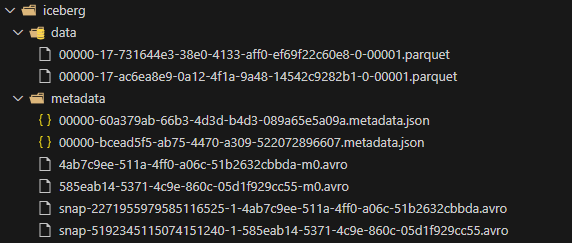
Overall Architecture
Apache Iceberg Table: dim_locations
├── data/                           # Data Layer
│   ├── 00000-17-731644e3-...-00001.parquet    # Data File 1
│   └── 00000-17-ac6ea8e9-...-00001.parquet    # Data File 2
│
└── metadata/                       # Metadata Layer
    ├── Table Metadata Files:
    │   ├── 00000-60a379ab-...metadata.json     # Table Metadata v1
    │   └── 00000-bcead5f5-...metadata.json     # Table Metadata v2 (current)
    │
    ├── Snapshot Manifests:
    │   ├── snap-2271955979585116525-1-4ab7c9ee-...avro  # Snapshot 1 Manifest
    │   └── snap-5192345115074151240-1-585eab14-...avro  # Snapshot 2 Manifest
    │
    └── Data Manifests:
        ├── 4ab7c9ee-511a-4ff0-a06c-51b2632cbbda-m0.avro # Data Manifest 1
        └── 585eab14-5371-4c9e-860c-05d1f929cc55-m0.avro # Data Manifest 2
3-Layer Metadata Architecture
1. Table Metadata (JSON)
   ├── Schema Evolution
   ├── Partition Evolution
   ├── Snapshot History
   └── Table Properties

2. Manifest List (Avro)
   ├── Snapshot Pointers
   ├── Manifest File Lists
   └── Operation Summaries

3. Manifest Files (Avro)
   ├── Data File Inventory
   ├── File Statistics
   ├── Partition Information
   └── Column-level Metadata
Data Flow in Operations
Read Operation:
- Read current metadata.json → Get current snapshot ID
- Read snapshot manifest → Get list of manifest files
- Read data manifests → Get list of data files + statistics
- Apply predicate pushdown using statistics
- Read relevant Parquet data files
Write Operation:
- Write new data files to /data/
- Create new manifest files referencing new data files
- Create new snapshot manifest
- Update table metadata.json with new snapshot
- Atomic commit by updating metadata pointer

NEXT STEPS
In this article, we learned how to deploy a complete pipeline on AWS Glue based on notebooks and workflows.
In the next part, let’s learn how the Governance & Monitoring services monitor pipeline performance.