



What is Data Lineage?
The monitoring of data flow over time is known as data lineage that provides a clear understanding of the data’s origin, its transformations, and its destination within the Unity Catalog or data pipeline as well as.
There must be a relationship between the table and view. It means that one table’s data is dependent upon other tables.
Types of Data Lineage?
There are two types of Lineage

1. Table Level
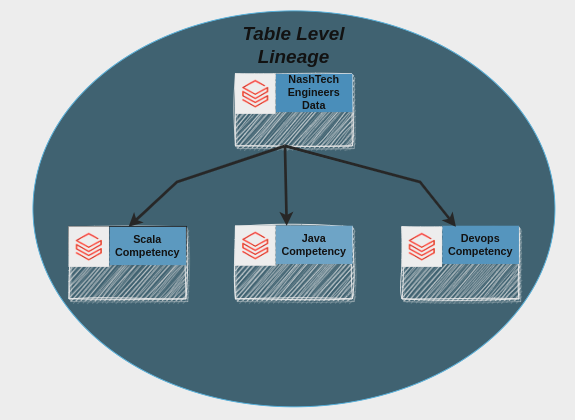
Table-level lineage indicates the relationship and dependencies between the different tables inside the Databricks unity catalog.
Example
2. Column Level
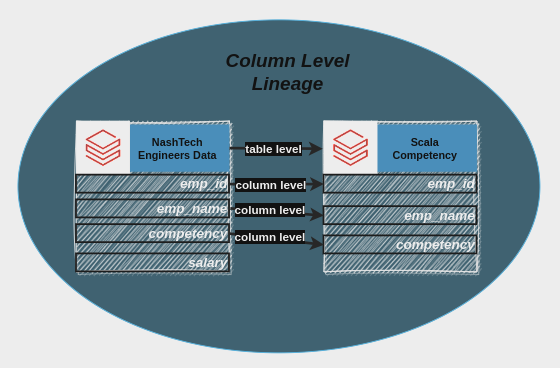
Column Level Lineage indicates the relationship between the columns of the different tables means how the column is generated from the previous column.
Example
Requirements to capture data lineage within the Unity Catalog
- The Databricks workspace must be Unity Catalog enabled.
- To view the lineage of all tables or views, users must store them in the same schema inside the Databricks Unity Catalog.
- Queries or code must use Spark Dataframe.
- To view the lineage of a table or view, users must have the SELECT privilege on the table or view.
Required Permission from Databricks Metastore
If the user doesn’t have the SELECT privilege on a table, they will not be able to explore the lineage.
Run the below SQL command in SQL Notebook to view the lineage.
Command to give permission through databricks notebookGRANT USE SCHEMA on unity_catalog_name.schema_name to
userA@company.com;
GRANT SELECT on unity_catalog_name.schema_name.table_name touserA@company.com;
How to View Lineage?
1. Login to Databricks Account.
2. Open a Databricks notebook, select any language (Scala, Python, SQL, R) attach the cluster to that notebook, and write the command to create a table from the existing table.
3. On the Dashboard in the Left panel click on Catalog and Select Catalog
4. Click on Schema and then click on the table to view lineage.
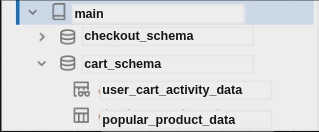
5. Now click on Lineage and click see Lineage Graph

6. Example
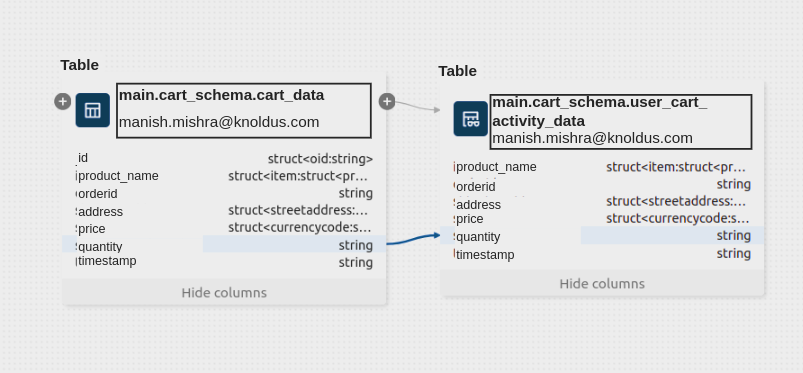
In this example, the data user cart activity undergoes a processing journey starting from the original cart data. The data-lineage analysis specifically focuses on the relationships between columns, showcasing how each column in the user cart activity data derives from corresponding columns in the original cart data. This detailed column-level lineage offers a comprehensive understanding of how individual data elements transform and contribute to the transition from the cart dataset to the user cart activity dataset.
Conclusion
Data lineage is the tracking of data flow from its origin through transformations to its final destination. To view lineage in Databricks Unity Catalog, users must have the appropriate privileges and follow specific steps, including granting permissions through SQL commands. It can be visualized in a graph, providing a clear understanding of how data is processed and transformed in the pipeline or job.