


Data Warehouse Architecture – Part 1: The Two-Level Architecture
The simplest way to build a data warehouse: one warehouse, one source of truth
Why do companies build data warehouses at all? Running analytics directly on operational systems (OLTP) is a bad idea: heavy queries slow down checkouts, history is missing, and every system names things differently (SP001 in the POS, 001-A in the warehouse system). A data warehouse fixes this by integrating data in one place.
Why do we need a data warehouse?
Imagine a retail chain. The accountant records payments in a general ledger, the sales staff ring up orders in a POS system, and the warehouse team tracks stock in an inventory system. These are operational (OLTP) systems: they are built to record transactions quickly, one at a time.
Now the manager asks: “Why do the finance and sales reports show different totals? And which items sell fast but are running low?” Answering that on the operational systems causes three problems:
- Performance. Scanning millions of order rows for a report competes with the POS that must stay fast at checkout.
- No history. Operational systems keep current data and overwrite or archive the old.
- Inconsistent data. The same product is
SP001in the POS and001-Ain the inventory system, so the data can’t be combined directly.
Analytics (OLAP) needs something different from transactions:
| OLTP (operations) | OLAP (analytics) | |
|---|---|---|
| Purpose | Record orders, payments, stock | Trends, comparisons, forecasts |
| Data | Current, detailed, constantly changing | Historical, integrated, summarized |
| Queries | Many short transactions | Fewer, but scan millions of rows |
| Priority | Fast response per transaction | Consistency across departments |
A data warehouse is the answer: a separate, integrated store built for analysis. It is typically subject-oriented (organized around topics like “Sales”, not around software), integrated (one code per product), time-variant (keeps history), and non-volatile (a cancelled order is recorded as a new event, not erased).
The big picture: four ways to organize a data warehouse
Every data warehouse architecture has to answer three questions:
- Where does data get integrated? In one central place, or separately by each team?
- How do the warehouse and the data marts relate? Is there a warehouse at all, and do marts depend on it? (A data mart is a smaller data store built for one department or business need.)
- How is data served, and how fresh is it? Batch loads, physical copies, or live logical views?
Depending on the answers, there are four common architectures. This series covers one per post:
| # | Architecture | In one sentence |
|---|---|---|
| 1 | Two-level | Integrate in a single warehouse; users query it directly. |
| 2 | Independent data marts | Each department builds its own mart and ETL from the sources. |
| 3 | Dependent data marts | Integrate once in an enterprise warehouse (EDW), then feed marts from it. |
| 4 | Logical marts + Active DW | Marts are views on the warehouse, updated in near real time with a feedback loop. |
Roughly, the list moves from simple and centralized (1), through fragmented (2) and governed (3), to fast and responsive (4). None is “best” in every situation: each trades simplicity, consistency, and freshness differently.
Let’s start with the simplest one.
The two-level architecture
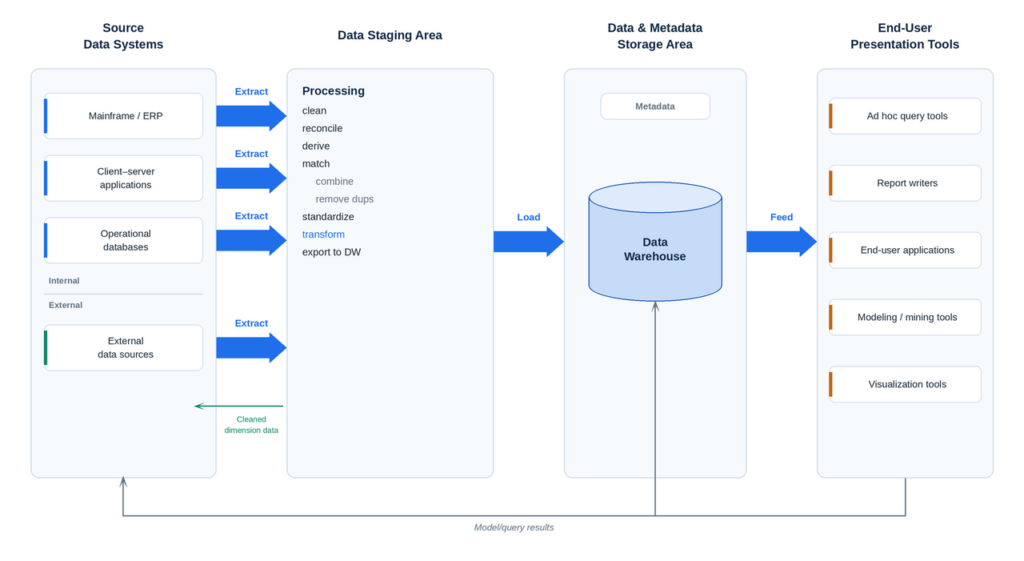
The name comes from the fact that there are only two levels of data storage: (1) the operational systems where data is born, and (2) the data warehouse where it is integrated and analyzed. Here is the journey of a piece of data, left to right in the diagram:
- Source systems. Internal systems (mainframe/ERP, client-server applications, operational databases) and external data sources.
- Extract. On a schedule, data is copied out of the sources. This is the “E” in ETL (Extract, Transform, Load).
- Staging area (transform). A temporary workspace where data is cleaned (fix errors), reconciled (resolve conflicts between sources), matched (combine records and remove duplicates), and standardized (one format and one code per thing).
- Load. The processed data is loaded into the warehouse, together with metadata: data about the data, such as where it came from and what it means.
- Feed. End-user tools (ad hoc query tools, report writers, applications, data mining, visualization) read directly from the warehouse. Results can flow back to the business as decisions.
Note the small green arrow in the diagram: cleaned dimension data (for example, a corrected customer or product list) can be sent back to the source systems, so the mess doesn’t come back next time.
Example: a retail chain
Suppose the chain has three stores. Each runs its own POS, and each uses a different code for the same product line: SP-001, 1001, and A-01.
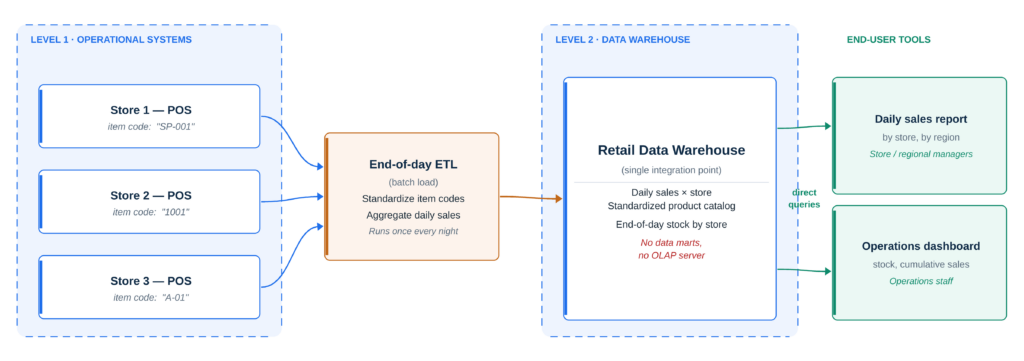
What happens each night:
- After closing, the end-of-day ETL job pulls that day’s sales from all three POS systems.
- It standardizes item codes, mapping
SP-001,1001, andA-01to one product ID in a standard catalog. - It aggregates daily sales, for example total units and revenue per product, per store, per day.
- It loads the result into the Retail Data Warehouse, which now holds daily sales × store, the standardized product catalog, and end-of-day stock by store.
What users get the next morning:
- A daily sales report for store and regional managers, broken down by store and region.
- An operations dashboard for the ops team showing stock and cumulative sales.
Both tools query the warehouse directly. There are no data marts and no OLAP server in between, so both read the exact same numbers.
Pros and Cons
Pros
- One shared integration point: Product codes are standardized in one place, so every report agrees.
- Simple to run: Only one pipeline and one warehouse to build, monitor, and secure.
- Clear access path: Every tool uses the same route to the data, which makes governance easier.
Cons
- Load concentrates on the warehouse: Every report, dashboard, and ad hoc query hits one system. Heavy users can slow each other down.
- Data is only as fresh as the last batch: With a nightly load, the morning report shows yesterday’s sales, not what happened an hour ago.
- Less tailored for each team: With no marts, every team works from the same structures, which may not suit specialized needs.
When to choose it
The two-level architecture fits small to mid-sized organizations that want a single version of the truth with minimal complexity, and where “yesterday’s data” is good enough. As the number of users and departments grows, the warehouse may need data marts on top, which is what the next architectures are about.
Next in the series: what happens when each department builds its own mart instead of sharing a warehouse.