


Debug chrome on android in 5 minutes.
As a web developer, you may occasionally encounter a situation where your website’s user interface works seamlessly and functions perfectly on a desktop or PC, but when viewed on a mobile device, it behaves unexpectedly or encounters a range of issues. These problems can include elements misaligning, text becoming unreadable, images not scaling properly, or interactive features failing to respond as intended. The disparity in how websites perform across different devices is a common challenge, primarily due to the differences in screen size, resolution, operating system, and browser behavior between desktop and mobile platforms.
Identifying the root cause of the issue can be difficult and debugging on a mobile device can be challenging
This article will guide you through how to debug chrome in Android using a PC.
The first step is to have a USB cable ready to connect your phone to your PC. Next, enable Developer Mode on your phone.
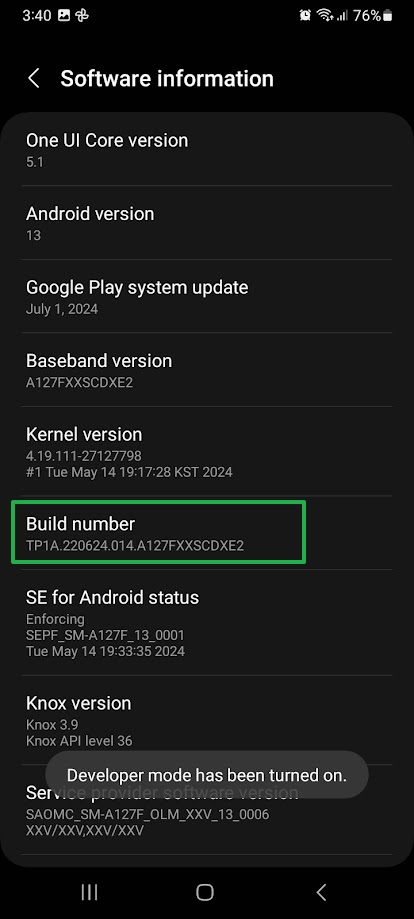
- Go to Settings > System > About phone (or Settings > About phone > Software information)
- Scroll down and tap Build number seven times until you see a popup message that you’re now a developer.
- Go back to Settings > Developer options menu is now visible.
- Go to Developer options menu and enable USB debugging
- Connect your phone to PC using USB Cable, tap Allow to confirm the action when prompted.


On your phone, open Chrome and navigate to the website you want to debug.
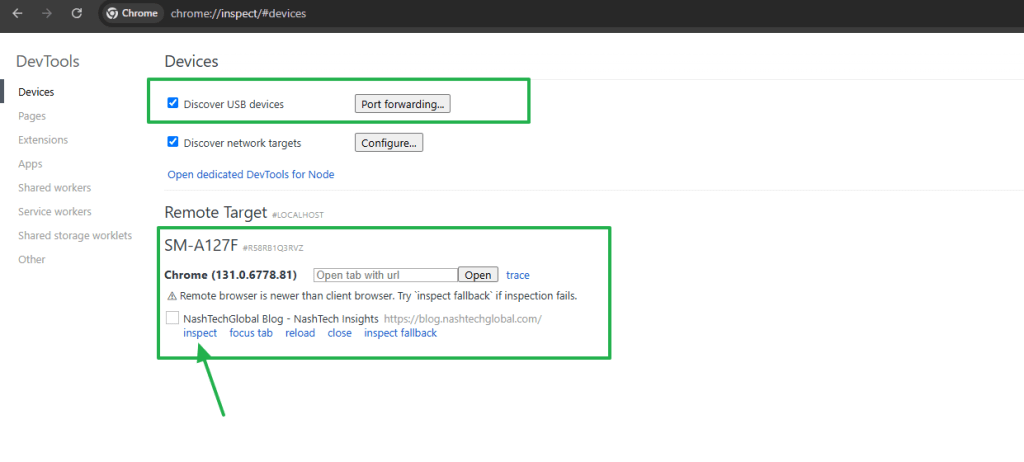
On your PC, open Chrome and enter chrome://inspect#devices in the address bar. Make sure checkbox Discover USB devices is enabled. In the “Remote Target” section, you will see your website displayed as it appears on your phone.
Click on Inspect to start debugging. You can now use tools like Elements, Console, Network, and all other available features to troubleshoot your website.

Materials used in this article
- Reference: Remote debug Android devices
- Chrome version: Version 131.0.6778.86 (Official Build) (64-bit)
- Phone: Samsung Galaxy A12 – Android version 13