



Understanding AKS and ACR:
Azure Kubernetes Service (AKS) streamlines the management of containerized applications using Kubernetes, simplifying deployment, scaling, and orchestration. It offers a robust platform for automating cluster provisioning and integrates seamlessly with Azure tools, ensuring efficient resource utilization and scalable operations.
Azure Container Registry (ACR) is a secure repository for Docker container images within Azure. It enables developers to securely store, manage, and deploy container images. ACR seamlessly integrates with AKS and other Azure services, providing rapid image transfers, role-based access control (RBAC), geo-replication, and enhanced security features such as Azure Active Directory integration and content trust, bolstering the reliability and security of container deployments.
Prerequisites:
- Azure Account: Access to Azure Portal and Subscription.
- Azure CLI or Azure Portal: You can use either the Azure command-line interface (CLI) or the Azure Portal for managing resources.
- Dockerized Application: A containerized application stored in a Docker image.
Step-by-Step Guide to Deploying an Containerized Applications on AKS:
Step 1: Setting Up the Environment:
First, create a resource group and an Azure Kubernetes Service (AKS) for deploying our containerized application. If you need a detailed walkthrough or step-by-step instructions about creating an AKS cluster you can check this blog
az group create --name MyResourceGroup --location westus
az aks create --resource-group MyResourceGroup --name MyAKSCluster --node-count 3 --enable-addons monitoring --location westus
az aks get-credentials --resource-group MyResourceGroup --name MyAKSCluster
Step 2: Preparing Your Application for AKS:
Assuming you have containerized application and possess the image, we’ll leverage a commonly used NGINX public image from Docker Hub. Let’s use a sample public image from Docker Hub, such as NGINX, and push it to Azure Container Registry (ACR):
# Log in to your Azure Container Registry
az acr login --name shaifacr

# Pull the NGINX public image from Docker Hub
docker pull nginx

# Tag the image and push it to your ACR
docker tag nginx:latest shaifacr.azurecr.io/nginx:latest
docker push shaiff/nginxapp:tag nginx:latest
These commands facilitate the transfer of the NGINX image from Docker Hub to your private Azure Container Registry, enabling you to manage and deploy it within your Azure Kubernetes Service (AKS) environment.
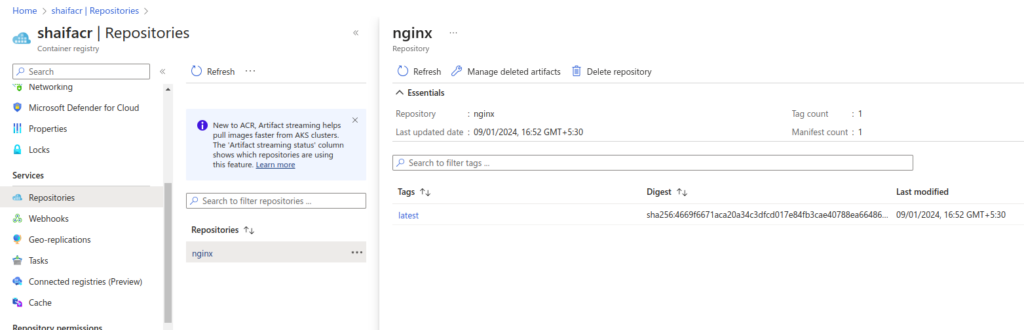
Step 3: Deploying Your Application:
Use the kubectl create secret docker-registry command to create a secret containing the ACR login information. Ensure that a Kubernetes secret exists in the same namespace as your Deployment, containing the ACR credentials. This secret is used by Kubernetes to authenticate and pull images from the registry.
kubectl create secret docker-registry acr-secret \
--docker-server=shaifacr.azurecr.io \
--docker-username=ACR_USERNAME \
--docker-password=ACR_PASSWORD \
--docker-email=YOUR_EMAIL -n your-namespace
Replace ACR_USERNAME and ACR_PASSWORD with your ACR credentials and YOUR_EMAIL with the associated email address.
Create a Kubernetes Deployment manifest (nginx-deployment.yaml) to use the NGINX image from your ACR:
apiVersion: apps/v1
kind: Deployment
metadata:
  name: nginx-deployment
spec:
  replicas: 3
  selector:
    matchLabels:
      app: nginx
  template:
    metadata:
      labels:
        app: nginx
    spec:
      containers:
      - name: nginx
        image: shaifacr.azurecr.io/nginx:latest
        ports:
        - containerPort: 80
      imagePullSecrets:
      - name: acr-secret
Apply the deployment to the AKS cluster:
kubectl apply -f nginx-deployment.yaml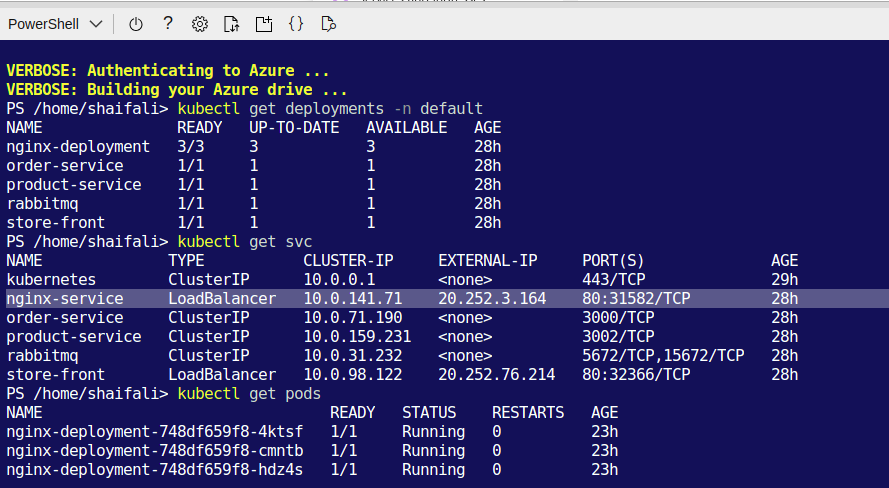
Step 4: Exposing and Accessing Your Application:
Create a Kubernetes Service manifest (nginx-service.yaml) to expose your NGINX deployment:
apiVersion: v1
kind: Service
metadata:
  name: nginx-service
spec:
  type: LoadBalancer
  ports:
  - port: 80
    targetPort: 80
  selector:
    app: nginx
Apply the service configuration:
kubectl apply -f nginx-service.yaml
Conclusion:
By following these steps, you’ve successfully deploy a NGINX containerized application on Azure Kubernetes Service (AKS) by transferring a Docker Hub image to Azure Container Registry (ACR). This streamlined process showcases deploying containerized applications from ACR to AKS, simplifying application deployment workflows.