



Continuing from our previous discussion on automating desktop applications with WinAppDriver, this blog post explores FlaUI. While WinAppDriver is supported by Microsoft, it has limitations and hasn’t seen recent updates. FlaUI offers an alternative solution. Let’s get familiar with FlaUI and how to integrate it into your projects
I. FlaUI Introduction
FlaUI is an open-source .NET library designed for automated UI testing of applications specifically on Windows Platform (Win32, WinForms, WPF, Store Apps, …). It acts as a wrapper around Microsoft’s native UI Automation libraries, making them easier to use with C# for writing test scripts.
We can download FlaUI from Nuget package for .Net Framework (https://www.nuget.org/packages?q=FlaUI)
II. FlaUI Features
Identification: FlaUI provides methods to identify UI elements on the screen using various criteria like name, automation ID, class name, …
Interaction: You can perform actions on identified elements like clicking buttons, entering text in text boxes, selecting items from lists, and more.
Property access: FlaUI allows you to access properties of UI elements like text content, enabled state, etc., which can be helpful for making assertions during tests.
Property Changes: FlaUI allows you to monitor specific properties of UI elements for changes. For example, you can check if a button’s “IsEnabled” property changes after a certain action is performed. This can be an indirect way to verify if an event like a button click might have triggered a state change.
Polls and Waits: FlaUI provides methods to wait for specific conditions to occur on the UI. You can use these methods to wait for elements to appear, disappear, or change their properties after simulating an event (like a button click).
Launching Applications: FlaUI can launch applications under test and interact with their windows.
Window Management: You can get references to specific windows within the application based on title, automation ID, or other criteria.
Window Interaction: FlaUI allows you to switch focus between windows, close windows, and manipulate their size and position.
Integration with Frameworks: FlaUI can be integrated with nUnit Framework and Robot Framework.
Accessibility Support: FlaUI can interact with UI elements that are designed for accessibility, making it suitable for automating tests for users with disabilities.
Screenshots and Visual Validation: FlaUI allows capturing screenshots during test execution, which can be useful for visual validation and debugging.
III. FlaUI Inspect Tool
FlaUInspect acts as a visual inspection tool specifically designed for UI elements within Windows applications. It allows you to explore the UI structure of an application, examine the properties of UI elements, and understand how they are exposed to automation tools like FlaUI.
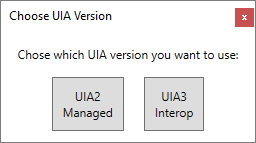
On startup, you can choose if you want to use UIA2 or UIA3:
Main Screen:

In the Mode menu, you can choose a few different options:

IV.Use FlaUI with nUnit Framework
a. How to install FlaUI
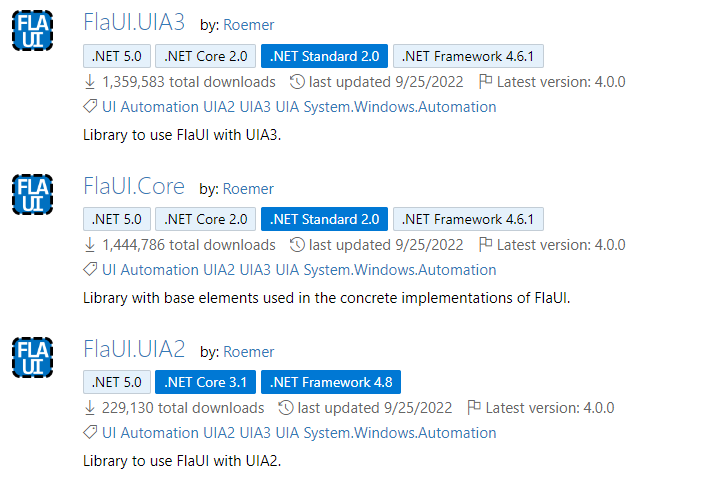
First, we need to install FlaUI.Core. Then we can base on the application type to install either FlaUI.UIA2 or FlaUI.UIA3:
- UIA2 is managed only, which would be good for C# but it does not support newer features (like touch) and it also does not work well with WPF or even worse with Windows Store Apps.
- UIA3 is the newest of them all and works great for WPF / Windows Store Apps but unfortunately, it can have some bugs with WinForms applications (see FAQ) which are not existent in UIA2.
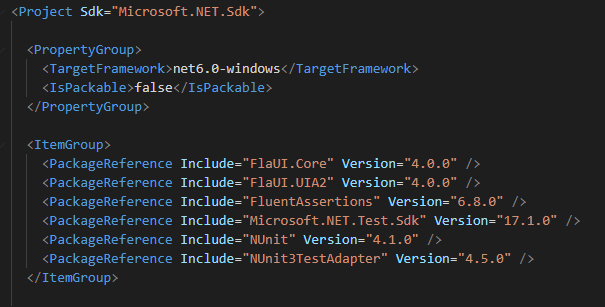
Note: If the project builds failed with this error “NETSDK1136: The target framework must be Windows”, we only need to change the “TargetFramework” value to “net6.0-windows” in .csproj file like below:
b. Code Sample
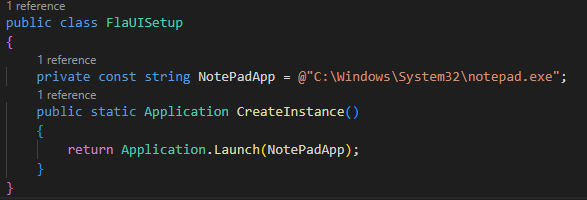
First, we will have a core function to launch application :
Then, we will use Hook event of nUnit to do the setup and teardown for our test:

Finally, we will create our test:

c. Demo
V. Conclusion
In Conclusion, FlaUI is a well-suited tool for automating UI testing of traditional Windows desktop applications. Because it provides a comprehensive set of features for automating UI testing of Windows desktop applications. It helps us to interact with various UI elements, manage application windows, and integrate with different testing frameworks. However, its limitations in handling modern applications and document content require careful consideration for specific testing needs.
I hope this article can help you to understand the FlaUI. Therefore, you can make an informed decision about whether it’s the right tool for your Windows desktop application UI testing needs.