


In this blog, we will see how to run a self-hosted agent inside a docker container for our Azure pipelines.
By utilising Docker containers as self-hosted agents in Azure Devops Pipelines, teams can unlock a plethora of benefits. Firstly, Docker containers provide a lightweight and portable environment, ensuring consistency across different stages of the development life cycle. Moreover, Docker’s containerisation technology facilitates efficient resource utilization, allowing teams to dynamically scale their build and deployment infrastructure based on workload demands. With self-hosted agents running in Docker containers, organisations can optimise costs and maximise the utilisation of their existing infrastructure, whether it’s on premises servers or cloud-based VMs.
Pre-Requisites
- Azure Account
Self-hosted Agent in Azure Devops
Create a Virtual Machine in Azure and configure Docker in it
You can check the official Docker documentation to install Docker in your VM or follow the steps mentioned below:
sudo apt update

sudo apt install apt-transport-https ca-certificates curl software-properties-common

curl -fsSL https://download.docker.com/linux/ubuntu/gpg | sudo apt-key add -

sudo add-apt-repository "deb [arch=amd64] https://download.docker.com/linux/ubuntu focal stable"

sudo apt install docker-ce

sudo usermod -aG docker ${USER}

sudo usermod -aG docker <azureuser>
Create and build the Dockerfile for the self-hosted Agent
mkdir ~/azp-agent-in-docker/
cd ~/azp-agent-in-docker/
Dockerfile
FROM alpine

RUN apk update
RUN apk upgrade
RUN apk add bash curl git icu-libs jq

ENV TARGETARCH="linux-musl-x64"

WORKDIR /azp/

COPY ./start.sh ./
RUN chmod +x ./start.sh

RUN adduser -D agent
RUN chown agent ./
USER agent
# Another option is to run the agent as root.
# ENV AGENT_ALLOW_RUNASROOT="true"

ENTRYPOINT ./start.sh
Create start.sh file and add the following script.
#!/bin/bash
set -e

if [ -z "${AZP_URL}" ]; then
echo 1>&2 "error: missing AZP_URL environment variable"
exit 1
fi

if [ -z "${AZP_TOKEN_FILE}" ]; then
if [ -z "${AZP_TOKEN}" ]; then
echo 1>&2 "error: missing AZP_TOKEN environment variable"
exit 1
fi

AZP_TOKEN_FILE="/azp/.token"
echo -n "${AZP_TOKEN}" > "${AZP_TOKEN_FILE}"
fi

unset AZP_TOKEN

if [ -n "${AZP_WORK}" ]; then
mkdir -p "${AZP_WORK}"
fi

cleanup() {
trap "" EXIT

if [ -e ./config.sh ]; then
print_header "Cleanup. Removing Azure Pipelines agent..."

# If the agent has some running jobs, the configuration removal process will fail.
# So, give it some time to finish the job.
while true; do
./config.sh remove --unattended --auth "PAT" --token $(cat "${AZP_TOKEN_FILE}") && break

echo "Retrying in 30 seconds..."
sleep 30
done
fi
}

print_header() {
lightcyan="\033[1;36m"
nocolor="\033[0m"
echo -e "\n${lightcyan}$1${nocolor}\n"
}

# Let the agent ignore the token env variables
export VSO_AGENT_IGNORE="AZP_TOKEN,AZP_TOKEN_FILE"

print_header "1. Determining matching Azure Pipelines agent..."

AZP_AGENT_PACKAGES=$(curl -LsS \
-u user:$(cat "${AZP_TOKEN_FILE}") \
-H "Accept:application/json;" \
"${AZP_URL}/_apis/distributedtask/packages/agent?platform=${TARGETARCH}&top=1")

AZP_AGENT_PACKAGE_LATEST_URL=$(echo "${AZP_AGENT_PACKAGES}" | jq -r ".value[0].downloadUrl")

if [ -z "${AZP_AGENT_PACKAGE_LATEST_URL}" -o "${AZP_AGENT_PACKAGE_LATEST_URL}" == "null" ]; then
echo 1>&2 "error: could not determine a matching Azure Pipelines agent"
echo 1>&2 "check that account "${AZP_URL}" is correct and the token is valid for that account"
exit 1
fi

print_header "2. Downloading and extracting Azure Pipelines agent..."

curl -LsS "${AZP_AGENT_PACKAGE_LATEST_URL}" | tar -xz & wait $!

source ./env.sh

trap "cleanup; exit 0" EXIT
trap "cleanup; exit 130" INT
trap "cleanup; exit 143" TERM

print_header "3. Configuring Azure Pipelines agent..."

./config.sh --unattended \
--agent "${AZP_AGENT_NAME:-$(hostname)}" \
--url "${AZP_URL}" \
--auth "PAT" \
--token $(cat "${AZP_TOKEN_FILE}") \
--pool "${AZP_POOL:-Default}" \
--work "${AZP_WORK:-_work}" \
--replace \
--acceptTeeEula & wait $!

print_header "4. Running Azure Pipelines agent..."

chmod +x ./run.sh

# To be aware of TERM and INT signals call ./run.sh
# Running it with the --once flag at the end will shut down the agent after the build is executed
./run.sh "$@" & wait $!
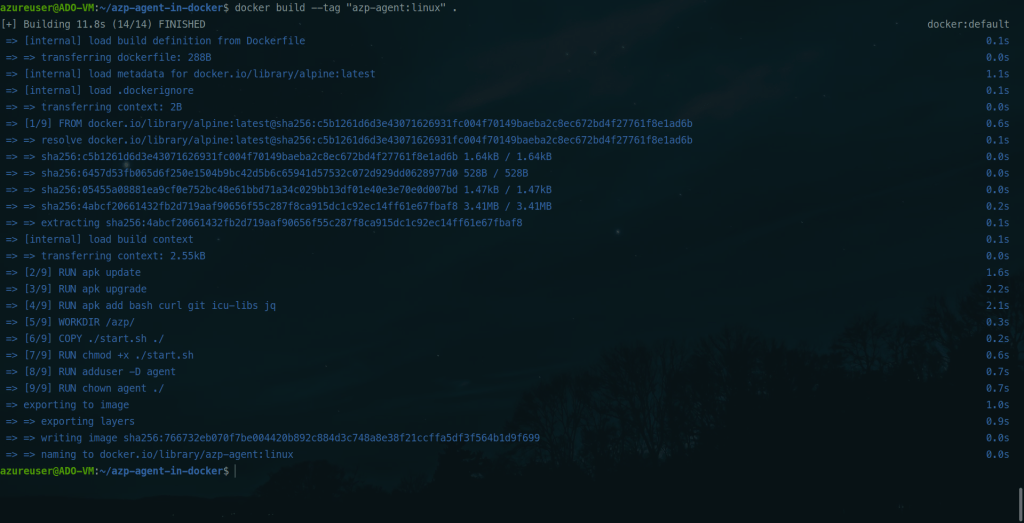
Build the Docker image
docker build –tag “azp-agent:linux” .
Run the Self-hosted Agent container
Run the Docker container for agent
docker run -it -e AZP_URL=”<AzureDevops-URL>” -e AZP_TOKEN=”<PAT-TOKEN>” -e AZP_POOL=”<Azure-Pool-Name>” -e AZP_AGENT_NAME=”<AGENT-NAME>” –name “azp-agent-linux” azp-agent:linux
For example,
docker run -it -e AZP_URL=”https://dev.azure.com/kklabusermain-7fa37198de484bf8/” -e AZP_TOKEN=”75f365z6akfyvu2fjkslbtw4gpiskt4vjryw6kmxi44asiwfvusq” -e AZP_POOL=”Nash-Pool” -e AZP_AGENT_NAME=”Docker Agent – Ubuntu” –name “azp-agent-linux” azp-agent:linux


The docker agent is up and running.
Lets see the same form the Azure Portal to verify if the agent has been added to the pool.
Open Azure Devops > Project > Settings > Agent Pools
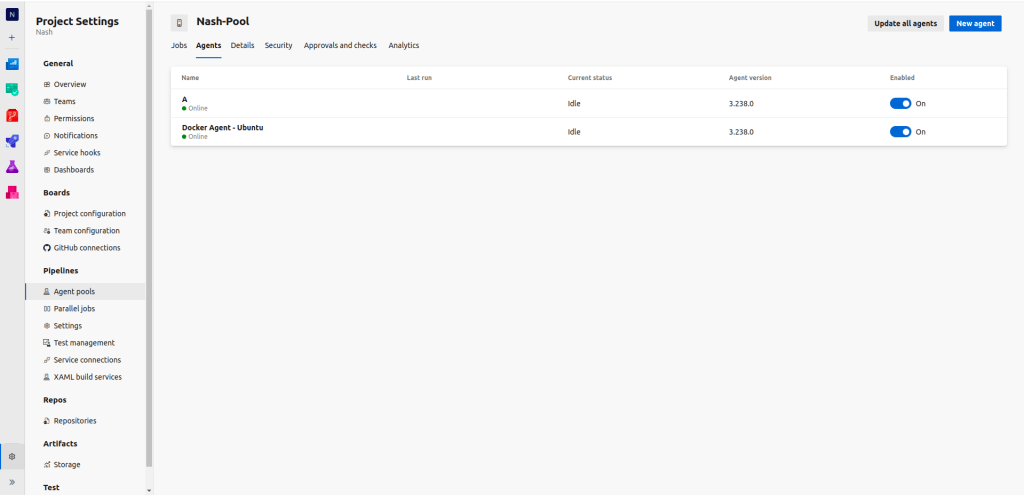
As you can see, the docker agent has been added successfully.
Using a self-hosted agent is important when we want to configure the agent packages according to our needs. We can also run them as pods in Kubernetes and scale them as and when required.
This is how you can configure self-hosted agent in the Azure Devops pipeline. If you have any questions/feedbacks regarding this blog, I am reachable at vidushi.bansal@nashtechglobal.com. You can find more of my blogs here.