



AI tools have revolutionized the way software testing is done, offering testers a smarter, faster way to create test cases, troubleshoot errors, and optimize automation processes. Models like ChatGPT, Gemini, Claude, and others have become essential in modern test automation workflows. These AI models can provide professional, precise responses to a wide range of questions related to manual and automated testing.
In this article, we will share some useful prompts or queries you can ask AI tools when working with software test automation. Whether you’re a beginner or an experienced tester, these examples will help you navigate through the process more effectively. Furthermore, they will guide you in improving your testing efficiency and accuracy.
🤖 AI Models You Can Use
- ChatGPT: Visit ChatGPT
- Gemini: Visit Gemini
- Claude: Visit Claude
- Deepseek: Visit Deepseek
- Grok: Visit Grok
Note: Claude and Grok are specialized tools designed for code generation. However, to access their full features, a paid subscription may be required, especially for users who wish to explore the tools extensively. Consider purchasing a Pro account through reputable platforms to get a better deal without requiring a credit card.
🚀 Effective AI Prompts for Testing
AI in software testing is incredibly versatile, capable of assisting with a variety of tasks, such as creating test cases, debugging errors, optimizing frameworks, or advising on new technologies. Below are some sample prompts that testers can use across different areas of test automation.
1. Writing Test Cases & Test Scripts
- “Write a test case for the login functionality of a web app using Selenium and Java.”
- “Create a REST API test script with RestAssured to test the /login endpoint using the POST method.”
- “Write a Cypress test script to validate the registration form.”
- “Design a Page Object Model class for the ‘Customers’ page.”
- “Write Gherkin scenarios for a Manage Project feature using Cucumber JVM.”
Advanced Prompt Example:
You can also upload a screenshot of a webpage, and then ask for specific details based on what you need:
- “Create a Page Object Model class in Selenium Java TestNG based on the Customers page in this screenshot.”
2. Debugging & Fixing Errors
- “I’m encountering an ElementNotInteractableException in Selenium. What causes this error and how can I fix it?”
- “My JUnit test throws a NoSuchMethodError. What does this mean and how can I resolve it?”
3. Optimizing Test Automation & Scripts
- “How can I optimize my Selenium test scripts for faster execution?”
- “Is there a way to reduce flakiness in Playwright test automation?”
- “Guide me on how to use the Page Object Model (POM) in Selenium with Python.”
Additional Prompt Example:
If you have a snippet of code, you can also ask for further clarification to ensure you fully understand it:
- “What does the following code do? Can you explain the purpose of this class/method?”
4. Configuration & Integration
- “How do I configure TestNG to run parallel tests with Selenium?”
- “How do I integrate Allure reports with pytest in Python?”
- “How can I run Playwright tests on CI/CD using GitHub Actions?”
5. Comparing & Choosing Technologies
- “When should I use Selenium versus Cypress?”
- “What are the differences between JUnit and TestNG?”
- “Are there better frameworks than RestAssured for API testing?”
🚀 Tool-Specific Prompts for Automation Testing
In addition, to general test automation questions, you can ask AI more focused queries about specific tools like Playwright, Katalon, JMeter, Jenkins, Selenium, and more. Below are some example prompts related to these tools:
1. Playwright
- “Write a Playwright script in JavaScript to test the search functionality on Google.”
- “How can I take a screenshot when a test fails in Playwright?”
- “Guide me on running Playwright tests on mobile browsers.”
2. Katalon
- “How do I create API test cases in Katalon Studio?”
- “How do I integrate Katalon with Jenkins for automated test execution?”
- “How can I create data-driven tests in Katalon using an Excel file?”
3. JMeter
- “How do I write a JMeter test script to check the performance of a RESTful API?”
- “How can I configure JMeter to send 1000 requests per second?”
- “How do I integrate JMeter with Grafana for performance monitoring?”
4. Jenkins
- “How can I create a Jenkins pipeline to run Selenium test automation?”
- “How do I configure Jenkins to run Playwright tests in a Docker environment?”
- “How do I set up Jenkins to trigger automated tests when new commits are made in GitHub?”
5. Selenium
- “Write a Selenium script in Java to automatically log in to a website.”
- “How do I handle alert pop-ups in Selenium WebDriver?”
- “Guide me on implementing headless testing with Selenium on Chrome.”
6. TestNG
- “How do I use TestNG annotations like @BeforeTest, @AfterTest, @DataProvider?”
- “How do I run parallel tests with TestNG in Selenium?”
- “How do I configure TestNG XML files to prioritize test execution?”
7. Allure Report
- “How do I integrate Allure Report with TestNG to generate beautiful test reports?”
- “How do I add screenshots to an Allure Report when tests fail?”
- “How do I create custom annotations for steps in Allure Report?”
💡 Effective Error Troubleshooting with AI
Therefore, when debugging test automation issues, providing sufficient details is crucial for quickly identifying the problem and finding a solution. Here are examples of how to ask AI for help with specific errors:
Common Mistakes (Avoid These) ❌
- “Selenium is broken, help!”
- “TestNG doesn’t work, what’s wrong?”
- “Jenkins is giving me an error, how do I fix it?”
Problem: These questions are too vague and lack context (error details, environment, or steps to reproduce).
Better Approach (Use These) ✅
- Selenium Error Example:
“However, I’m getting anElementNotInteractableExceptionin Selenium WebDriver when using ChromeDriver. I tried addingThread.sleep(), but it didn’t help. How can I fix this?”
Key Info to Include:
- Testing environment (Java/Python, Selenium version, ChromeDriver version)
- Specific error message
- Solutions already tried
- TestNG Error Example:
“Currently, I’m getting aNullPointerExceptionin TestNG when running a test suite with@DataProvider. The data isn’t being passed correctly. Here’s my code:
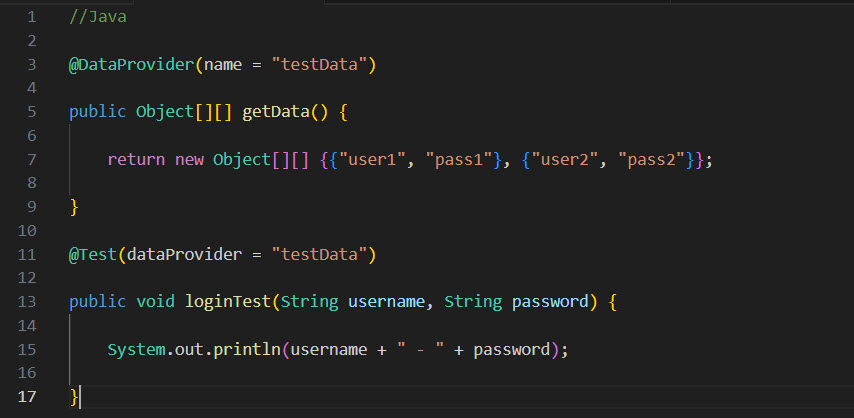
I checked for null but can’t figure out the issue. What should I do next?”
Key Info to Include:
- Relevant code snippet
- Specific error
- Troubleshooting attempts
Final Tips for Asking Effective AI Queries
- Be Specific: Clearly describe the problem, error message, and the tools you are using.
- Provide Code: If possible, share the relevant portion of the code or configuration.
- Include Environment Details: Mention the versions of the tools you are using (Selenium, TestNG, etc.).
- Share What You’ve Tried: This helps AI avoid suggesting solutions you’ve already attempted.
By using these well-structured prompts, you can make the most of AI in your test automation workflow, ensuring that you get accurate, relevant, and actionable insights to improve your testing processes.
Reference
👉 30+ Best AI/ChatGPT Prompts for Software Testing – LambdaTest
👉 Prompt Engineering for Testers: Unleashing the Power of LLMs – Testsigma
👉 How to Use ChatGPT for Software Testing – PractiTest
👉 AI in Test Automation: A Complete Guide – LambdaTest
👉 Prompt Engineering in QA and Software Testing – testRigor
👉 Prompt Engineering: An Important Key Skill for Test Engineers – LinkedIn