



Introduction
In the era of data-driven decision-making, leveraging machine learning (ML) has transformed the business landscape in various industries. Amazon SageMaker, a fully managed service provided by Amazon Web Services (AWS), plays a pivotal role in enabling organizations to effectively build, train, and deploy machine learning models at scale, also we can say it as Amazon SageMaker for MLOps. This comprehensive guide delves into the essential features of Amazon SageMaker, providing insights and best practices for harnessing the power of machine learning for business success.
Understanding Amazon SageMaker
1.1 What is Amazon SageMaker for MLOps?
Amazon SageMaker is a fully managed service that enables developers and data scientists to build, train, and deploy machine learning models quickly. It provides a comprehensive set of tools and services to simplify the entire ML lifecycle, from data labeling and model training to deployment and monitoring.
1.2 Key Features
- Managed Notebooks: SageMaker offers Jupyter notebooks for collaborative, interactive development.
- Built-in Algorithms: Pre-built algorithms for common ML tasks, reducing the need for extensive coding.
- Automated Model Tuning: Optimize your model with hyperparameter tuning for better performance.
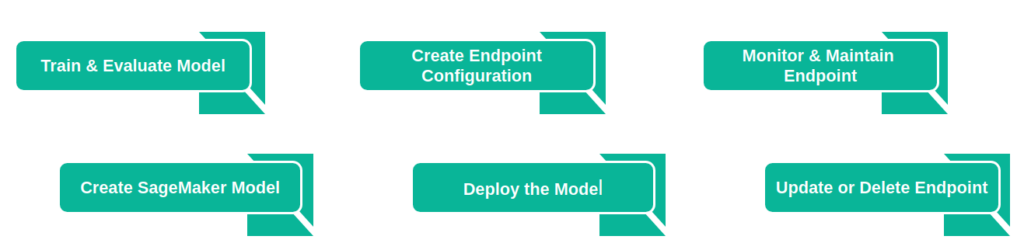
- Model Deployment: Seamlessly deploy models on scalable infrastructure for real-time or batch predictions.
Best Practices for SageMaker
2.1 Data Preparation
- Data Cleaning: Ensure your datasets are clean and well-organized to enhance model accuracy.
- Feature Engineering: Identify and create relevant features to improve model performance.
2.2 Model Training
- Experimentation: Utilize SageMaker’s experiment tracking to compare and optimize models efficiently.
- Instance Selection: Choose the right instance type and size for your specific workload to manage costs effectively.
2.3 Model Deployment
- Endpoint Configuration: Optimize endpoint configurations for better scalability and cost efficiency.
- Monitoring and Debugging: Set up monitoring to identify and rectify issues in real-time.
2.4 Security and Compliance
- IAM Roles: Implement least privilege principles using Identity and Access Management (IAM) roles.
- Data Encryption: Ensure data security in transit and at rest with encryption mechanisms.
Having covered the discussion on Amazon SageMaker and the best practices we’ve explored so far, let’s now proceed to explore how we can effectively utilize this platform to construct our end-to-end machine learning solution.
Code Pipeline in SageMaker
AWS CodePipeline streamlines the development and oversight of your pipeline, offering a user-friendly graphical interface for effortless creation, configuration, and supervision. This visual representation is instrumental in enhancing comprehension and structuring of your release process workflow, particularly when incorporating machine learning for business using Amazon SageMaker.
Note: Please visit the link attached in: “CodePipeline” to go through the steps of integrating your own code pipeline.
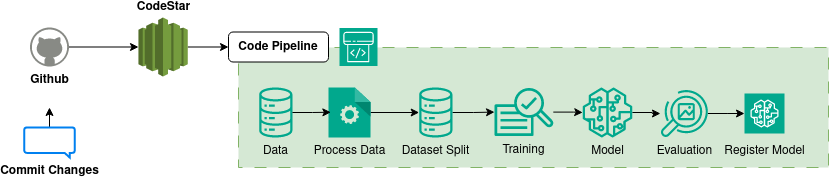
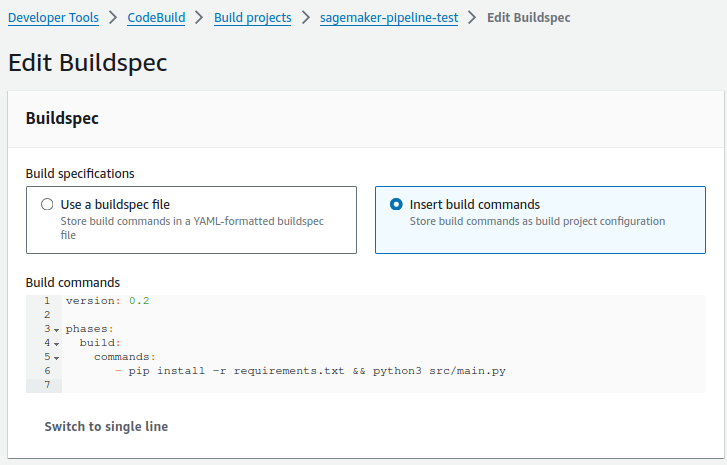
Upon reviewing the above illustration, once we commit our new changes to the source repository, the created project linked with the source repository detects the committed changes. This, in turn, triggers the steps outlined in our CodePipeline. In this process, we have specified some fundamental commands to initially install the requirements and execute our pipeline in SageMaker Studio: [pip install -r requirements.txt && python3 src/main.py]. We can take the reference from below image.
Register and Deploy Models with Model Registry
So far, we’ve successfully navigated our journey, from initiating the pipeline to enlisting our model in the SageMaker Model Registry. Moving forward, let’s delve into the exciting realm of interacting with our model registry as we progress towards deploying the model on the SageMaker Endpoint.
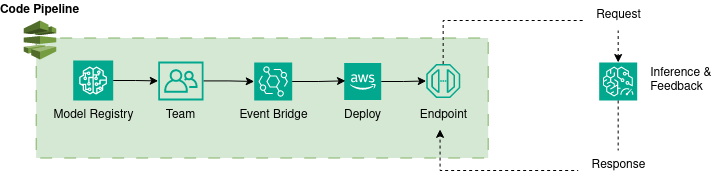
We have now finished the deployment process for our model on the SageMaker endpoint. With this completed deployment, we can proceed to make requests using the deployed endpoint. This can be achieved by utilizing AWS services such as Lambda function and API Gateway. The successful execution of requests to the endpoint involves integrating custom inference code into our Lambda function.
Conclusion
In the data-driven landscape of modern decision-making, Amazon SageMaker for MLOps. emerges as a pivotal tool for organizations, offering a fully managed service that streamlines the machine learning lifecycle. Its key features, including managed notebooks, built-in algorithms, and automated model tuning, facilitate efficient model development and deployment. Best practices outlined for SageMaker encompass data preparation, model training, deployment optimization, and security measures.