


Introduction
In today’s fast-paced world, automation can save a lot of time and effort. One task that’s often-sending emails—whether it’s for system notifications, updates, or reminders. Imagine being able to send emails without having to open your email account and manually type them out.
In this blog, we’ll show you how you can send emails using Microsoft Graph API with Scala.
We’ll guide you step by step, starting from setting up the required accounts and permissions in Azure to writing the Scala code that sends emails. By the end of this blog, you’ll be able to send emails with just a few lines of code. Visit for more blogs.
Setting Up Your Microsoft Azure Account
Create an Azure Account
1. Go to the Azure Portal.
2. Sign in with your Microsoft account.
Register Your App in Azure
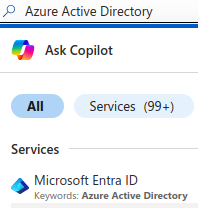
Once logged in, go to Azure Active Directory.
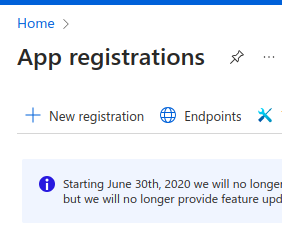
Click on App registrations, then new registration.
Give your app a name (something like “AutoEmailApp“).


Click Register.
Get Your Credentials (Tenant ID, Client ID, Client Secret)
Now, you need three things to authenticate your app:
Tenant ID: This is like your app’s ID in the Azure system.
Client ID: This is your app’s unique identifier.
Client Secret: This is a key your app will use to prove its identity to Azure.

You can get these credentials by going to the Overview section of your app’s registration page but for client secret you have to create it by clicking on Certificates & secrets and make sure to save it.
Set Permissions to Send Emails
For your app to send emails, you need to give it the right permissions.
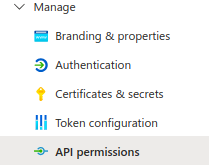
Click API permission.
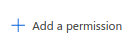
Click Add a permission, then choose Microsoft Graph.

Select Application permissions from Microsoft Graph and then choose Mail.Send.
This permission allows your app to send emails on its own, without needing a user to log in each time. Ask your organization admin to Grant access of these permission after adding permission.
Writing the Scala Code to Send an Email
Set Up Your Project
To interact with Microsoft Graph API, you’ll need a couple of dependencies in your project. Add these to your build.sbt file:
libraryDependencies ++= Seq(
"com.azure" % "azure-identity" % "1.6.1",
"com.microsoft.graph" % "microsoft-graph" % "5.80.0",
"com.typesafe" % "config" % "1.4.2",
"ch.qos.logback" % "logback-classic" % "1.2.3"
)
Write the Code
Here’s a simple Scala program to send an email using Microsoft Graph API:
import com.azure.identity.ClientSecretCredentialBuilder
import com.microsoft.graph.authentication.TokenCredentialAuthProvider
import com.microsoft.graph.models.{BodyType, EmailAddress, ItemBody, Message, Recipient, UserSendMailParameterSet}
import com.microsoft.graph.requests.GraphServiceClient
import org.slf4j.LoggerFactory

import scala.jdk.CollectionConverters.*

object GraphEmailSender {

  private val logger = LoggerFactory.getLogger("GraphEmailSender")

  def sendEmail(tenantId: String, clientId: String, clientSecret: String, senderEmail: String, recipientEmail: String): String = {
    // Build the credentials and authentication provider
    val credential = new ClientSecretCredentialBuilder()
      .tenantId(tenantId)
      .clientId(clientId)
      .clientSecret(clientSecret)
      .build()

    val authProvider = new TokenCredentialAuthProvider(List("https://graph.microsoft.com/.default").asJava, credential)

    // Initialize Graph Service Client
    val graphClient = GraphServiceClient
      .builder()
      .authenticationProvider(authProvider)
      .buildClient()

    // Create email message
    val emailMessage = new Message()
    emailMessage.subject = "Test Email from Microsoft Graph API"

    // Set up email body
    val body = new ItemBody()
    body.contentType = BodyType.TEXT
    body.content = "Hello, this is a test email sent from Scala using Microsoft Graph API."
    emailMessage.body = body

    // Define the recipient
    val toRecipient = new Recipient()
    val emailAddress = new EmailAddress()
    emailAddress.address = recipientEmail
    toRecipient.emailAddress = emailAddress
    emailMessage.toRecipients = List(toRecipient).asJava

    // Set up parameters for sending mail
    val sendMailParameterSet = UserSendMailParameterSet
      .newBuilder()
      .withMessage(emailMessage)
      .withSaveToSentItems(true)
      .build()

    // Send the email and handle potential errors
    try {
      graphClient
        .users(senderEmail)
        .sendMail(sendMailParameterSet)
        .buildRequest()
        .post()
      logger.info(s"Email sent successfully to $recipientEmail from $senderEmail")
      s"Email sent successfully to $recipientEmail from $senderEmail"
    } catch {
      case e: Exception =>
        logger.error(s"Error sending email from $senderEmail to $recipientEmail: ", e)
        s"Error sending email from $senderEmail to $recipientEmail: "
    }
  }

}
Key Steps in the Code
Authentication: Your app uses the Client ID, Client Secret, and Tenant ID to prove its identity to Microsoft Azure.
Graph Service Client: This client interacts with the Microsoft Graph API to send emails.
Email Details: You specify the subject, body, and recipient of the email.
Sending the Email: The app sends the email to the recipient.
Running the Scala Program
Now that the code is ready, you can run the program with the following parameters:
- Tenant ID
- Client ID
- Client Secret
- Sender Email: the email address from which the email will be sent
- Recipient Email: the email address of the person who will receive the email
When you run the program, the email will be sent automatically without needing you to log in or interact with the app.
val tenantId = "your-tenant-id"
val clientId = "your-client-id"
val clientSecret = "your-client-secret"
val senderEmail = "sender@example.com"
val recipientEmail = "recipient@example.com"

GraphEmailSender.sendEmail(tenantId, clientId, clientSecret, senderEmail, recipientEmail)
Benefits of Automating Email Sending
Using Microsoft Graph API with Scala to send emails automatically offers several advantages:
- No User Interaction: Once set up, the email can be sent without requiring a user to log in or interact with the system.
- Perfect for Automation: If you need to send emails regularly, like system notifications or reports, automation can handle it effortlessly.
- Secure and Scalable: The app doesn’t rely on individual user logins, making it more secure and scalable for larger applications.
Conclusion
In this guide, we’ve shown you how to use Microsoft Graph API with Scala to send emails. Whether you’re sending reminders, alerts, or system notifications, this method allows you to automate email sending (by including scheduler) without needing to manually interact with the application every time.
By following these steps, you can easily set email sending for your applications and enjoy the power of Microsoft Graph API in just a few lines of Scala code. Sample Code Reference.