


Introduction
Robot Framework is a generic open-source automation framework. It can be used for test automation and robotic process automation (RPA) and is supported by Robot Framework Foundation.
Robot Framework has an easy syntax, utilizing human-readable keywords. Its capabilities can be extended by libraries implemented with Python, Java or many other programming languages. Robot Framework has a rich ecosystem around it, consisting of libraries and tools that are developed as separate projects.
High-level architechture
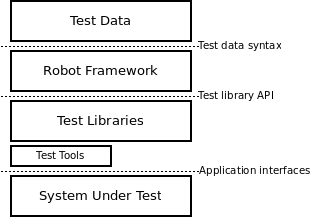
The test data is in simple, easy-to-edit tabular format. When Robot Framework is started, it processes the data, executes test cases and generates logs and reports. The core framework does not know anything about the target under test, and the interaction with it is handled by libraries. Libraries can either use application interfaces directly or use lower level test tools as drivers.
Why Robot Framework
- The framework requires less technical skill than programming language-based frameworks, and so can be used by team members who have very little programming experience.
- Because of its flexibility, robot framework can be used to test desktop applications, web applications, mobile applications, and RESTful and SOAP-based services.
- One of the great strengths of the robot framework is that it is highly extensible. Many of the features are implemented as libraries.
- Open source for free
Components
Test Libraries/Test Tools
- Standard libraries and Built-in tools
- Included in normal installation
- OperatingSystem, Screenshot, String, Telnet, XML, …
- Refer https://robotframework.org/robotframework/
- External libraries and tools
- Must be installed separately
- SeleniumLibrary, SwingLibrary, DatabaseLibrary, AutoItLibrary, SSHLibrary, HTTPLibrary, …
- Refer https://robotframework.org/#resources
- Project and team specific libraries
*** Settings ***
Documentation     This is a .resource file, that can contain variables and keywords.
...               Keywords defined here can use the supported keywords in libraries.
Library    SeleniumLibrary
Library    String

*** Variables ***
${LOGIN URL}        https://demoqa.com/login
${BROWSER}        Chrome

*** Keywords ***
Open Browser To Login Page
    Open Browser    ${LOGIN URL}    ${BROWSER}
    Maximize Browser Window

Input Username
    [Arguments]    ${username}
    Input Text    id:userName    ${username}

Submit Credentials
    Click Button    id:login
High-level keywords
- Defined in the resource file, that can contain variables and high-level user defined keywords
- These keywords usually serve to the business of application under test
*** Settings ***
Library    SeleniumLibrary
Library    String

*** Variables ***
${LOGIN URL}        https://demoqa.com/login
${BROWSER}        Chrome
*** Keywords ***
Open Browser To Login Page
    Open Browser    ${LOGIN URL}    ${BROWSER}
    Maximize Browser Window

Input Username
    [Arguments]    ${username}
    Input Text    id:userName    ${username}

Input Password
    [Arguments]    ${password}
    Input Text    id:password    ${password}

Submit Credentials
    Click Button    id:login
Test cases
Keyword-driven test cases
- Test cases are constructed in test case sections from the available keywords. Keywords can be imported from test libraries or resource files, or created in the keyword section of the test case file itself.
*** Settings ***
Resource          ../resources/login.resource
*** Test Cases ***
Login successfully
    Open Browser To Login Page
    Login User            demoqa    test123
    Verify Valid Login    demoqa
Data-driven test cases
- Where test cases use only one higher-level keyword, often created as a user keyword, that hides the actual test workflow. This approach helps to test the same scenario with different input and/or output data. And test template functionality allows specifying the keyword to use only once. The below example has six separate tests, one for each invalid user/password combination.
*** Settings ***
Resource          ../resources/login.resource
Test Template    Login with invalid credentials should fail

*** Test Cases ***                USERNAME         PASSWORD
Invalid User Name                 invalid          ${VALID PASSWORD}
Invalid Password                  ${VALID USER}    invalid
Invalid User Name and Password    invalid          invalid
Empty User Name                   ${EMPTY}         ${VALID PASSWORD}
Empty Password                    ${VALID USER}    ${EMPTY}
Empty User Name and Password      ${EMPTY}         ${EMPTY}

*** Keywords ***
Login with invalid credentials should fail
    [Arguments]    ${username}    ${password}
    Open Browser To Login Page
    Login User              ${username}    ${password}
    Verify Invalid Login    ${username}
- Data-driven approach can be extended to load test data from data file (.csv , .xls or .xlsx files) or some other sources (databases or json files). To do this, we need to install separately the external library of DataDriver for RobotFramework. Robot Framework will run the separated tests for each data row in the external resource
*** Settings ***
Test Template    Login with invalid credentials should fail
Resource          ../resources/login.resource
Library          DataDriver    file=../testdata/accounts.xlsx

*** Test Cases ***
Invalid Account                 ${username}    ${password}

*** Keywords ***
Login with invalid credentials should fail
  [Arguments]    ${username}    ${password}
  Open Browser To Login Page
  Login User             ${username}    ${password}
  Verify Invalid Login    ${username}
Behavior-driven test cases
- It is also possible to write test cases as requirements that also non-technical project stakeholders must understand. One way to write these requirements/tests is Given-When-Then style popularized by Behavior Driven Development (BDD).
- Robot Framework ignores prefixes (Given, When, Then, And and But) when matching keywords are searched.
*** Test Cases ***
Valid Login
    Given login page is open
    When valid username and password are inserted
    and credentials are submitted
    Then welcome page should be open
Conclusion
Robot Framework is a powerful test automation framework that offers a wide range of features and benefits. It is easy to use, extensible and supports various types of testing such as web testing, database testing, and XML testing. While it may have some challenges such as limited support for mobile testing and a steep learning curve for advanced features.
Reference: Robot Framework