



Introduction
Entity Framework Core (EF Core) is a well-known ORM tool and very convenient for things like inserting, updating, and deleting database operations, However, for things like retrieving data, it often has been compared with Dapper in terms of speed and performance as it needs to translate your LINQ queries into SQL queries rather than writing directly SQL queries using Dapper. In this article, we’ll examine how slow it is in comparison with Dapper and how we can tweak our code to make it run faster and as close to Dapper as possible.
Setting Up The Benchmark
Let’s create a Console application named: EfCoreVsDapper using Visual Studio 2022 or Visual Studio Code.
Reuse the same models and setup in my previous post: Entity Framework Core Tips: Detect a Select without Where Clause Using DbComand Interceptor.
public class Blog
{
    public int BlogId { get; set; }

    public string Url { get; set; }

    public List<Post> Posts { get; } = new();
}
public class Post
{
public int PostId { get; set; }
public string Title { get; set; }
public string Content { get; set; }
public int BlogId { get; set; }
public Blog Blog { get; set; }
}public class BloggingContext : DbContext
{
public DbSet<Blog> Blogs { get; set; }
public DbSet<Post> Posts { get; set; }
public string DbPath { get; }
public BloggingContext()
{
var folder = Environment.SpecialFolder.LocalApplicationData;
var path = Environment.GetFolderPath(folder);
DbPath = System.IO.Path.Join(path, "blogging.db");
}
protected override void OnConfiguring(DbContextOptionsBuilder optionsBuilder)
{
optionsBuilder.UseSqlite($"Data Source={DbPath}");
}
}Next up, we need to install the BenchmarkDotNet NuGet package and then the EfCoreVsDapper.csproj file should look like this:
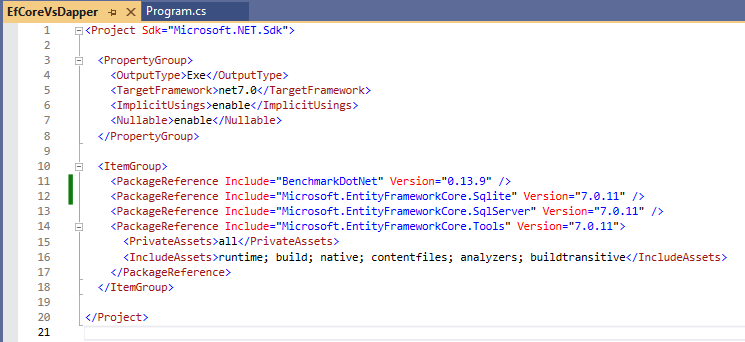
Now, create our Benchmarks.cs file and populate the below code:
[Config(typeof(BenchmarkConfig))]
[MemoryDiagnoser]
public class Benchmarks
{
    private BloggingContext? _dbContext;
    private IDbConnection? _dbConnection;
    private Blog? _testBlog;

    [GlobalSetup]
    public async Task Setup()
    {
        _dbContext = new BloggingContext();
        _dbConnection = new SqliteConnection($"Data Source={_dbContext.DbPath}");

        var blogs = new List<Blog>();
        for (int i = 1; i <= 1000; i++)
        {
            var blog = new Blog { BlogId = i, Url = $"https://blog.phongnguyen.com/posts/{i}" };
            blogs.Add(blog);
        }

        await _dbContext.Blogs.AddRangeAsync(blogs);
        await _dbContext.SaveChangesAsync();

        _testBlog = new Blog { BlogId = Random.Shared.Next(1, 1000) };
    }

    [GlobalCleanup]
    public async Task Cleanup()
    {
        await _dbContext!.Blogs.ExecuteDeleteAsync();
        await _dbContext.SaveChangesAsync();
    }

}
Code for the BenchmarkConfig type can be found in the BenchmarkConfig.cs file:
public class BenchmarkConfig : ManualConfig
{
    public BenchmarkConfig()
    {
        AddJob(Job.MediumRun.WithToolchain(InProcessNoEmitToolchain.Instance));
    }
}
Back to the Benchmarks.cs file, let’s define a few test cases as below:
[Benchmark]
public async Task<Blog?> EFCore_Single()
{
    return await _dbContext!.Blogs.SingleOrDefaultAsync(x => x.BlogId == _testBlog!.BlogId);
}

[Benchmark]
public async Task<Blog?> EFCore_First()
{
    return await _dbContext!.Blogs.FirstOrDefaultAsync(x => x.BlogId == _testBlog!.BlogId);
}

[Benchmark]
public async Task<Blog?> Dapper_GetById()
{
    return await _dbConnection!.QuerySingleOrDefaultAsync<Blog>("SELECT * FROM Blogs WHERE BlogId=@BlogId LIMIT 1", new { _testBlog!.BlogId });
}
In order to build and run the benchmarks, we need to install the Dapper NuGet package as well, so now the EfCoreVsDapper.csproj should look like this:

Run the application with Release mode and wait for the benchmarks to execute successfully.

As you can see, the queries run by Dapper are much faster and have less memory allocated.
Introducing EF Core Compiled Queries
When you have an application that executes structurally similar queries many times, you can frequently increase performance by compiling the query one time and executing it several times with different parameters. For example, an application might have to retrieve all the customers in a particular city; the city is specified at run time by the user in a form. LINQ to Entities supports using compiled queries for this purpose.
Let’s create 2 more test cases and use complied queries this time.
private static readonly Func<BloggingContext, int, Task<Blog?>> SingleBlogAsync = EF.CompileAsyncQuery(
    (BloggingContext context, int blogId) => context.Blogs.SingleOrDefault(x => x.BlogId == blogId));

[Benchmark]
public async Task<Blog?> EFCore_Single_Compiled()
{
    return await SingleBlogAsync(_dbContext!, _testBlog!.BlogId);
}

private static readonly Func<BloggingContext, int, Task<Blog?>> FirstBlogAsync = EF.CompileAsyncQuery(
    (BloggingContext context, int id) => context.Blogs.FirstOrDefault(x => x.BlogId == id));

[Benchmark]
public async Task<Blog?> EFCore_First_Compiled()
{
    return await FirstBlogAsync(_dbContext!, _testBlog!.BlogId);
}
Run the application with Release mode again and wait for the benchmarks to execute successfully.

The results of compiled queries might be a bit disappointing as they’re not so close to Dapper but as you can see they are still much better than normal queries.
Wrapping Up
Now that we all know the performance benefit of compiled queries, should we update all our code to use compiled queries? probably not unless those queries are being executed very often.
The source code for this demo is published at https://github.com/phongnguyend/blog.nashtechglobal.com.