



Introduction
According to Entity Framework (EF) Core documentation:
- Compiled models can improve EF Core startup time for applications with large models.
- A large model typically means hundreds to thousands of entity types and relationships.
- Startup time here is the time to perform the first operation on a
DbContextwhen thatDbContexttype is used for the first time in the application. - Note that just creating a
DbContextinstance does not cause the EF model to be initialized. Instead, typical first operations that cause the model to be initialized include callingDbContext.Addor executing the first query.
I also have a post to explain What happened when the 1st, 2nd, 3rd, … queries were executed?, so typically, there are a lot of steps involved and EF Core utilizes caching a lot to reduce the time-consuming when serving your queries. However, for the first time when a DbContext type is used in the application (usually your 1st query using the DbContext), there is nothing in the cache at that point in time, so it results in a very slow execution time.
Environment Setup
Let’s jump right into code by creating a Console application named EfCoreCompiledModels and preparing a DbContext that has quite a lot of entity types and relationships as below:
namespace EfCoreCompiledModels.Models;

public class Blog001
{
    public int Id { get; set; }
    public required string Url { get; set; }
    public List<Post001> Posts { get; } = new();
}

public class Blog002
{
    public int Id { get; set; }
    public required string Url { get; set; }
    public List<Post002> Posts { get; } = new();
}

public class Blog003
{
    public int Id { get; set; }
    public required string Url { get; set; }
    public List<Post003> Posts { get; } = new();
}

public class Blog004
{
    public int Id { get; set; }
    public required string Url { get; set; }
    public List<Post004> Posts { get; } = new();
}

public class Blog005
{
    public int Id { get; set; }
    public required string Url { get; set; }
    public List<Post005> Posts { get; } = new();
}

public class Blog006
{
    public int Id { get; set; }
    public required string Url { get; set; }
    public List<Post006> Posts { get; } = new();
}

public class Blog007
{
    public int Id { get; set; }
    public required string Url { get; set; }
    public List<Post007> Posts { get; } = new();
}

public class Blog008
{
    public int Id { get; set; }
    public required string Url { get; set; }
    public List<Post008> Posts { get; } = new();
}

public class Blog009
{
    public int Id { get; set; }
    public required string Url { get; set; }
    public List<Post009> Posts { get; } = new();
}

public class Blog010
{
    public int Id { get; set; }
    public required string Url { get; set; }
    public List<Post010> Posts { get; } = new();
}

public class Blog011
{
    public int Id { get; set; }
    public required string Url { get; set; }
    public List<Post011> Posts { get; } = new();
}

public class Blog012
{
    public int Id { get; set; }
    public required string Url { get; set; }
    public List<Post012> Posts { get; } = new();
}

public class Blog013
{
    public int Id { get; set; }
    public required string Url { get; set; }
    public List<Post013> Posts { get; } = new();
}

public class Blog014
{
    public int Id { get; set; }
    public required string Url { get; set; }
    public List<Post014> Posts { get; } = new();
}

public class Blog015
{
    public int Id { get; set; }
    public required string Url { get; set; }
    public List<Post015> Posts { get; } = new();
}

public class Blog016
{
    public int Id { get; set; }
    public required string Url { get; set; }
    public List<Post016> Posts { get; } = new();
}

public class Blog017
{
    public int Id { get; set; }
    public required string Url { get; set; }
    public List<Post017> Posts { get; } = new();
}

public class Blog018
{
    public int Id { get; set; }
    public required string Url { get; set; }
    public List<Post018> Posts { get; } = new();
}

public class Blog019
{
    public int Id { get; set; }
    public required string Url { get; set; }
    public List<Post019> Posts { get; } = new();
}

public class Blog020
{
    public int Id { get; set; }
    public required string Url { get; set; }
    public List<Post020> Posts { get; } = new();
}
namespace EfCoreCompiledModels.Models;
public class Post001
{
public int Id { get; set; }
public required string Title { get; set; }
public required string Content { get; set; }
public required Blog001 Blog { get; set; }
}
public class Post002
{
public int Id { get; set; }
public required string Title { get; set; }
public required string Content { get; set; }
public required Blog002 Blog { get; set; }
}
public class Post003
{
public int Id { get; set; }
public required string Title { get; set; }
public required string Content { get; set; }
public required Blog003 Blog { get; set; }
}
public class Post004
{
public int Id { get; set; }
public required string Title { get; set; }
public required string Content { get; set; }
public required Blog004 Blog { get; set; }
}
public class Post005
{
public int Id { get; set; }
public required string Title { get; set; }
public required string Content { get; set; }
public required Blog005 Blog { get; set; }
}
public class Post006
{
public int Id { get; set; }
public required string Title { get; set; }
public required string Content { get; set; }
public required Blog006 Blog { get; set; }
}
public class Post007
{
public int Id { get; set; }
public required string Title { get; set; }
public required string Content { get; set; }
public required Blog007 Blog { get; set; }
}
public class Post008
{
public int Id { get; set; }
public required string Title { get; set; }
public required string Content { get; set; }
public required Blog008 Blog { get; set; }
}
public class Post009
{
public int Id { get; set; }
public required string Title { get; set; }
public required string Content { get; set; }
public required Blog009 Blog { get; set; }
}
public class Post010
{
public int Id { get; set; }
public required string Title { get; set; }
public required string Content { get; set; }
public required Blog010 Blog { get; set; }
}
public class Post011
{
public int Id { get; set; }
public required string Title { get; set; }
public required string Content { get; set; }
public required Blog011 Blog { get; set; }
}
public class Post012
{
public int Id { get; set; }
public required string Title { get; set; }
public required string Content { get; set; }
public required Blog012 Blog { get; set; }
}
public class Post013
{
public int Id { get; set; }
public required string Title { get; set; }
public required string Content { get; set; }
public required Blog013 Blog { get; set; }
}
public class Post014
{
public int Id { get; set; }
public required string Title { get; set; }
public required string Content { get; set; }
public required Blog014 Blog { get; set; }
}
public class Post015
{
public int Id { get; set; }
public required string Title { get; set; }
public required string Content { get; set; }
public required Blog015 Blog { get; set; }
}
public class Post016
{
public int Id { get; set; }
public required string Title { get; set; }
public required string Content { get; set; }
public required Blog016 Blog { get; set; }
}
public class Post017
{
public int Id { get; set; }
public required string Title { get; set; }
public required string Content { get; set; }
public required Blog017 Blog { get; set; }
}
public class Post018
{
public int Id { get; set; }
public required string Title { get; set; }
public required string Content { get; set; }
public required Blog018 Blog { get; set; }
}
public class Post019
{
public int Id { get; set; }
public required string Title { get; set; }
public required string Content { get; set; }
public required Blog019 Blog { get; set; }
}
public class Post020
{
public int Id { get; set; }
public required string Title { get; set; }
public required string Content { get; set; }
public required Blog020 Blog { get; set; }
}
And the DbContext:
using Microsoft.EntityFrameworkCore;

namespace EfCoreCompiledModels.Models;

public class BloggingContext : DbContext
{
    public DbSet<Blog001> Blogs001 { get; set; }
    public DbSet<Blog002> Blogs002 { get; set; }
    public DbSet<Blog003> Blogs003 { get; set; }
    public DbSet<Blog004> Blogs004 { get; set; }
    public DbSet<Blog005> Blogs005 { get; set; }
    public DbSet<Blog006> Blogs006 { get; set; }
    public DbSet<Blog007> Blogs007 { get; set; }
    public DbSet<Blog008> Blogs008 { get; set; }
    public DbSet<Blog009> Blogs009 { get; set; }
    public DbSet<Blog010> Blogs010 { get; set; }
    public DbSet<Blog011> Blogs011 { get; set; }
    public DbSet<Blog012> Blogs012 { get; set; }
    public DbSet<Blog013> Blogs013 { get; set; }
    public DbSet<Blog014> Blogs014 { get; set; }
    public DbSet<Blog015> Blogs015 { get; set; }
    public DbSet<Blog016> Blogs016 { get; set; }
    public DbSet<Blog017> Blogs017 { get; set; }
    public DbSet<Blog018> Blogs018 { get; set; }
    public DbSet<Blog019> Blogs019 { get; set; }
    public DbSet<Blog020> Blogs020 { get; set; }

    public DbSet<Post001> Posts001 { get; set; }
    public DbSet<Post002> Posts002 { get; set; }
    public DbSet<Post003> Posts003 { get; set; }
    public DbSet<Post004> Posts004 { get; set; }
    public DbSet<Post005> Posts005 { get; set; }
    public DbSet<Post006> Posts006 { get; set; }
    public DbSet<Post007> Posts007 { get; set; }
    public DbSet<Post008> Posts008 { get; set; }
    public DbSet<Post009> Posts009 { get; set; }
    public DbSet<Post010> Posts010 { get; set; }
    public DbSet<Post011> Posts011 { get; set; }
    public DbSet<Post012> Posts012 { get; set; }
    public DbSet<Post013> Posts013 { get; set; }
    public DbSet<Post014> Posts014 { get; set; }
    public DbSet<Post015> Posts015 { get; set; }
    public DbSet<Post016> Posts016 { get; set; }
    public DbSet<Post017> Posts017 { get; set; }
    public DbSet<Post018> Posts018 { get; set; }
    public DbSet<Post019> Posts019 { get; set; }
    public DbSet<Post020> Posts020 { get; set; }

    public string DbPath { get; }

    public BloggingContext()
    {
        var folder = Environment.SpecialFolder.LocalApplicationData;
        var path = Environment.GetFolderPath(folder);
        DbPath = Path.Join(path, "EfCoreCompiledModels.db");
    }

    protected override void OnConfiguring(DbContextOptionsBuilder optionsBuilder)
    {
        optionsBuilder.UseSqlite($"Data Source={DbPath}");
    }
}
The First Operation Cold Start
Let’s write a pretty simple benchmark to check how long it takes to process a first query when there is nothing in the cache.
Create our Benchmarks.cs file and populate the below code:
using BenchmarkDotNet.Attributes;
using EfCoreCompiledModels.Models;
using Microsoft.EntityFrameworkCore;

namespace EfCoreCompiledModels;

[Config(typeof(BenchmarkConfig))]
[MemoryDiagnoser]
public class Benchmarks
{
    [Benchmark]
    public async Task BloggingContext()
    {
        using var context = new BloggingContext();
        await context.Blogs001.ToListAsync();
    }
}
Code for the BenchmarkConfig type can be found in the BenchmarkConfig.cs file:
public class BenchmarkConfig : ManualConfig
{
    public BenchmarkConfig()
    {
        AddJob(Job.MediumRun.WithToolchain(InProcessNoEmitToolchain.Instance));
    }
}
Back to the Program.cs file and populate the below code:
using BenchmarkDotNet.Running;
using EfCoreCompiledModels;

var summary = BenchmarkRunner.Run<Benchmarks>();
Run the application, wait for the benchmark to finish, and check the result:

Wait a second, you might realize that the result here is not what we want to see because the benchmark ran our test multiple iterations, so from the 2nd iteration, the cache was already being utilized so the result is not correct. Luckily, we can disable caching to let EF Core doesn’t use the cache.
Back to the BloggingContext.cs file, update the OnConfiguring method to disable caching.
protected override void OnConfiguring(DbContextOptionsBuilder optionsBuilder)
{
    optionsBuilder.UseSqlite($"Data Source={DbPath}");
    optionsBuilder.EnableServiceProviderCaching(false);
}
Run the benchmark again and check the result:

As you can see, the Mean value is very high now, it indicates that this is usually the time it takes for the 1st query to complete in our test scenario. Next, let’s see how compiled models can help.
EF Core Compiled Models
Note: In order to follow along with this demo, you need to have the dotnet ef tool installed first and how to install is out of the scope of this article.
Now go to the root folder of the project and run the below command to generate the model:
dotnet ef dbcontext optimize --output-dir MyCompiledModels --namespace EfCoreCompiledModels.Models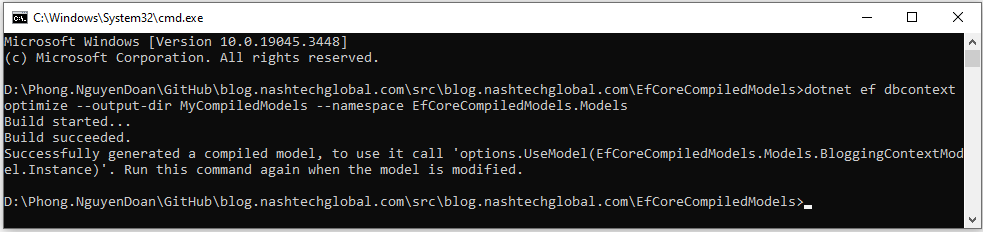
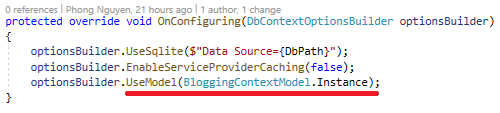
Back to the BloggingContext.cs file again, and update the OnConfiguring method to use the generated compiled model.
protected override void OnConfiguring(DbContextOptionsBuilder optionsBuilder)
{
    optionsBuilder.UseSqlite($"Data Source={DbPath}");
    optionsBuilder.EnableServiceProviderCaching(false);
    optionsBuilder.UseModel(BloggingContextModel.Instance);
}
Run the benchmark again and check the result:

As you can see, it’s now more than 10 times faster. Let’s do one more test with the compiled model and caching enabled next.
protected override void OnConfiguring(DbContextOptionsBuilder optionsBuilder)
{
    optionsBuilder.UseSqlite($"Data Source={DbPath}");
    optionsBuilder.UseModel(BloggingContextModel.Instance);
}

The result might disappoint you a bit as overall it’s a bit slower than not using the complied model at all, so the key thing to remember here is always benchmark carefully without blindly applying it.
Limitations
According to EF Core documentation, compiled models have some limitations:
- Global query filters are not supported.
- Lazy loading and change-tracking proxies are not supported.
- The model must be manually synchronized by regenerating it any time the model definition or configuration changes.
- Custom IModelCacheKeyFactory implementations are not supported. However, you can compile multiple models and load the appropriate one as needed.
Summary
Compiled models are great, but because of the limitations, you should only use compiled models if your EF Core startup time is too slow. Compiling small models is typically not worth it. One more thing to remember is always to benchmark your code to see if it benefits your scenarios.
The source code for this demo is published at https://github.com/phongnguyend/blog.nashtechglobal.com.