


Building an optimized machine learning model using techniques like quantization and pruning is only half the battle. To actually run that model on production hardware, you need an embedded deployment framework.
Unlike standard AI software that relies on heavy cloud servers or full operating systems, edge frameworks compile your machine learning model directly into lean binaries.
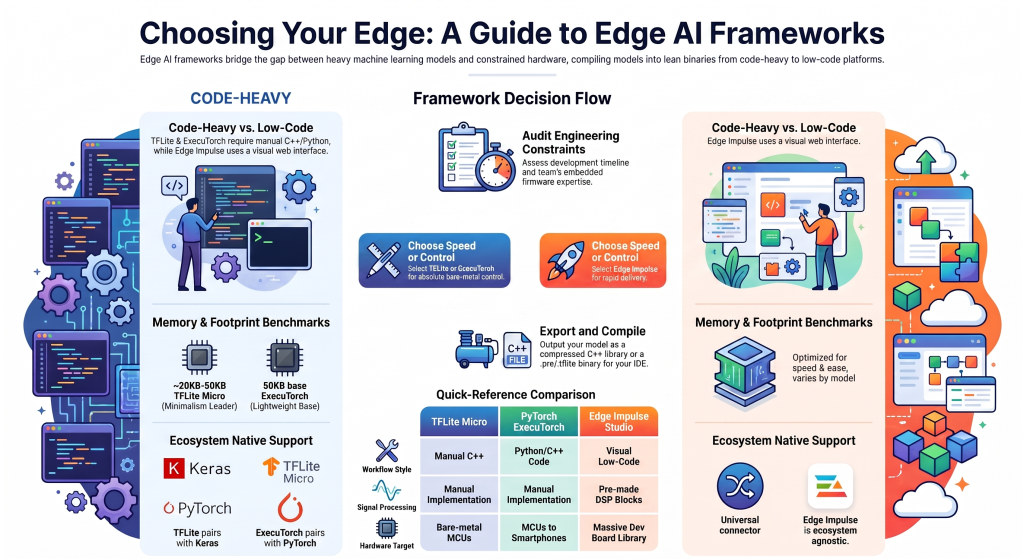
The edge framework ecosystem operates on a spectrum. On one end, you have code-heavy tools that give you absolute bare-metal control. On the other end, you have low-code/no-code graphical platforms that automate the entire workflow.
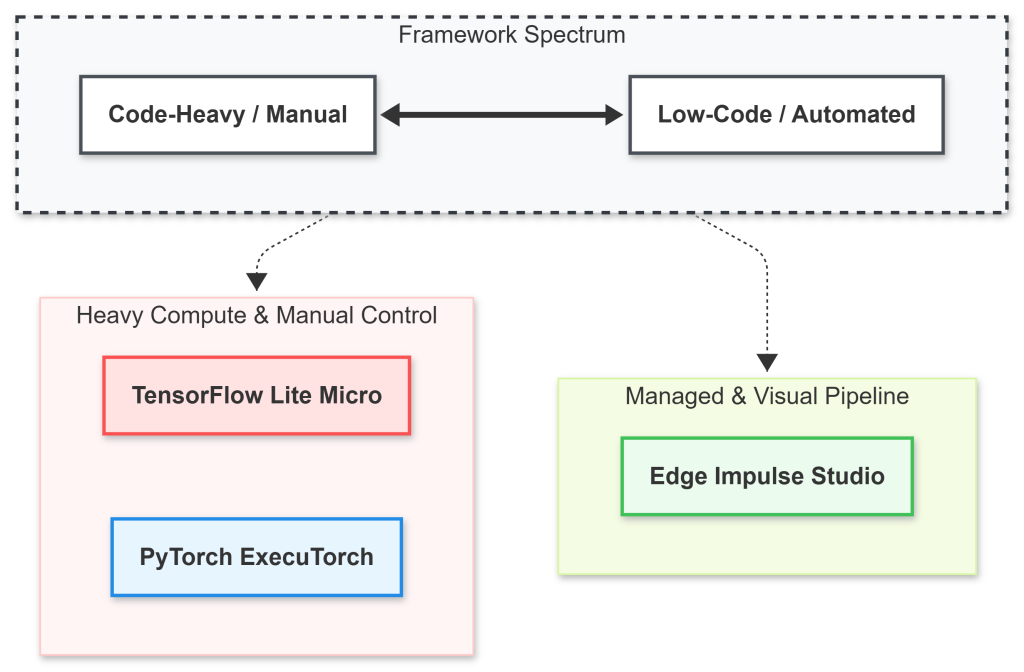
Let’s evaluate the three heavyweights ruling the Edge AI space: TensorFlow Lite, PyTorch Mobile (ExecuTorch), and Edge Impulse.
1. TensorFlow Lite for Microcontrollers (The Custom C++ Benchmark)
For engineers who want absolute authority over every byte of silicon runtime, TensorFlow Lite for Microcontrollers (TFLite Micro) is the historical benchmark tool.
TFLite Micro does not assume your platform has operating system support, standard C/C++ libraries, or dynamic memory allocation (malloc). Instead, it builds an explicit, pre-allocated internal memory space called an Op Resolver Tensor Arena.
+-------------------------------------------------------------+
| TFLite Micro Tensor Arena (Static Memory Block)             |
|                                                             |
| [ Model Tensor Weights ] [ Input Buffers ] [ Scratch Pads ] |
+-------------------------------------------------------------+
  Managed via an explicit C++ memory pointer array
The Trade-offs of Going Raw C++
- The Advantage: You write code directly at the hardware driver level. You can strip out unused operators to shave kilobytes off your storage profile and optimize execution via hardware vector libraries like Arm’s CMSIS-NN or Espressif’s ESP-NN manually.
- The Friction: Data preparation, digital signal filtering, and model debugging must be managed completely by hand. If your model graph uses an unsupported operator, your system builds will fail silently at boot time.
2. PyTorch at the Edge: The ExecuTorch Evolution
Historically, PyTorch developers relied on PyTorch Mobile to target smartphones. However, to match the ultra-tight constraints of the Microcontroller Edge, the ecosystem evolved into ExecuTorch – PyTorch’s unified solution for deploying models from mobile phones down to bare-metal microchips.
Direct Graph Export
nlike old workflows that forced you to convert your code into an intermediate format (like ONNX or .tflite), ExecuTorch extracts the model graph directly from PyTorch using torch.export(). It compiles the logic down into a clean .pte binary file.
Key Architectural Highlights
- Tiny Footprint: The core runtime library has an incredibly small base footprint of roughly 50KB, allowing it to comfortably fit on highly constrained embedded systems.
- One Export, Multiple Backends: You can switch between hardware targets (like XNNPACK, Apple Core ML, or Qualcomm NPUs) with a single line change in your optimization script.
- Out-of-the-Box Quantization: It integrates directly with PyTorch’s native
torchaooptimization tools for swift 8-bit and 4-bit quantization.
3. The Low-Code Powerhouse: Edge Impulse Studio
If TFLite Micro and ExecuTorch represent custom vehicle mechanics, Edge Impulse operates like an automated precision assembly line. It is the premier low-code/no-code platform designed to remove the tedious configuration steps out of embedded machine learning pipelines.
Instead of writing custom scripts to format data, designing filtering layers in Python, and manually writing C++ drivers, Edge Impulse unifies the complete machine learning lifecycle into an approachable web interface.
The Architecture: Building with “Impulses”
At the core of Edge Impulse is the concept of an Impulse. An Impulse is a modular, end-to-end data pipeline containing three visual blocks:
[ Raw Sensor Input Block ] ───> [ DSP Pre-processing Block ] ───> [ Learning/AI Network Block ]
A. Centralized Data Acquisition
You can connect an ESP32, an Arduino, or even your mobile phone directly to the web dashboard via a secure browser link. The platform allows you to record, clean up, and label sensor data, camera snapshots, or audio clips instantly, splitting them automatically into training and testing datasets.
B. Visual DSP Blocks
Raw sensor values are noisy and heavy. Edge Impulse solves this by integrating visual Digital Signal Processing (DSP) blocks. Instead of writing complex filtering algorithms by hand, you add specialized blocks—like Spectral Analysis for accelerometer data or MFCC (Mel-Frequency Cepstral Coefficients) for human voice recognition—with a few clicks.
C. EON Tuner: Autonomous Microcontroller Tuning
The standout component of Edge Impulse is the EON (Edge Optimized Network) Tuner. This engine automatically tests thousands of model permutations, adjusting pruning rates and architectural layouts behind the scenes.
It then presents a clear trade-off report detailing exactly how many milliseconds an inference pass will take, along with the precise RAM and Flash usage across specific microcontrollers before you ever download a line of compiled source code.
TinyML Framework Comparison Matrix
| Attribute | TensorFlow Lite Micro | PyTorch ExecuTorch | Edge Impulse Studio |
| Workflow Style | Code-Heavy (C++) | Code-Heavy (Python & C++) | Low-Code / No-Code (Visual) |
| Native Ecosystem | TensorFlow / Keras | PyTorch Natively | Agnostic (Supports both under the hood) |
| Runtime Footprint | Extremely small (~20KB-50KB) | Lightweight (~50KB base) | Dependent on the exported blocks |
| Data Ingestion | Manual code writing | Manual code writing | Automated via web dashboard |
| Signal Processing | Manual implementation | Manual implementation | Visual pre-made DSP blocks |
| Hardware Targets | Highly flexible bare-metal | Constrained MCUs to Smartphones | Massive library of officially supported dev boards |
Framework Decision Framework
Choosing the right tool depends entirely on your specific hardware limits and team skills:
1.Audit Engineering Constraints:
Step 1.
Assess your available development timeline and identify if your team has dedicated, low-level embedded firmware engineers.
2.Select Low-Code for Rapid Delivery:
Step 2 (Edge Impulse).
If you need to ship a product quickly, require automated data labeling, or want visual signal processing blocks, build your pipeline using Edge Impulse Studio.
3.Select Code-Heavy for Absolute Control:
Step 2 (TFLite / ExecuTorch).
If your system architecture forbids external cloud dashboards, demands custom non-standard neural network operators, or requires raw C++ control, choose TFLite Micro or ExecuTorch.
4.Export & Compile:
Step 3.
Export your finished pipelines either as a highly compressed C++ static library archive (from Edge Impulse) or compile your models (.pte or .tflite) straight into your target IDE.
The Final Takeaway
The Edge AI landscape is no longer limited to writing low-level firmware drivers. While systems like TensorFlow Lite and PyTorch ExecuTorch keep the gates open for absolute bare-metal optimization, low-code environments like Edge Impulse have successfully democratized the edge space. By abstracting away complex data pipelines and digital signal processing math, any team can confidently deploy reliable machine learning straight to the physical world.