



Introduction
What is Event-Driven Architecture?
Event-Driven Architecture is a design model in which software components react to events and communicate by producing and consuming events. An event can be defined as a significant change in state, such as a new order being placed, a payment being processed, or a sensor recording a temperature change. EDA promotes loose coupling between components, allowing for more flexible and scalable systems.
Advantages of EDA over Traditional Architectures
– Scalability: Components can scale independently.
– Flexibility: Easier to modify and extend individual components without affecting the entire system.
– Real-time Processing: Immediate response to events as they occur.
– Decoupling: Components interact through events, reducing direct dependencies.
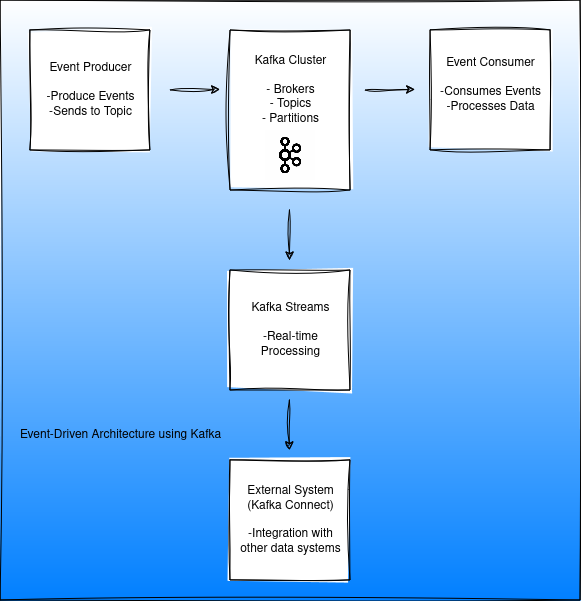
Why Apache Kafka for Event-Driven Architecture?
Kafka as a Core Component
Apache Kafka is a distributed streaming platform that excels at handling high-throughput, low-latency data feeds. It is designed for real-time event streaming, making it an ideal backbone for EDA.
Comparison with Other Message Brokers
– Scalability: Kafka can handle large volumes of data with minimal latency.
– Durability: Ensures data is not lost, even in the event of failures.
– Performance: Optimized for throughput and low latency.
Benefits of Using Kafka
– Scalability: Kafka’s partitioning and replication allow for horizontal scaling.
– Durability: Persistent storage ensures data is reliably stored.
– Real-time Processing: Supports real-time event processing and analytics.
Key Components of EDA with Kafka
Events and Event Streams
Events are the fundamental units of data in EDA. An event can represent any significant action or change in state. Event streams are sequences of events that are continuously generated by event producers.
Event Topics
Kafka topics are categories or feed names to which records are published. Each topic can be divided into partitions to allow for parallel processing.
Partitioning
Partitioning allows Kafka to distribute data across multiple servers, enabling horizontal scalability and parallel processing. Each partition is an ordered, immutable sequence of records.
Setting Up Kafka for EDA
Installation and Configuration
1. Download and Install Kafka: Follow the official documentation to download and set up Kafka.
2. Configure Brokers: Set up Kafka brokers with proper configurations for replication, partitioning, and networking.
3. Zookeeper Setup: Ensure Zookeeper is set up as Kafka depends on it for cluster management.
Configuration Best Practices
– Replication Factor: Set a replication factor greater than 1 to ensure data durability.
– Partitions: Configure an optimal number of partitions for parallel processing.
– Compression: Use compression to reduce storage and network usage.
Implementing EDA with Kafka
Producer
Event Production
Design event producers to capture significant changes and publish events to Kafka topics.
Producing Events to Kafka Topics
using Confluent.Kafka;
using System;
using System.Threading.Tasks;

public class EventProducer
{
private readonly IProducer<string, string> _producer;

public EventProducer(string bootstrapServers)
{
var config = new ProducerConfig { BootstrapServers = bootstrapServers };
_producer = new ProducerBuilder<string, string>(config).Build();
}

public async Task ProduceEvent(string topic, string key, string value)
{
var message = new Message<string, string> { Key = key, Value = value };
await _producer.ProduceAsync(topic, message);
_producer.Flush(TimeSpan.FromSeconds(10));
}
}
Understand the code snippet: Producer
1. Namespaces and Dependencies:
– `using Confluent.Kafka;`: This imports the Kafka client library provided by Confluent, which includes all the necessary classes and methods for Kafka operations.
– `using System; using System.Threading.Tasks;`: These are standard C libraries for handling basic operations and asynchronous tasks.
2. EventProducer Class:
– The `EventProducer` class encapsulates the logic for producing messages to Kafka.
3. Producer Configuration:
– `ProducerConfig { BootstrapServers = bootstrapServers }`: This sets up the configuration for the Kafka producer, specifically specifying the Kafka broker addresses.
4. Producer Initialization:
– `new ProducerBuilder<string, string>(config).Build();`: This initializes a new Kafka producer with the specified configuration. The `<string, string>` indicates that both the key and value of the messages will be strings.
5. Producing a Message:
– `public async Task ProduceEvent(string topic, string key, string value)`: This method takes the topic name, key, and value as parameters and produces an event to the specified Kafka topic.
– `var message = new Message<string, string> { Key = key, Value = value };`: This creates a new Kafka message with the provided key and value.
– `await _producer.ProduceAsync(topic, message);`: This asynchronously sends the message to the specified topic.
– `_producer.Flush(TimeSpan.FromSeconds(10));`: This ensures all messages are sent before the producer is closed, with a timeout of 10 seconds.
Consumer
Event Consumption
Design event consumers to subscribe to Kafka topics and process events as they arrive.
Consuming Events from Kafka Topics
using Confluent.Kafka;
using System;
using System.Threading;

public class EventConsumer
{
private readonly IConsumer<string, string> _consumer;

public EventConsumer(string bootstrapServers, string groupId)
{
var config = new ConsumerConfig
{
BootstrapServers = bootstrapServers,
GroupId = groupId,
AutoOffsetReset = AutoOffsetReset.Earliest
};
_consumer = new ConsumerBuilder<string, string>(config).Build();
}

public void ConsumeEvents(string topic)
{
_consumer.Subscribe(topic);

while (true)
{
var consumeResult = _consumer.Consume(CancellationToken.None);
Console.WriteLine($"Consumed event with key: {consumeResult.Message.Key}, value: {consumeResult.Message.Value}");
}
}
}
Understand the code snippet: Consumer
1. Namespaces and Dependencies:
– `using Confluent.Kafka;`: Imports the Kafka client library.
– `using System; using System.Threading;`: Imports standard libraries for basic operations and handling threading.
2. EventConsumer Class:
– The `EventConsumer` class encapsulates the logic for consuming messages from Kafka.
3. Consumer Configuration:
– `ConsumerConfig { BootstrapServers = bootstrapServers, GroupId = groupId, AutoOffsetReset = AutoOffsetReset.Earliest }`: This sets up the configuration for the Kafka consumer, specifying the broker addresses, consumer group ID, and the offset reset policy.
– `AutoOffsetReset.Earliest`: This ensures the consumer starts reading messages from the beginning of the topic if no offset is found.
4. Consumer Initialization:
– `new ConsumerBuilder<string, string>(config).Build();`: This initializes a new Kafka consumer with the specified configuration. The `<string, string>` indicates that both the key and value of the messages will be strings.
5. Consuming Messages:
– `public void ConsumeEvents(string topic)`: This method subscribes to the specified topic and continuously consumes messages.
– `_consumer.Subscribe(topic);`: Subscribes the consumer to the specified Kafka topic.
– `while (true) { var consumeResult = _consumer.Consume(CancellationToken.None); … }`: This loop continuously consumes messages from the topic. The `CancellationToken.None` is used to indicate that no cancellation token is provided.
– `Console.WriteLine($”Consumed event with key: {consumeResult.Message.Key}, value: {consumeResult.Message.Value}”);`: This prints the consumed message’s key and value to the console.
These snippets provide a basic foundation for producing and consuming events with Kafka in a .NET environment. They can be extended and modified to fit more complex use cases and integrate into larger applications.
Event Processing
Use Kafka Streams for real-time processing of events. Kafka Streams is a powerful API for building real-time applications and microservices.
Integration with Kafka Connect
Kafka Connect simplifies the process of integrating Kafka with other data systems. It provides connectors for various data sources and sinks, enabling seamless data flow between Kafka and external systems.
Real-World Use Cases
Microservices Communication
Microservices can communicate asynchronously through Kafka, enhancing scalability and decoupling. Each microservice can act as an event producer or consumer, reacting to events as needed.
Example Architecture and Workflow
1. Order Service: Produces an event when a new order is placed.
2. Payment Service: Consumes order events and processes payments.
3. Inventory Service: Updates stock based on order events.
Data Integration
Kafka facilitates real-time data integration across different systems, such as databases, data warehouses, and analytics platforms.
Example of EventDriven Architecture Pipeline using Kafka Connect
1. Source Connector: Captures data changes from a database.
2. Kafka Streams: Transforms data in real-time.
3. Sink Connector: Writes transformed data to a data warehouse or analytics tool.
Challenges and Best Practices
Handling Schema Evolution
Schema evolution is crucial in EDA. Use Schema Registry to manage and version schemas, ensuring compatibility between producers and consumers.
Ensuring Data Quality and Reliability
Implement strategies for error handling and data validation to maintain data quality. Use dead-letter queues for handling problematic messages.
Monitoring and Maintenance
Use monitoring tools such as Kafka Manager, Confluent Control Center, or Grafana to monitor Kafka clusters. Regularly check for lag, broker health, and other metrics to ensure smooth operation.
Summary
Event-Driven Architecture is poised to become more prevalent as the need for real-time data processing grows. Kafka’s robust features and flexibility make it a key player in modern EDA implementations.
As Kafka continues to evolve, it will further solidify its position as a cornerstone for building scalable, reliable, and real-time event-driven systems.