



In the dynamic realm of software development, the traditional linear approach often falls short in meeting the demands of today’s complex and interconnected applications. Enter Event-Driven Programming (EDP), a paradigm that not only transforms the architecture of software systems but also redefines how we approach design, scalability, and responsiveness. In this blog, we’ll embark on a journey to understand the essence of Event-Driven Programming, exploring its principles, applications, and the transformative impact it has on modern software development.

Understanding Event-Driven Programming
At its core, Event-Driven Programming is a paradigm that determines the program’s flow based on events such as user actions, sensor outputs, or messages from other system components. Unlike the traditional imperative style, where a predefined sequence of steps dictates program execution, event-driven systems respond to external stimuli, fostering a more reactive and flexible architecture.
Unlike traditional, tightly-coupled systems, EDA promotes loose coupling and asynchronous communication between components. Instead of components directly calling each other’s functions, they communicate through events.
Key Components
Events
Events, fundamentally, are occurrences or happenings that instigate specific actions within a program. This broad spectrum encompasses user interactions as well as system-level notifications.
Event Handlers
Event handlers are functions or methods designed to respond to specific events. When an event occurs, the associated handler is invoked.
Event Loop
The event loop is a crucial component that continually checks for events. Once an event is detected, the corresponding handler is executed.
Publish-Subscribe Pattern
Event-Driven systems often implement the publish-subscribe pattern. In this pattern, components, acting as publishers, emit events, and concurrently, other components, functioning as subscribers, respond to specific events. This intentional decoupling significantly enhances the modularity of the system.
Real-World Applications of Event-Driven Programming
Graphical User Interfaces (GUIs)
GUIs heavily rely on event-driven architecture to handle user interactions. Clicks, mouse movements, and keyboard inputs trigger specific actions.
Web Development
Both client and server-side web development often employ event-driven models. Client-side scripts respond to user interactions, while server-side applications handle events like HTTP requests.
Microservices Architecture
Event-Driven patterns are prevalent in microservices architectures. Services communicate asynchronously through events, fostering scalability.
Internet of Things (IoT):
IoT platforms leverage event-driven paradigms to manage the continuous stream of data from sensors and devices.
Advantages of Event-Driven Programming
Responsiveness:
EDP leads to highly responsive systems as they react promptly to user inputs or external changes.
Scalability:
The inherently scalable nature of event-driven architectures allows for the addition of new features or services without disrupting existing functionalities.
Modularity:
Event-Driven systems are modular, allowing for the independent development and maintenance of different components. This modularity simplifies testing and updates.
Real-time Capabilities:
Applications requiring real-time processing, such as financial systems or IoT platforms, benefit significantly from the event-driven approach.
Challenges and Considerations
Complexity:
Implementing event-driven systems can be more complex than traditional approaches, requiring careful design and understanding of system requirements.
Debugging:
Debugging asynchronous code, a common feature of event-driven systems, can be challenging. Robust logging and monitoring are essential.
Consistency:
Ensuring consistency in distributed event-driven systems may require additional considerations regarding data consistency and transaction management.
Example-1: Working of event loop
In .NET Core, the event loop concept is often associated with asynchronous programming using tasks and the async and await keywords. For instance below is a simple example demonstrating an event loop using Task.Delay to simulate asynchronous operations and an event being raised.
using System;
using System.Threading.Tasks;

class Program
{
    static async Task Main()
    {
        // Start the event loop
        await EventLoopAsync();
    }

    static async Task EventLoopAsync()
    {
        Console.WriteLine("Event loop started.");

        // Simulate an asynchronous operation (e.g., IO, network request)
        await Task.Delay(1000);

        // Raise an event
        OnMessageReceived("Hello, Event Loop!");

        Console.WriteLine("Event loop ended.");
    }

    static void OnMessageReceived(string message)
    {
        // Event handler logic
        Console.WriteLine($"Received Message: {message}");
    }
}
EventLoopAsyncsimulates an asynchronous operation usingTask.Delay(1000)to represent a delay of 1000 milliseconds (1 second). During this time, the event loop is free to perform other operations.
- After the delay, the code calls the
OnMessageReceivedmethod, simulating the event being raised when some asynchronous operation completes in a real-world scenario.
OnMessageReceivedcontains the logic that should execute when the event occurs. In this example, it simply prints a message to the console.
- The
Mainmethod calls theEventLoopAsyncmethod, starting the event loop. Theawaitkeyword is used to ensure that the program doesn’t exit before the asynchronous operations complete.
Example-2: Building a Real-Time Notification System
Let’s delve into a practical example of an event-driven application: a real-time notification system. Imagine you’re building a messaging app, and you want users to receive notifications instantly when they receive a new message.
Below is an example of a real-time notification system in .NET Core
public class MessageEventArgs : EventArgs
{
    public string Message { get; }

    public MessageEventArgs(string message)
    {
        Message = message;
    }
}
public class Notifier
{
// Define the event using EventHandler delegate
public event EventHandler<MessageEventArgs> NewMessage;
// Method to raise the event
protected virtual void OnNewMessage(string message)
{
NewMessage?.Invoke(this, new MessageEventArgs(message));
}
public void SendMessage(string message)
{
// Logic to send the message
Console.WriteLine($"Message Sent: {message}");
// Trigger the 'NewMessage' event
OnNewMessage(message);
}
}The Notifier class has an event named NewMessage representing the ‘newMessage’ event.
public class NotificationService
{
    public void Subscribe(Notifier notifier)
    {
        // Subscribe to the 'NewMessage' event
        notifier.NewMessage += HandleNewMessage;
    }

    private void HandleNewMessage(object sender, MessageEventArgs e)
    {
        Console.WriteLine($"New Message: {e.Message}");
        // Logic to send a real-time notification to the user
    }
}
The NotificationService class subscribes to this event and provides a method (HandleNewMessage) that gets executed when the event is triggered.
class Program
{
    static void Main()
    {
        // Creating instances of Notifier and NotificationService
        var notifier = new Notifier();
        var notificationService = new NotificationService();

        // Subscribing to the 'NewMessage' event
        notificationService.Subscribe(notifier);

        // Simulating a new message
        notifier.SendMessage("Hello, World!");
    }
}
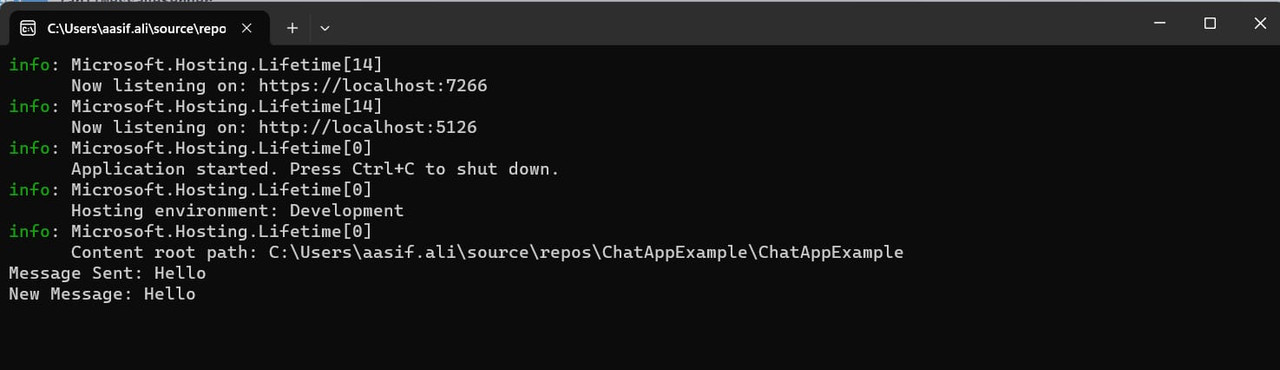
In the Main method, an instance of Notifier and NotificationService is created. The NotificationService subscribes to the NewMessage event, and then a new message is sent using the SendMessage method of Notifier For example given below output
Conclusion
Event-Driven Architecture signifies a paradigm shift in how we conceive and build software systems. Furthermore, its inherent ability to foster scalability, flexibility, and real-time responsiveness makes it a cornerstone for modern applications. Specifically, Event-Driven Architecture revolves around the concept of events. These events, acting as occurrences or signals, represent a change in state or a notable action within a system.