


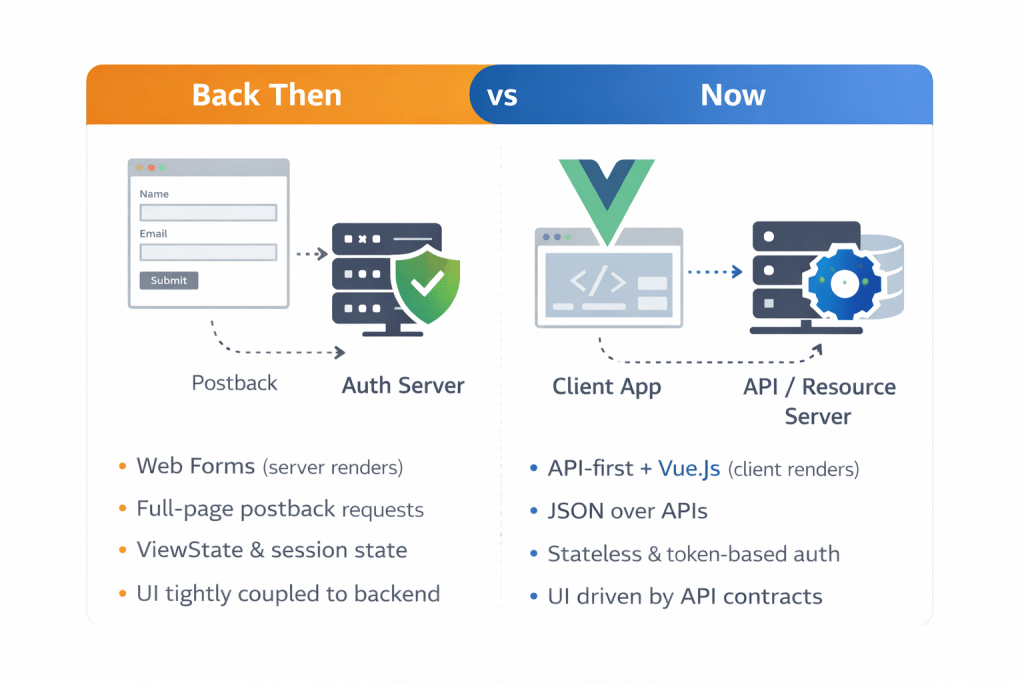
Back Then vs Now: From Web Forms to API-First + Vue
One Diagram to Explain the Shift

THEN (Web Forms)                         NOW (API + Vue)
───────────────────────────────         ───────────────────────────────
Browser                                 Vue SPA / UI Client
  │ Full-page POST (postback)             │ JSON over HTTPS
  ▼                                       ▼
ASP.NET Page Lifecycle                    API Layer (Controllers)
  │ ViewState + Session                   │ Stateless + Token Auth
  ▼                                       ▼
Server renders full HTML page             Domain Services / DB / Cache
  │ Full reload                           │ Partial UI re-render
THEN: Server-Centric Web Forms (Stateful UI on the Server)
Architecture model
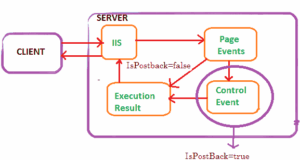
Web Forms implemented a server-owned UI model. The server controlled rendering and UI events. A user action typically triggered a full postback, executing the ASP.NET page lifecycle and returning a new HTML document.
Request execution and lifecycle
- Init
- Load ViewState
- Load Postback Data
- Raise Events (e.g., Button_Click)
- Render
- Save ViewState
This lifecycle made behavior implicit: code execution depends on phase ordering, control state hydration, and event wiring. It’s productive when you’re “inside the model,” but it raises the cost of debugging and refactoring at scale.
State: ViewState + Session (why scale was harder)
- ViewState: serialized control state embedded into the page (hidden fields), increasing payload size and sometimes becoming a perf bottleneck.
- Session: storing user state server-side often encouraged sticky sessions, complicating horizontal scale and adding memory pressure.
Code example: Web Forms (UI + logic coupled)
// CreateAppointment.aspx.cs
protected void btnSave_Click(object sender, EventArgs e)
{
    var appt = new Appointment
    {
        Date = DateTime.Parse(txtDate.Text),
        UserId = Session["UserId"].ToString()
    };
    AppointmentService.Save(appt);
    Response.Redirect("Appointments.aspx");
}
Architecture constraints (long-term)
- UI ↔ backend coupling: business logic tends to live “behind” pages, reducing reuse.
- Statefulness: session/viewstate patterns reduce elasticity and complicate load balancing.
- Operational boundaries: UI and backend deploy together; changes often feel riskier.


NOW: API-First + Vue (Stateless Services, UI in the Browser)
Architecture model
Modern web systems typically treat the UI as a client application (Vue SPA or hybrid), and treat the backend as a set of stateless capabilities exposed via versioned APIs. This enforces an explicit boundary: contracts over coupling.
API boundary (contract-driven)
- Resources, not pages (e.g., /appointments)
- HTTP semantics (GET/POST/PUT/DELETE)
- Consistent error shapes (validation, auth, server)
- Versioning to decouple deployments (/v1, /v2)
POST /api/v1/appointments
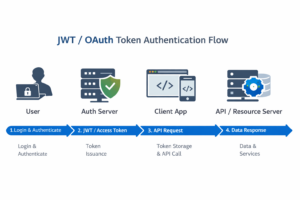
Authorization: Bearer <JWT>
Content-Type: application/json
Code example: API controller (backend decoupled from UI)
[ApiController]
[Route("api/v1/appointments")]
public class AppointmentsController : ControllerBase
{
    [HttpPost]
    public IActionResult Create(CreateAppointmentDto dto)
    {
        var created = _service.Create(dto);
        return CreatedAtAction(nameof(GetById), new { id = created.Id }, created);
    }
    [HttpGet("{id}")]
    public IActionResult GetById(int id) => Ok(_service.Get(id));
}
Code example: Vue component (UI owns rendering + UX state)
<script setup>
import { ref } from 'vue'
import api from '@/api'
const date = ref('')
async function save() {
  await api.post('/appointments', { date: date.value })
}
</script>
<template>
  <label>Date</label>
  <input v-model="date" />
  <button @click="save">Save</button>
</template>
Security and scalability (practical implications)
- Security: enforce authN/authZ at the API boundary; consistent policy regardless of UI client.
- Scale: stateless APIs simplify load balancing and autoscaling; caching becomes more straightforward.
- Operations: independent deployment of frontend/backend; contract tests reduce integration risk.


Architecture Review Summary
- Web Forms optimized for shipping quickly in a server-rendered world, but statefulness and lifecycle coupling increased long-term maintenance and limited reuse.
- API + Vue optimize for evolution: explicit contracts, stateless scaling, independent deployability, and multi-client reuse.
- The fundamental shift is UI as server output → UI as a client app, with APIs as the boundary.