


Introduction
If you have ever deployed an application in Kubernetes with an Ingress object, it’s obvious you might get stuck on the configured paths, even if everything is set up correctly. If you are new and don’t know what an Ingress is and how it works, I will also explain that in my blog. So, without further delay, let’s Explore nginx.ingress.kubernetes.io/rewrite-target annotation.
What is an Ingress?
An Ingress is a Kubernetes object that functions as a reverse proxy within the Kubernetes cluster. To simplify, think of it as a way to expose applications to users outside the cluster. For example, if you have an application running inside your Kubernetes cluster and you want to make it accessible to users, Ingress provides a convenient and efficient method for doing so.
why to use nginx.ingress.kubernetes.io/rewrite-target annotation?
The nginx.ingress.kubernetes.io/rewrite-target annotation is crucial for adjusting URL paths in Kubernetes Ingress. It allows mapping incoming paths to backend services
Lets understand it with a hands on practice demo.
1. Application setup
Here I have a python application code which runs as a container inside my kuberentes.
from flask import Flask
app = Flask(__name__)
@app.route("/user")
def me_api():
return {
"username": "shahenvaz",
"age": 25,
"qualification": "Master",
}
@app.route("/")
def home():
return {
"msg": "welcome to python application",
}
app.run('0.0.0.0',5000)
Here you need to remember the paths that I have provided which is / and /user.
2. Deploying application with service
apiVersion: apps/v1
kind: Deployment
metadata:
  name: myapp
  labels:
    app: myapp
spec:
  replicas: 2
  selector:
    matchLabels:
      app: myapp
  template:
    metadata:
      name: myapp
      labels:
        app: myapp
    spec:
      containers:
        - name: my-appcontainer
          image: shahenvaz7/app:1.0
          ports:
          - containerPort: 5000
            name: webapp
---
apiVersion: v1
kind: Service
metadata:
name: myapp-service
labels:
app: myapp-service
spec:
ports:
- port: 80
targetPort: 5000
name: myapp
selector:
app: myapp
3. Deploying ingress
apiVersion: networking.k8s.io/v1
kind: Ingress
metadata:
  name: web-ingress
spec:
  rules:
  - http:
      paths:
      - path: /home
        pathType: Prefix
        backend:
          service:
            name: myapp-service
            port:
              number: 80
after deploying these we need to check ingress by running the command
$ kubectl get ing
you will get the name of ingress with host as *

Note: Here I am using minikube so, I will use following command to test my ingress controller
$ curl minikube_ip/my_path
But when I run
$ curl 192.168.49.2/home
I am getting this response
<html>
<head><title>404 Not Found</title></head>
<body>
<center><h1>404 Not Found</h1></center>
<hr><center>nginx</center>
</body>
</html>
But what’s wrong here? when I check my pod logs, I am getting this
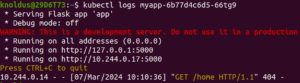
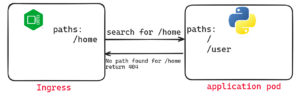
Solution
apiVersion: networking.k8s.io/v1
kind: Ingress
metadata:
  name: web-ingress
  annotations: #add this annotation
    nginx.ingress.kubernetes.io/rewrite-target: "/"
spec:
  rules:
  - http:
      paths:
      - path: /home
        pathType: Prefix
        backend:
          service:
            name: myapp-service
            port:
              number: 80

apiVersion: networking.k8s.io/v1
kind: Ingress
metadata:
  name: web-ingress
  annotations:
    nginx.ingress.kubernetes.io/rewrite-target: /$2
spec:
  rules:
  - http:
      paths:
      - path: /home
        pathType: ImplementationSpecific
        backend:
          service:
            name: myapp-service
            port:
              number: 80
Now, with this Ingress configuration, it will take “/home” and rewrite the path based on the second part of the path provided in the curl command. For example, if we pass “/home,” it will be treated as “/”, and if we pass “/home/user,” it will be treated as “/user.”
Bonus Content
If you want the entire code for this blog, I have published it in my repository. I have defined each and every step of how you can run this example on your local system.