


FABRIC DBT JOB – dbt running natively in Fabric has finally arrived
For a long time, using dbt with Fabric usually meant “dbt-core somewhere else”: a local machine, GitHub Actions, Azure DevOps, or a VM. It worked—but you had to own the runtime, secrets, scheduling, and operational glue.
Now Fabric has a new first-class item: dbt job—a managed, native experience to author and run dbt transformations directly inside Fabric.
Let’s walkthrough of what it is, what it’s great at, and what’s still rough.
Release timeline and Ignite context
At Microsoft Ignite 2025 (Nov 18, 2025), dbt Labs announced dbt job in Microsoft Fabric as Public Preview.
Microsoft’s own Ignite-era Fabric Data Factory update also referenced dbt jobs becoming available as a preview rollout in December 2025.
So in practice, I can just be able to see and try in late Dec 2025.
What is Fabric dbt job?
A dbt job in Fabric is a workspace item that lets you build, test, and deploy dbt models inside Fabric—no need to install dbt locally or run external orchestration.
Under the hood, Fabric provides a managed dbt Job Runtime:
• Versioned, consistent execution environment
• Default runtime (currently) dbt job runtime v1.0
• Supports dbt Core v1.9 (pinned to the runtime)
This is an important shift: instead of “you manage dbt,” it’s “Fabric manages dbt for you.”
Permissions and enablement
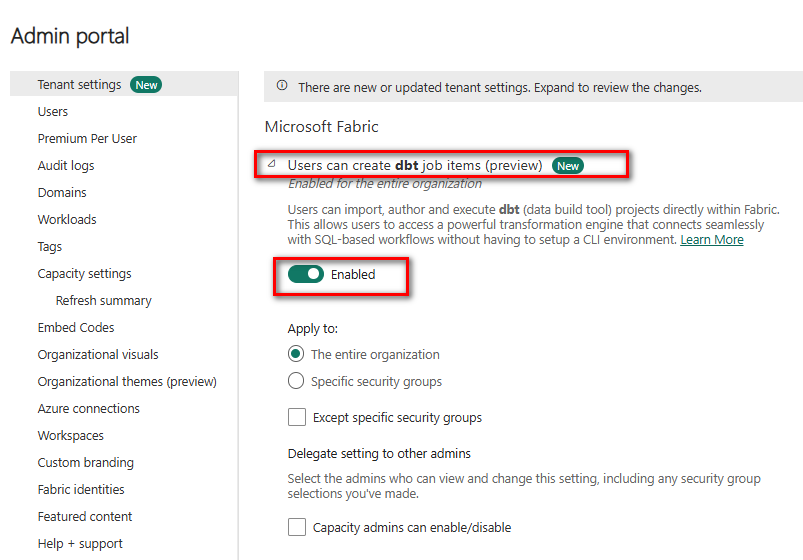
Tenant admin must enable dbt jobs (preview) in Fabric Admin portal
You need Contributor in the workspace and read/write on the target Warehouse + linked connections
Key features
1) Fabric-native UI experience
Fabric positions dbt jobs as a “unified environment” where you:
Author models: Write SQL code and YAML configurations directly.
Define dependencies: Manage relationships between tables using the ref() and source() functions.
Run tests: Ensure data quality with built-in test suites.
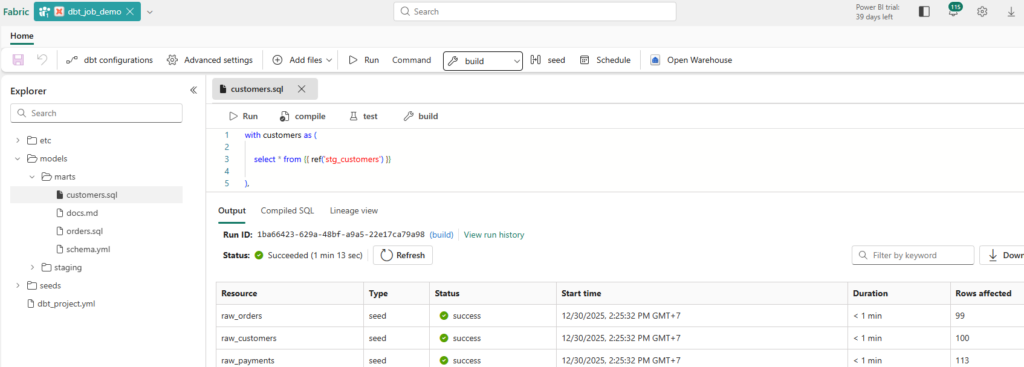
View lineage and run results: Visually track data flow and execution history.
…all within the same workspace.
2) Supported commands
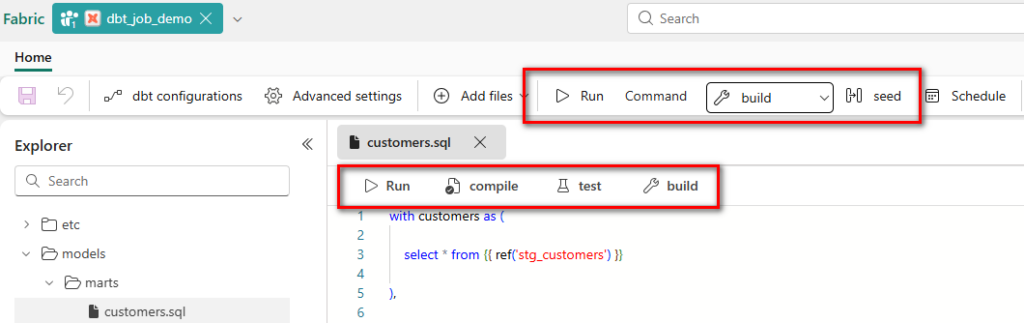
The experience centers on core dbt workflows (build/run/test/seed/snapshot/compile). Practically, you trigger these via the job UI, and the runtime executes them with managed logging
3) Native scheduling and monitoring
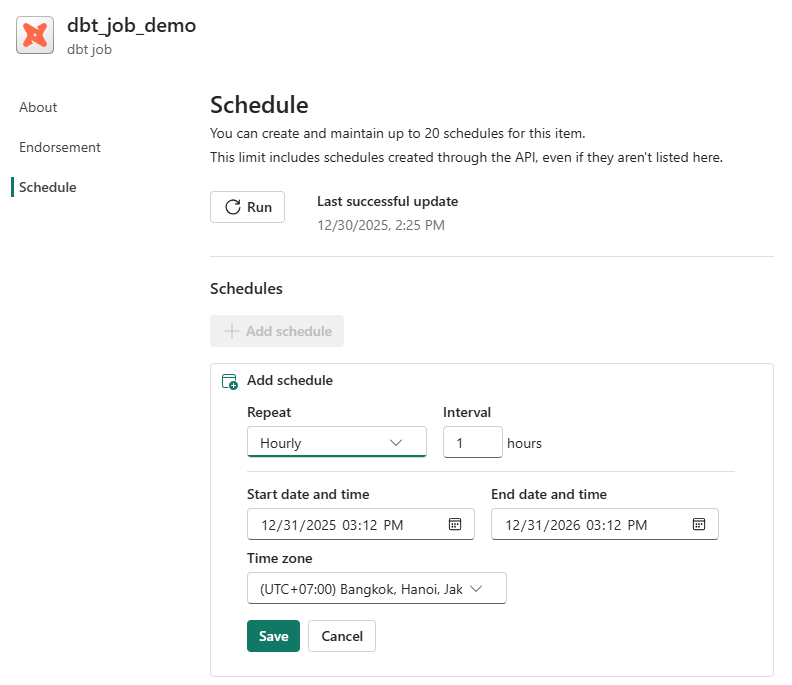
Scheduling is built-in—no external cron, no separate orchestrator required. Fabric calls out native scheduling and monitoring as part of the integration.
4) Lineage + compiled SQL visibility
Fabric highlights “visual insights into runs, tests, and lineage.” In daily work, this is one of the most useful parts: you can validate what dbt produced and how models depend on each other without leaving Fabric.
5) Multiple targets (adapters)
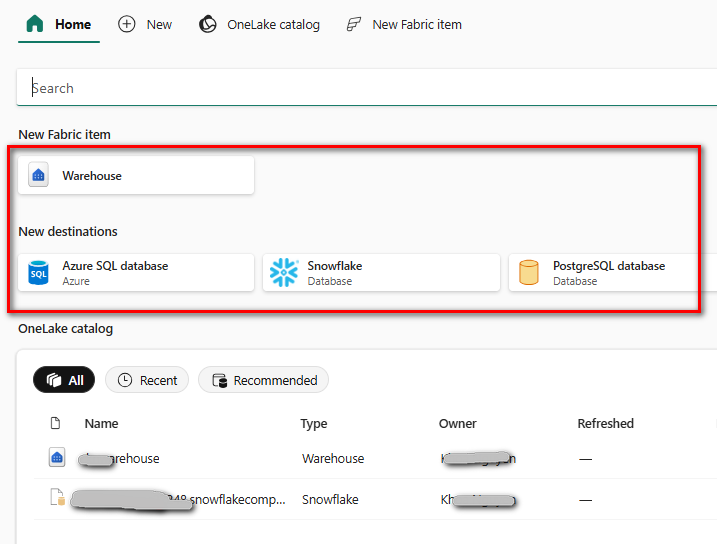
A dbt job can run transformations on the chosen platform using supported adapters:
• Fabric Warehouse
• Snowflake
• PostgreSQL
• Azure SQL Server
Limitations
Microsoft lists these limitations in the preview:
• No build caching: each run compiles/executes “fresh”; artifacts from previous runs aren’t reused.
• Incremental models: you need correct primary keys / unique constraints for reliable incremental builds.
• Adapter constraints: not all adapters are supported yet.
What I hit in practice (real-world preview behavior)
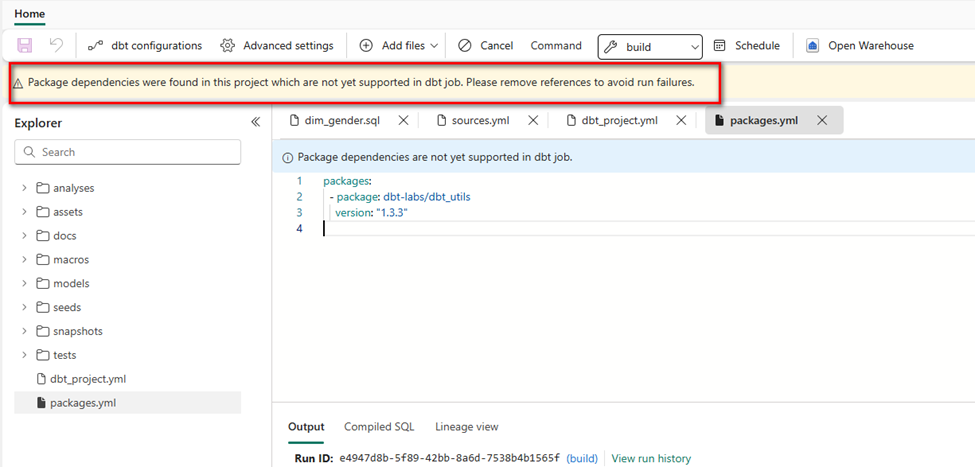
In my Fabric dbt job UI, adding a packages.yml (e.g., dbt_utils) triggered a banner warning: package dependencies are not yet supported and may cause failures.
That changes the dbt “feel” a lot, because packages are central to many dbt teams’ productivity. If your project relies heavily on packages, you’ll need a workaround (more on that later).
If your Fabric dbt job doesn’t support dependencies packages yet, you have three practical choices:
1. Vendor the macros you need: copy a small set of macros into your project’s macros/ folder (good for a few utilities).
2. Write minimal internal macros for common patterns (surrogate keys, standard audits).
3. For package-heavy teams, run dbt-core externally targeting Fabric Warehouse, until native dependency support lands.
Pros/cons vs dbt Core(self-managed)
Pros
• Zero runtime setup: no Python env management, no runner infra, no separate scheduler.
• Everything is inside Fabric: job UI, logs, lineage, monitoring.
• Enterprise alignment: Fabric emphasizes security/governance in the same environment.
Cons
• Less flexibility: runtime pins dbt version (currently dbt Core v1.9).
• Preview limitations like no build caching can matter for large projects.
Compared to dbt Cloud
Pros
• If your org is standardized on Fabric, dbt jobs reduce “tool sprawl.”
• You get a single place for data factory orchestration + dbt execution.
Cons
• dbt Cloud is still the most complete “dbt product platform” for many teams (environments, governance workflows, and advanced observability features vary by plan).
• Fabric dbt job is preview and currently focused on “running dbt natively,” not necessarily replacing the broader dbt Cloud experience.
When to use it (and when not to)
Use Fabric dbt job if you…
• already run most analytics work inside Fabric and want a native, managed dbt execution layer
• want simple scheduling + monitoring without building CI infrastructure
• are starting a new dbt project and can live within preview constraints
Avoid (for now) if you…
• rely heavily on dbt packages (especially dbt_utils and friends) and don’t want to vendor/copy macros
• need sophisticated build caching / artifact-based workflows (common in mature CI/CD patterns)
• require adapters beyond the currently supported list
Roadmap: dbt Fusion and what to watch next
dbt Labs has been explicit that the Fabric integration starts with dbt Core and is planned to expand to the dbt Fusion engine in 2026.
For Fabric users, this is worth watching because Fusion is positioned as a next-generation engine focusing on performance and developer experience—exactly the pain points that show up as projects scale.
https://www.getdbt.com/blog/dbt-labs-integrates-dbt-fusion-engine-in-microsoft-fabric
Conclusion
Fabric dbt jobs are a big deal for teams who want dbt-style analytics engineering without the operational overhead of “running dbt somewhere else.” The core value is simple: native scheduling + monitoring + lineage + a managed runtime inside Fabric.
But it’s still preview. Today, the biggest practical constraints are the documented ones (no caching, incremental requirements) plus the very real ecosystem gap if package dependencies aren’t supported in your environment yet.
If you’re starting new on Fabric Warehouse, or you want a quick path to “dbt in production-lite,” this is absolutely worth piloting.
If you’re a mature dbt shop that leans heavily on packages and CI workflows, you’ll likely run hybrid for a while: Fabric dbt job for native operations where it fits, and dbt-core/cloud for the rest—until the preview matures.
Reference link https://learn.microsoft.com/en-us/fabric/data-factory/dbt-job-overview