



LLM – Large Language Model fine-tuning refines pre-trained models by exposing them to specialized datasets, enhancing their performance in specific tasks. Acting as a bridge between generic models like OpenAI’s GPT-3 and task-specific requirements, fine-tuning tailors models for precise applications. For example, a healthcare organization fine-tunes GPT-3 with medical data using tools like SuperAnnotate’s LLM custom editor. The refined model adeptly handles medical terminologies, clinical language nuances, and report structures, proving its adaptability for specialised tasks, such as assisting doctors in generating accurate patient reports.

Fine-tuning Large Language Models (LLMs) addresses specific business needs by acquainting the model with industry-specific terminologies, nuances, and contexts. This process enhances relevance, ensuring content aligns with the business context. Moreover, fine-tuning improves accuracy, crucial for precision in business functions. Tailoring LLMs for customer interactions through fine-tuning ensures consistent brand voice and data privacy, mitigating the risk of sensitive information leakage. Additionally, fine-tuning addresses rare scenarios, optimizing LLMs for domain-specific challenges and ensuring optimal performance tailored to business requirements.
Introduction of LLM – Databricks’ Dolly Model
Databricks’ Dolly, a large language model, is trained on their machine learning platform, licensed for commercial use. Stemming from pythia-12b, it refines its capabilities using ~15k instruction/response fine-tuning records (databricks-dolly-15k). Despite not being state-of-the-art, dolly-v2-12b exhibits exceptional instruction-following behavior. As part of Databricks’ commitment to AI accessibility, the Dolly model family represents a significant step forward, now available on Hugging Face as databricks/dolly-v2-12b.
Let’s see a small example, that how we can utilise databricks/dolly-v2-3b model from HuggingFace
    import torch
    from transformers import pipeline

    generate_text = pipeline(
        model="databricks/dolly-v2-3b",
        torch_dtype=torch.bfloat16,
        trust_remote_code=True,
        device_map="auto"
    )

    res = generate_text(
        "Tell me who is Amitabh Bachchan?"
    )

    print(res[0]["generated_text"])

When prompted with the questions above, the model responded with a compelling answer. Notably, this impressive response was generated by the smallest available model of Dolly 2.0.
Fine-Tuning LLM – databricks/dolly-v2-3b model
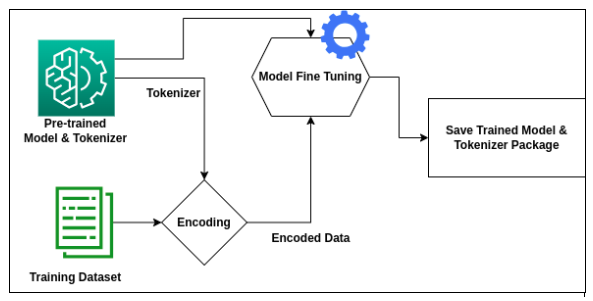
Fine-tuning the databricks/dolly-v2-3b model involves a structured process. The process will include the below steps –
- Loading the Model
- Preparation of the Data
- Training the Model
Loading the Model
Streamlining the loading process of a pre-trained model is seamlessly facilitated through Hugging Face’s model hub. This entails the straightforward loading of both the pre-trained model and tokenizer. For further details refer this link – https://huggingface.co/transformers/v3.0.2/model_doc/auto.html
import torch
from instruct_pipeline import InstructionTextGenerationPipeline
from transformers import AutoModelForCausalLM, AutoTokenizer

tokenizer = AutoTokenizer.from_pretrained("databricks/dolly-v2-3b", padding_side="left")
model = AutoModelForCausalLM.from_pretrained("databricks/dolly-v2-3b", device_map="auto", torch_dtype=torch.bfloat16)

generate_text = InstructionTextGenerationPipeline(model=model, tokenizer=tokenizer)
Preparation of Data
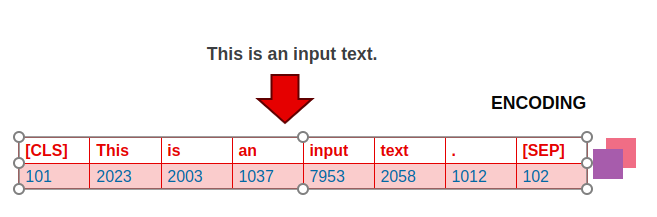
Preparing the data for fine-tuning involves two main steps- first, we process the dataset in the instruction and response format and then use the tokenizer to transform the text in a machine understandable language.
STEP 1 – Instruction datasets typically have three keys: instruction, context (optional context for the given instruction), and the expected response from the LLM. Below is a sample example of instruction data we provided to fine-tune our Dolly Model –

STEP 2 – Once, we create the above JSON file, then we have to perform Tokenization.
- Tokenization is the process of splitting text into individual units, typically words or sub words.
- This step is crucial for the model to understand the structure of the text.
- In languages like English, tokenization is relatively straightforward, as words are typically separated by spaces.
Training the Model
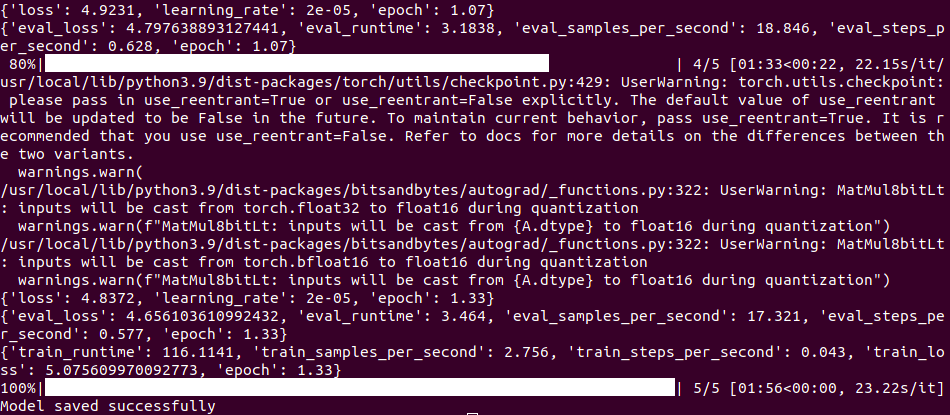
In the concluding training phase, a pivotal step is the creation of a TrainingArguments object. This object plays a crucial role in configuring the entire training job, encompassing hyperparameters like learning rate, batch size, epochs, and strategies for logging, evaluation, and saving. The Trainer object is then instantiated with the GPT-3 model, tokenizer, training arguments, and datasets for both training and testing. The training process kicks off with the trainer.train() method, while the resulting model is preserved in the output directory using trainer.save_model().
Arguments while Fine-Tuning the LLM Model
Let’s understand some of the arguments we have in TrainingArguments. For detailed arguments, refer – https://huggingface.co/transformers/v4.0.1/_modules/transformers/training_args.html
- output_dir – The output directory where the model predictions and checkpoints will be written.
- evaluation_strategy – The evaluation strategy to adopt during training. Possible values are:
- no: No evaluation is done during training.
- steps: Evaluation is done (and logged) every :obj:`eval_steps`.
- epoch: Evaluation is done at the end of each epoch.
- gradient_accumulation_steps -Number of updates steps to accumulate the gradients for, before performing a backward/update pass. When using gradient accumulation, one step is counted as one step with backward pass. Therefore, logging, evaluation, save will be conducted every “gradient_accumulation_steps * xxx_step“ training examples.
- eval_accumulation_steps – Number of predictions steps to accumulate the output tensors for, before moving the results to the CPU. If left unset, the whole predictions are accumulated on GPU/TPU before being moved to the CPU (faster but requires more memory).
- num_train_epochs – Total number of training epochs to perform (if not an integer, will perform the decimal part percents of the last epoch before stopping training).
- max_steps – If set to a positive number, the total number of training steps to perform. Overrides:obj:`num_train_epochs`.
- warmup_steps – Number of steps used for a linear warmup from 0 to :obj:`learning_rate`.
- logging_dir – Tensorboard log directory. Will default to `runs/**CURRENT_DATETIME_HOSTNAME**`.
- logging_first_step – Whether to log and evaluate the first :obj:`global_step` or not.
- logging_steps – Number of update steps between two logs.
- save_steps – Number of updates steps before two checkpoint saves.
- save_total_limit – If a value is passed, will limit the total amount of checkpoints. Deletes the older checkpoints in:obj:`output_dir`.
Here, is the sample code for your reference –
training_args = TrainingArguments(
    output_dir=local_output_dir,  # save-model-directory
    per_device_train_batch_size=4,  # no of batch size per device
    gradient_accumulation_steps=4,  # after mentioned ni-batches, backward pass and parameter update are done.
    optim="adamw_torch",
    save_steps=1,
    logging_steps=1,

    learning_rate=5e-05,  # default learning rate from TrainingArguments
    fp16=False,
    bf16=True,
    num_train_epochs=epoch_count,
    save_total_limit=5,  # saved checkpoints till 5 counts removes older.
    evaluation_strategy="steps",
    max_grad_norm=0.3,
    max_steps=5,
    warmup_ratio=0.03,
    group_by_length=True,
    lr_scheduler_type="constant"
)
Benefits of Fine-Tuning LLM
Fine-tuning a pre-trained model offers several benefits:
- Domain Specificity:
Fine-tuning allows adapting a model to a specific domain or task, enhancing its performance on tasks related to the target domain. - Resource Efficiency:
Training a model from scratch requires substantial computational resources. Fine-tuning leverages pre-existing knowledge, saving time and computational costs. - Improved Generalization:
Pre-trained models often exhibit strong generalization capabilities. Fine-tuning on task-specific data enhances the model’s ability to generalize to new and related tasks. - Faster Convergence:
Starting with pre-trained weights accelerates the convergence of the model during training on a new task, as the model has already learned useful features from the pre-training data. - Data Efficiency:
Fine-tuning can be effective with smaller datasets since the model has already learned rich representations from the larger pre-training dataset. - Transfer Learning:
It facilitates transfer learning by transferring knowledge from one task (pre-training) to another (fine-tuning), enabling the model to leverage prior learning for improved performance. - Customization for Specific Goals:
Fine-tuning enables customization of a model for specific goals, adjusting its behavior to meet the requirements of a particular application or problem. - Adaptation to Evolving Data:
Models can be fine-tuned periodically to adapt to changes in the data distribution, ensuring continued relevance and effectiveness over time. - Task-Specific Optimization:
Fine-tuning allows tweaking hyperparameters specifically for the target task, optimizing the model’s performance in a task-specific context.
In summary, fine-tuning strikes a balance between leveraging pre-existing knowledge and adapting to new, task-specific requirements, resulting in improved performance and resource efficiency.
Conclusion
In conclusion, the process of fine-tuning pre-trained models emerges as a powerful strategy in the realm of machine learning. By harnessing the benefits of domain specificity, resource efficiency, improved generalisation, and faster convergence, fine-tuning allows for the customisation and adaptation of models to specific tasks. This approach not only optimises performance but also proves resource-efficient, particularly when dealing with smaller datasets.