


Flutter, Google’s powerful UI toolkit, enables developers to build natively compiled applications for mobile, web, and desktop from a single codebase. Flutter saw significant updates from versions 3.19 to 3.24 in 2024, introducing a wealth of improvements.
Flutter 2024 releases comes packed with new features and performance enhancements designed to help developers create more robust, high-performance applications across multiple platforms. In this blog post, we’ll explore the standout features of this release and how they can elevate your app development experience.
Here are the key points we will go through together, to details please refer the document in document
Flutter 3.24
Some Breaking changes:
Navigator’s page APIs breaking change
The onDidRemovePage property replaces the onPopPage property. No longer veto a pop in the onDidRemovePage property. Instead, you are only responsible for updating the pages.
The veto mechanism is now managed with the Page.canPop and Page.onPopInvoked properties. These function similar to how you use the PopScope widget.
Navigator(
  pages: pages,
  onDidRemovePage: (page) {
    // Simply update pages here when a page is removed
    pages.remove(page);
  },
);

class MyPage extends Page {
  @override
  bool get canPop => true; // Can be used to veto pop

  @override
  void onPopInvoked() {
    // Handle when a pop is triggered
    print('Page is popped!');
  }
}

// Key Points:
- onDidRemovePage: handles page removal by updating the stack.
- canPop: determines if a page can be popped.
- onPopInvoked: manages custom logic when the page is popped.
Generic types in PopScope
Generic type <T> was added to the PopScope class, along with the new onPopInvokedWithResult method, replacing the deprecated onPopInvoked property. The Form widget also adopts onPopInvokedWithResult to replace onPopInvoked.
Here’s a short sample code incorporating the generic type <T> for both PopScope and Form with onPopInvokedWithResult:
PopScope<String>(
  onPopInvokedWithResult: (String result) {
    print('Popped with result: $result');
    return true; // Allow the pop to happen
  },
  child: Form<String>(
    onPopInvokedWithResult: (String result) {
      print('Form popped with result: $result');
      return true; // Handle form pop
    },
    child: Scaffold(),
  ),
);

// Key Points:
- Generic Type <T>: In this case, it's <String> for both PopScope and Form, specifying the type of result passed during the    pop.
- onPopInvokedWithResult: Handles the pop event, allowing you to process the result of the pop with the specified generic type.
Deprecate ButtonBar in favor of OverflowBar
The ButtonBar widget has been deprecated in favor of the more efficient OverflowBar widget. Consequently, both ThemeData.buttonBarTheme and ButtonBarTheme have also been deprecated. The OverflowBar widget is not tied to the Material library and is part of the core widgets.dart library.
Here’s a short sample code replacing ButtonBar with OverflowBar:
OverflowBar(
  spacing: 8.0,
  overflowAlignment: OverflowBarAlignment.center,
  children: [
    ElevatedButton(onPressed: () {}, child: Text('Button 1')),
    ElevatedButton(onPressed: () {}, child: Text('Button 2')),
  ],
);

// Key Points:
- OverflowBar: Replaces ButtonBar for layout control of buttons or widgets. It's more efficient and flexible.
- Overflow Alignment & Spacing: Customize how widgets overflow and align, similar to the old ButtonBar.
New APIs for Android plugins that render to a Surface
The Android embedder for Flutter introduces a new API, SurfaceProducer, which allows plugins to render to a Surface without needing to manage what the backing implementation is.
In newer versions of the Android API (>= 29), Android introduced a backend-agnostic HardwareBuffer, which coincides with the minimum version that Flutter will attempt to use the Vulkan renderer. The Android embedding API needed to be updated to support a more generic Surface creation API that doesn’t rely on OpenGLES.
Release notes:
Performance
– Flutter GPU Preview
Flutter introduces a new low-level graphics API, Flutter GPU, along with the 3D rendering library flutter_scene (powered by Flutter GPU). Both are in preview on the main channel, require the Impeller backend, and may experience breaking changes as they rely on experimental features.
To understand more about Flutter GPU, you can read this article: Getting started with Flutter GPU
– Engine
Improving Performance and Fidelity
Example: a long series of improvements to text rendering greatly increased the performance of emoji scrolling, eliminating jank when scrolling a large collection of emojis, which was a fantastic stress test of Impeller’s text rendering capabilities.
This is screenshot evidences have poor performance with lots of emojis and after improve Impeller.
Before improve performance
After improve performance
– Swift Package Manager Support
introduces initial support for Swift Package Manager, complementing its use of CocoaPods for managing native iOS and macOS dependencies. This update allows Flutter plugins to access the Swift package ecosystem and simplifies installation, as Swift Package Manager comes bundled with Xcode—eliminating the need for Ruby and CocoaPods in the future. Plugin authors are encouraged to add Swift Package Manager support and share their feedback.
UI Framework
– Video Ad Monetization
Launched a new Interactive Media Ads (IMA) plugin to support instream video ad monetization on Flutter mobile apps. The new IMA plugin provides new ad monetization opportunities for Flutter apps on top of the existing Google Mobile Ads (GMA) plugin which primarily supports display ad formats.
Instream video ads are typically shown to a user in the video player before (preroll), during (midroll), or after (postroll) video content playback. Some instream video ads can be skippable as well.
– New Slivers
Added slivers like SliverResizingHeader and PinnedHeaderSliver for dynamic app bar behaviors.
//Here’s a sample code demonstrating the use of SliverFloatingHeader and PinnedHeaderSliver for dynamic app bar behaviors:
class MyApp extends StatelessWidget {
  @override
  Widget build(BuildContext context) {
    return MaterialApp(
      home: Scaffold(
        body: CustomScrollView(
          slivers: [
            SliverAppBar(
              floating: true,
              expandedHeight: 200.0,
              flexibleSpace: FlexibleSpaceBar(
                title: Text('Floating Header'),
              ),
            ),
            PinnedHeaderSliver(
              child: Container(
                height: 100,
                color: Colors.blue,
                alignment: Alignment.center,
                child: Text('Pinned Header', style: TextStyle(color: Colors.white)),
              ),
            ),
            SliverList(
              delegate: SliverChildBuilderDelegate(
                (context, index) => ListTile(title: Text('Item #$index')),
                childCount: 50,
              ),
            ),
          ],
        ),
      ),
    );
  }
}
– TreeView Widget
The two_dimensional_scrollables package now features the TreeView widget, along with various companion classes for creating high-performance scrolling trees that can expand in any direction.
Here is the screenshot sample when implement a TableView that scrolls in both the vertical and horizontal axes.
– CarouselView
Introduces the Material Design carousel widget, CarouselView. This widget features an “Uncontained” layout, offering a scrollable list of items that extend to the edges of the container. As items scroll in and out of view, the leading and trailing items dynamically adjust their size.
– Enhanced AnimationStatus Features
The AnimationStatus enum has been upgraded with new features, introducing several useful getters:
isDismissed
isCompleted
isRunning
isForwardOrCompleted
While some of these getters were previously available in subclasses like AnimationController and CurvedAnimation, they are now accessible across all Animation subclasses in conjunction with AnimationStatus. Additionally, a new toggle method has been introduced in AnimationController, allowing developers to easily switch the direction of animations.
Here’s a sample code snippet demonstrating the enhanced features of AnimationStatus with the new getters and the toggle method in AnimationController, and example showcases how to utilize the enhanced AnimationStatus features, allowing you to control the animation effectively.
class _AnimatedDemoState extends State<AnimatedDemo>
    with SingleTickerProviderStateMixin {
  late AnimationController _controller;
  late Animation<double> _animation;

  @override
  void initState() {
    super.initState();
    _controller = AnimationController(
      duration: const Duration(seconds: 2),
      vsync: this,
    )..addListener(() {
        setState(() {});
      });
    _animation = Tween<double>(begin: 0, end: 200).animate(_controller);
  }
  void _toggleAnimation() {
    if (_controller.isDismissed || _controller.isCompleted) {
      _controller.forward();
    } else {
      _controller.reverse();
    }
  }

//Key Points:
AnimationController: Manages the animation and its duration.
Animation Status: The current status of the animation is displayed.
Toggle Method: The _toggleAnimation function switches between playing and reversing the animation based on its current status.
– Multi-View Embedding for Web
Flutter web applications now support multi-view embedding, enabling developers to render content into multiple HTML elements at once. This feature, known as “embedded mode,” allows for flexible integration of Flutter views within existing web applications. More details you can check out the detailed documentation.
Tools
– Improved DevTools
New features in DevTools for better performance tracking and debugging.
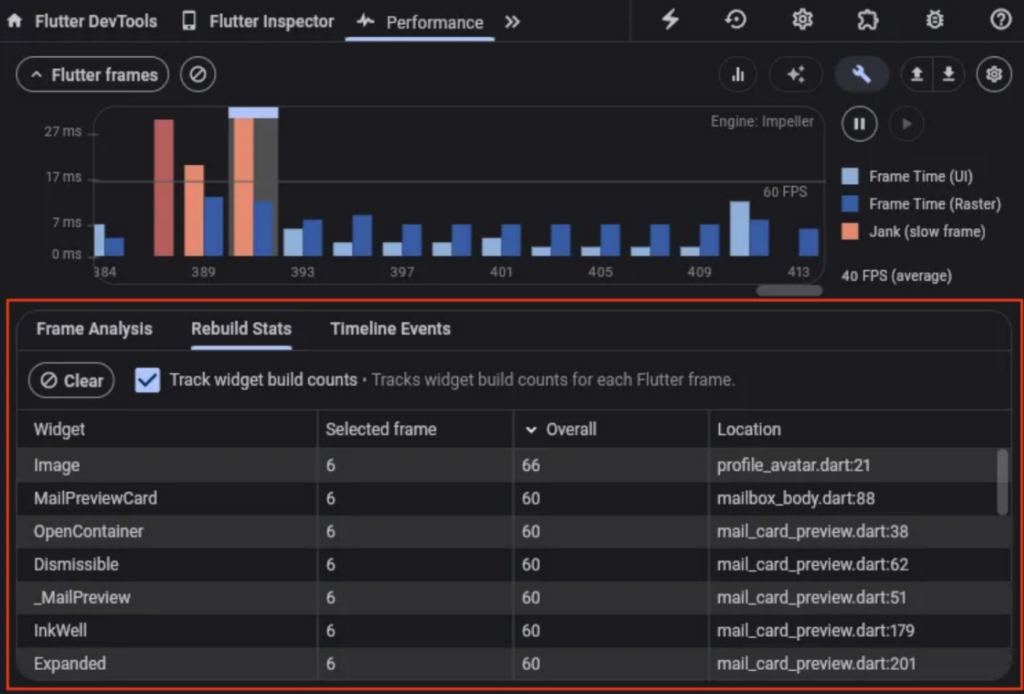
the new features in DevTools for performance tracking and debugging include:
– Rebuild Stats feature to check the number times a widget was built in your app:
– Widget Inspector inside IDE(VSCode, Android Studio), allowing you to explore the widget tree, debug layout issues.
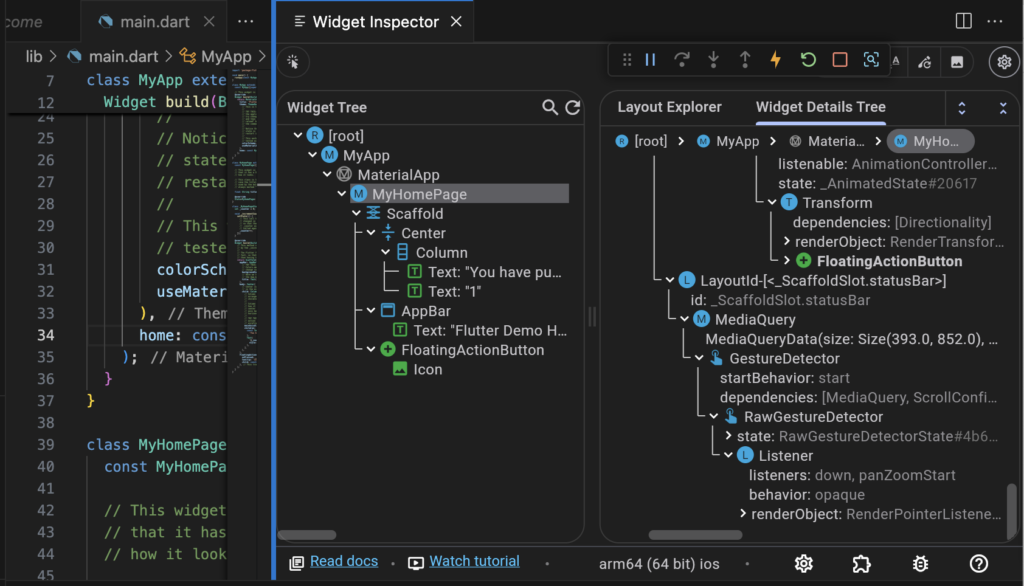
beside that, you can see the debug the frame every widgets in screen.

Flutter 3.22
Deprecated API removed after v3.19
Several deprecated APIs were removed as part of Flutter’s effort to clean up old code and streamline the framework. Here are some notable APIs that were deprecated and eventually removed:
– Replace FlatButton with TextButton.
TextButton(
  onPressed: () {},
  child: Text('Click Me'),
);
– Replace RaisedButton with ElevatedButton.
ElevatedButton(
  onPressed: () {},
  child: Text('Click Me'),
);
– Replace OutlineButton with OutlinedButton.
OutlinedButton(
  onPressed: () {},
  child: Text('Click Me'),
);
– The ButtonTheme was deprecated as part of Flutter’s transition to the newer button widgets (TextButton, ElevatedButton, OutlinedButton).
– The old ScaffoldMessenger.showSnackBar signature, which didn’t use the SnackBarAction, was deprecated.
ScaffoldMessenger.of(context).showSnackBar(
  SnackBar(
    content: Text('Hello!'),
    action: SnackBarAction(label: 'Undo', onPressed: () {}),
  ),
);
– The old showDialog API, which lacked the use of barrierDismissible and barrierColor, was updated.
showDialog(
  context: context,
  barrierDismissible: false,
  builder: (context) => AlertDialog(title: Text('Dialog')),
);
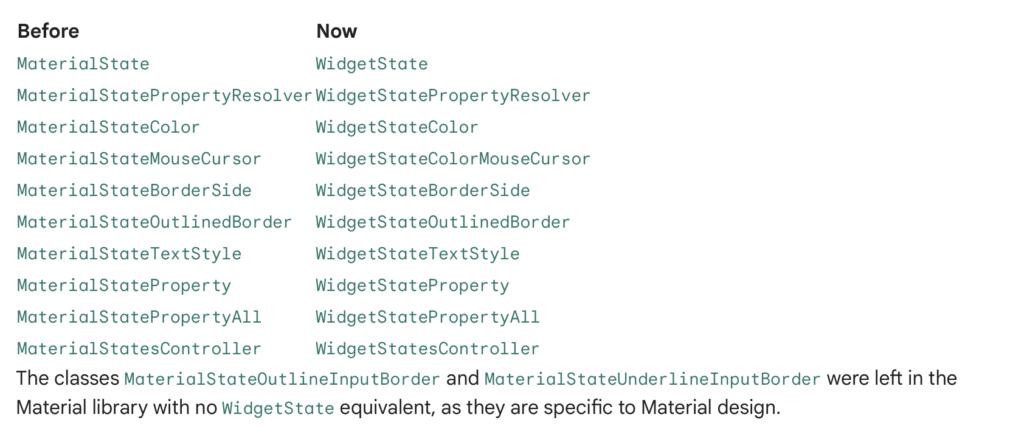
Rename MaterialState to WidgetState
Previously, MaterialState provided logic for handling multiple different states a widget could have, like “hovered”, “focused”, and “disabled”. Because this functionality is useful outside the Material library, namely for the base Widgets layer and Cupertino, it was decided to move it outside of Material. As part of the move, and to avoid future confusion, the different MaterialState classes have been renamed to WidgetState. The behavior of the two are the same.
Dropping support for Android KitKat
Flutter will no longer work on devices running Android KitKat (API 19).
Targeting Android will need to increase the minSdkVersion in their build.gradle and AndroidManifest.xml files from 19 to at least 21.
WebAssembly
With the release of Flutter 3.22, WebAssembly (Wasm) is now available in the stable channel, bringing substantial performance gains to Flutter web apps. In internal benchmarks, such as those conducted on Chrome with an M1 MacBook, the Wonderous app saw a 2x improvement in average frame rendering times and a 3x improvement in worst-case scenarios.
These optimizations are especially critical for apps that involve complex animations and rich transitions, as Wasm minimizes performance bottlenecks, enabling smoother experiences. Developers looking to leverage this in their Flutter web apps can refer to the Dart Wasm documentation and Flutter Wasm documentation. You can also check out the full announcement in the Flutter at Google I/O blog post.
Platform View Performance Improvements in Flutter
We recognize that platform view performance on iOS has been a significant pain point for Flutter developers, particularly when using platform views inside scroll views. Recent updates have addressed these issues with the following key improvements, especially noticeable in scenarios like embedding multiple inline ads within articles:
- – Reduced GPU Usage: A 50% reduction in GPU usage, resulting in lower power consumption and potentially smoother user interactions.
- – Improved Frame Rendering: The average frame render time has decreased by 1.66ms (33%), improving visual performance.
- – Minimized Jank: The worst-case frame render time has improved by 3.8ms (21%), reducing jank during scrolling.
Flutter 3.19
Flutter 3.19 was a minor yet significant release focused on performance improvements, enhanced platform support, and cleanup of deprecated APIs. Here are some key highlights:
1. AI integration
Gemini Google AI Dart SDK beta release
Launched the AI Dart SDK in beta, allowing developers to integrate generative AI features into Dart or Flutter apps. Powered by Google’s latest AI models (Gemini), the SDK includes the google_generative_ai package available on pub.dev.
We can see the blog how to build with the Google AI Dart SDK in this blog post
2. Framework
Some UI updated:
– Scrolling improvements
– AnimationStyle
– SegmentedButton.styleFrom
– Adaptive Switch
– SemanticsProperties accessibility identifier
– Increased access to text widget state
– UndoHistory stack
3. Engine
– Impeller progress Android OpenGL preview
Flutter’s Impeller engine is progressing, with the OpenGL backend reaching feature parity with Vulkan, including MSAA support. This enables Impeller to run correctly on most Android devices. Flutter developers are encouraged to upgrade to the latest stable version, test Impeller, and report any issues, especially with specific device details. Impeller’s performance feedback should come from profile or release builds, compared against Skia. Future improvements include support for custom shaders and external textures, as Impeller gears up to become Flutter’s default renderer.
4. Performance and Graphics Enhancements
Specialization constants
The team added support for specialization constants to Impeller. Taking advantage of this feature in Impeller’s shaders reduced uncompressed binary size of the Flutter engine by nearly 350KB.
Backdrop filter speedups
The team added support for specialization constants to Impeller. Taking advantage of this feature in Impeller’s shaders reduced uncompressed binary size of the Flutter engine by nearly 350KB.
5. Tools
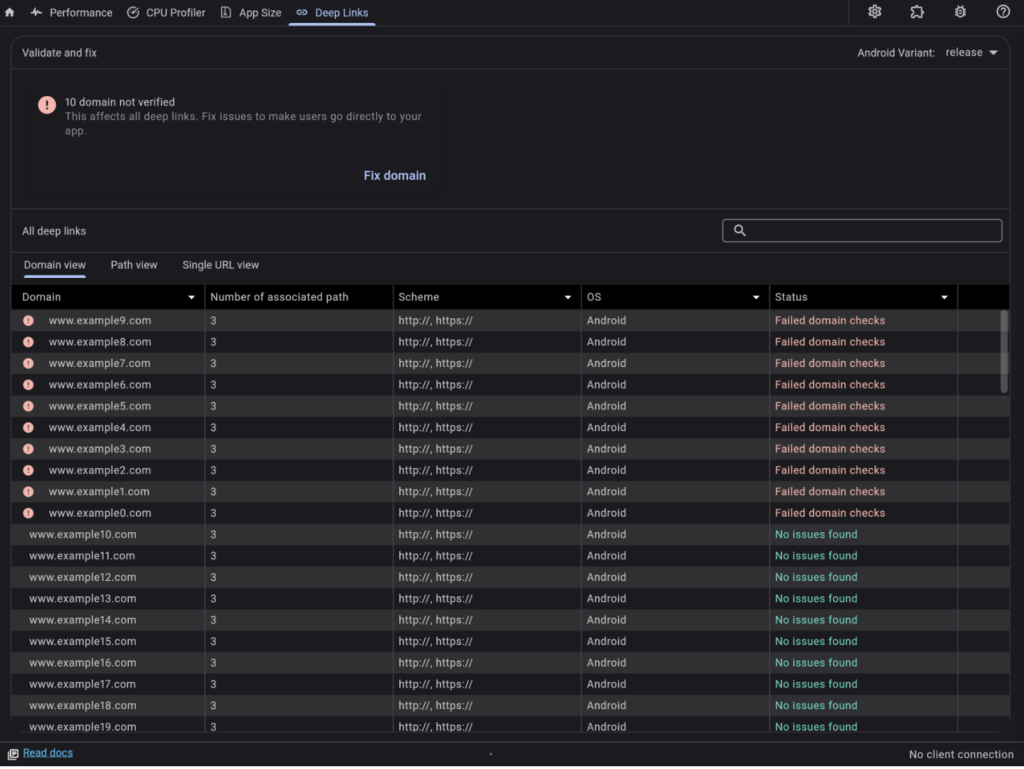
– DevTools validate deeplinks setup on Android.
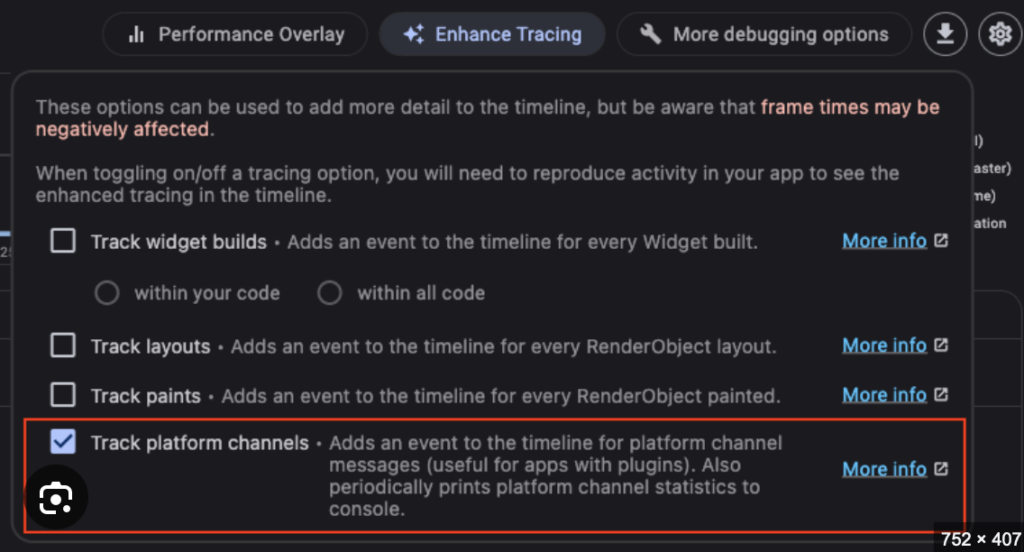
– Enhance Tracing menu for tracking platform channel activity. This is useful for apps with plugins.
– The Performance and CPU profiler screens are now made available when there is no connected app. Performance data or CPU profiles that were previously saved from DevTools can be reloaded for viewing from these screens.
– The Flutter Sidebar in VS Code now has the ability to enable new platforms if not enabled for the current project, and the DevTools menu in the sidebar now has an option to open DevTools in an external browser window.
Conclusion
Upgrading to Flutter 3.19 to 3.24 may bring challenges such as breaking changes and API deprecations, requiring code adjustments and extensive testing.
For projects using versions below 3.19, upgrading offers performance improvements like Wasm support and Impeller rendering and apply AI with Gemini AI, but you’ll need to assess potential refactoring and API compatibility.
Key Considerations:
– Thorough Testing is essential for stability.
– Review Deprecated APIs to avoid disruptions.
– Balance Stability and New Features to determine if the upgrade fits your project’s needs.
This decision should weigh the benefits of performance gains against the cost of necessary changes.