


Large language models (LLM) are being included in debugging, code generation and test automation processes, which occur more often in the hurriedly developed area of AI-Assisted Development. But to fully use your capacity, unarmed test data must be converted into reference-rich, structured JSON signals. LLM signals formatting selenium testing failures in JSON signals is a useful technique that facilitates smooth communication between local LLMs, such as LM Studio and selenium-based test structures.
The conversion of test failures into structured JSON formats that are optimised for LLM input is examined in this blog post. We can enable more precise, useful responses from LLMs by encapsulating test metadata, failure context, and pertinent code snippets in a machine-friendly structure. Formatting Selenium test failures into LLM-Ready JSON prompts helps close the gap between noisy test output and intelligent, AI-driven debugging workflows, whether you’re creating developer tools, CI/CD integrations, or internal AI assistants.
How LLMs Compare to Other AI Models for Test Debugging

When we talk about AI models in software engineering, it’s important to clarify that not all language models are created equal, especially when it comes to interpreting code, understanding test failures, and suggesting context-aware fixes.
Here’s how LLMs (like GPT-4, Claude, or Gemini) compare with earlier or alternative AI model types:
- LLMs vs. Rule-Based Systems
- Rules-based models (such as static rules engines or Regex matches) depend on predefined patterns and parameters. They operate quickly but are fragile and prone to breaking when conditions change.
- When the test output differs slightly from expectations (for example, a new exception type or an update to the third-party library), they are unable to adjust.
- On the other hand, LLMS normalises the pattern. They can debug unknown problems without any reproduction because they understand the semantics other than syntax.
- LLMs vs. Domain-Specific AI Tools
- Some artificial intelligence equipment is specially designed for testing analysis (e.g., failure type labelling with a machine learning classifier).
- These are helpful, but limited because they usually require label training data, have trouble with new errors, and do not offer solutions.
- In contrast, LLMs are able to understand zero-shot, capable of understanding failures that have not been seen earlier and even suggest working solutions without working tuning.
- LLMs vs. Small Language Models
- Although they can function well in an environment with limited resources, small LMS (such as CodeT5 or DistilBERT) often lack the ability to scale through the action test log or complex multi-file codebase.
- LLMS are perfect for complex debugging as they provide multi-model arguments, which allow them to interpret the code, log and natural language in a single context.
Why LLM Ready Prompts

Debugging can be greatly improved by using a large language model (LLM) to analyse these failures. However, the test failure data requires an organised and understandable format to inform LLM. The best option becomes JSON (JavaScript object notation).
We produce a standardised prompt that an LLM can easily process the test failure details, including the test name, error message, stack trace, and relevant code snippets, within a JSON object. LLM can accurately understand the context of failure and, thanks to this methodical approach, can produce recommendations.
For example:
{
  "test_name": "testUserAuthentication",
  "error_message": "Assertion failed: User not authenticated",
  "stack_trace": [
    "file: Auth.java, line: 25",
    "file: TestAuth.java, line: 12"
  ],
  "code_snippet": "public void testUserAuthentication() {\n    Assert.assertTrue(authenticateUser(\"test_user\", \"wrong_password\"));\n}"
}
This JSON format provides the LLM with a clear and concise representation of the test failure, facilitating more accurate and relevant analysis. Consequently, engineers can benefit from faster debugging cycles and improved software quality.
Steps to Integrate LLM with Automated Test Failures
Pre-requisites
- Java Development Environment
- JDK 11 or above,
- IDE like IntelliJ, Eclipse or VS Code,
- Maven for dependency management.
- Selenium Setup
- Configure Selenium WebDriver dependency in pom.xml,
- Configure preferred browser driver, i.e. chromedriver.
- Test Framework
- Either TestNG or JUnit dependency in pom.xml.
- OpenAI account or LM Studio
- Sign up at OpenAI,
- Generate an API Key for authentication.
- Access to the GPT-4 or GPT-3.5 model endpoint.
Step 1: Set Up LM Studio API (Local Server)
First, let’s get LM Studio up and running:
- Get the LM Studio AppImage file from lmstudio.ai.
- Access the AppImage by making it executable via the commands below. Note: The following commands are for the Linux Ubuntu OS
# Navigate to the Directory
cd /path/to/directory

# Set Permissions
chmod u+x LM-Studio-0.3.16-8-x64.AppImage

# Execute the file
./LM-Studio-0.3.16-8-x64.AppImage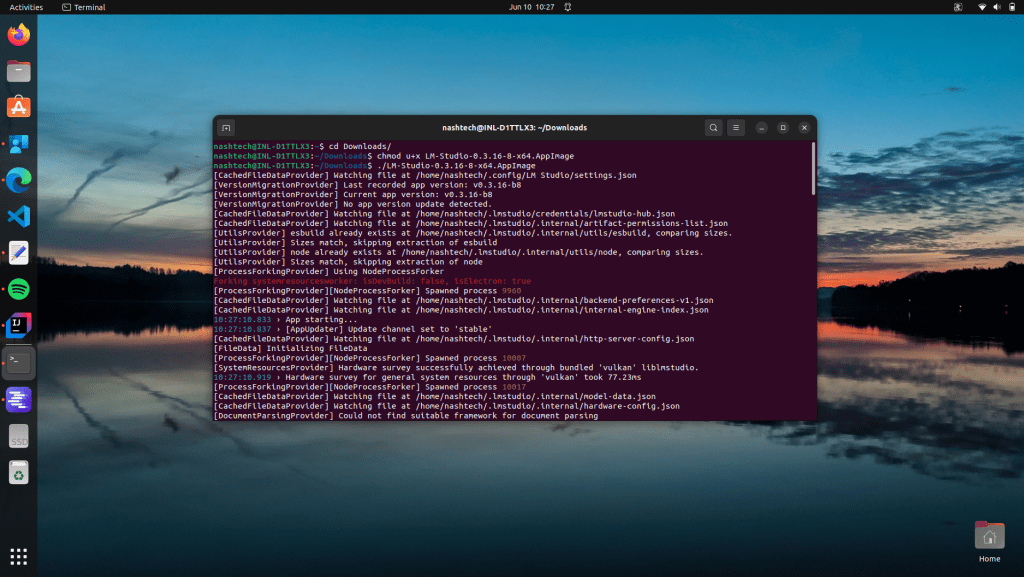
- Launch it and download a local model. We recommend a coding-aware model like:
- qwen
- Mistral Instruct
- GPTQ variants (optimised for local inference)
- Enable Local API Server:
- Go to Settings → Enable Local Server.
Note: the default port: usually http://localhost:1234.
- This exposes the model via a REST API that you can interact with from any programming language.

Step 2: Capturing Test Results in JSON
You must first gather the necessary information in a clear and consistent manner before you can use an LLM to analyse test failures. Because JSON format is both machine-processable and human-readable, it is the ideal way to organise this data.
In this step, you’ll capture the following details after a test failure:
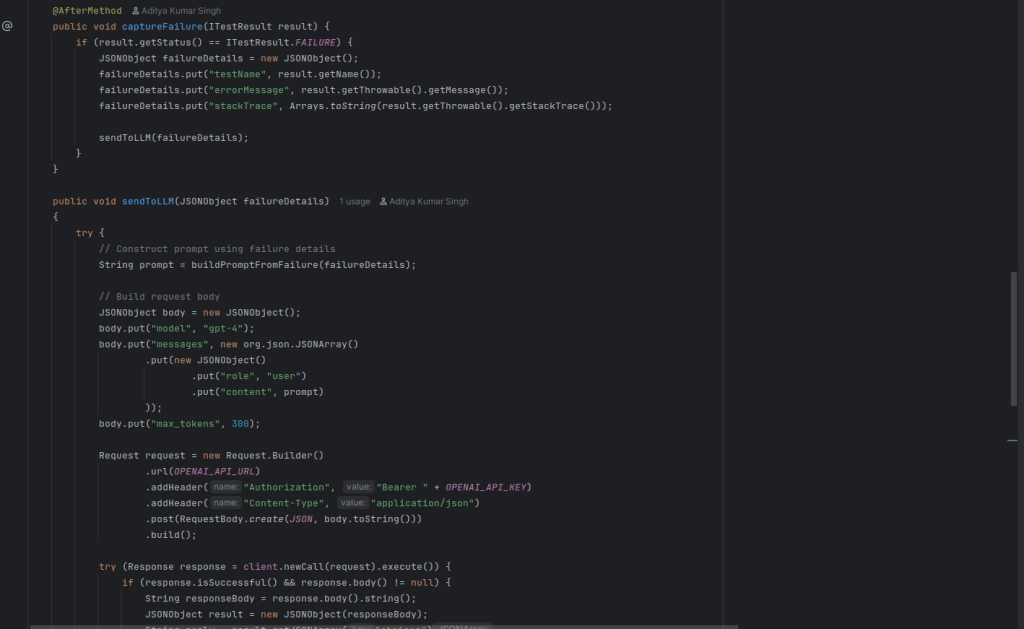
Here’s why JSON is ideal:
- It’s easy to log or send to APIs.
- It works seamlessly with LLM prompts as contextual input.
- It allows for extensible structures as your framework grows.
Implementation Idea:
To find out when a test fails, use TestNG’s @AfterMethod hook in your base test class (such as BaseTest.java). When it does, create a JSONObject with all of the information mentioned above and send it on to the following step for logging or LLM analysis. The foundation of your integration is failure capture in JSON, which is how you transform unprocessed automation output into insightful, comprehensible data.
Step 3: Query LM Studio with Test Results
Now that you’ve captured structured test failure output, the next goal is to translate that failure information into something an LLM can understand and respond to. This means feeding it the stack trace, error message, and any surrounding context, and then retrieving a useful, human-readable explanation.
- Crafting the LLM Prompt, i.e. we need to build a prompt that gives the LLM:
- A short intro (e.g., “You’re a helpful assistant…”)
- The actual error or stack trace
- An instruction (e.g., “Explain this and suggest a fix.”)
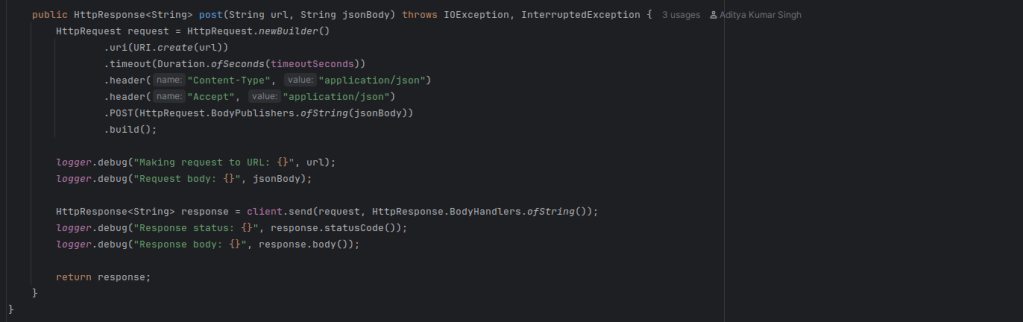
- Calling the LM Studio API

Step 4: Final Rundown
Once the required configuration changes are compiled, we can simply execute mvn test In the terminal of the IDE.


Conclusion
In this blog, we explored how to capture and format Selenium test failures in Java, convert them into structured JSON, and then transform that structured data into clear, LLM-ready prompts. Using LM Studio, we were able to run powerful local models like qwen without relying on external APIs or sending sensitive code or error data over the internet.
By feeding these well-formatted JSON-based prompts into an LLM, you can:
- Instantly generate human-readable explanations for cryptic stack traces
- Receive targeted suggestions for fixes
- Reduce the mental load of test triage and failure analysis
This isn’t just a technical experiment — it’s a meaningful step toward intelligent test reporting, where every failure can come with context, insight, and guidance.