


Introduction
In this blog post, I’ll share our experience building the Cafe Management System – a coffee shop management system using FrankenPHP as the application server. We’ll explore FrankenPHP and Roadrunner – two modern application servers written in Go, and how we applied them to this real-world project.
Our project includes:
Backend API: Pure PHP with custom Router, MVC pattern
Database: PostgreSQL with UUID primary keys
Frontend: React + Vite
Application Server: FrankenPHP (written in Go)
Containerization: Docker Compose
The Problem with Traditional PHP and Why We Chose FrankenPHP
When starting the Cafe Management System project, we faced the question: Which application server should we use?
Problems with Traditional PHP-FPM
With PHP-FPM, each request would:
Load the entire application into memory
Reinitialize the database connection
Parse and compile PHP code
Cleanup after the request completes
This causes:
High memory overhead: Each worker process consumes 20-50MB RAM
Slow cold start: First request after restart takes 100-500ms
Database connection overhead: Must reconnect on every request
No persistent state utilization: Application must reload from scratch
Why Choose FrankenPHP for Cafe Management System?
For a coffee shop management system, we needed:
High throughput: Handle multiple orders simultaneously
Low latency: Fast API responses for frontend
Resource efficiency: Run on compact servers
Easy deployment: Simple setup with Docker
FrankenPHP solves all these problems!
Cafe Management System Architecture with FrankenPHP
Implementation with FrankenPHP
Dockerfile Configuration
FROM dunglas/frankenphp:latest

# Install PostgreSQL extensions for PHP
RUN install-php-extensions pdo_pgsql pgsql

WORKDIR /app
Caddyfile – Web Server Configuration
{
    auto_https off
}

:80 {
    root * public
    encode zstd gzip

    php_server

    file_server
}
This configuration enables:
Auto compression: Automatic zstd and gzip
PHP processing: All requests to public/ are handled by PHP
Static file serving: Serve static files directly
Zero config: No need for nginx or Apache
Entry Point – public/index.php

Database Connection – Persistent and Efficient
class Database
{
    private static ?PDO $connection = null;

    public static function getConnection(): PDO
    {
        if (self::$connection === null) {
            // Connection is created only once
            // With FrankenPHP worker mode, this connection persists between requests!
            self::$connection = new PDO($dsn, $username, $password, [
                PDO::ATTR_ERRMODE => PDO::ERRMODE_EXCEPTION,
                PDO::ATTR_DEFAULT_FETCH_MODE => PDO::FETCH_ASSOC,
                PDO::ATTR_EMULATE_PREPARES => false,
            ]);
        }
        return self::$connection;
    }
}
Benefits with FrankenPHP:
Database connection is reused between requests
No need to reconnect on every request
Significantly reduced latency
Docker Compose Setup
services:
  postgres:
    image: postgres:15-alpine
    environment:
      POSTGRES_DB: cafe_management
      POSTGRES_USER: cafe_user
      POSTGRES_PASSWORD: cafe_password

  frankenphp:
    build:
      context: .
      dockerfile: Dockerfile
    ports:
      - "80:80"
    volumes:
      - .:/app
      - ./Caddyfile:/etc/caddy/Caddyfile
    depends_on:
      postgres:
        condition: service_healthy
Roadrunner: Alternative High-Performance Solution
What is Roadrunner?
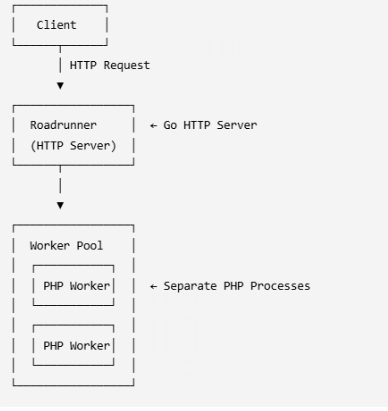
Roadrunner is another application server also written in Go, using a worker pool model. Although we chose FrankenPHP for this project, Roadrunner is also an excellent choice.
If We Used Roadrunner for Cafe Management System
Install Roadrunner dependencies:
{
    "require": {
        "spiral/roadrunner-cli": "^2.0",
        "spiral/roadrunner-http": "^2.0"
    }
}
Roadrunner Architecture
Setup Guide for Cafe Management System with FrankenPHP
Step 1: Clone and Setup Project
# Clone project
git clone <repo-url>
cd cafe-management-system

# Install PHP dependencies
composer install

# Install frontend dependencies
cd frontend && npm install && cd ..
Step 2: Configure Database
Create .env file
DB_HOST=postgres
DB_PORT=5432
DB_NAME=cafe_management
DB_USER=cafe_user
DB_PASSWORD=cafe_password
Step 3: Docker Setup
# Start services
docker-compose up -d

# Check logs
docker-compose logs -f frankenphp
Step 4: Verify Installation
# Test API
curl http://localhost/api/health

# Expected response:
# {
#   "status": "ok",
#   "message": "Cafe Management API is running",
#   "timestamp": "2024-01-01 12:00:00"
# }
Step 5: Access Application
Backend API: http://localhost/api
Frontend: http://localhost:3000 (Vite dev server)
Best Practices from Cafe Management System
Database connection management
private static ?PDO $connection = null;

public static function getConnection(): PDO
{
    if (self::$connection === null) {
        // Connection is reused between requests
        self::$connection = new PDO($dsn, $username, $password, [
            PDO::ATTR_PERSISTENT => false, // Let FrankenPHP handle persistence
            PDO::ATTR_ERRMODE => PDO::ERRMODE_EXCEPTION,
        ]);
    }
    return self::$connection;
}
Error Handling
protected function successResponse($data, string $message = null, int $statusCode = 200): void
{
    $response = [
        'success' => true,
        'data' => $data
    ];

    if ($message !== null) {
        $response['message'] = $message;
    }

    $this->jsonResponse($response, $statusCode);
}
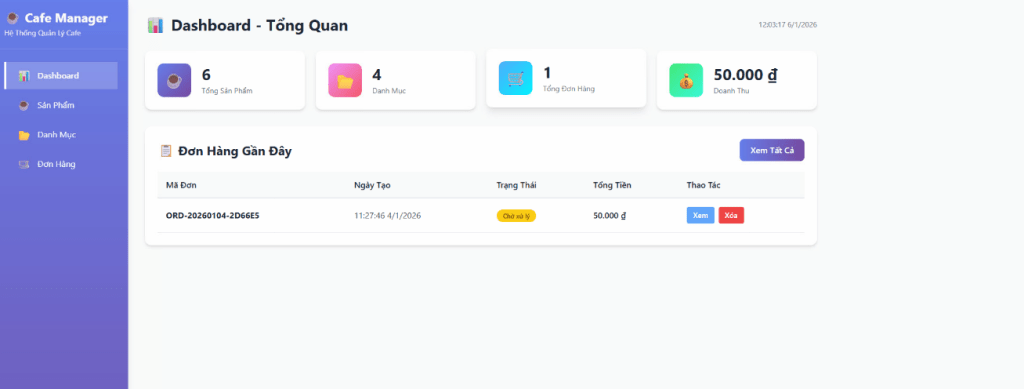
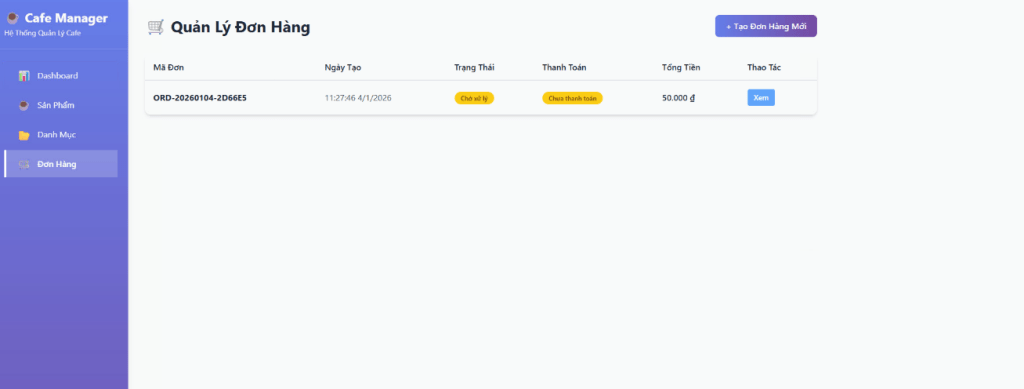
Demo


Lessons Learned
Custom Router: Simple, easy to maintain, no heavy framework needed
MVC Pattern: Clear code organization
Database Singleton: Efficient connection reuse
Docker Compose: Consistent development and production setup
Resources
FrankenPHP Documentation: https://frankenphp.dev/
Roadrunner Documentation: https://roadrunner.dev/
Caddy Documentation: https://caddyserver.com/docs/
Project Repository: https://github.com/danghieu1407/cafemanagement