



Why Polars in Rust?
- Speed without the drama. Polars runs a multi‑threaded, vectorized engine over Arrow memory—so group‑bys, joins, window functions, and scans can saturate your CPU cores out of the box.
- Bigger‑than‑RAM processing. Flip on streaming execution to process big datasets in batches, instead of face‑planting on memory.
- Lazy execution that actually optimizes. Build a query plan now, execute later; Polars pushes projections/filters down to the file scan and reorders work for fewer passes over data.
If you’re building CLIs, ETL jobs, services, or anything where runtime, memory, or deployable binaries matter, Polars + Rust is a good fit. If you want a notebook‑first workflow with a giant ecosystem of plotting/ML tools, pandas still has the advantage (more on that later).
Install & project setup
Add Polars to your Cargo.toml. You must enable features you use (like lazy and csv; parquet is optional but common):
[package]
name = "polars_intro"
version = "0.1.0"
edition = "2025"

[dependencies]
polars = { version = "0.50.0", features = ["lazy", "csv", "parquet"] }
planus = { version = "=1.1.1" }
Polars’ own install page shows enabling features via cargo add polars -F lazy or by listing them in Cargo.toml
Heads‑up: with some versions, turning on
parquetmay need an extra dependency (e.g.,zlib-rs) due to resolver quirks. Pin versions and read the linked issue if you hit it
Sample Dataset:
Eager Polars: quick CSV read
Sample data set used in this post:
Use the eager API when you just need a DataFrame now.
use polars::prelude::*;

fn main() -> PolarsResult<()> {
    // Read a CSV eagerly into a DataFrame
    let df = CsvReadOptions::default()
        .with_has_header(true)
        .try_into_reader_with_file_path(Some("./src/customers.csv".into()))?
        .finish()?;

    println!("DataFrame contents:");
    println!("{df}");

    println!("\nDataFrame metadata:");
    println!("Shape: {:?}", df.shape());
    println!("Columns: {}", df.get_column_names().len());
    println!("Rows: {}", df.height());

    println!("\nColumn information:");
    for (name, dtype) in df.get_column_names().iter().zip(df.dtypes().iter()) {
        println!("  {}: {:?}", name, dtype);
    }

    println!("\nMemory usage: {} bytes", df.estimated_size());

    // Show first few rows
    println!("\nFirst 5 rows:");
    println!("{}", df.head(Some(5)));
    Ok(())
}

// Result ...
DataFrame metadata:
Shape: (10000, 4)
Columns: 4
Rows: 10000
...
Column information:
  customer_id: Int64
  name: String
  email: String
  city: String

Memory usage: 551142 bytes
...
Lazy Polars: scan, filter, group, join
For anything non‑trivial, prefer the lazy API. You “scan” files (no full read yet), build an expression graph, then collect() the result. This enables predicate/project pushdown and better parallelism.
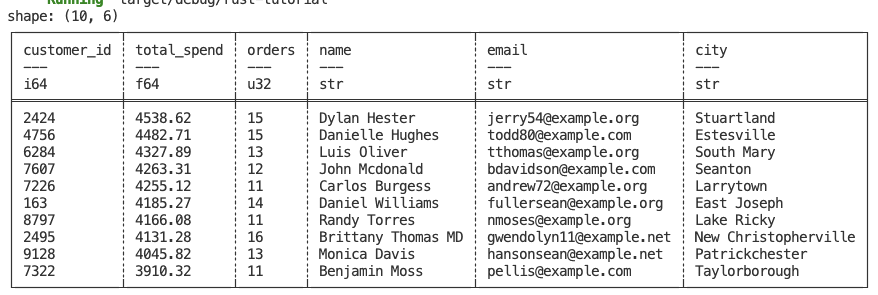
Build a top‑customers report
use polars::prelude::*;

fn main() -> PolarsResult<()> {
    // Lazily scan the inputs (no data loaded yet)
    let orders = LazyCsvReader::new(PlPath::new("data/orders.csv"))
        .with_has_header(true)
        .finish()?; // -> LazyFrame

    let customers = LazyCsvReader::new(PlPath::new("data/customers.csv"))
        .with_has_header(true)
        .finish()?;

    // Derive metrics per customer: total spend + order count
    let top_customers = orders
        .group_by([col("customer_id")])
        .agg([
            col("amount").sum().alias("total_spend"),
            col("order_id").count().alias("orders"),
        ])
        // Join customer attributes
        .join(
            customers,
            vec![col("customer_id")],
            vec![col("customer_id")],
            JoinArgs::new(JoinType::Left),
        )
        // Sort by total_spend descending
        .sort_by_exprs(
            vec![col("total_spend")],
            SortMultipleOptions::new().with_order_descending(true),
        )
        .limit(10)
        .collect()?; // executes lazily-built plan

    println!("{top_customers}");
    Ok(())
}
Window/conditional logic with when/then/otherwise
You’ll often need bucketing or conditional columns. Polars has a clear DSL for this:
use polars::prelude::*;

fn bucketize_orders(orders: LazyFrame) -> PolarsResult<DataFrame> {
    orders
        .with_column(
            when(col("amount").lt_eq(lit(50)))
                .then(lit("small"))
                .when(col("amount").lt_eq(lit(200)))
                .then(lit("medium"))
                .otherwise(lit("large"))
                .alias("size_bucket"),
        )
        .select([
            col("order_id"),
            col("customer_id"),
            col("amount"),
            col("size_bucket"),
        ])
        .collect()
}

fn main() {
    let orders = match LazyCsvReader::new(PlPath::new("data/orders.csv"))
        .with_has_header(true)
        .finish()
    {
        Ok(orders) => orders,
        Err(e) => {
            eprintln!("Error reading CSV: {}", e);
            return;
        }
    };

    match bucketize_orders(orders) {
        Ok(df) => println!("{:?}", df.head(Some(10))),
        Err(e) => eprintln!("Error: {}", e),
    }
}
Streaming (bigger‑than‑RAM) execution
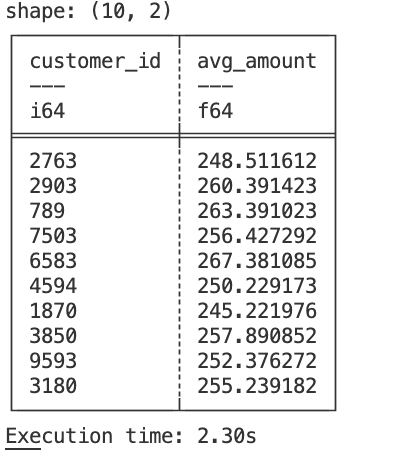
If your data doesn’t fit in memory, tell Polars to stream the query:
use std::time::Instant;

use polars::prelude::{col, lit, LazyCsvReader, LazyFileListReader, PlPath};

fn main() -> Result<(), Box<dyn std::error::Error>> {
    // Record the start time
    let now = Instant::now();

    let lf = LazyCsvReader::new(PlPath::new("data/5m-rows.csv"))
        .with_has_header(true)
        .finish()?
        .filter(col("amount").gt(lit(5)))
        .group_by([col("customer_id")])
        .agg([col("amount").mean().alias("avg_amount")]);

    // Toggle streaming engine for the collection
    let result = lf.with_new_streaming(true).collect();

    // Record the end time and calculate the duration
    let elapsed = now.elapsed();

    // Print the result
    println!("{:?}", result?.head(Some(10)));

    // Print the execution time
    println!("Execution time: {:.2?}", elapsed);

    Ok(())
}
Write to Parquet
Parquet is a compact, columnar format that lines up well with Arrow in memory—which is why Polars reads/writes it quickly.
use std::fs::File;

use polars::{
    error::PolarsResult,
    frame::DataFrame,
    prelude::{
        LazyCsvReader, LazyFileListReader, ParquetWriter, PlPath, StatisticsOptions, col, lit,
    },
};

fn write_parquet(mut df: DataFrame) -> PolarsResult<()> {
    let mut file = File::create("out/sample.parquet")?;
    ParquetWriter::new(&mut file)
        .with_statistics(StatisticsOptions::default())
        .finish(&mut df)?;
    Ok(())
}

fn main() -> Result<(), Box<dyn std::error::Error>> {
    let lf = LazyCsvReader::new(PlPath::new("data/5m-rows.csv"))
        .with_has_header(true)
        .finish()?
        .filter(col("amount").gt(lit(5)))
        .group_by([col("customer_id")])
        .agg([col("amount").mean().alias("avg_amount")]);
    let result = lf.with_new_streaming(true).collect();
    match result {
        Ok(df) => {
            write_parquet(df)?;
            Ok(())
        }
        Err(_) => todo!(),
    }
}
The same pipeline in pandas
import pandas as pd

orders = pd.read_csv("data/orders.csv")
customers = pd.read_csv("data/customers.csv")

top_customers = (
    orders.groupby("customer_id")
    .agg(total_spend=("amount", "sum"), orders=("order_id", "size"))
    .reset_index()
    .merge(customers, on="customer_id", how="left")
    .sort_values("total_spend", ascending=False)
    .head(10)
)

# bucketize
def bucket(x):
    if x <= 50: return "small"
    if x <= 200: return "medium"
    return "large"

orders["size_bucket"] = orders["amount"].apply(bucket)
For large files that don’t fit in memory, pandas recommends chunked reads (chunksize), but advanced operations (e.g., groupby) are not always straightforward chunk‑wise—at which point switching libraries (Dask/Modin/Polars) is often suggested
Polars vs pandas: the blunt comparison
| Area | Polars (Rust) | pandas (Python) |
|---|---|---|
| Engine | Vectorized, multi‑threaded by default; Arrow columnar. | Mostly single‑threaded core; NumPy arrays by default (PyArrow optional). |
| Execution | Lazy + eager. Lazy enables pushdown/optimizations. | Eager only (no native lazy); can simulate pipelines but no global query optimizer. |
| Scale | Streaming lets you process larger‑than‑RAM datasets from a single binary. | Chunking works for IO; many transformations aren’t trivial to do chunk‑wise. |
| Language fit | Compiled Rust binaries; great for CLIs/services. | Best in notebooks/interactive analysis with a massive ecosystem. |
| Memory model | Arrow (zero‑copy interop, columnar). | NumPy by default; can opt into PyArrow‑backed dtypes for some wins. |
| Syntax | Expression DSL (col, when, over, etc.). | Imperative method chaining (df.groupby(...).agg(...).sort_values(...)). |
| Performance reality | Usually faster on big, columnar‑friendly workloads; don’t expect miracles on tiny frames (call overhead and IO dominate). | Often snappy on small/medium data; can be slower as size/complexity grows. |
Benchmarking Result (May-2025) – Polars Document
Wrap‑up
- Use eager Polars for small, one‑off tasks;
- Use lazy Polars (and streaming) for serious pipelines;
- Measure your real workload instead of trusting hype;
- Don’t expect data‑viz/ML batteries from the Rust ecosystem the way you do in Python—pair Polars with the right tools for your target.