1. GDPR Cookies Glossary
To comply with the regulations governing cookies under the GDPR.
- Receive users’ consent before you use any cookies except strictly necessary cookies.
- Provide accurate and specific information about the data each cookie tracks and its purpose in plain language before consent is received.
- Document and store consent received from users.
- Allow users to access your service even if they refuse to allow the use of certain cookies.
- Make it as easy for users to withdraw their consent as it was for them to give their consent in the first place.
2. Type of Cookies
In general, there are 3 different ways to classify cookies: what purpose they serve, how long they endure, and their provenance.
Duration
Persistent Cookies – This category encompasses all cookies that remain on your hard drive until you erase them or your browser does, depending on the cookie’s expiration date. All persistent cookies have an expiration date written into their code, but their duration can vary. According to the ePrivacy Directive, they should not last longer than 12 months, but in practice, they could remain on your device much longer if you do not take action.
Provenance
Third-party Cookies – The cookies that are placed on your device, not by the website you are visiting but by a third party like an advertiser or an analytic system.
Purpose
Functionality/ Preference Cookies – These cookies allow a website to remember choices you have made in the past, like what language you prefer, what region you would like weather reports for, or what your username and password are so you can automatically log in.
Tracking and Performance/ Statistics/ Analytical Cookies – These cookies collect information about how you use a website, like which pages you visited and which links you clicked on. None of this information can be used to identify you. It is all aggregated and, therefore, anonymized. Their sole purpose is to improve website functions. This includes cookies from third-party analytics services as long as the cookies are for the exclusive use of the owner of the website visited.
Targeting and Advertising – These cookies track your online activity to help advertisers deliver more relevant advertising or to limit how many times you see an ad. These cookies can share that information with other organizations or advertisers. These are persistent cookies and almost always of third-party provenance.
When people complain about the privacy risks presented by cookies, they are generally speaking about third-party, persistent, marketing cookies which can contain significant amounts of information about the online activity, preferences, and location.
2. Cookie Audit
As mentioned above, not all the cookies should be handled with GDPR, so we must categorize them as the very first step in the GDPR compliance. Most of the Cookie plugin will help to classify them into the appropriate category, but it will be different from one to other business.

- There are the cases which a cookie could be classified as Functional Cookies on the 3rd party but Strictly Necessary Cookies on the current site.
- The 3rd party cookies could belong to more than one category, but the site barely manages to allow opt-in or opt-out just a category of the 3rd party handled so there might be the extra work to check when a 3rd party could be active on the site (i.e only when have the consent of all the related-categories).
3. Cookie Control
3.1 Notify about Cookie in use
Cookie Notice page could usually be accessed via the Site footer or “View More” button from the Cookie banner.
The main sections of Cookie Notice page include:
- Definition and Purpose of Cookies being used in the Site
- List of cookies per Purpose types, then the description of each cookie group.
- Customize setting
- Life span of each cookie (optional)
If your site uses the 3rd party cookies, make sure you indicate such fact and link to the relevant 3rd party privacy/ cookie notice page.
3.2 Configure Cookie Banner
Choose your favorite style for the Cookie banner.
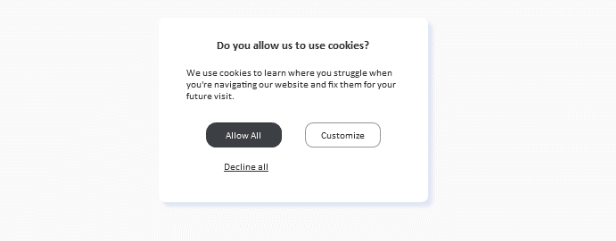
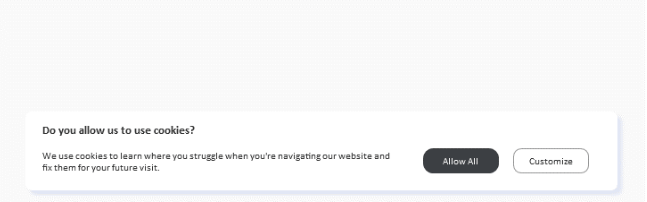
Depending on the business needs, the site might have different banner for different location, so we need to work on how to detect the location appropriately,
3.3 Customize Cookie Preferences
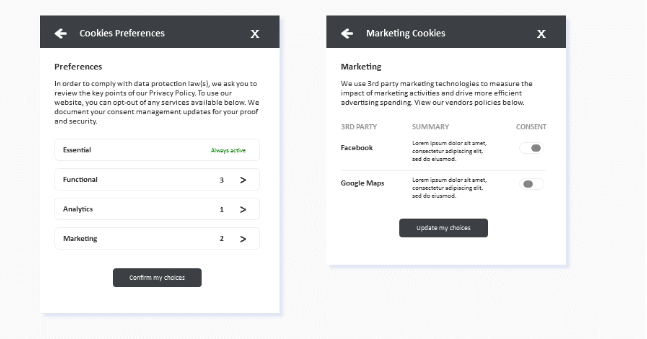
Give your audience the right to control which cookies they want to accept or reject. Cookie preferences are required by the EU privacy law, the GDPR, which demands informed consent before data can be collected.
Some key notes to take into the consideration:
- Define the expiry duration for each cookie group.
- Suggest the Recommended settings
- Except for the Strictly Necessary, almost all other categories would need to be disabled by default (if you need the user consent).
- If the system plans to categorize into functional/ 3rd party cookies, make sure that you cover the system behaviors accordingly.