


A practical integration guide with code, patterns, and production tips
Why QuestPDF?
QuestPDF is a modern, fluent C# library for programmatic PDF generation. It’s fast, strongly-typed, testable, and designed for server-side scenarios (APIs, background jobs, Lambdas/Functions). Compared to HTML-to-PDF tools, you get deterministic layout without a headless browser, and compared to Office automation, you avoid COM headaches and licensing traps.
Install & Setup
NuGet
dotnet add package QuestPDF
Namespaces
using QuestPDF.Fluent;
using QuestPDF.Helpers;
using QuestPDF.Infrastructure;
using QuestPDF.Drawing;
Mental Model (How it renders)
QuestPDF builds a layout tree (like a constrained flexbox). You define pages and compose containers using fluent builders:
- Page → Header, Content, Footer
- Inside content: Column, Row, Stack, Table, Grid, Image, Text
- Styles cascade via
TextStyle.Defaultor explicitly per element ShowOnce(),PageNumber(),Section()andGeneratePdf/GeneratePdfAsynccontrol output behavior
Fonts, Unicode (e.g. Vietnamese), and Branding
If you render Vietnamese or other non-ASCII glyphs, register a font that supports them:
FontManager.RegisterFont(File.OpenRead("Assets/Fonts/Roboto-Regular.ttf"));
FontManager.RegisterFont(File.OpenRead("Assets/Fonts/Roboto-Bold.ttf"));

TextStyle.Default
    .Fallback(x => x.FontFamily("Roboto")) // or your chosen font
    .FontSize(10);
Images & Logos
byte[] logo = await File.ReadAllBytesAsync("Assets/Logo.png");
page.Header().Row(r =>
{
    r.RelativeItem().Text("Your Title").FontSize(18).Bold();
    r.ConstantItem(64).Height(64).Image(logo);
});
Pagination, Long Tables, and Performance
QuestPDF automatically paginates long content. For large tables:
- Keep rows lightweight (avoid heavy per-row images).
- Prefer value types / primitives in your DTOs.
- Consider streaming data into the model and pre-chunking long datasets for very large outputs (e.g., 50k+ rows).
For multi-document batch jobs, reuse:
- FontManager registration at app start
- Static styles and shared byte[] assets
Use GeneratePdfAsync if you’re in an async pipeline, but avoid blocking on sync.
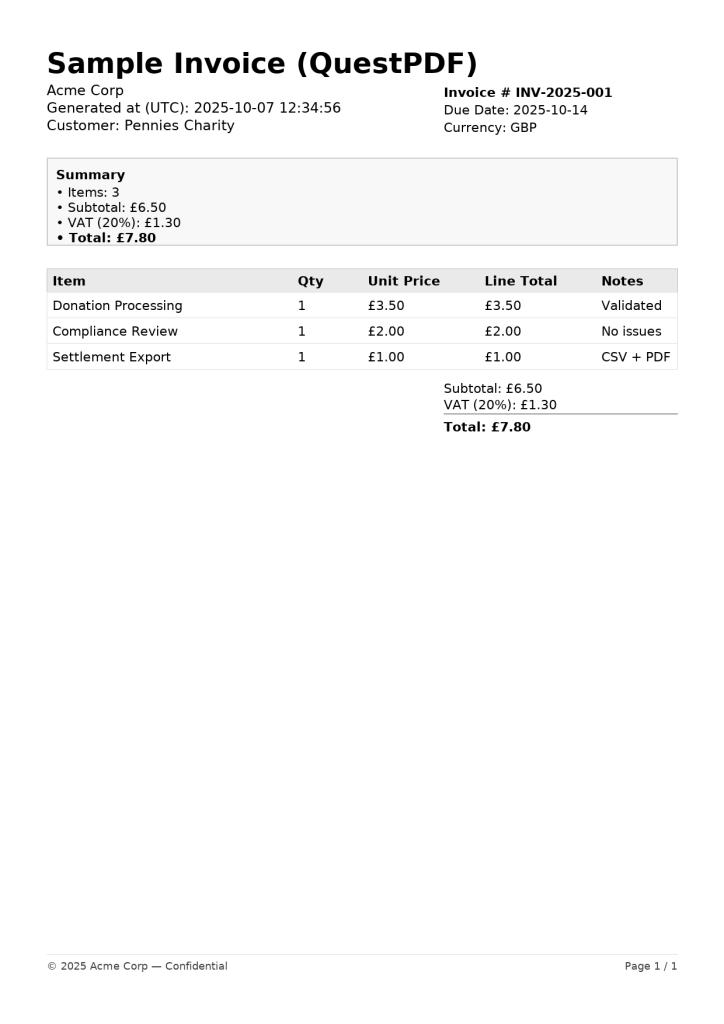
A Complete Example: Invoice Generation
Install
dotnet new console -n QuestPdfMinimal
cd QuestPdfMinimal
dotnet add package QuestPDF
Program.cs
using QuestPDF.Fluent;
using QuestPDF.Infrastructure;
using QuestPDF.Helpers;
using System.Globalization;

record LineItem(string Name, int Qty, decimal UnitPrice, string Notes);

class InvoiceDocument(LineItem[] items) : IDocument
{
    public DocumentMetadata GetMetadata() => new() { Title = "Sample Invoice (QuestPDF)", Author = "Acme Corp" };

    public void Compose(IDocumentContainer container)
    {
        container.Page(page =>
        {
            page.Margin(36);
            page.Size(PageSizes.A4);
            page.DefaultTextStyle(TextStyle.Default.FontSize(10).Fallback(x => x.FontFamily("Times")));

            page.Header().Row(row =>
            {
                row.RelativeItem().Column(col =>
                {
                    col.Item().Text("Sample Invoice (QuestPDF)").FontSize(18).SemiBold();
                    col.Item().Text("Acme Corp").FontColor(Colors.Grey.Darken1);
                    col.Item().Text($"Generated at (UTC): {DateTime.UtcNow:yyyy-MM-dd HH:mm:ss}");
                    col.Item().Text("Customer: Pennies Charity");
                });

                row.ConstantItem(200).AlignRight().Column(col =>
                {
                    col.Item().Text($"Invoice # INV-2025-001").SemiBold();
                    col.Item().Text($"Due Date: {DateTime.UtcNow.AddDays(7):yyyy-MM-dd}");
                    col.Item().Text($"Currency: GBP");
                });
            });

            page.Content().Column(col =>
            {
                col.Spacing(10);

                // Summary
                col.Item().Border(1).BorderColor(Colors.Grey.Lighten2).Padding(10).Column(box =>
                {
                    var subtotal = items.Sum(i => i.Qty * i.UnitPrice);
                    var vat = subtotal * 0.20m;
                    var total = subtotal + vat;

                    box.Item().Text("Summary").SemiBold();
                    box.Item().Text($"• Items: {items.Length}");
                    box.Item().Text($"• Subtotal: {subtotal.ToString("C", CultureInfo.GetCultureInfo("en-GB"))}");
                    box.Item().Text($"• VAT (20%): {vat.ToString("C", CultureInfo.GetCultureInfo("en-GB"))}");
                    box.Item().Text($"• Total: {total.ToString("C", CultureInfo.GetCultureInfo("en-GB"))}").SemiBold();
                });

                // Table
                col.Item().Table(table =>
                {
                    table.ColumnsDefinition(cols =>
                    {
                        cols.RelativeColumn(3);  // Item
                        cols.RelativeColumn(1);  // Qty
                        cols.RelativeColumn(2);  // Unit Price
                        cols.RelativeColumn(2);  // Line Total
                        cols.RelativeColumn(3);  // Notes
                    });

                    table.Header(h =>
                    {
                        h.Cell().Background(Colors.Grey.Lighten3).Padding(6).Text("Item").SemiBold();
                        h.Cell().Background(Colors.Grey.Lighten3).Padding(6).Text("Qty").SemiBold();
                        h.Cell().Background(Colors.Grey.Lighten3).Padding(6).Text("Unit Price").SemiBold();
                        h.Cell().Background(Colors.Grey.Lighten3).Padding(6).Text("Line Total").SemiBold();
                        h.Cell().Background(Colors.Grey.Lighten3).Padding(6).Text("Notes").SemiBold();
                    });

                    foreach (var it in items)
                    {
                        var lineTotal = it.Qty * it.UnitPrice;
                        table.Cell().BorderBottom(1).BorderColor(Colors.Grey.Lighten2).Padding(6).Text(it.Name);
                        table.Cell().BorderBottom(1).BorderColor(Colors.Grey.Lighten2).Padding(6).Text(it.Qty.ToString());
                        table.Cell().BorderBottom(1).BorderColor(Colors.Grey.Lighten2).Padding(6)
                             .Text(it.UnitPrice.ToString("C", CultureInfo.GetCultureInfo("en-GB")));
                        table.Cell().BorderBottom(1).BorderColor(Colors.Grey.Lighten2).Padding(6)
                             .Text(lineTotal.ToString("C", CultureInfo.GetCultureInfo("en-GB")));
                        table.Cell().BorderBottom(1).BorderColor(Colors.Grey.Lighten2).Padding(6).Text(it.Notes);
                    }
                });
            });

            page.Footer().Row(row =>
            {
                row.RelativeItem().Text("© 2025 Acme Corp — Confidential").FontColor(Colors.Grey.Darken1);
                row.ConstantItem(160).AlignRight().Text(x =>
                {
                    x.Span("Page "); x.CurrentPageNumber(); x.Span(" / "); x.TotalPages();
                });
            });
        });
    }
}

class Program
{
    static void Main()
    {
        var items = new[]
        {
            new LineItem("Donation Processing", 1, 3.50m, "Validated"),
            new LineItem("Compliance Review",   1, 2.00m, "No issues"),
            new LineItem("Settlement Export",   1, 1.00m, "CSV + PDF"),
        };

        var doc = new InvoiceDocument(items);
        doc.GeneratePdf("SampleInvoice.pdf");
        Console.WriteLine("Generated SampleInvoice.pdf");
    }
}
The Result
References (official & community)
- Official site & docs:
https://www.questpdf.com/ - GitHub repository:
https://github.com/QuestPDF/QuestPDF - Samples gallery (official):
https://www.questpdf.com/samples.html - Release notes / API changes: GitHub Releases tab
- Discord / Discussions: linked from the GitHub README
Tip: Always check the latest docs for API changes (especially around
IDocument, page sizing, and new components).