


Introduction
In software testing, creating test data is crucial. However, automated testing demands generating even larger datasets. While various methods exist for data creation across programming languages, leveraging existing libraries offers the most efficient approach. Today, we’ll delve into Java Faker, a popular library for generating test data.
Setup
Maven: declare in pom.xml
<dependency>
<groupid>com.github.javafaker</groupid>
<artifactid>javafaker</artifactid>
<version>1.0.2/version>
</dependency>
Gradle: declare in build.gradle
dependencies {
implementation ‘com.github.javafaker:javafaker:1.0.2’
}
How to use
The Java Faker library has two main classes: Faker and FakerValueService. Which one you use depends on how you want the data to be created.
Faker Class
The Faker class will provide you with completely random data. Some common data that Java Faker provided:
@Test
void test2() {
Faker faker = new Faker();
// Create full name
System.out.println(faker.name().fullName());
// Create cellPhone
System.out.println(faker.phoneNumber().cellPhone());
// Create emailAddress
System.out.println(faker.internet().emailAddress());
// Create job
System.out.println(faker.job().position());
// Create String in number format that has xxx digits
System.out.println(faker.number().digits(18));
// Create number between xxx and yyy
System.out.println(faker.number().numberBetween(0, 100));
}
FakeValueService Class
On the other hand, this class provides methods for generating random sequences, in which you can interfere and control the random data as you want. Let us see some of the useful methods provided by the FakeValueService class.
- Letterify :
This method helps to generate random sequences of alphabetic characters.
- Numerify :
This method helps to generate numeric sequences.
- Bothify :
This method combines the two and can create random alphanumeric sequences – useful for mocking contents like ID strings.
- Regexify :
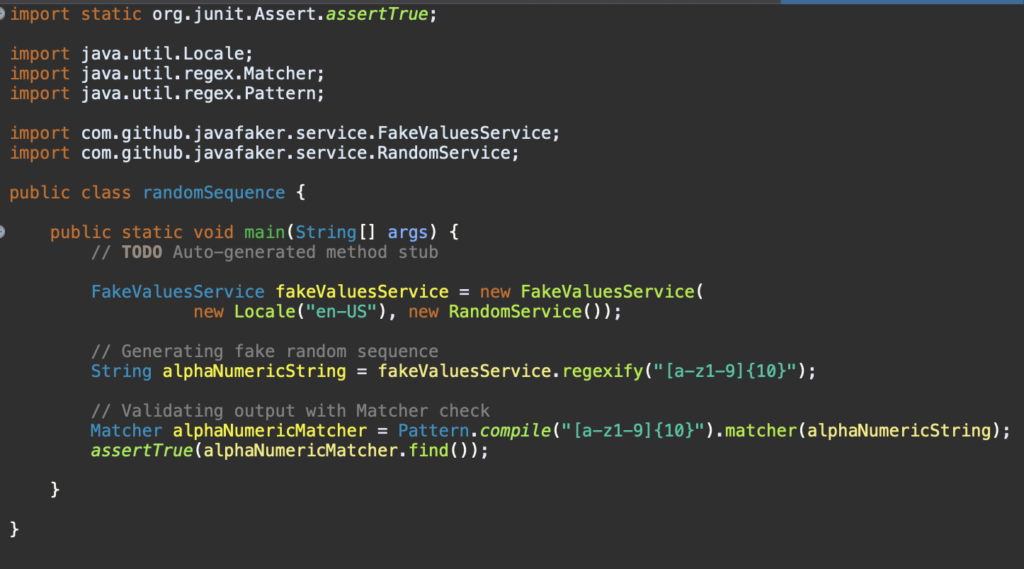
This method generates a random sequence based on a given regex pattern.
FakeValueService requires a valid Locale, as well as a random service.
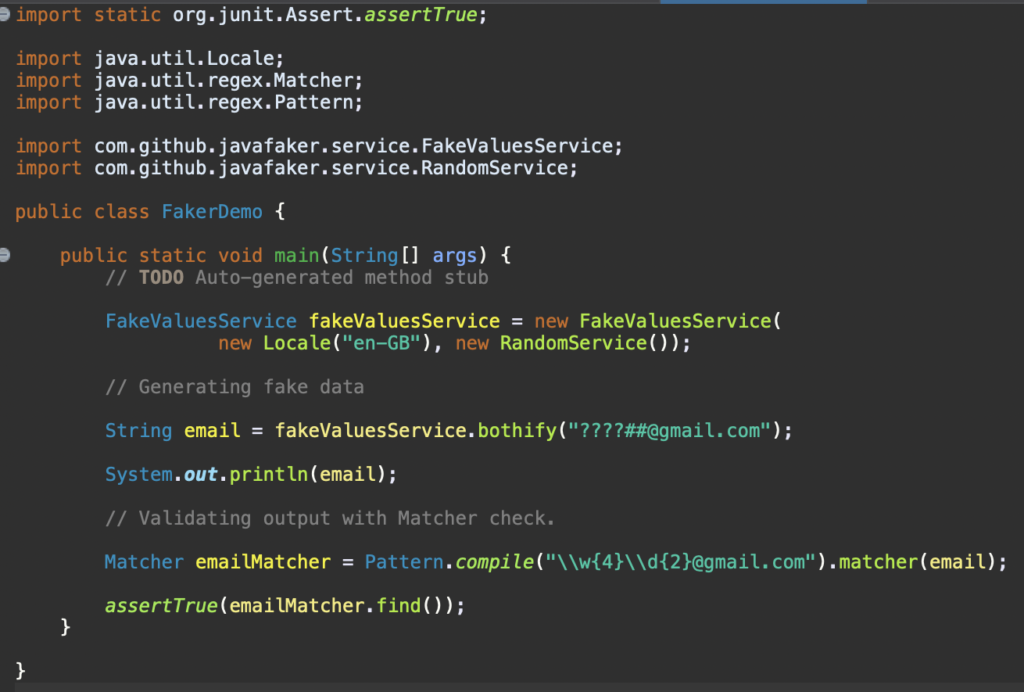
In the below test, we create a FakeValueService instance with locale ‘en-GB’ and generate a unique fake Gmail address with the help of the Bothify method.
Here, we replace ‘?’ with random letters and ‘#’ with random numbers and then validate the generated Gmail address with the help of Matcher.
In the below code snippet, we will use FakeValueService to create a random sequence based on a specified regex using the Regexify method.
In this tutorial, we explored the Java Faker library to generate real-looking fake data and the useful classes Java Faker class and FakeValueService class. Also, we saw how to use locales to generate location-specific data.
Multiple supported types
Fakers support many data types; you can see the list below. It might have what you need
- Address
- Ancient
- Animal
- App
- Aqua Teen Hunger Force
- Artist
- Avatar
- Back To The Future
- Aviation
- Basketball
- Beer
- Bojack Horseman
- Book
- Boolean
- Business
- ChuckNorris
- Cat
- Code
- Coin
- Color
- Commerce
- Company
- Crypto
- DateAndTime
- Demography
- Disease
- Dog
- DragonBall
- Dune
- Educator
- Esports
- EnglandFootBall
- File
- Finance
- Food
- Friends
- FunnyName
- GameOfThrones
- Gender
- Hackers
- HarryPotter
- Hipsters
- HitchhikersGuideToTheGalaxy
- Hobbit
- HowIMetYourMother
- IdNumber
- Internet
- Job
- Kaamelott
- LeagueOfLegends
- Lebowski
- LordOfTheRings
- Lorem
- Matz
- Music
- Name
- Nation
- Number
- Options
- Overwatch
- PhoneNumber
- Photography
- Pokemon
- Princess Bride
- Relationship Terms
- RickAndMorty
- Robin
- RockBand
- Shakespeare
- Sip
- SlackEmoji
- Space
- StarCraft
- StarTrek
- Stock
- Superhero
- Team
- TwinPeaks
- University
- Weather
- Witcher
- Yoda
- Zelda
When you initialize a Java Faker object without any parameters, by default it will be in English. If you want your data to be in Vietnamese, you can use “vi” to setting Locale.
Faker faker = new Faker(new Locale(“vi”));
You can see other languages that are supported here.
Conclusion
Java Faker will strongly help you input rapidly and randomly, for instance, personal data, which would cost you time to generate similar fake personal information if done normally.
Reference
GitHub – DiUS/java-faker: Brings the popular ruby faker gem to Java