



If your load test is only as good as your data, how do you generate hundreds of thousands of realistic records quickly, safely, and repeatedly?
Introduction
Imagine your team is preparing to run a performance test for a brand-new analytics platform.
The scripts are ready. The infrastructure is provisioned. Dashboards are configured.
Then someone asks a simple question:
“Where are the 500,000 records we’re supposed to test with?”
Suddenly, the bottleneck is no longer the performance test—it is the data.
Generating large-scale test data is often underestimated. In many projects, creating realistic datasets consumes more effort than writing the test scripts themselves. Whether you are validating search, analytics, reporting, recommendation engines, or pagination, large and representative datasets are essential.
Before Choosing a Tool, ask yourself three questions:
• How much data do I need?
• Do I need concurrent execution?
• Am I validating functionality or generating load?
The answers determine whether Postman or k6 is the better choice.
Understanding the Goal
There are generally two scenarios.
Scenario 1 — Data Preparation
You simply need enough data for testing.
Examples include:
- Creating 20,000 customer accounts
- Populating a database before UI testing
- Preparing records for search functionality
- Creating observations before analytics testing
Performance is not your concern.
You only need the requests to succeed.
Scenario 2 — Load Generation
Your objective is completely different.
Instead of creating data, you’re trying to answer questions like:
- Can the API handle 500 requests per second?
- What happens with 200 concurrent users?
- Where is the system’s breaking point?
- Does the application respect rate limiting?
This is no longer data preparation.
This is performance testing.
The distinction matters because it determines which tool is appropriate.
Example scenarios
We’ll generate 50,000 test users via:
POST /api/users
Assume the request body:
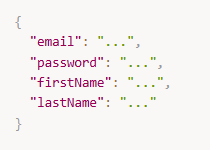
And response includes:

Option 1: Generating large test data with Postman
Postman can generate data via Collection Runner or Newman (CLI) with:
- environment variables
- pre-request scripts
- CSV/JSON data files
When Postman works well
- You need workflow-style data setup (create user → login → create order → verify)
- You want quick iteration and visibility
- Your scale is hundreds to low thousands (sometimes tens of thousands, depending on environment)
Example: Postman pre-request script (unique email)
In the request Pre-request Script:
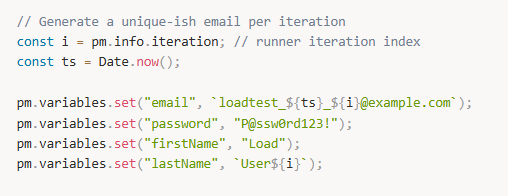
Then use variables in the request body:
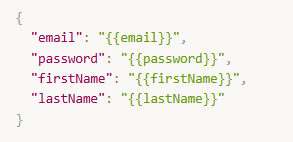
Running at scale with Newman
If you have a collection and environment:
newman run collection.json -e env.json -n 50000 –delay-request 0
Common issues when using Postman for high-volume testing
- Runner/Newman are not designed for high concurrency; they’re mostly sequential or limited.
- Memory usage grows with large data files and verbose reporting.
- Error handling and retry logic is possible but becomes clunky.
- You’ll often need to manage throttling manually (
--delay-request, backoff logic in scripts).
Option 2: Generating large test data with k6
k6 is built for:
- high concurrency (many virtual users)
- long-running execution
- performance-style workloads
When k6 works well
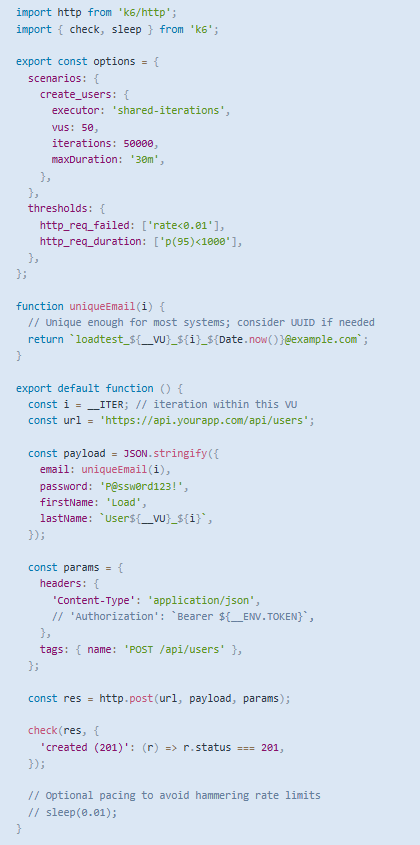
- You need tens of thousands to millions of entities
- You want controlled concurrency + pacing
- You want better retry/backoff, metrics, and CI-friendly runs
Example: k6 script to create 50,000 users
Postman vs. k6: strengths and weaknesses
| Criterion | Postman | k6 |
|---|---|---|
| Best for | Functional workflows, exploratory + regression checks | High-volume generation + performance-style execution |
| Concurrency | Limited | Excellent |
| Scale comfort zone | Hundreds → low thousands (sometimes more) | Tens of thousands → millions (depending on API) |
| Scripting | Easy for request-level logic | More code, but more flexible at scale |
| Data files | CSV/JSON data-driven runs are convenient | Possible, but large files need careful handling |
| Retry/backoff | Possible, but less elegant | Straightforward to implement |
| Metrics | Basic reports | Strong metrics + thresholds |
| CI/CD | Newman works, but not ideal for very large runs | Designed for CI and performance gates |
| Debuggability | Great UI | Better logs/metrics; less UI-driven |
Conclusion
Data generation is often treated as a preparation step, but in reality it is part of the test itself.
Every generated request exercises authentication, validation, business rules, persistence, and system capacity.
Choosing between Postman and k6 isn’t about choosing a better HTTP client.
It’s about choosing the right execution model.
Use Postman when correctness is your priority.
Use k6 when scale becomes a requirement.
The moment your test data becomes larger than your functional test, you’ve entered a different engineering problem—and that’s exactly where k6 begins to shine.