


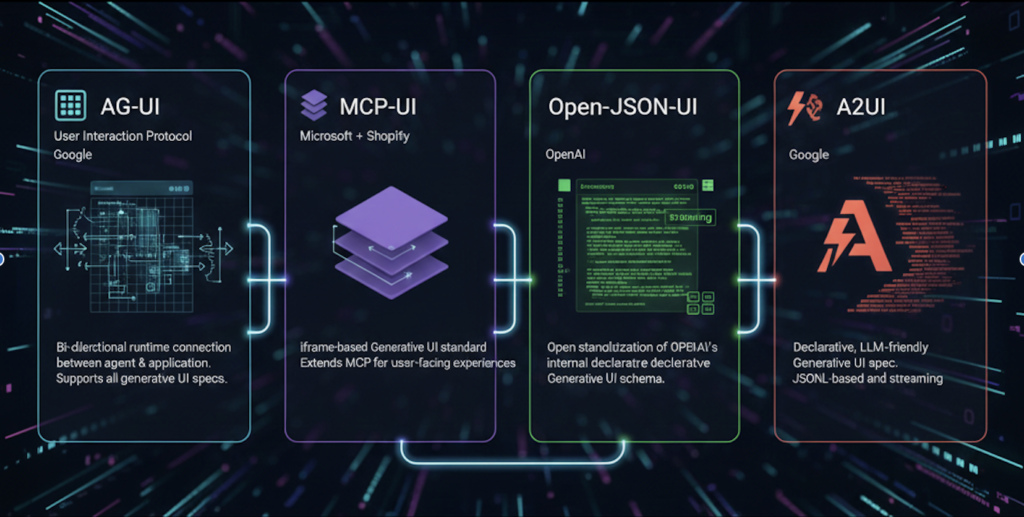
If you’ve been hearing terms like Open-JSON-UI, A2UI, MCP-UI, and AG-UI, you’re not alone if they feel confusing.
They sound similar.
They all talk about “UI”.
They all involve JSON, agents, or tools.
Without context, it’s easy to think:
“Are these competing frameworks?”
“Which one should I use?”
“Do I need all of them?”
The short answer is: they are not alternatives. They exist because UI stopped being a single thing.
So let’s start from a simple checkout flow, and watch how each idea appears naturally. When teams first build an e-commerce application, UI is usually the least controversial part.
You design a product list page.
You design a cart page.
You design a checkout page.
Frontend renders screens. Backend returns data. Everyone is happy.
Then one day, someone asks:
“Can we make it smarter?”
When UI stops being static?
Imagine a checkout flow. A user clicks Pay, but forgets to enter their city.
Traditionally, the backend returns a validation error and the frontend re-renders the entire address form.
Same screen. Same layout. One red error message.
It works—but it’s not pleasant.
Now imagine you have an agent.
The agent reasons:
“The user only missed one field.
Showing the full form again is unnecessary and frustrating.”
So instead of returning the same screen, the backend returns a new UI, generated at runtime:
{
    "screen": {
        "title": "Just one more thing",
        "components": [
            {
                "type": "text",
                "value": "We only need your city to continue"
            },
            {
                "type": "input",
                "id": "city"
            }
        ]
    }
}
At this moment, something important has changed.
UI is no longer fixed.
UI is now a runtime decision.
This is what people mean when they say Generative UI.
The first step: JSON-driven UI (Open-JSON-UI)
Before agents ever entered the picture, many teams were already halfway there—often without realizing it.
Backends returned JSON describing what the UI should look like, and frontends rendered it.
For example, a cart page:
{
    "screen": {
        "title": "Your Cart",
        "components": [
            {
                "type": "productList"
            },
            {
                "type": "priceSummary"
            },
            {
                "type": "button",
                "label": "Checkout"
            }
        ]
    }
}
This approach is:
- Simple
- Predictable
- Easy to test
Later, this pattern became known as Open-JSON-UI.
Open-JSON-UI is not an agent.
It does not reason or adapt.
It answers one simple question:
“What should the UI look like right now?”
For product lists, carts, dashboards, and admin screens, Open-JSON-UI works beautifully.
When the agent starts deciding the UI (A2UI)?
Checkout is where things change.
Now the system doesn’t just describe UI—it decides it.
An agent may:
- Ask only for missing information
- Explain why something failed
- Adapt the flow based on user behavior
Here, the UI is no longer predefined.
It is the output of reasoning.
This pattern is commonly called A2UI (Agent-to-UI).
A2UI is powerful and user-friendly—but it comes with risk.
Payment changes everything
The moment payment enters the picture, flexibility becomes dangerous.
No team wants an agent to:
- Invent a “Pay” button
- Skip confirmation steps
- Modify legal text
- Change card input fields
Payment UI must be:
- Owned by the payment provider
- Isolated
- Auditable
- Compliant
So teams introduce iframes.
When the agent decides it’s time to pay, it doesn’t generate UI anymore.
Instead, it selects a tool, and that tool owns the UI:
{
    "ui": {
        "kind": "iframe",
        "src": "https://payment.example.com/checkout",
        "height": 600
    }
}
This approach is often called MCP-UI.
The agent decides when to pay.
The tool decides how payment looks.
The frontend problem no one talks about
At this point, frontend code starts to struggle.
Sometimes it receives:
- JSON screens (Open-JSON-UI)
- Agent-generated screens (A2UI)
- iframe instructions (MCP-UI)
Early implementations usually look like this:
if (json.screen) {
renderJsonUI(json);
} else if (json.kind === "iframe") {
renderIframe(json);
}
This works… until it doesn’t.
The frontend is guessing what kind of UI it received.
A small backend change can silently break everything.
This is the real problem AG-UI was created to solve.
AG-UI: not a UI framework, but a protocol
AG-UI does not replace Open-JSON-UI, A2UI, or MCP-UI.
It answers one very specific question:
“What kind of UI is this?”
Instead of guessing, the backend says it explicitly.
Example: agent-generated UI:
{
    "type": "ui.update",
    "ui": {
        "standard": "a2ui",
        "payload": {
            "screen": {
                "title": "Just one more thing",
                "components": [
                    {
                        "type": "input",
                        "id": "city"
                    }
                ]
            }
        }
    }
}
Or payment UI:
{
    "type": "ui.mount",
    "ui": {
        "standard": "mcp-ui",
        "payload": {
            "kind": "iframe",
            "src": "https://payment.example.com/checkout"
        }
    }
}
AG-UI does not understand the payload.
It only labels it and manages its lifecycle.
AG-UI is not one-way communication protocol
A common misunderstanding is thinking AG-UI only sends UI down to the frontend.
Payment shows why this is wrong.
When a user interacts with a payment iframe, things happen:
- Payment succeeds
- Payment fails
- User cancels
The agent must know.
So the frontend sends an AG-UI event back:
{
    "type": "user.event",
    "sessionId": "sess-456",
    "event": "PAYMENT_CANCELLED"
}
The agent reasons:
“The user canceled payment.
Maybe they want to choose another method.”
And returns a new UI:
{
    "type": "ui.update",
    "ui": {
        "standard": "a2ui",
        "payload": {
            "screen": {
                "title": "Payment cancelled",
                "components": [
                    {
                        "type": "text",
                        "value": "Choose another payment method?"
                    }
                ]
            }
        }
    }
}
AG-UI is a closed event loop, not a one-directional pipe.
Shared state is explicit, not magic
Agents do not “see” UI state.
If a user deletes something, changes something, or completes a step, the frontend must say so:
{
    "type": "user.event",
    "event": "PAYMENT_SUCCESS",
    "data": {
        "transactionId": "tx_123"
    }
}
The agent updates its memory and decides what happens next.
No hidden synchronization.
No implicit coupling.
Just clear contracts.
Why AG-UI matters?
Generative UI is not about letting agents draw buttons.
It’s about coordination:
- Between static UI and agent-driven UI
- Between safe, compliant tools and flexible reasoning
- Between frontend, backend, and agent
AG-UI exists to make that coordination explicit, reliable, and evolvable.
Reference for AG-UI https://docs.ag-ui.com/introduction