



Introduction
Imagine a testing framework that transforms the mundane task of writing tests into an art form—enter Mocha, the JavaScript testing superhero. This feature-rich framework simplifies testing for Node.js and browser-based applications, offering flexibility, customizable test setups, seamless asynchronous handling, and detailed reports. Supporting multiple assertion libraries, Mocha empowers developers to tailor their testing strategies while ensuring reliable, bug-free software, making it the go-to tool for an effortless and efficient testing experience.
Why use mocha? for Test Automation
Mocha stands out in the testing landscape with its flexible and intuitive approach to test automation.
- Descriptive Testing: With describe() and it() blocks, you can write tests that read almost like natural language.
- Versatile Assertion Support: Works seamlessly with multiple assertion libraries like Chai.
- Async Testing: Built-in support for testing synchronous and asynchronous code.
Getting Started with Mocha for Test Automation
Quick Setup for Mocha
1. Prerequisites
Node.js and npm (Node Package Manager) are required to run Mocha.
It can be downloaded and installed directly from its official website. (Mocha is compatible only with Node.js versions 14.0.0 and above.)
Verify the installation:

2. Install Mocha
Install Mocha as a development dependency:
npm install --save-dev mocha3. Create a Project Directory
Create a folder for your project:
mkdir test4. Set up a test script in package.json:
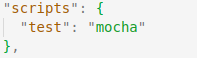
5. Write your First Test
Inside the tests folder create a test file, e.g., loginPageTest.js:
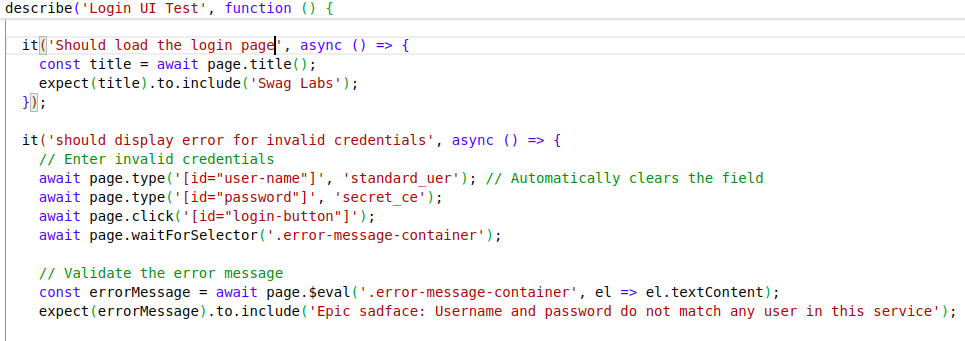
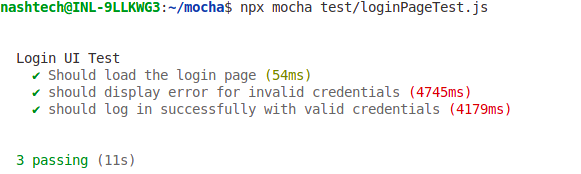
6. Run your tests using the Nightwatch CLI:
npm testor npx mocha test/test1.js
Key Components of Mocha Testing
1. Test Structure and Syntax
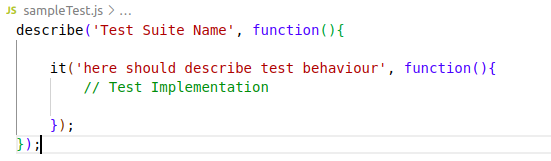
Mocha uses a Behavior-Driven Development (BDD) approach with two primary functions:
- describe(): Groups related test cases together.
- it(): Defines the individual test cases.
Example of Test Structure:
2. Mocha hooks
- before(): This hook executes once before any of the tests within the code block are run.
- after(): This hook is executed once after all the tests in the code block have finished running.
- beforeEach(): This hook runs before each individual test case within the code block is executed.
- afterEach(): This hook runs after each individual test within the code block has completed.
3. Assertion Libraries
Mocha doesn’t provide built-in assertions but integrates smoothly with assertion libraries like Chai. Install Chai enhance your testing capabilities. Install Chai enhance your testing capabilities.
npm install --save dev chai4. Unique Test Features
Mocha provides functionality to specify exactly which tests to run and which ones to skip.
- Exclusive Tests – .only() is your surgical test executor, by isolating specific test cases or entire suites with a single method call.
- Inclusive Tests – Unlike .only(), the .skip() feature allows you to instruct Mocha to bypass specific suites or test cases.
- Pending Tests – Tests that are marked as pending will still appear in the test results, but they are not considered as failures.
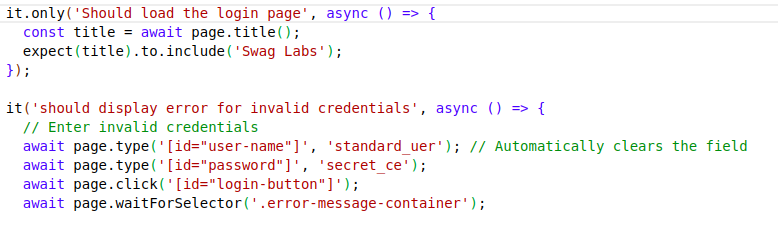
It will only execute first test case:
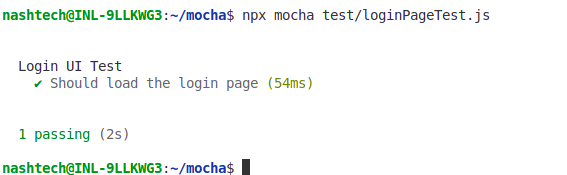
5. Retry and Timeouts
Retry:
- It executes the failed tests several times according to your requirement.
- Re-runs works on beforeEach/afterEach hooks but not in the before and after.
Timeouts:
There are three levels in which we can use Timeouts –
- Suite-level – You can apply suite-level timeouts across the entire test suite or disable them completely by using
this.timeout(0). - Test-level – You can configure specific timeouts for each individual test or disable them entirely by setting
this.timeout(0). - Hook-level – You can apply hook-level timeouts directly within the hooks.
For example, in this case, this.timeout() is applied at the suite level.
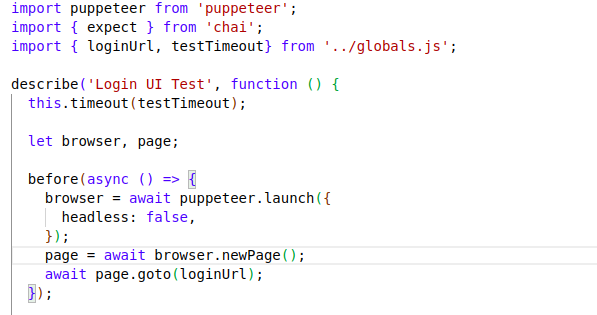
6. Reporters
Mocha reporters are mostly Terminal based
- Spec – This is a default reporter. The ‘spec’ reporter displays test results in a hierarchical structure, reflecting the organization of the test cases.
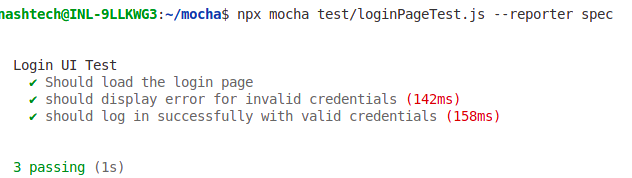
- Dot Matrix – The dot matrix reporter uses a series of characters to represent test cases: failures are marked with red exclamation marks (!), pending tests with blue commas (,), and slow tests are highlighted in yellow.
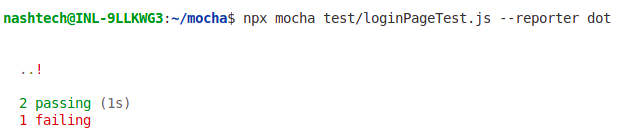
- Other types – NYAN, TAP, Landing Strip, List, Progress, JSON, JSON Stream, Min, Doc
Best Practices
- Write descriptive test cases
- Keep tests small and focused
- Use hooks for setup and cleanup
- Cover different scenarios and edge cases
- Integrate with continuous integration systems
Conclusion
Mocha is not just a testing framework; it’s a powerful tool designed to make testing straightforward, efficient, and reliable. By streamlining the process, it helps developers ensure their applications are reliable and deliver a seamless user experience.
Reference
https://mochajs.org/#getting-started
https://testautomationu.applitools.com/mocha-javascript-tests