


This blog will help us with Getting Started with Report Portal Using Docker & Kubernetes. In today’s fast-paced software development world, ensuring that applications are of high quality and reliability is crucial. Testing and quality assurance have become integral parts of the development process, highlighting the need for efficient and scalable testing platforms. This is where Report Portal steps in a powerful tool designed to streamline test execution, analysis, and reporting.
What is Report Portal?
Report Portal is an open-source, AI-powered test automation reporting platform. It provides a comprehensive solution for managing automated tests, gathering test results, and generating detailed reports. Whether you’re working with small teams or large enterprises, Report Portal is highly customizable and supports various testing frameworks to meet your specific needs.
Why Docker & Kubernetes?
Docker offers lightweight containers that package applications and their dependencies, ensuring consistency across different environments. Meanwhile, Kubernetes serves as a container orchestration platform, automating deployment, scaling, and management tasks.
Advantages of Docker & Kubernetes with Report Portal:
- Portability: Docker containers offer a consistent environment for running Report Portal, allowing seamless deployment across different platforms and environments.
- Scalability: Kubernetes facilitates automatic scaling of Report Portal instances based on workload demands, ensuring optimal performance and resource utilization.
- Flexibility: Docker and Kubernetes provide a flexible and modular architecture, enabling customization and extension of Report Portal to meet specific requirements.
With Report Portal, Docker, and Kubernetes working together, teams can streamline their testing processes, ensuring robust and reliable applications in today’s dynamic software landscape.
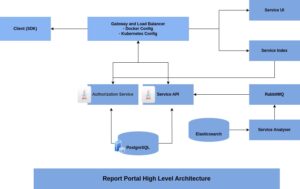
Primary characteristics of ReportPortal:
ReportPortal offers several key features that streamline test automation and reporting processes. Firstly, it seamlessly integrates with mainstream platforms like Jenkins, Jira, and BDD processes, along with various functional and unit testing frameworks. This integration enables real-time tracking of execution statuses directly within ReportPortal. Moreover, test case execution results are stored in a structured manner, mirroring the organization of reporting suites and test plans, providing a cohesive view of all related data in one place.
Users have access to logs, screenshots, binary data, and the execution pipeline of specific test cases, facilitating easy access to previous execution results. Additionally, ReportPortal supports collaborative analysis by allowing users to associate test cases with products, bugs, automation issues, or system issues, and submit them as issues directly from the execution result. Furthermore, ReportPortal leverages historical data of test execution to provide enhanced capabilities, including auto result analysis and identification of root causes for failures.
This analysis results in test results flagged for further engineer analysis, ensuring that potential issues are promptly addressed and resolved.
Streamlining ReportPortal Deployment with Docker:
Prerequisites:
- Installation of Docker.
- To achieve optimal performance, it’s advised to allocate a minimum of 2 CPUs and 6 GB of RAM for Docker.
- Docker Desktop is accessible for users on MAC, Windows, and Linux operating systems.
- However, for enhanced stability and performance, it’s strongly recommended to deploy Docker in a Linux-based environment.
Configure and Deploy ReportPortal:
- Retrieve the most recent ReportPortal Docker Compose YAML/YML file from the original source or use it by running the following command:
curl -LO https://raw.githubusercontent.com/reportportal/reportportal/master/docker-compose.yml
- Launch the application using the command.
docker-compose -p reportportal up -d –force-recreate
-
- -p reportportal: Assigns the project prefix ‘reportportal’ to all containers.
- up: Initiates the creation and startup of containers.
- -d: Activates daemon mode.
- –force-recreate: Ensures the recreation of containers.
Streamlining ReportPortal Deployment on Kubernetes with Helm:
Prerequisites:
- Minimum requirements for a single-node ReportPortal solution: 2 CPUs and 6Gi of memory.
- Required versions:
- Kubernetes v1.26+
- Helm Package Manager v3.4+
Configure and Deploy ReportPortal:
- Execute the provided command to add the official ReportPortal Helm Chart repository.
helm repo add reportportal https://reportportal.io/kubernetes && helm repo update reportportal
- Once added, proceed to install the Chart using the following command.
helm install my-release –set uat.superadminInitPasswd.password=”MyPassword” reportportal/reportportal
- Upon the initial installation and the first login of the SuperAdmin, they are required to create a unique initial password. This password should differ from the default password provided in the ReportPortal installation documentation.
- For uninstallation, use the following command.
helm uninstall my-release
- Execute these commands to manage the installation and removal of the ReportPortal Helm Chart effectively.
Launch ReportPortal:
- If you choose to deploy ReportPortal on a distinct host, access it through.
http://IP_ADDRESS:8080
- Use the provided credentials:
- For user access:
- Username: default
- Password: 1q2w3e
- For admin access:
- Username: superadmin
- Password: erebus
- For user access:
Conclusions and Recommendations
Mastering test execution analysis with Report Portal, Docker, and Kubernetes is a journey that requires ongoing learning and adaptation. By following best practices and leveraging the powerful features of Report Portal, teams can streamline testing processes, improve software quality, and accelerate time-to-market.
In conclusion, Report Portal serves as a valuable tool for organizations looking to optimize test execution analysis and improve overall software quality. By deploying Report Portal using Docker and Kubernetes, teams can harness the full potential of this powerful platform and drive continuous improvement in their testing practices.
Reference: