


1. Introduction
In Agile projects, testers often create the same testing tasks for each Product Backlog Item (PBI).
For example, a PBI may require tasks for creating test cases, reviewing test cases, executing tests, and verifying defects.
Creating these tasks manually is repetitive, especially when a sprint contains many PBIs.
This workflow uses GitHub Copilot Agent with Azure DevOps MCP to automate the creation of testing tasks directly in Azure DevOps.
2. Setup Azure DevOps MCP
This guide uses the Azure DevOps Remote MCP Server with VS Code and GitHub Copilot.
The remote server is hosted by Azure DevOps, so there is no need to install or run an MCP server locally. It uses Microsoft Entra authentication.
Step 1: Create mcp.json
In the project repository, create:
.vscode/
└── mcp.json
Add the following configuration:
{
  "servers": {
    "ado-remote-mcp": {
      "type": "http",
      "url": "https://mcp.dev.azure.com/YOUR_ORGANIZATION"
    }
  }
}
Replace YOUR_ORGANIZATION with your Azure DevOps organization name.
Step 2: Authenticate
After saving .vscode/mcp.json, open GitHub Copilot in VS Code and switch to Agent mode.
The first time Copilot sends a request to the Azure DevOps MCP server, VS Code prompts you to sign in with a Microsoft Entra account that has access to the Azure DevOps organization.
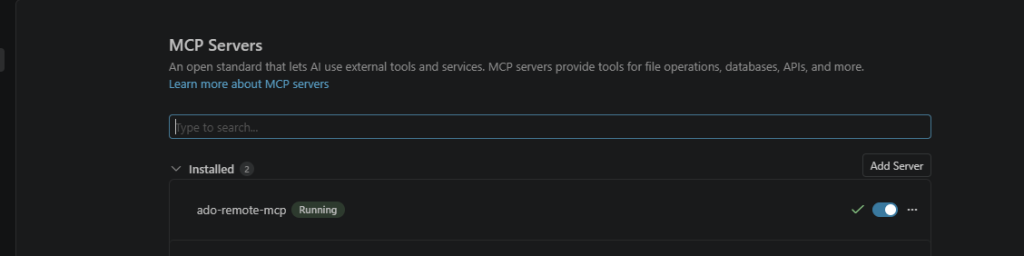
After sign-in completes, open Agent Customizations > MCP Servers and confirm that ado-remote-mcp appears in the Installed list with the status Running.
Step 3: Verify the Connection
Test the connection with a simple read request:
Show the PBIs in the current sprint for project "YOUR_PROJECT" and team "YOUR_TEAM".
Then:
Show the existing child tasks for PBI 1234.
If Copilot successfully returns data from the Azure DevOps project, the MCP connection is working.
3. Approach
Once the MCP connection is working, give Copilot Agent clear rules for how testing work items should be handled.
A practical workflow should follow these rules:
- Work within a clearly defined project, team, and sprint scope.
- Check existing tasks, Review Requests, and links before creating anything.
- Create only missing work items and missing links.
- Use the project’s required titles, fields, and relationship types.
- Show all planned write operations for approval before making changes.
The most important part is the duplicate check.
If a PBI already has a required testing task, Review Request, or link, Copilot should not create another one.
This helps make the workflow safer to run repeatedly and helps prevent duplicate work items.
The overall flow is:
Sprint scope
    ↓
Find PBIs
    ↓
Check existing tasks and links
    ↓
Create missing testing tasks
    ↓
Link tasks to PBI
    ↓
Create Review Request if required
    ↓
Link Review Request according to the project workflow
4. Example Project Testing Workflow
The following is an example workflow for a project named Example Commerce Platform.
The team defines four standard testing tasks for each PBI:
| Task | Purpose |
|---|---|
Test - Create Test Case | Create test cases |
Test - Review Test Case | Review test cases |
Test - Execute Test Cases | Execute test cases |
Test - Verify bug | Verify defects |
The same project uses this Review Request title format:
[PBI ID] Review Test Case Request
This is only an example. Another project can use different task titles, a different Review Request type, different tags, or no Review Request workflow at all.
5. Execution Prompt
Use the following prompt for Example Commerce Platform. Replace the placeholders with that project’s actual team, area, and sprint.
For project "YOUR_PROJECT", team "YOUR_TEAM", area path "YOUR_PROJECT\\YOUR_AREA",
and iteration path "YOUR_PROJECT\\YOUR_SPRINT":

1. List all Product Backlog Items in the specified iteration.

2. Retrieve the Task work item type metadata.

   Identify any project-specific field and allowed values used to classify testing tasks.

   If no such field exists, continue without setting a classification field.

3. For each PBI, retrieve child work items.

   Consider only children with work item type "Task".

4. Create only the missing tasks from this exact list.

   A task already exists only when its title exactly matches one of these titles:

   - "Test - Create Test Case"
   - "Test - Review Test Case"
   - "Test - Execute Test Cases"
   - "Test - Verify bug"

5. For each new Task, set:
   - System.Title
   - System.AreaPath
   - System.IterationPath
   - Microsoft.VSTS.Common.Activity = "Testing"

   When a classification field was identified in step 2, set it only with a value verified by that metadata.

   Create a parent-child relation to its PBI.

6. For each PBI, check for a child work item of type "Review Request"
   titled "[PBI {PBI_ID}] Review Test Case Request"
   with tag "ReviewTesting".

   Create it only when missing.

   Set:
   - System.Title
   - System.Tags
   - System.AreaPath
   - System.IterationPath

7. Identify the project-defined relationship types for linking a Review Request
   to its PBI and review task.

   If the project does not require either relationship, do not create it.

8. Link the new Review Request to the PBI and the review task using the verified
   relationship types.

   Do not add either link when it already exists.

9. Before performing any write operation, show a table of every planned Task,
   Review Request, and link.

   Wait for explicit approval.

   After approval, create only the planned missing work items and links.

10. Return a summary with:
    - PBI ID
    - Created or skipped Tasks
    - Created or skipped Review Request
    - Created or skipped links

    Do not modify any work item not covered by this request.
Review Request relationships are project-specific. Before creating links, verify which relationship types and display labels the project uses to associate a Review Request with its PBI and review task.
When Copilot prepares a write operation, VS Code displays an Approve Tool Result request. Review the target PBI, title, iteration, and parent link before approving it.
The signed-in Azure DevOps account must have permission to create and edit work items in the project.
6. Conclusion
Using GitHub Copilot Agent with Azure DevOps MCP makes it possible to automate repetitive Azure DevOps task creation while keeping the workflow controlled. By working within a defined sprint scope, checking for existing tasks and links, and requiring approval before write operations, the process remains repeatable and safe.
The main benefit is time savings. Instead of creating the same testing tasks manually for every PBI, the team can let Copilot prepare the missing work items and spend more time on test analysis, test design, execution, and defect verification.