


In the ever-evolving landscape of software development, automation and efficient collaboration have become paramount. GitHub Workflows emerge as a powerful tool in this realm, offering developers a streamlined approach to continuous integration and delivery (CI/CD). In this comprehensive guide, we’ll delve into the world of GitHub Workflows, with a special focus on .NET solutions. We’ll explore what GitHub Workflows are, their benefits, why they’re essential, and how to create one for your .NET project.
What is GitHub Workflow?
A GitHub Workflow is a configurable automated process defined using YAML files within a GitHub repository. It is part of GitHub Actions, which is a platform for continuous integration and continuous delivery (CI/CD). Workflows can perform various tasks such as building, testing, and deploying applications. They are triggered by specific events in the repository, such as pushes, pull requests, or manual triggers, and can include multiple jobs that run sequentially or in parallel.
Benefits of GitHub Workflow
Seamless Integration:
GitHub Workflows are natively integrated into your GitHub repository, eliminating the need for external CI/CD tools. This tight integration ensures a smoother development experience and reduces context switching.
Automation:
By automating repetitive tasks like building, testing, and deploying, GitHub Workflows free up developers to focus on writing code and solving problems.
Consistency:
Workflows ensure that every change goes through the same build and test process, reducing the “it works on my machine” syndrome and catching issues early.
Flexibility:
With support for various programming languages, including .NET, and the ability to run on different operating systems, GitHub Workflows can adapt to diverse project requirements.
Community and Marketplace:
GitHub’s extensive marketplace offers a wide array of pre-built actions, allowing you to quickly add complex functionality to your workflows.
Parallel Execution:
Workflows can run multiple jobs in parallel, significantly reducing the overall execution time of your CI/CD pipeline.
Built-in Secret Management:
GitHub provides secure storage for sensitive information like API keys, making it easy to use these secrets in your workflows without exposing them.
Detailed Logs and Visibility:
Each workflow run provides detailed logs, making it easy to diagnose and fix issues. The status of workflow runs is also visible directly in pull requests.
Customizability:
Users can create workflows tailored to their specific needs by defining various jobs and steps within the YAML configuration.
Event-Driven:
Workflows can be triggered by a wide range of events, enabling responsive and dynamic processes.
Reusability:
GitHub Actions allows for the reuse of actions across different workflows, promoting efficiency and consistency in automation.
Why Do We Need it?
Quality Assurance: By automatically running tests on every code change, workflows help maintain code quality and catch bugs early in the development process.
Time Efficiency: Automating repetitive tasks saves developers time and reduces human error, allowing teams to deliver features faster.
Continuous Integration: Workflows facilitate the practice of continuously merging code changes into a central repository, ensuring that the codebase is always in a working state.
Continuous Delivery: With automated builds and tests, workflows pave the way for continuous delivery, allowing teams to release new versions of their software quickly and reliably.
Consistency Across Environments: By defining the build and test environment in code, workflows ensure consistency between development, staging, and production environments.
Collaboration: Workflows provide visibility into the build and test process, fostering better collaboration among team members and making it easier to onboard new developers.
Scalability: As projects grow, manually managing builds and deployments becomes unsustainable. Workflows provide a scalable solution that grows with your project.
Writing a GitHub Workflow for .Net Solution
- Create the Workflow File: In your repository, create a new file at
.github/workflows/dotnet-ci.yml. This is where we’ll define our workflow. - Define the Workflow: Start by specifying when the workflow should run and on which operating system:
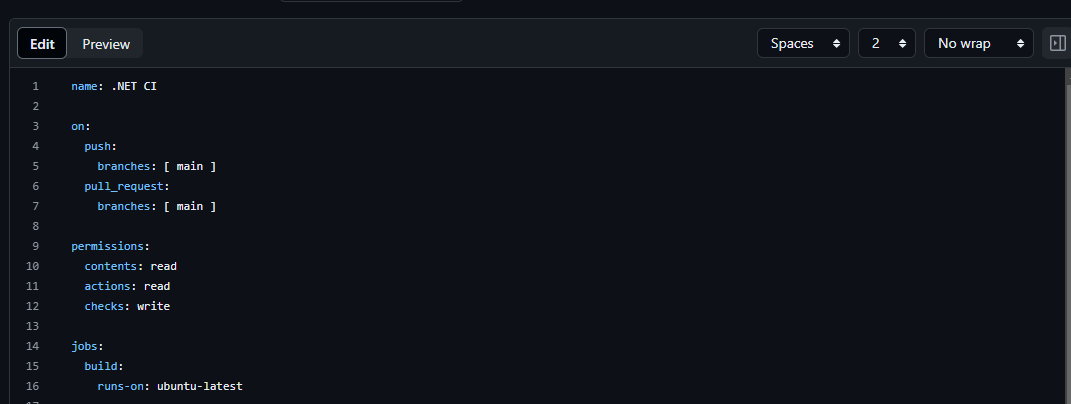
These permissions are need for later steps.
- Checkout Step: The first step in our job will be to checkout the code:

This action clones your repository into the workflow’s execution environment.
- Setup .NET: Next, we’ll set up the .NET environment:

This step ensures that the correct version of .NET is installed and available for subsequent steps.
- Restore Dependencies: Before building, we need to restore the project’s dependencies.
- Build the Project: Now we can build the project.

The--no-restoreflag is used because we’ve already restored dependencies in the previous step.
- Run Tests: After building, we’ll run the tests.

We’ve specified here to store the results in TestResults directory which will be used in next step.
- Test Reporter: So, to get a nice report of our test results, we can use a community action like
dorny/test-reporter

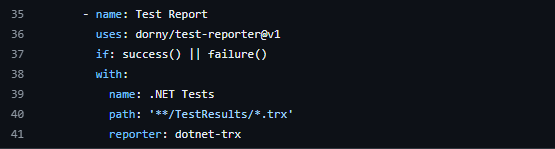
Putting it all together, your complete workflow file should look like this:
name: .NET CI

on:
  push:
    branches: [ main ]
  pull_request:
    branches: [ main ]

permissions:
  contents: read
  actions: read
  checks: write

jobs:
  build:
    runs-on: ubuntu-latest

    steps:
    - uses: actions/checkout@v4

    - name: Setup .NET
      uses: actions/setup-dotnet@v4
      with:
        dotnet-version: '8.0.x'

    - name: Restore dependencies
      run: dotnet restore

    - name: Build
      run: dotnet build --no-restore

    - name: Test
      run: dotnet test --no-build --verbosity normal --logger trx --results-directory TestResults

    - name: Test Report
      uses: dorny/test-reporter@v1
      if: success() || failure()
      with:
        name: .NET Tests
        path: '**/TestResults/*.trx'
        reporter: dotnet-trx
After running the workflow, this is how it looks like:
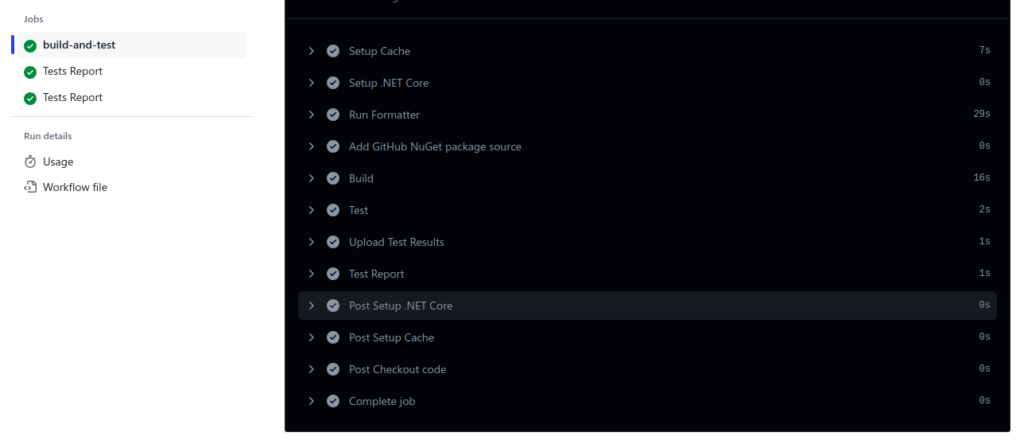
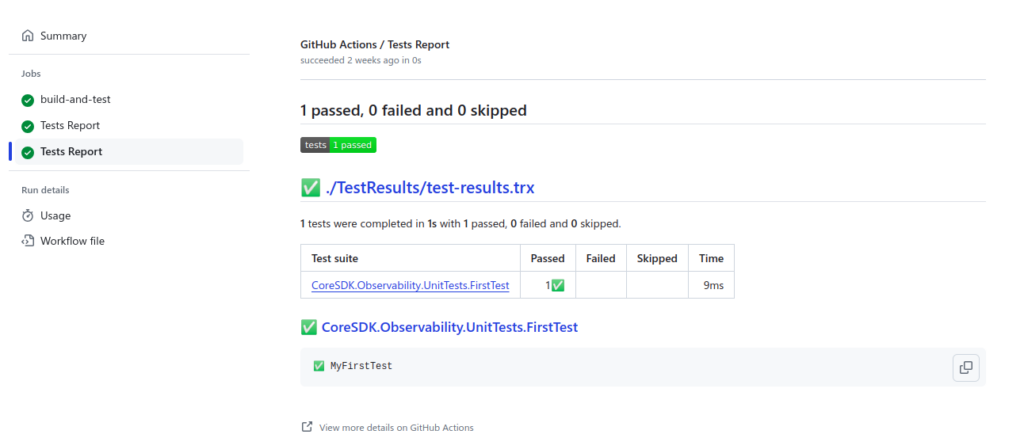
Conclusion
GitHub Workflows offer a powerful, flexible, and integrated solution for automating your software development processes. For .NET developers, they provide a seamless way to implement continuous integration and delivery practices directly within the GitHub ecosystem. By setting up a workflow like the one we’ve described, you can ensure that every change to your codebase is automatically built, tested, and reported on. This not only saves time and reduces errors but also helps maintain high code quality and facilitates faster, more confident releases.