



I. Introduction
Brief Introduction And Hook of Cloud Functions
One powerful serverless computing service is Google Cloud Functions (GCF), which allows developers to build and deploy applications without worrying about the underlying infrastructure. Serverless computing has gained immense popularity in recent years due to its benefits of scalability, cost-effectiveness, and simplified infrastructure management. In this blog post, we will delve into the features of Cloud Functions and explore its Java runtime capabilities through examples.
II. Understanding Google Cloud Functions
A. Definition
Google Cloud Functions is a serverless execution environment that enables developers to write lightweight functions in various programming languages, including Java. It provides a flexible and scalable platform for implementing event-driven architectures.
B. Benefits
Using Google Cloud Functions comes with several key benefits. Firstly, it offers scalability, allowing functions to automatically scale based on demand. Secondly, it is cost-effective, as users only pay for the execution time of their functions. Lastly, Google Cloud Functions simplifies infrastructure management, allowing developers to focus solely on writing code.
C. Versatility
This can be applied to various use cases. It can process HTTP requests, react to changes in Cloud Storage objects, and respond to Pub/Sub messages, among other events. This versatility makes it suitable for a wide range of scenarios.
III. Exploring the Features of Google
A. Event-driven Architecture
One of the notable features of Google Cloud Functions is its event-driven architecture. It can be triggered by various events, such as HTTP requests, Cloud Storage object changes, or Pub/Sub messages. This capability allows developers to build reactive and responsive applications.
B. Automatic Scaling
Google handles scaling automatically based on the incoming workload. Scalability is achieved by adjusting resources in real time, ensuring optimal performance even during spikes in traffic. This feature eliminates the need for manual scaling and ensures cost-efficient resource utilization.
C. Pay-as-you-go Pricing
With Google Functions, users only pay for the actual execution time of their functions. This pay-as-you-go pricing model contributes to a cost-efficient approach for running serverless applications. Additionally, there are no charges for idle time, making it convenient for sporadic or low-traffic workloads.
D. Integration with Other Google Cloud Services
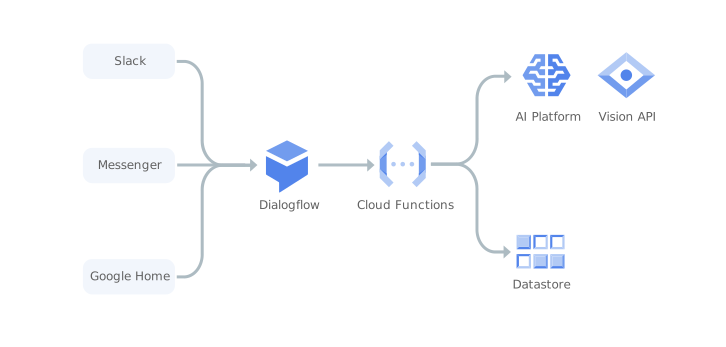
Google Cloud Functions seamlessly integrates with various other Google Cloud services, including Cloud Pub/Sub, Cloud Storage, and Fire-store. This deep integration enhances the functionality of Google Cloud Functions, enabling developers to leverage the capabilities of these services within their functions.
IV. Java Runtime
A. Introduce Java Runtime
Google Cloud Functions supports multiple programming languages, including Java. The Java runtime allows developers to write functions using familiar Java syntax and utilize the extensive Java ecosystem.
Benefits of Serverless Applications
Java brings several benefits to serverless applications. Its robustness, extensive libraries, and large community support make it suitable for building complex and scalable applications. Java developers can leverage existing codebases and libraries, streamlining the development process.
C. Setting up Java Development Environment
To set up the Java development environment for Google, developers need to install the necessary tools, including Java Development Kit (JDK) and Apache Maven. A guide with step-by-step instructions can be found in the Google documentation.
You can find more in the Google document over here.
D. Examples of Java Functions
Java functions in Google can be triggered by various events and handle cloud events effectively. Examples include processing HTTP requests, manipulating Cloud Storage objects, and reacting to Pub/Sub messages. These examples demonstrate the versatility and power of using Java with Google Functions.
Consider a real-world use case for Cloud Functions:
Problem Statement: in and before HTTP1.0 the GET method has allowed the request body not to be empty and Google APIGEE API Gateway (that strictly follows HTTP 1.1 onwards standard) rejects the same request in their global load balancer.
Solution for problem statement: By using the Google Cloud function, we can manipulate requests and transfer them to APIGEE like below.
import json
import requests

def lambda_handler(event, context):

    print(event)
    # Extract the request context and path
    request_context = event.get('requestContext', {})
    # path = event.get('path', '/')

    # Construct the full path
    full_path = event.get('rawPath', '/')

    # Extract relevant data from the event
    request_json = event.get('body', {})
    request_args = event.get('queryStringParameters', {})
    request_headers = event.get('headers', {})
    request_body = event.get('body', '')
    request_method = event['requestContext']['http']['method']

    response_body = {
        "message": f"Hello, full path: {full_path}, request_body: {request_body} and request_headers:{request_headers}, request-method: {request_method}"
    }

    # Create new request for Apigee
    # Modify this line to set the new host name
    new_host = 'api-dv-preview.amwayglobal.com'
    new_domain = f'https://{new_host}'

    # Constructing the new URL
    new_request_url = f'{new_domain}{full_path}'
    print(new_request_url)

    if request_method in ['GET', 'DELETE']:
        request_headers['content-length'] = '0'
        request_headers['host'] = new_host
        # Send the request without a request body
        new_response = requests.request(request_method, new_request_url, headers=request_headers)
    else:
        # For other request methods, include the original request body
        request_headers['host'] = new_host
        new_response = requests.request(request_method, new_request_url, headers=request_headers, data=request_body)

    new_response_data = {}
    if new_response is not None:
        new_response_data = {
            "new_response_status_code": new_response.status_code,
            "new_response_headers": dict(new_response.headers),
            "new_response_body": new_response.text
        }
        print("New Response Status Code:", new_response.status_code)
        print("New Response Headers:", new_response.headers)

        if new_response.text is not None:
            print("New Response Body:", new_response.text)
        else:
            print("New Response Body is None")

    response = {
        "statusCode": new_response_data['new_response_status_code'],
        "body": json.dumps(new_response_data)
    }

    return response
You can find more examples in the Google document over here.
V. Conclusion
A. Recap Key Features
Google Cloud Functions offers a powerful serverless platform with features such as event-driven architecture, automatic scaling, pay-as-you-go pricing, and seamless integration with other Google Cloud services. The Java runtime brings additional benefits of robustness, extensive libraries, and community support.
B. Potential of Cloud Function
The combination of Google and Java opens up possibilities for simplifying serverless application development and deployment. Developers can take advantage of the scalable and cost-effective nature of serverless computing while leveraging the capabilities of Java.
C. Encourage Exploration
To explore further, developers are encouraged to experiment with Functions using Java. The versatility of Google combined with the power of Java allows developers to build highly responsive and scalable serverless applications.
By harnessing the features and Java runtime of Google Cloud Functions, developers can unlock the potential of serverless computing and streamline their application development processes.
For more, you can refer to the Google Cloud Function
For a more technical blog, you can refer to the Nashtech blog: https://blog.nashtechglobal.com/