


Introduction:
As businesses generate and store massive amounts of data, having a reliable and scalable file storage solution is crucial. Google File Store is a fully managed file storage service offered by Google Cloud Platform, designed to provide consistent performance and secure storage for various workloads. In this blog post, we will explore the features and benefits of Google File store and learn how to get started with this powerful cloud storage service.
Features:
1. Workload Versatility:
Google File Store is an ideal solution for a range of workloads, including high-performance computing (HPC), media and entertainment, and enterprise applications. Its performance and scalability make it suitable for demanding tasks such as genome sequencing, and financial modeling, as well as storing and managing large media files like videos and audio.
2. NFS Support
File Store supports NFSv3 as well as NFSv4 as a result, making it compatible with various clients and systems. This allows for easy integration as well as seamless access to the file system across different platforms.
3. Snapshots and Backups:
With Filestore, you can easily create snapshots and backups of your data. This ensures data protection and provides a recovery option in case of accidental data loss or corruption.
4. High Availability:
Google File Store is designed to be highly available, ensuring that your data is accessible whenever you need it. At the same time, it is backed by Google’s global network of data centers, providing reliable access regardless of your location.
5. Scalability:
Filestore is built with scalability in mind. As your data storage needs grow, you can easily add capacity to your instance without any disruption, ensuring you have the resources you need when you need them.
6. Security Features:
Filestore offers robust security features to protect your data. It supports encryption furthermore access control, ensuring that your files are stored securely and that only authorized users have access to them.
7. Cost-Effectiveness:
Google Filestore offers a cost-effective storage solution. In effect you pay only for the storage you use, without any upfront costs. This allows you to effectively manage your storage expenses and hence scale your storage as your needs evolve.
Getting Started with Google Filestore:
To get started with Google Filestore, you can visit the Google Cloud Platform website and create a free account. Once your account is set up, you can create a File store instance, selecting the desired size and storage type. Once your instance is created, you can start storing and managing your data.
Consider the below scenario.
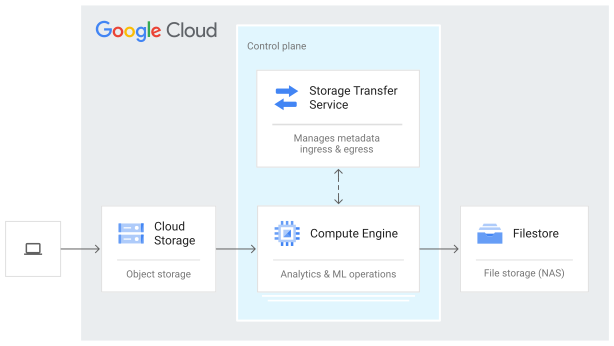
In one of our Client’s projects, they have to process many files accordingly from different Geo Location regions, and it is an on-premises application that afterward requires a file system interface. That can run parallel processing generating reports daily, so they’ve made it easy to migrate their enterprise applications to the cloud with Google’s fully managed storage service. Filestore Enterprise is built for critical applications requiring regional availability, as well as having unstructured NFS data requirements.
Here you can find steps for creating a Filestore instance by using the gcloud CLI
You can refer steps mentioned in Google Docs.
Conclusion:
Google File Store provides a robust, reliable, as well as scalable file storage solution for businesses of all sizes. With features such as NFS support, snapshots, backups, high availability, and security measures, File Store ensures the performance, integrity, and security of your data. By leveraging the benefits of Google File store, moreover, businesses can enjoy efficient data management, cost savings, and streamlined workflows for various workloads.
For more, you can refer to the Google File Store
For a more technical blog, you can refer to the Nashtech blog: https://blog.nashtechglobal.com/