


In this article, we will implement a Unary RPC using gRPC in a .NET Core application. Unary RPC is the simplest type of gRPC communication, where the client sends a single request to the server and receives a single response. We will create a weather service that returns the current temperature for a given city.

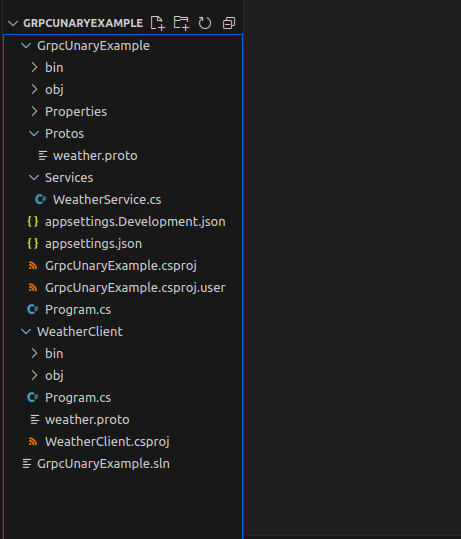
here is the folder structure to follow this tutorial:
Step 1: Define the gRPC Service in .proto File
First, we need to define our gRPC service and messages in a .proto file. This file describes the service and the data structures used in the communication between the client and server.
Note: GrpcUnaryExample project is serving as server and WeatherClient project is serving as client project here.
In GrpcUnaryExample project, Create a folder named “Protos” and add the file named “weather.proto”
weather.proto
syntax = "proto3";

option csharp_namespace = "GrpcUnaryExample";

service Weather {
  rpc GetWeather(WeatherRequest) returns (WeatherResponse);
}

message WeatherRequest {
  string city = 1;
}

message WeatherResponse {
  string city = 1;
  float temperature = 2;
  string timestamp = 3;
}
Step 2: Install gRPC and Protocol Buffers Tools
To use gRPC in your .NET Core project, you need to install the necessary NuGet packages. Run the following commands in the terminal:
dotnet add package Grpc.AspNetCore
dotnet add package Grpc.Tools
Step 3: Generate C# Code from .proto File
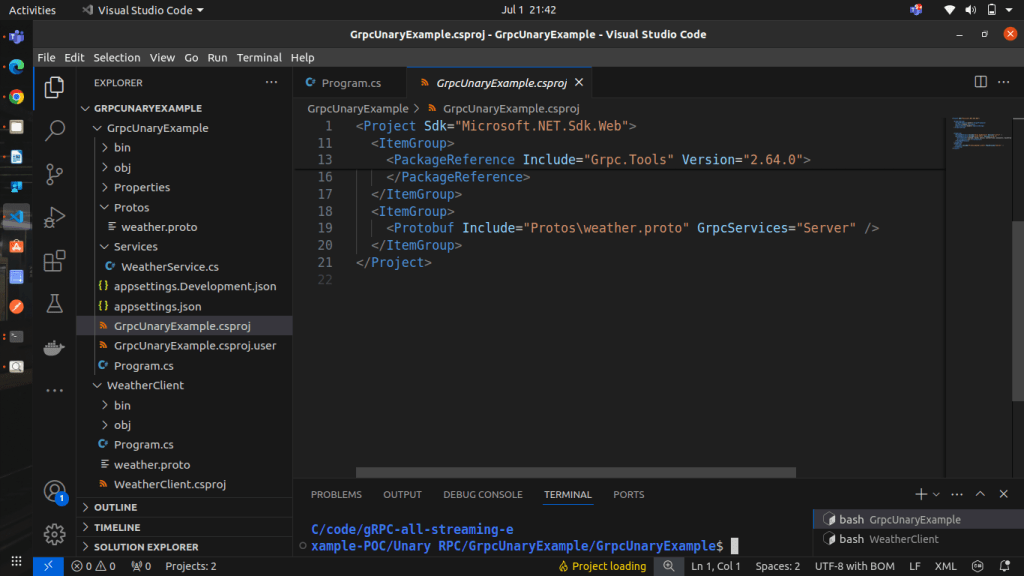
Add the following ItemGroup to your .csproj file to generate the C# code from the .proto file during the build process:
<ItemGroup>
  <Protobuf Include="Protos\weather.proto" GrpcServices="Server" />
</ItemGroup>
Step 4: Implement the gRPC Server
Create a folder named Services and add new class called WeatherService.cs that implements the WeatherBase class generated from the .proto file. This class will handle incoming gRPC requests.
using Grpc.Core;
using GrpcUnaryExample;
using Microsoft.Extensions.Logging;
using System;
using System.Threading.Tasks;

namespace GrpcUnaryExample
{
    public class WeatherService : Weather.WeatherBase
    {
        private readonly ILogger<WeatherService> _logger;

        public WeatherService(ILogger<WeatherService> logger)
        {
            _logger = logger;
        }

        public override Task<WeatherResponse> GetWeather(WeatherRequest request, ServerCallContext context)
        {
            _logger.LogInformation($"Received request for weather in {request.City}");

            // Simulate generating weather data
            var rnd = new Random();
            var temperature = rnd.Next(10, 30) + rnd.NextDouble();
            var timestamp = DateTime.UtcNow.ToString("yyyy-MM-ddTHH:mm:ssZ");

            var response = new WeatherResponse
            {
                City = request.City,
                Temperature = (float)temperature,
                Timestamp = timestamp
            };

            _logger.LogInformation($"Sending weather response for {request.City}: {response.Temperature}°C at {response.Timestamp}");

            return Task.FromResult(response);
        }
    }
}
Step 5: Configure gRPC in ASP.NET Core
Next, we need to configure our ASP.NET Core application to host the gRPC service. Update the Program.cs file as follows:
using GrpcUnaryExample;

var builder = WebApplication.CreateBuilder(args);

// Add services to the container.
builder.Services.AddGrpc();

var app = builder.Build();

app.MapGrpcService<WeatherService>();//adding weatherservice here
app.MapGet("/", () => "Communication with gRPC endpoints must be made through a gRPC client. To learn how to create a client, visit: https://go.microsoft.com/fwlink/?linkid=2086909");

app.Run();
Step 6: Run the gRPC Server
Build and run your application by executing the following command:
dotnet runStep 7: Implement the gRPC Client
Create a new console application for the gRPC client. In the client project, install the necessary NuGet packages:
dotnet add package Grpc.Net.Client
dotnet add package Google.Protobuf
dotnet add package Grpc.Tools
Copy the weather.proto file from the server project to the client project and add the following ItemGroup to the client’s .csproj file:
<ItemGroup>
  <Protobuf Include="Protos\weather.proto" GrpcServices="Client" />
</ItemGroup>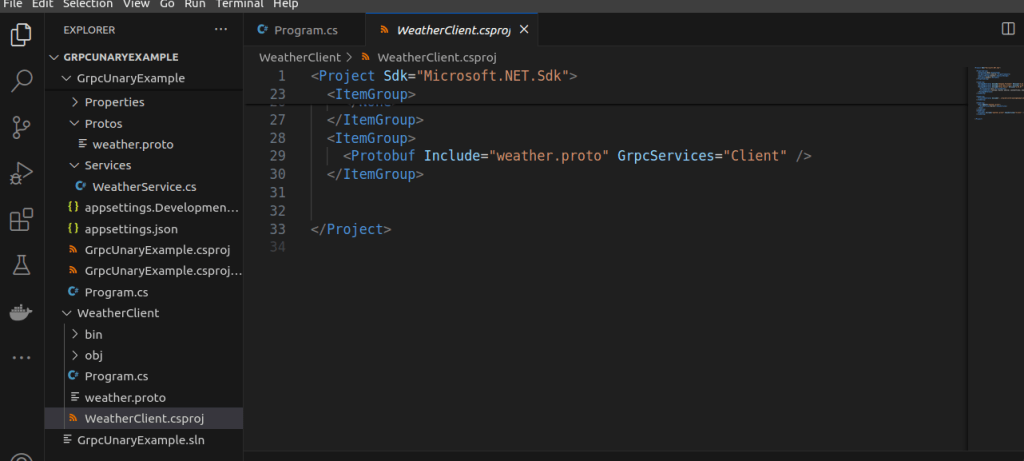
Next, implement the client application:
add the given code to Program.cs in WeatherClient project, make sure to change the namespace and localhost port as per your code.
using Grpc.Core;
using Grpc.Net.Client;
using GrpcUnaryExample;
using System;

namespace GrpcUnaryExample
{
    class Program
    {
        static void Main(string[] args)
        {
            // For development, trust all certificates (e.g., self-signed)
            AppContext.SetSwitch("System.Net.Http.SocketsHttpHandler.Http2UnencryptedSupport", true);

            var handler = new HttpClientHandler();
            handler.ServerCertificateCustomValidationCallback = HttpClientHandler.DangerousAcceptAnyServerCertificateValidator;

             //change the port as per your server port
            using var channel = GrpcChannel.ForAddress("https://localhost:5289", new GrpcChannelOptions
            {
                HttpHandler = handler
            });

            var client = new Weather.WeatherClient(channel);

            // Example of Unary RPC
            var response = client.GetWeather(new WeatherRequest { City = "New York" });

            Console.WriteLine($"Received weather update for {response.City}: {response.Temperature}°C at {response.Timestamp}");

            Console.WriteLine("Press any key to exit...");
            Console.ReadKey();
        }
    }
}
Step 8: Run the gRPC Client
Build and run the client application by executing the following command:
dotnet runand you will see the output like the following, the client will connect to the gRPC server, send a request for the weather in New York, and print the response to the console

You can download the POC code from here: https://github.com/sujitmeshramnashtech/gRPC-all-streaming-example-POC/tree/main/Unary%20RPC/GrpcUnaryExample
Conclusion
In this article, we implemented a simple Unary RPC using gRPC in a .NET Core application. We defined a weather service in a .proto file, implemented the server, configured ASP.NET Core to host the gRPC service, and created a client to communicate with the server. This example demonstrates the basics of gRPC communication, laying the groundwork for more complex patterns like streaming RPCs.