



Tricentis Testim is known as one of the most popular codeless automation testing tools that leverage AI to do automation tests efficiently. In this article, let’s see how Testim solves the challenges of automation testing.
1. Automation test challenges
With traditional automation testing tools, we may need to overcome a lot of challenges when we do automation testing. Here are some popular challenges.
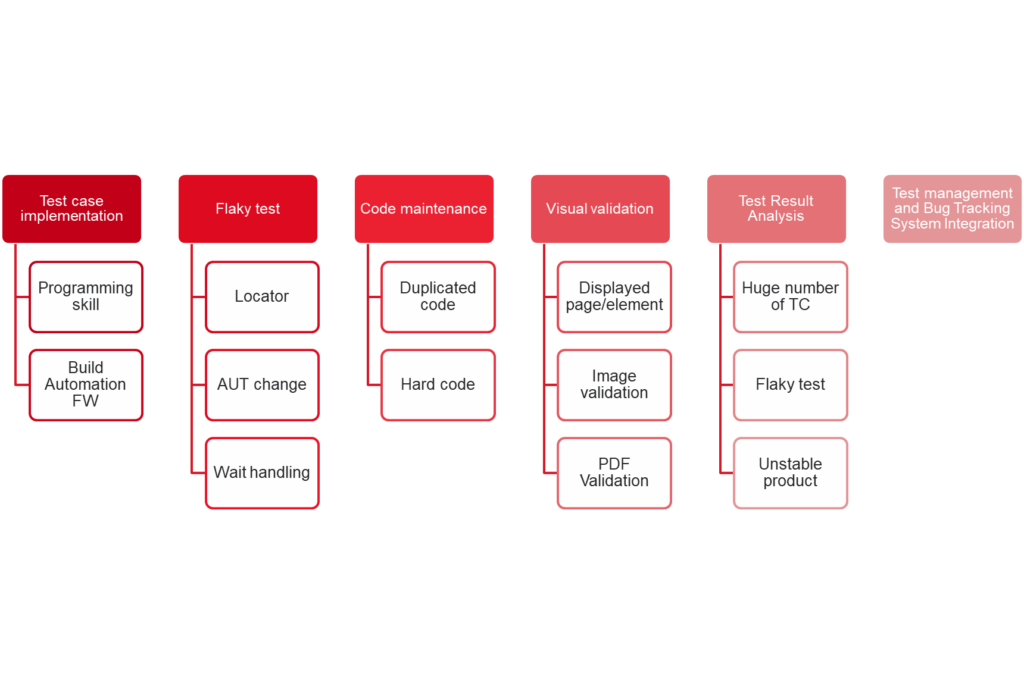
1.1 Build automation framework
For popular automation tools like Selenium, programming skills are required for using it. Moreover, you will need a lot of effort to build an automation framework that is easy to use, highly maintainable and extendable. Our framework needs to be able to support us to run tests in crossed browsers or run tests in parallel. The auto-generated test report is a must-have item in our framework. We’ll have a lot of things to do to build an automation framework. We especially need to have knowledge and skills related to OOP and design pattern to build it efficiently.
1.2 Flaky test
If you’re experienced with automation test, I’m sure that we’ve resolved a lot of issues related to flaky tests. The flaky test may come from the way we capture the locator, the change of AUT or the waiting handling in our test script.
1.3 Code maintenance
If we don’t have the mindset about clean code or skills to make your script easy to read and maintain, code maintenance will be a big challenge for us. Duplicated code/hard code will take a lot of time for us to update the script when something is changed in our AUT or testing environment. Changing the logic of the existing function/class will be hard if we don’t have good code organization.
1.4 Test management
For test management tools, we usually use popular tools like Excel, Zephyr, Test Rail, etc. It will take our effort to associate the test script with the test cases in the above tools. To run the test cases defined in the test suite/test plan, we usually need to add tags to the test case or define the rule of test case method naming. After that, we need to update the test result to the test management tools manually or use the API of these tools to implement the test script to upload the test results automatically.
1.5 Test Result Analysis
After the test execution, we will have the list of passed/failed test cases. For the failed test cases, we need to classify the root cause like failed by bug, failed by AUT changes, or failed by automation script. Let’s imagine that we have hundreds of failed test cases in your test result, the effort for test case analysis will be high. Besides, to have the overview related to the product quality, we need to have a dashboard for showing the passed rate of the test case, the percentage of failed test cases by each root cause or the history of test execution.
2. Testim solution
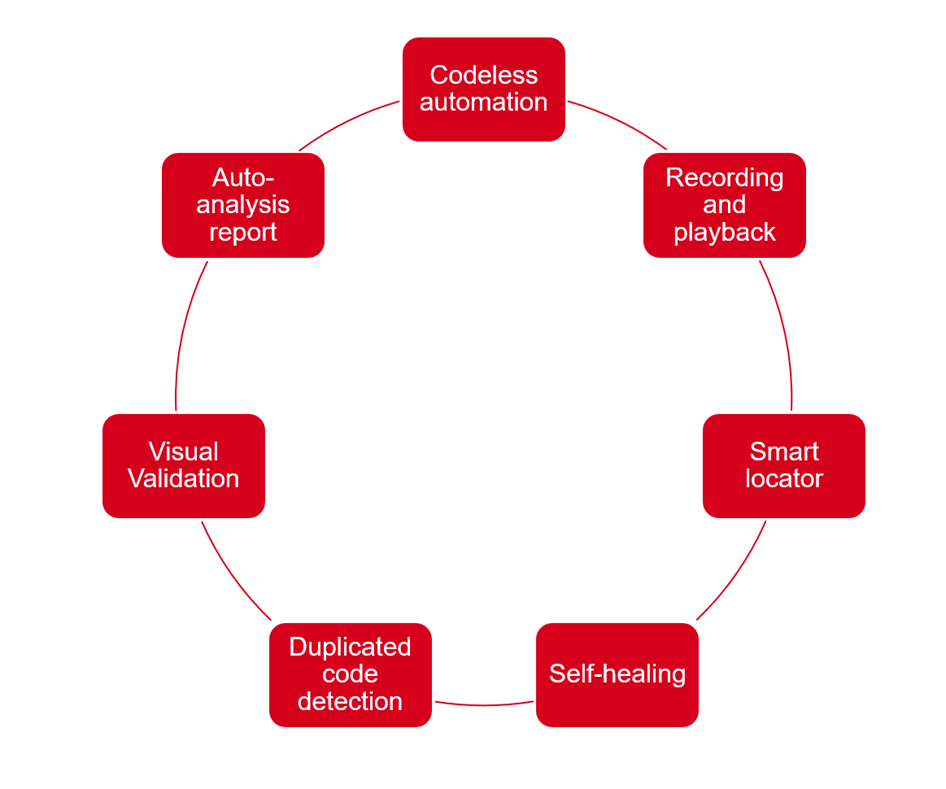
2.1 Codeless automation
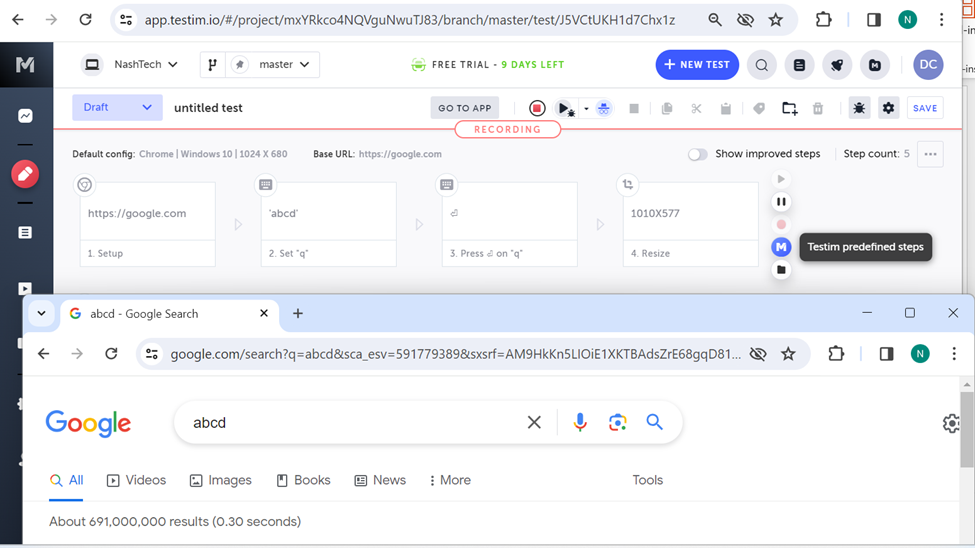
Testim is built as a web-based application for doing automation testing. Without programming skills, we’re still able to create test scripts quickly with Testim. Instead of writing test scripts, we can have the test script generated quickly with the recording tool of Testim. Please see the detailed information of the recording tool in section 2.2. After recording the steps are displayed as below.
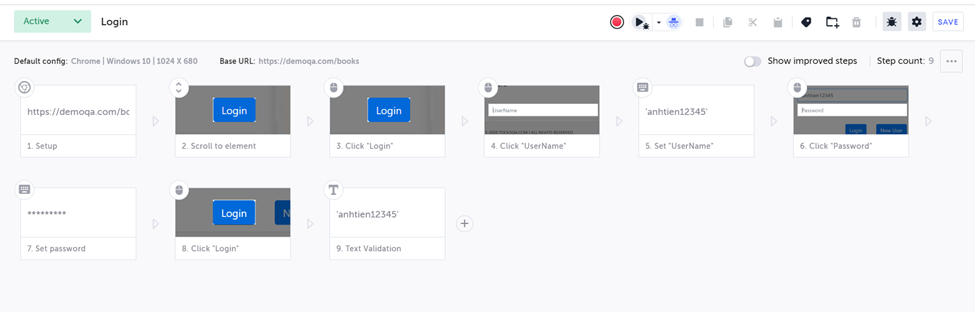
The test steps are highly readable with not only the automation tester but also the manual testers, developers and stakeholders. We can add/remove test steps easily via UI and change the order of test steps by dragging and dropping the test step.
We don’t need to care about building automation framework because Testim has already supported the following features on the web-based application.
- Record test script
- Filter test case for running tests
- Select the browser for running tests
- Create test suites/test plans
- Run tests in parallel
- Test report
- Test scheduler
2.2 Recording and playback
We have a lot of tools for recording and playback like Selenium IDE. The problem with the old tools is the script is not highly reusable because of the wrong locator or the wait handling in generating script. Testim has resolved this issue with smart locator, self-healing technology and dynamic waiting in their solution. For the smart locator and self-healing features, you can see more detailed information in sections 2.3 and 2.4. Dynamic waiting will help the test script to be more stable. Before interacting with each element, Testim will automatically wait for the element to be visible and ready for interaction. Thanks to these technologies, we don’t need to update too much for the script generated by the recorder of Testim.
2.3 Smart Locator
When we work with automation tools like Selenium, Cypress or Playwright, we need to capture the locator by inspecting the web elements. Capturing good locators is very important to our test script. Testim provides us with the capability of capturing the smart locator. When we use the recorder to interact with elements, a lot of attributes will be recorded, and each attribute will have a different weight. Especially, not only the target element’s attributes but also its parent’s attributes are captured.
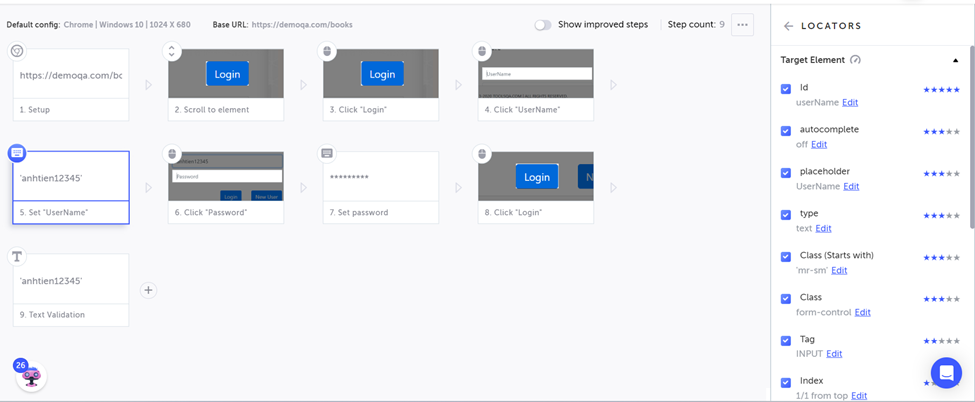
Of course, we can review the selected attributes and update them. You can see that in the above picture, the screenshot of the element is also saved. All the captured attributes and the screenshot will be the input for the self-healing technology described in section 2.4. Moreover, when the UI around the target element is changed, Testim supports us to improve the locator automatically with improving locator features.
2.4 Self-healing
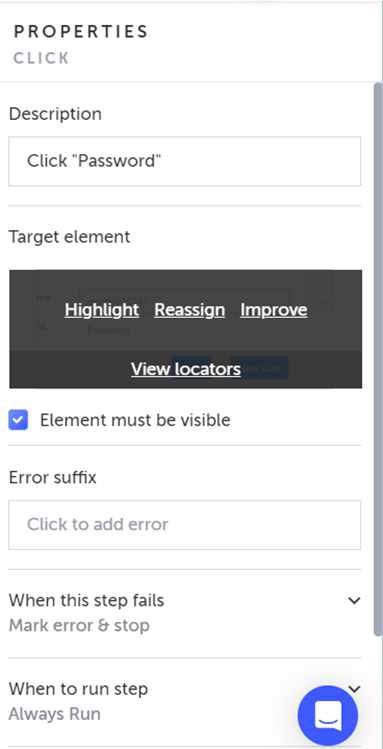
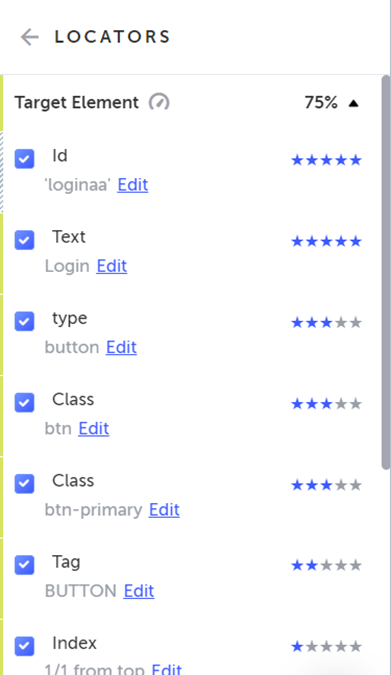
As we know, the AUT can be changed day by day, and it leads to broken tests. With traditional tools, we’ll need to investigate and update the locator/script to handle the changes. Self-healing is the solution for us to reduce the number of test cases failed by AUT change and the effort of updating locators. Based on the captured attributes and screenshot of the element, Testim applies self-healing technology to find a similar element to interact if it can’t find the defined element in the test script. After finding the new element to interact with, Testim will update the accuracy of the existing attributes. When the accuracy drops to below 70%, Testim will suggest a new locator and monitor the stability of the new one.
2.5 Duplicated code detection
Testim supports Shared Steps feature so that we can create common functions for using in different test cases.
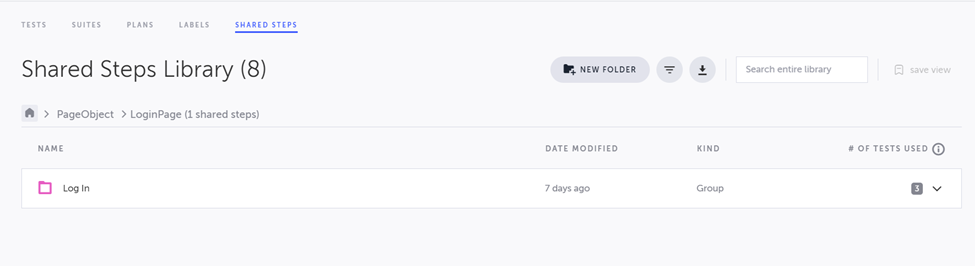
If we have the mindset of avoiding duplicated code, we can create functions and add them to the Shared Steps. However, we sometimes are not aware of creating duplicated code. Don’t worry. After having the test result, Testim is able to use AI to detect the percentage of duplicated code in our project and suggest creating the shared step for them.
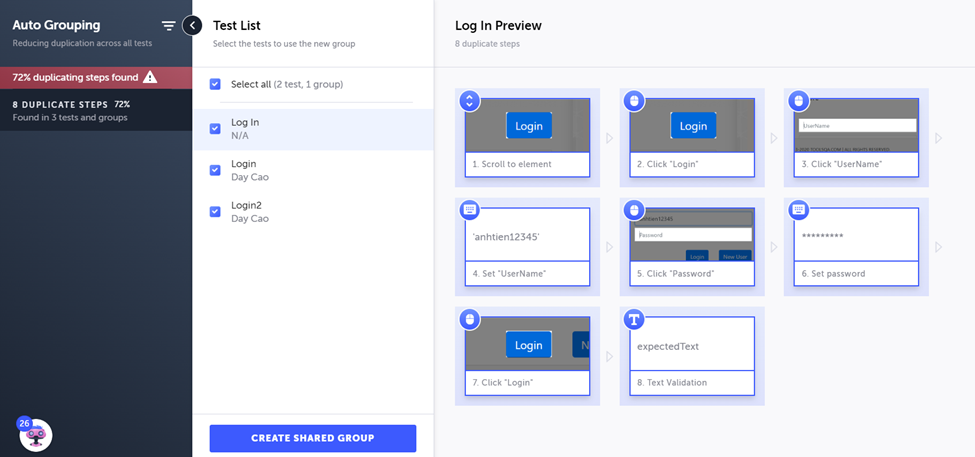
When we choose to create a shared group, Testim will automatically create a new branch for the test script so that we can review the changes before merging it to the master branch.
2.6 Visual validation
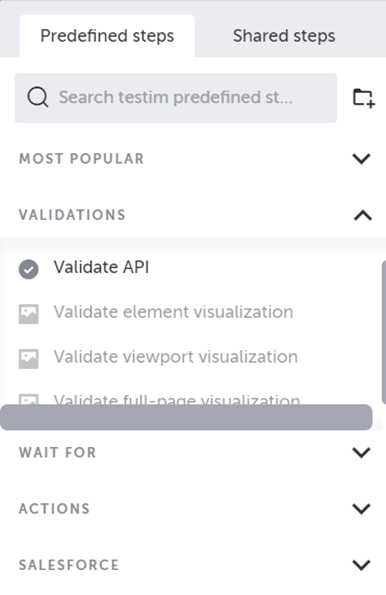
Through the integration with Applitools, Testim supports the actions to validate the visualization of a web element or the full-page.
2.7 Test management
We can easily define the test suite/test plan with Testim without using external test management tools. The test cases are stored in Test Library, and we can create sub-folders to maintain the test case more easily. In the below picture, we can see the information related to the test case like owner, last updated time, label, status and last runs. We can filter the test cases by title or label.
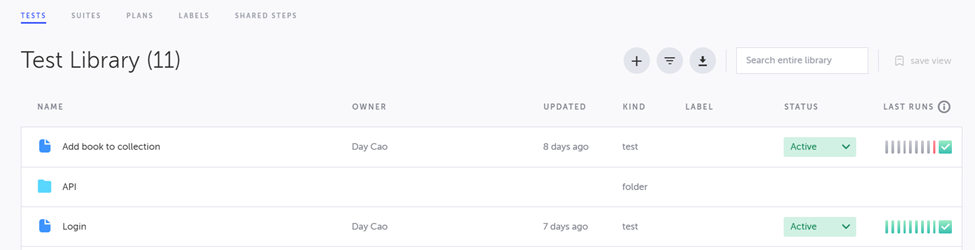
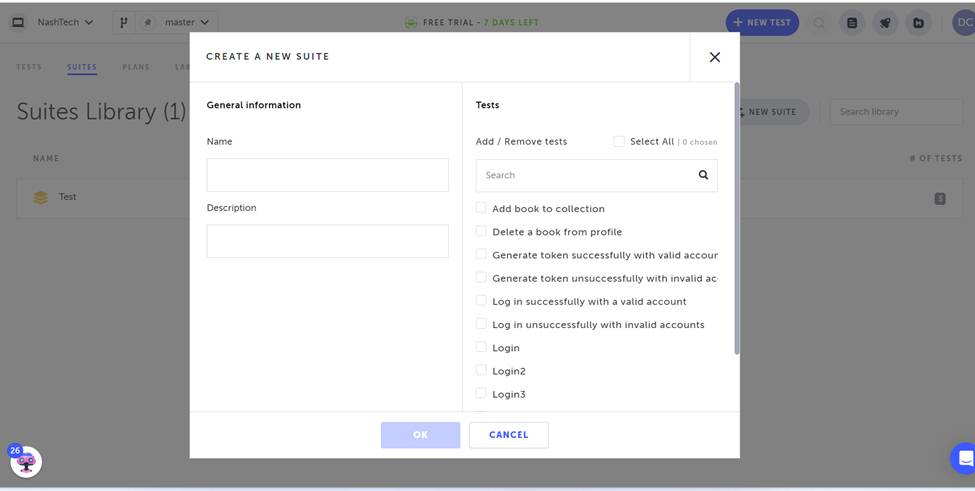
From the Test Library view, we can create test suites/ test plans easily.
2.8 Auto-analysis report
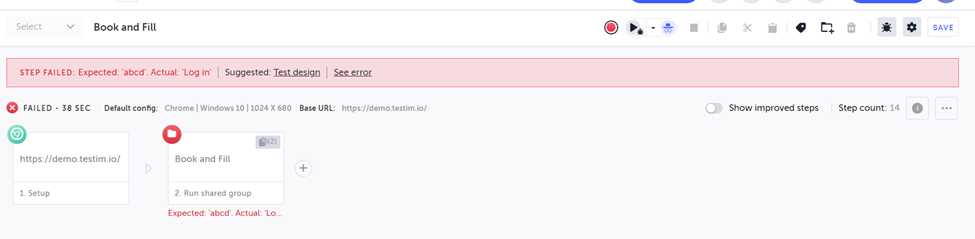
After running tests, we will have an informative test report. The report includes information like the failed step, the screenshot of the last successful test run, the console log and the network log. Especially, based on the previous test run, it can suggest the root cause of the failure. It will help us save a lot of effort in analyzing test results.

3. Testim disadvantages
We have shared a lot about the interesting features of Testim and how they solve automation testing challenges. However, based on my experience with Testim for implementation test cases, here are some points we need to pay attention to if we want to choose Testim as our automation testing tool.
- Lack of necessary actions for testing. We will need to implement them in Javascript like the developer.
- Hard to handle complex/dynamic workflow
- Hard to manage test hook
- Hard to customize the locator.
- Need to implement the customized actions for using xpath, css
- Hard to control the source code version
- Small community
- Pricing: many features are only available with enterprise plan
Conclusion
According to the above information, we can see that Testim has many great ideas and features to solve the challenges of automation testing. For simple test cases or workflows, it can shorten the progress of automation testing and help us release the product earlier. However, we need to spend time playing with it to make sure that it’s the appropriate choice for our project.
Reference: https://testim.io/