


How Google ADK Makes A2A Protocol Implementation Simple
Introduction
Agent2Agent (A2A) is an open-source communication protocol that enables standardized interaction between AI agents built with different frameworks or by different vendors. It allows agents to discover each other’s capabilities through Agent Cards and delegate tasksoperating as distributed services across different machines.
You can find more details at https://a2a-protocol.org/. Below is a brief summary.
Key Terminology
- Agent Card: The agent’s public metadata for discovery, including name, URL, version, and skills Google Cloud
- AgentSkill: Declaration of agent capabilities with unique ID, name, description, and examples Google Cloud
- A2AServer: Acts as the public interface allowing other agents to send requests over a network Google
- RemoteA2aAgent: ADK client component that handles network communication, authentication, and data formatting Google
When to use it?
Because the Agent-to-Agent protocol typically wraps your agent in a separate process and exposes it externally, it should be used only when necessary. For example, if agents can run on the same machine but need to use tools hosted on another server via MCP, that approach should be preferred instead.
When to Use A2A:
- You need multiple agents working together across different systems or networks
- You want agents from different teams or organizations to collaborate
- You’re building distributed systems where agents run on separate machines
- You need agents built with different frameworks to work together
When NOT to Use A2A:
- You only need one agent
- All your agents can run efficiently on the same machine (use regular multi-agent systems instead)
- The overhead of network calls slows things down too much
- Your app is simple and doesn’t need distributed agent collaboration
- Agents are tightly coupled and need immediate, local communication
What We Are Building?
Overview
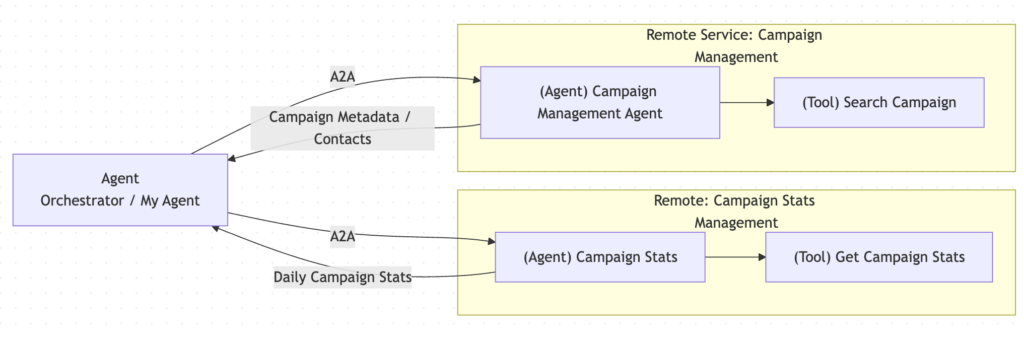
Imagine we are building an application with the following logic.
We have three agents. The first agent acts as the main orchestrator. It does not manage campaigns directly; instead, it coordinates with other agents using the A2A protocol.
- The second agent runs on a remote service and is responsible for campaign management. It exposes a tool called Search Campaign, which returns campaign metadata and contact information.
- The third agent also runs on a remote service and handles campaign statistics. It exposes a tool called Get Campaign Stats, which provides daily performance data for campaigns.
- The orchestrator agent communicates with both remote agents via A2A, delegates tasks to them, and then aggregates the results to serve the application’s needs.
Create Campaign Management Agent
We will implement the campaign management agent first and make sure it works correctly before moving on to the next parts of the system.
- Create the Python virtual environment
- Install required library
pip install 'google-adk[a2a]' - Create the campaign management agent
adk create cm_agent - Update the
/cm_agent/agent.pywith the following code
from google.adk.agents import Agent

# Sample campaign data
CAMPAIGNS = [
  {"id": "CMP-001", "name": "Spring Sale", "type": "Email", "start_date": "2025-03-01", "end_date": "2025-03-15", "budget": 5000.00, "currency": "USD", "is_active": False},
  {"id": "CMP-002", "name": "Summer Launch", "type": "Social", "start_date": "2025-06-01", "end_date": "2025-08-31", "budget": 15000.00, "currency": "USD", "is_active": True},
  {"id": "CMP-003", "name": "Winter Clearance", "type": "Web", "start_date": "2025-11-01", "end_date": "2025-12-31", "budget": 8500.00, "currency": "USD", "is_active": True}
]

def search_campaigns(query: str) -> dict:
    """Searches for campaigns by name, type, or other metadata.

    Args:
        query (str): The search query to match against campaign names, types, or IDs.

    Returns:
        dict: status and result or error msg.
    """
    query_lower = query.lower()
    results = []

    for campaign in CAMPAIGNS:
        if (query_lower in campaign["name"].lower() or
            query_lower in campaign["type"].lower() or
            query_lower in campaign["id"].lower()):
            results.append(campaign)

    if results:
        return {
            "status": "success",
            "campaigns": results,
            "count": len(results),
        }
    else:
        return {
            "status": "error",
            "error_message": f"No campaigns found matching '{query}'.",
        }

root_agent = Agent(
    name="campaign_management_agent",
    model="gemini-2.5-flash",
    description=(
        "Agent to answer questions and search for campaign metadata."
    ),
    instruction=(
        "You are a helpful agent who can answer user questions about campaigns and search for campaign metadata."
    ),
    tools=[search_campaigns],
)
- Use command
adk webto open the web debug app to make sure our first agent is setup and able to call tool correctly
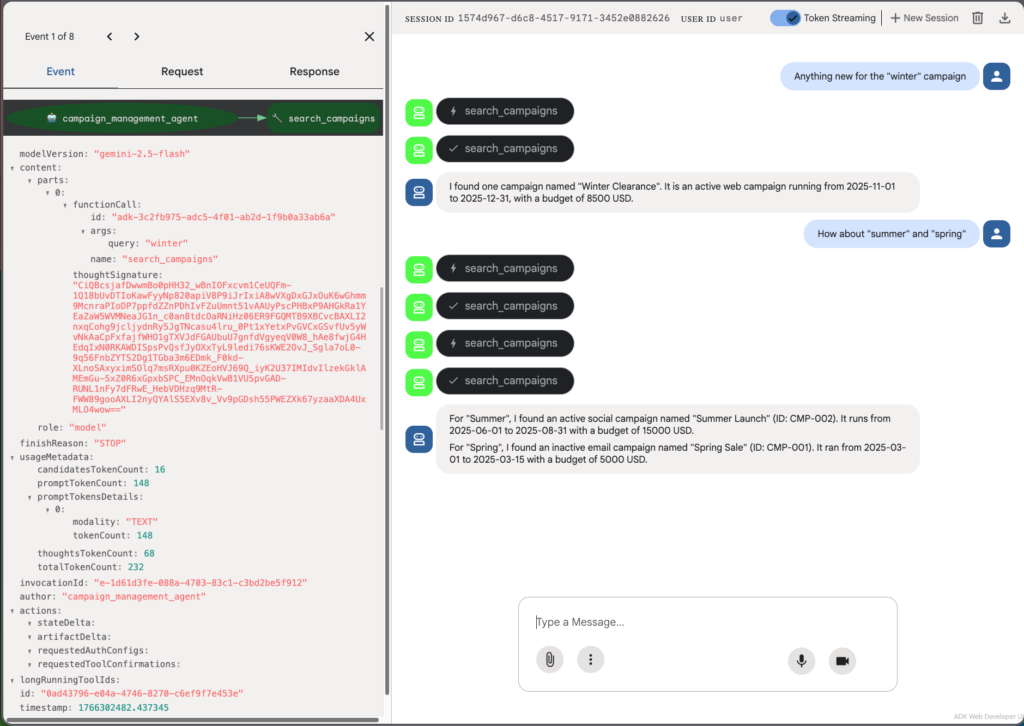
However, the agent currently only works when it stays in the same codebase and is linked with other agents. For other agents to interact with it, we need to expose it via A2A.
from google.adk.a2a.utils.agent_to_a2a import to_a2a
# Existing code
a2a_app = to_a2a(root_agent)
Run the server uvicorn cm_agent.agent:a2a_app --port=8000 then you can check your A2A server:
To view information about your agent run this command: curl http://localhost:8000/.well-known/agent-card.json this will allow other agent to understand what you agent can do (what skills/tools do they have as well)
{
  "capabilities": {

  },
  "defaultInputModes": [
    "text/plain"
  ],
  "defaultOutputModes": [
    "text/plain"
  ],
  "description": "Agent to answer questions and search for campaign metadata.",
  "name": "campaign_management_agent",
  "preferredTransport": "JSONRPC",
  "protocolVersion": "0.3.0",
  "skills": [
    {
      "description": "Agent to answer questions and search for campaign metadata. I am a helpful agent who can answer user questions about campaigns and search for campaign metadata.",
      "id": "campaign_management_agent",
      "name": "model",
      "tags": [
        "llm"
      ]
    },
    {
      "description": "Searches for campaigns by name, type, or other metadata.\n\nArgs:\n    query (str): The search query to match against campaign names, types, or IDs.\n\nReturns:\n    dict: status and result or error msg.",
      "id": "campaign_management_agent-search_campaigns",
      "name": "search_campaigns",
      "tags": [
        "llm",
        "tools"
      ]
    }
  ],
  "supportsAuthenticatedExtendedCard": false,
  "url": "http://localhost:8000",
  "version": "0.0.1"
}
You can test sending the message using this CURL
curl -X POST http://localhost:8000/ -H 'Content-Type: application/json' -d '{"jsonrpc":"2.0","id":"1","method":"message/send","params":{"message":{"messageId":"msg-1","role":"user","parts":[{"text":"List all campaigns"}]}}}'

# Result
{"id":"1","jsonrpc":"2.0","result":{"artifacts":[{"artifactId":"ad9aeced-4a96-4779-85e0-9ee2c21d9170","parts":[{"kind":"text","text":"I can't list all campaigns. I can only search for campaigns based on a specific query. Please provide a query to search campaigns by name, type, or other metadata."}]}],"contextId":"7bc846f2-79a5-4cc6-8338-3b1c03b5b2c8","history":[{"contextId":"7bc846f2-79a5-4cc6-8338-3b1c03b5b2c8","kind":"message","messageId":"msg-1","parts":[{"kind":"text","text":"List all campaigns"}],"role":"user","taskId":"8e1839bd-fdea-4912-89d5-c468ced8c01a"},{"contextId":"7bc846f2-79a5-4cc6-8338-3b1c03b5b2c8","kind":"message","messageId":"msg-1","parts":[{"kind":"text","text":"List all campaigns"}],"role":"user","taskId":"8e1839bd-fdea-4912-89d5-c468ced8c01a"},{"kind":"message","messageId":"547f6784-e06e-4693-ba9e-ef7f56e2acfd","parts":[{"kind":"text","text":"I can't list all campaigns. I can only search for campaigns based on a specific query. Please provide a query to search campaigns by name, type, or other metadata."}],"role":"agent"}],"id":"8e1839bd-fdea-4912-89d5-c468ced8c01a","kind":"task","metadata":{"adk_app_name":"campaign_management_agent","adk_user_id":"A2A_USER_7bc846f2-79a5-4cc6-8338-3b1c03b5b2c8","adk_session_id":"7bc846f2-79a5-4cc6-8338-3b1c03b5b2c8","adk_invocation_id":"e-bee11fd6-0eb1-43f2-b537-c95aa548980a","adk_author":"campaign_management_agent","adk_usage_metadata":{"candidatesTokenCount":36,"promptTokenCount":143,"promptTokensDetails":[{"modality":"TEXT","tokenCount":143}],"thoughtsTokenCount":70,"totalTokenCount":249},"adk_actions":{"stateDelta":{},"artifactDelta":{},"requestedAuthConfigs":{},"requestedToolConfirmations":{}}},"status":{"state":"completed","timestamp":"2025-12-21T08:13:04.118783+00:00"}}}%
Custom Agent Card
This agent card is generated based on the instructions, function descriptions, and function parameter descriptions. If you want a different description, you can create a custom agent card.
# ... Your original code ...

my_custom_agent_card = AgentCard(
    name="campaign_management_agent",
    url="http://example.com",
    description="Agent to answer questions and search for campaign metadata.",
    version="1.0.0",
    capabilities={},
    skills=[],
    defaultInputModes=["text/plain"],
    defaultOutputModes=["text/plain"],
    supportsAuthenticatedExtendedCard=False,
)

a2a_app = to_a2a(root_agent, port=8001, agent_card=my_custom_agent_card)
Create Campaign Stats Management Agent
Create the cms_agent agent, steps should be similar to the previous agent:
from google.adk.agents import Agent
from google.adk.a2a.utils.agent_to_a2a import to_a2a
from dotenv import load_dotenv
load_dotenv()

CAMPAIGN_STATS = {
    "CMP-001": [
        {"date": "2025-03-01", "impressions": 1200, "clicks": 95},
        {"date": "2025-03-02", "impressions": 1150, "clicks": 88}
   ... Rest of the mock data here
}

def get_campaign_stats(id: str) -> dict:
    """Gets campaign statistics for a specific campaign ID.

    Args:
        id (str): The campaign ID to retrieve stats for.

    Returns:
        dict: status and result or error msg.
    """
    if id in CAMPAIGN_STATS:
        stats = CAMPAIGN_STATS[id]
        return {
            "status": "success",
            "campaign_id": id,
            "stats": stats,
            "count": len(stats),
        }
    else:
        return {
            "status": "error",
            "error_message": f"No stats found for campaign '{id}'.",
        }


root_agent = Agent(
    name="campaign_stats_management_agent",
    model="gemini-2.5-flash",
    description=(
        "Agent to answer questions and retrieve campaign statistics."
    ),
    instruction=(
        "You are a helpful agent who can answer user questions about campaign statistics and retrieve campaign stats data."
    ),
    tools=[get_campaign_stats],
)

a2a_app = to_a2a(root_agent, port=8002)
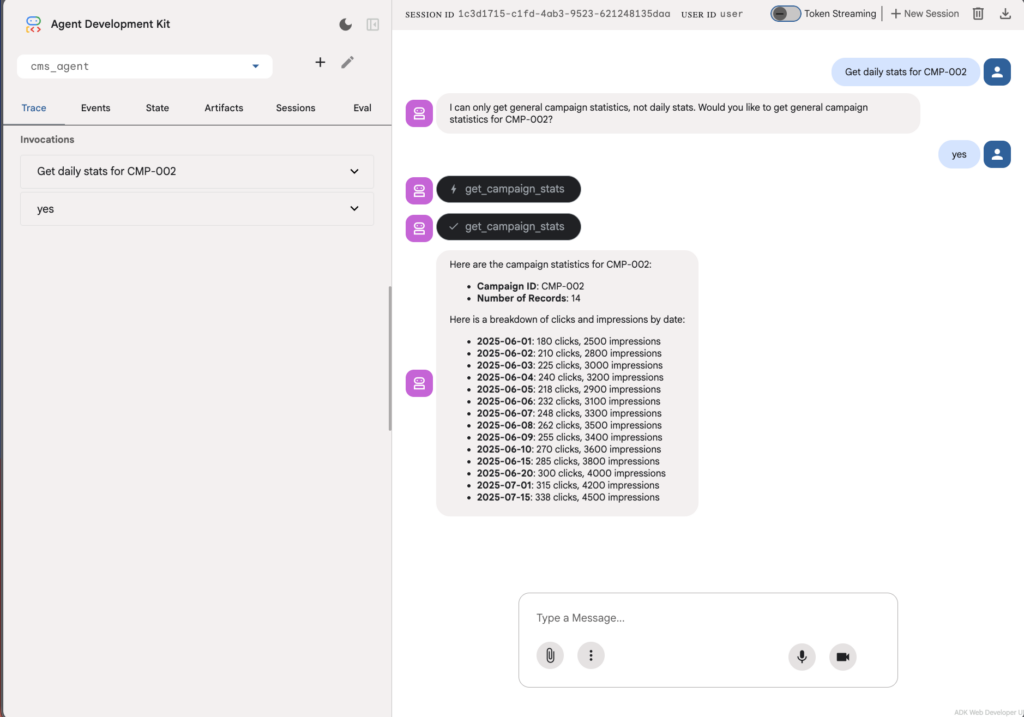
Make sure it’s working:
Create Root Agent
Create agent my_agent using the following code:
from google.adk.agents.remote_a2a_agent import AGENT_CARD_WELL_KNOWN_PATH
from google.adk.agents.remote_a2a_agent import RemoteA2aAgent
from google.adk.agents.llm_agent import Agent

# Create remote A2A agents
cm_agent = RemoteA2aAgent(
    name="campaign_management_agent",
    description="Agent to answer questions and search for campaign metadata.",
    agent_card=(
        f"http://localhost:8001/{AGENT_CARD_WELL_KNOWN_PATH}"
    ),
)

cms_agent = RemoteA2aAgent(
    name="campaign_stats_management_agent",
    description="Agent to answer questions and retrieve campaign statistics.",
    agent_card=(
        f"http://localhost:8002/{AGENT_CARD_WELL_KNOWN_PATH}"
    ),
)

root_agent = Agent(
    model='gemini-2.5-flash',
    name='root_agent',
    description='A helpful assistant for user questions about campaigns and campaign statistics.',
    instruction="""
      You are a helpful assistant that can help users with campaign management and campaign statistics.
      You delegate tasks to specialized agents:
      1. If the user asks about campaigns, searches for campaigns, or needs campaign metadata, delegate to the campaign_management_agent.
      2. If the user asks about campaign statistics, performance metrics, or needs campaign stats data, delegate to the campaign_stats_management_agent.
      3. If the user asks for both campaign information and statistics, you can call both agents as needed.
      Always clarify the results before proceeding.
    """,
    sub_agents=[cm_agent, cms_agent],
)
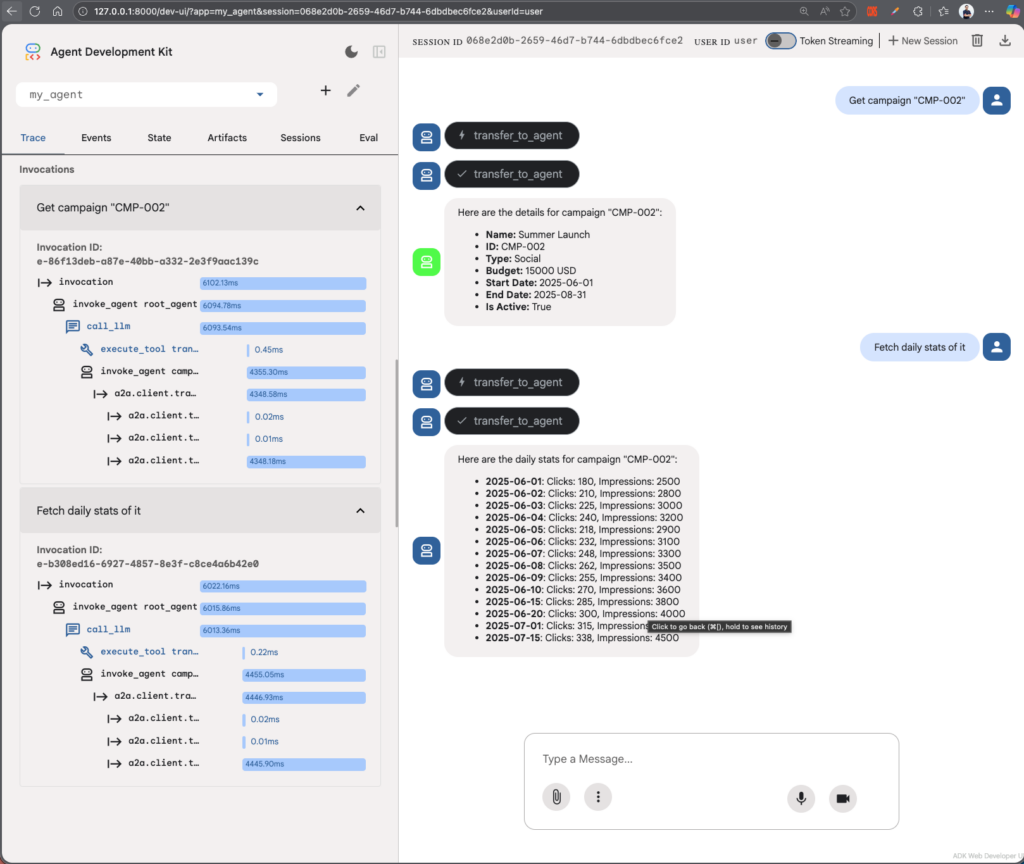
Run the previous cm_agent and cms_agent on port 8001 and 8002.
Test your agent using the ADK web command. You’ll see that even the main agent can’t use other tools to fetch campaign information, but it can obtain it by asking another agent.
What’s next?
Now that you have a simple demo of using the A2A protocol, you can extend it by:
- Add authentication: In a real-world scenario, you wouldn’t leave your A2A endpoints public.
- Chain multiple tasks: Ask the root agent a more complex question that requires data from both agents, such as “Which active campaign had the most clicks last month?”
- Deploy to the cloud: Move your cm_agent and cms_agent to Google Cloud Run or AWS Lambda to see how the protocol handles true cross-network communication.