


Wait… you mean the app runs like a native macOS app? But it’s written in PHP?”
That was exactly my reaction the first time I heard about it. It sounded almost too good to be true. Naturally, I had to dig deeper.
After spending some time researching—and diving a bit further into how it works—I finally found the answer:
Yes. It’s 100% Laravel + PHP, made possible by an exciting new tool called PHPNative.
Who I Am?
Hi, I’m Khoa – a web developer who also tries to balance coding with lifting weights and running (yes, I do my best!). Lately, I’ve gotten curious about blogging, and this is my very first post. I’ve spent the past few years building web apps using Laravel, React, Node.js, Moodle, and more. I enjoy turning ideas into reality through code — creating things that may not exist in real life but somehow come alive on the screen.
Recently, though, I came across something I had never heard of before — a tool called PHPNative. Honestly, I didn’t even think something like this could exist: a toolset that lets PHP (especially Laravel) developers build native-feeling desktop and mobile apps using familiar web technologies. Yep, that means you can write a desktop app using PHP — probably before GTA VI gets released .
Since I love exploring “magical” tools like this, I decided to dig in and even build a small app — something I call Calories App — as a demo to see what PHPNative is really capable of.
What is PHPNative?
It’s not a wrapper. It’s not a hack. It’s more like a secret tunnel — linking Laravel to native platforms like macOS, Windows, Linux, and even iOS/Android.
NativePHP (or PHPNative, if you prefer) is an open-source tool that lets you build native desktop and mobile apps using your favorite web stack: Laravel and PHP.(1) Yes — PHP. Seriously.
At its heart, NativePHP is just a Laravel package. But what it unlocks is far more exciting: it bundles a static PHP runtime inside a Tauri or Electron shell, and exposes native OS features through a clean, Laravel-style API.
The best part? You don’t have to write any JavaScript — at least not for the native parts. (Of course, if your frontend uses React or some fancy JS libraries, you’ll still be writing JavaScript — this isn’t witchcraft)
Everything runs inside your app, powered entirely by PHP. Want to show a system notification? Open a file picker? Add a tray icon or access the clipboard? You can — with simple, expressive facades that feel just like Laravel.
This creates a refreshingly smooth developer experience — especially for those of us who already live and breathe Laravel, and don’t want to dive headfirst into a whole new native ecosystem.
So, what does this look like in practice?
With NativePHP, you still build your app the Laravel way — routing, controllers, models, Blade views — all the stuff you already know and love.
Behind the scenes, it runs locally using Laravel’s built-in server, and renders the UI inside a native window, thanks to Electron or Tauri.
And the magic? You can tap into real system features like notifications, file dialogs, tray icons, global shortcuts — all using PHP (2).
It’s Laravel, but native. And honestly, that’s kind of amazing.
History
NativePHP was first dreamed up in 2023 by Marcel Pociot and Simon Hamp, and made its debut at Laracon US 2023 (3). The idea? Let PHP and Laravel developers build desktop apps — yes, real native apps — using the tools they already know.
Watch Marcel’s original NativePHP talk from Laracon US 2023 in Nashville
The demo blew minds. It showed a Laravel app running natively on macOS, Windows, and Linux — without any weird hacks. The buzz from the community was immediate and electric, pushing Marcel and Simon to keep going, with their sights set on a production-ready v1 release in 2024 (4)(5).
Of course, building something this ambitious wasn’t easy. They had to juggle day jobs, open-source work, and the challenges of sustaining the project through community support (6)(7). But they stuck with it.
Originally, NativePHP was built on Tauri, chosen for its speed and strong security model. However, to move faster during early development, they temporarily shipped an Electron-based alpha. Once the foundation was stable, they circled back and finalized full Tauri support — and even overhauled the internal architecture to remove embedded web servers from the apps, simplifying deployment and boosting security.
Then, in April 2025, the big moment arrived: NativePHP 1.0 for desktop was released — fully compatible with Laravel 12.x, PHP 8.4, and with official native Windows support (8). Just one month later, in May 2025, NativePHP Mobile 1.0 was unveiled, allowing Laravel apps to run natively on iOS and Android — no JavaScript bridges, no external servers required.
Today, NativePHP is an active open-source project with over 3.8k stars on GitHub, maintained by Marcel, Simon, and a growing community, with backing from BeyondCode. While mobile support is currently in Early Access, it’s well on its way to becoming a fully stable solution.
All in all, NativePHP is making native app development surprisingly approachable — and even kind of fun — for PHP developers everywhere.
Why I Built a Calorie Tracker with NativePHP
Let’s rewind a bit.
Before I wrote a single line of code for this app, I was just someone struggling to get back in shape. Like many developers, long hours in front of the screen — plus some late-night snacks — gradually pushed me into an “oops, my pants don’t fit” situation.
I started running, lifting weights, and most importantly — tracking my calories. I tried a few calorie-tracking apps, and while some were great, most of them felt bloated, overly complex, or required internet just to log a boiled egg. As a developer, that naturally got me thinking: Could I build something lightweight, simple, and offline-first — using Laravel?
That’s when NativePHP came into the picture. It was the perfect excuse to mix two things I care about: code and health.
And so, Calories App was born — a small native desktop app, built entirely with Laravel, for tracking what I eat every day. Just enough features to help me stay on track, and just nerdy enough to keep me excited about using it.
In the next part, I’ll walk you through how it works — and how Laravel + NativePHP made it surprisingly fun to build.
Building the Health App
Obviously, this article isn’t a step-by-step guide to building a full app with NativePHP. Instead, it’s a fun peek into my first-ever PHP native app experience. If that sounds cool to you, let’s dive in together.
Let me share a bit about how I built my calories-tracking app.
First, I began by sketching out ideas for the main pages of the app. To do this, I took inspiration from calorie-tracking apps I’d personally used before. Leveraging AI tools greatly simplified this step—I turned to platforms like ChatGPT to analyze, structure, and detail exactly how each page should look and function. Thanks to this approach, the initial planning and design stages were incredibly smooth and efficient.
One key lesson I’ve learned—and this might be familiar to you—is that we’re building a native application, not a typical web app. That means our user interface should prioritize native usability, intuitive navigation, and optimal performance, rather than simply being responsive like a traditional web interface. I highly recommend exploring current native or mobile app design trends for inspiration. Tailoring your UI specifically for native applications significantly enhances the user experience, ensuring the app feels intuitive and pleasant to use.
With all preparations complete, it was time to dive into development. I started by initializing a new Laravel project. Thanks to the valuable updates in Laravel 12, especially the new Starter Kits supporting React (an amazing library), setting up the basic structure of the app—especially authentication—became much quicker. All I had to do was add routes and tweak the UI based on my earlier planning.
One important lesson I learned along the way (which I really should have been aware of from the start) is to use SQLite as your database at this stage. Why SQLite? Laravel provides a powerful ORM that helps you avoid writing raw SQL, but database choice matters significantly when building a native app. PHPNative uses SQLite by default, and using another database (like PostgreSQL, as I initially did) can cause compatibility issues later. For instance, SQLite lacks support for certain features available in other databases, such as full-text search. This oversight required extra adjustments when I integrated PHPNative into my app, highlighting the importance of choosing the right database early on.
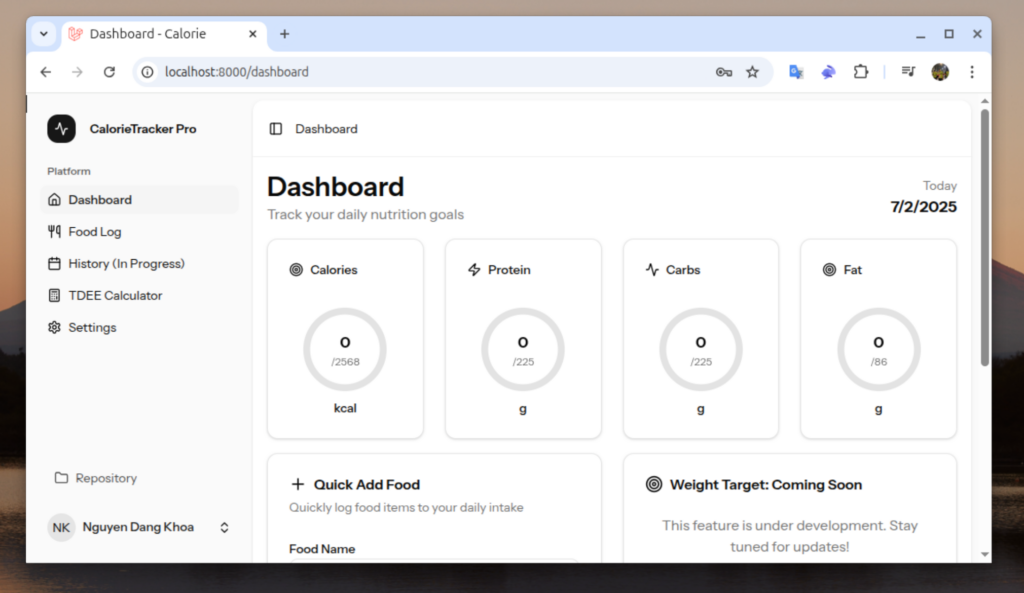
By leveraging Laravel’s strengths, minimal additional changes were required to quickly build the desired web app. But remember, at this stage, it’s still just a web app. Let’s transform it into a true native application in the next steps. In the meantime, here’s a sneak peek at what I’ve created:


Integrating NativePHP
Now, let’s bring PHPNative into our project—don’t worry, it’s easier than you might think!
First, ensure your setup meets these basic requirements: PHP 8.3 or newer, Laravel 11 or above, and Node 22+, all running on a modern OS (Windows 10+, macOS 12+, or Linux).
With that sorted, navigate to your Laravel project directory and run:
composer require nativephp/electronThis command pulls in everything you need—commands, service providers, configurations—to connect your Laravel app with Electron (or Tauri).
Next, simply execute:
php artisan native:install
- This convenient command handles:
- Registering the NativePHP service provider
- Publishing essential configuration files (config/nativephp.php)
- Adding a composer script for easy future use
- Installing any additional dependencies needed (like npm packages)
Finally, to preview your app in a native desktop window:
php artisan native:serve
That’s it! You’re now running your Laravel project as a native desktop app—no JavaScript necessary for backend integration, no extra web server configurations. Just Laravel, your app, and pure native magic.

Features Used in the Project
PHPNative provides a variety of useful PHP facades—like customizing windows, menu bars, dialogs, and alerts. Check out their official documentation for the full list of features. For this project, I’ll share the coolest features I personally used and explain how I implemented them.
Windows Management
One exciting feature is PHPNative’s windows management, allowing you to easily control and customize your app windows. Whether adjusting window sizes, positions, or behaviors, the facade makes these tasks straightforward and intuitive. For instance, you can quickly set your main application window’s title and dimensions:
Window::open()
->width(1000)
->height(800)->resizable(false);
Menu Bar Customization
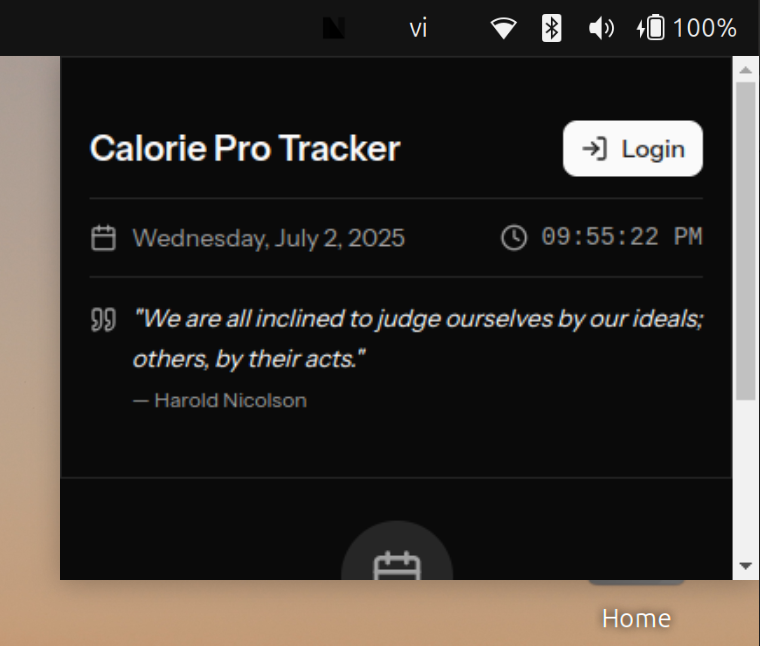
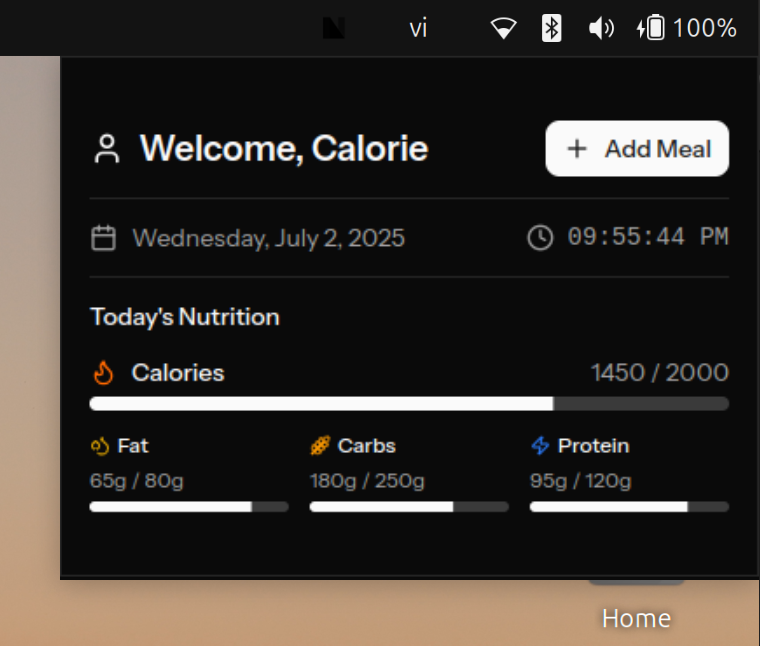
My absolute favorite is the customization Menu Bar. Instead of traditional, boring menu selections, PHPNative allows us to create dynamic, visually appealing menu bars by loading views directly into them. Implementation is simple—just declare it within the NativeAppServiceProvider’s boot method:
MenuBar::create()->height(300)->route('widget.menubar')->alwaysOnTop();
Then define the route to load your custom view:
// Route
Route::group(['prefix' => 'widget'], function () {
    Route::get('/menubar', [WidgetController::class, 'index'])->name('widget.menubar');
});
// Controler.
public function index() {
if (auth()->check()) {
$name = explode(' ', auth()->user()->name)[0];
$dailyGoals = $this->foodService->dailyGoals();
return inertia('widgets/unauthenticate-menubar', ['name' => $name, 'dailyGoals' => $dailyGoals, 'authenticated' => true]);
}
return inertia('widgets/unauthenticate-menubar', []);
}This flexibility significantly enhances your app’s user experience, making your application feel truly native.
Additionally, I utilized Broadcasting for the Menu Bar. Whenever a user successfully logs in, a broadcast event updates the menu bar view accordingly. This ensures the interface dynamically adapts for logged-in users.
public function store(LoginRequest $request): RedirectResponse
    {
        $request->authenticate();

        $request->session()->regenerate();
        if (Tdee::where('user_id', Auth::id())->exists()) {
		        // Broad cast event.
            broadcast(new LoginSuccess());
            return redirect()->intended(route('dashboard', absolute: false));
        } else {
            return redirect()->route('tdee-calculator');
        }
    }
In the view:
useEffect(() => {
        const timer = setInterval(() => {
            setCurrentTime(new Date());
        }, 1000);

        const eventName = 'App\\\\Events\\\\LoginSuccess';

        window.Native.on(eventName, () => {
            setIsAuthenticated(true);
        });

        return () => {
            clearInterval(timer);
        };
    }, []);
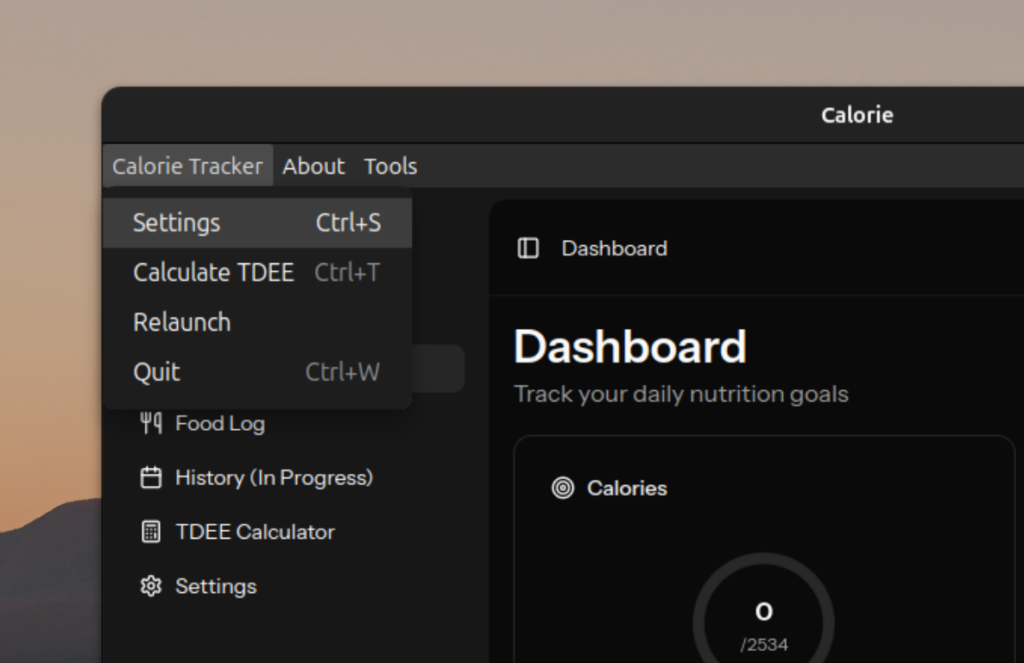
Next, the Menu facade completely transformed the default, mundane menu into something more meaningful and interactive. Here’s how I defined it in the NativeAppServiceProvider boot method:
Menu::make(
	Menu::route('settings', 'Settings', 'Ctrl+S'),
	Menu::route('tdee-calculator', 'Calculate TDEE', 'Ctrl+T'),
	Menu::route('app.relaunch', 'Relaunch', 'Ctrl+R'),
	Menu::route('app.quit', 'Quit', 'Ctrl+W'),
)->label('Calorie Tracker');
Each menu item triggers a specific route defined in web.php. This allows easy handling of user actions, such as quickly navigating to the TDEE calculator via the shortcut Ctrl+T, or quitting the application using a simple method:
use Native\Laravel\Facades\App;
public function quit(Request $request)
{
	App::quit();
}
By harnessing these native methods, we elevate our web app to feel authentically native.
You can also check out my full demo repository here: MyCalorie. Keep in mind, this is just a quick demo built to meet deadlines, so it’s best used as a reference.
A Bright Future for NativePHP
The future of NativePHP is incredibly bright. Desktop improvements like shifting fully to Tauri promise enhanced performance, reduced resource usage, and tighter security. On the mobile front, we can anticipate numerous exciting integrations including in-app purchases, over-the-air updates, and deeper native device integrations.
Personally, I’m thrilled about the vision of “writing Laravel once, running everywhere.” Imagine effortlessly deploying your Laravel projects to web, desktop, and mobile platforms from a single codebase—no extra languages or complex setups needed. The maintainers’ roadmap is ambitious yet realistic, with community input actively shaping its direction.
With powerful new features around the corner, improved distribution methods, and an evolving open-source community, NativePHP is undoubtedly set to revolutionize PHP development. I’m genuinely excited to see where this journey takes us, and I wholeheartedly believe there’s never been a better time to dive into the world of PHPNative.
References
(1) https://nativephp.com/docs/desktop/1/getting-started/introduction
(2) https://nativephp.com/docs/desktop/1/the-basics/menu-bar
(3) https://laravel-news.com/nativephp#:~:text=Published on July 26th%2C,by Paul Redmond
(5) https://github.com/orgs/NativePHP/discussions/248#:~:text=Our Goals for 2024
(6) https://github.com/orgs/NativePHP/discussions/248#:~:text=We need your support
(8) https://nativephp.com/docs/desktop/1/getting-started/releasenotes#:~:text=