


Ensuring strong test coverage is one of the most challenging responsibilities for any QA team. As applications grow more complex—with multiple user roles, devices, browsers, configurations, and environments—the risk of missing critical scenarios increases significantly. Even well‑written test cases can leave gaps when test design lacks structure.
Matrix data offers a clear, systematic approach to test design. By organizing test conditions into a structured matrix, QA engineers can visualize coverage, uncover hidden edge cases, and design more effective manual and automated tests. In this blog, we’ll explore what matrix data is, why it matters, and how it can dramatically improve your test coverage.
What Is Matrix Data in Software Testing?
Matrix data is a method for organizing test conditions and inputs in a clear table or grid—essentially, a map for testing.
- Rows: represent different test scenarios or situations
- Columns: represent inputs, settings, or user types
By structuring tests this way, testers can quickly visualize coverage and identify gaps.
Example: Imagine testing a login feature across different browsers, user roles, and input types:
- Browsers (Chrome, Microsoft Edge)
- User Roles (Admin, Registered User, Guest)
- Input Type (Valid data, Invalid data)
| Browser | User Role | Input Type | Test Scenario |
| Chrome | Admin | Valid | Login successful |
| Chrome | Admin | Invalid | Show error message |
| Chrome | Registered User | Valid | Login successful |
| Chrome | Registered User | Invalid | Show error message |
| Chrome | Guest | Valid | Show error message |
| Chrome | Guest | Invalid | Show error message |
| Microsoft Edge | Admin | Valid | Login successful |
| Microsoft Edge | Admin | Invalid | Show error message |
| Microsoft Edge | Registered User | Valid | Login successful |
| Microsoft Edge | Registered User | Invalid | Show error message |
| Microsoft Edge | Guest | Valid | Show error message |
| Microsoft Edge | Guest | Invalid | Show error message |
Using this table, you can ensure that all important combinations are tested and nothing is overlooked.
Why Traditional Test Design Falls Short in Software Testing
Many teams still create test cases ad‑hoc, adding new cases as bugs are discovered or features evolve. While this approach may work initially, it often results in:
- Duplicate or overlapping test cases
- Missed edge cases and rare combinations
- Limited visibility into overall coverage
- Difficulty scaling tests as the product grows
Matrix data addresses these issues by introducing structure and logic into test design.
How Matrix Data Improves Test Coverage
Matrix data offers many benefits for QA teams. Here are the main reasons to use it:
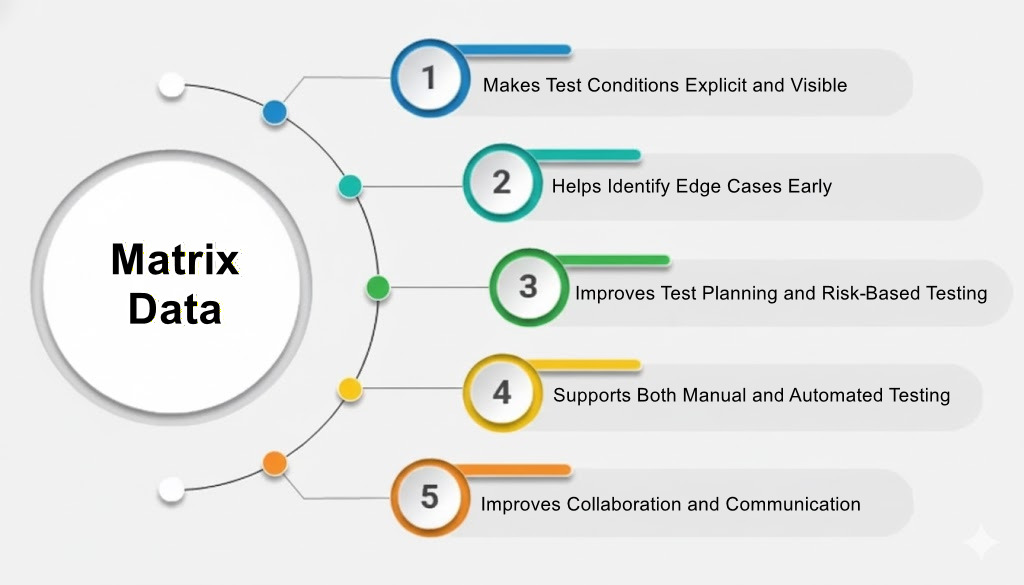
1. Makes Test Conditions Explicit and Visible
A test matrix displays all relevant variables in one place. This clarity helps testers and stakeholders understand which conditions exist, how they interact, and which combinations remain untested.
2. Helps Identify Edge Cases Early
Most defects appear at the intersection of conditions rather than in isolated flows. Thinking in combinations makes it easier to spot boundary conditions, rare scenarios, and high-risk input interactions. As a result, edge cases are discovered before they reach production.
3. Improves Test Planning and Risk‑Based Testing
Not all test scenarios carry the same business risk. With a matrix, teams can highlight high-impact combinations, prioritize tests based on usage and severity, and decide which scenarios to automate first. This approach enables smarter, risk-focused testing instead of testing everything equally.
4. Supports Both Manual and Automated Testing
Matrix data is flexible and works well across testing types:
- Manual testing: Guides exploratory testing and ensures regression coverage
- Automation testing: Provides datasets for data-driven or parameterized tests, reducing duplicate scripts and improving maintainability
5. Improves Collaboration and Communication
How to Use Matrix Data
Here is a step-by-step guide to using matrix data effectively:
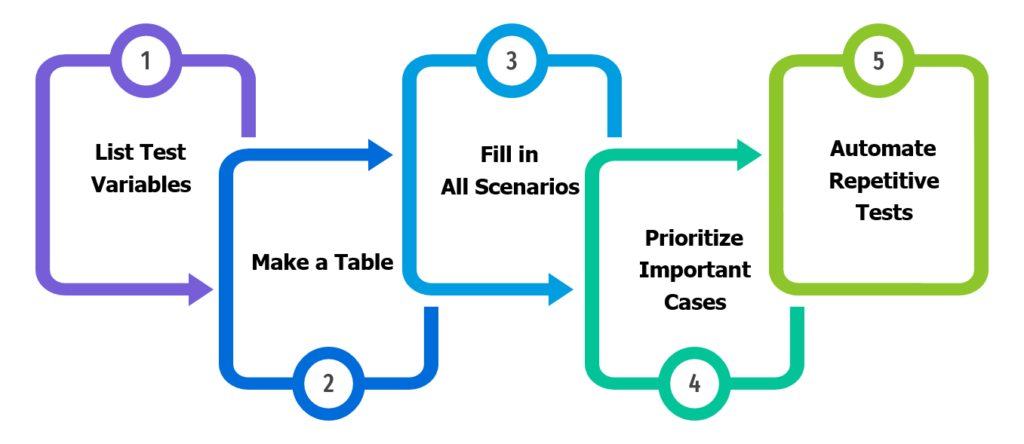
- List Test Variables: Identify all inputs, settings, configurations, and user roles (e.g., browser type, OS, payment method).
- Make a Table: Organize variables along rows and columns.
- Fill in All Scenarios: Add every combination along with expected outcomes to ensure nothing is missed.
- Prioritize Important Cases: Focus first on high-risk or frequently used scenarios.
- Automate Repetitive Tests: Automation can save time and reduce errors for repetitive scenarios.
Examples
Scenario: E-Commerce Checkout API
Consider an API that allows users to place orders with different user roles, products, and optional add-ons
- Different user roles: Guest, Customer, Admin
- Different products: Basic, Premium
- Optional add-ons: Extra Storage, Priority Support
The API has business rules:
| Rule | Description |
| R1 | Guest cannot purchase Premium Plan |
| R2 | Guest cannot add any add-on |
| R3 | Admin can purchase any plan with any add-on |
| R4 | Partner cannot add Priority Support |
| R5 | Customer can only add add-ons with Premium Plan |
Create the Matrix Data
| User Role | Base Product | Add-on | Expected Result |
| Admin | Basic | None | 201 Created |
| Admin | Basic | Extra Storage | 201 Created |
| Admin | Premium | Priority Support | 201 Created |
| Customer | Basic | Non | 201 Created |
| Customer | Basic | Extra Storage | 400 Bad Request |
| Customer | Premium | Extra Storage | 201 Created |
| Customer | Premium | Priority Support | 201 Created |
| Guest | Basic | None | 201 Created |
| Guest | Basic | Extra Storage | 403 Forbidden |
| Guest | Premium | None | 403 Forbidden |
Define Test Cases from Matrix
- TC – 01: Verify Admin can purchase Basic Plan without add-on
- TC – 02: Verify Admin can purchase Premium Plan with Priority Support
- TC – 03: Verify Customer can purchase Basic Plan with Extra Storage
- TC – 04: Verify Guest can purchase Premium Plan
- TC – 05: Verify Customer can purchase Premium Plan with Extra Storage
Benefits of Matrix Data
- Complete Test Coverage – Every role–product–add-on combination is covered.
- Avoids Missed Scenarios – No more guessing or assuming which cases matter.
- Simplifies Test Case Creation – Matrix rows can be converted directly to automated or manual tests.
- Easy Maintenance – Add new products, add-ons, or roles, and expand the matrix systematically.
Best Practices for Using Matrix Data
To maximize the value of matrix data:
- Start with critical user flows and high‑risk features
- Limit variables to meaningful and realistic conditions
- Review the matrix with stakeholders early
- Keep the matrix updated as requirements evolve
- Treat the matrix as a living document, not a one‑time artifact
Common Mistakes to Avoid
While powerful, matrix data can be misused. Avoid:
- Creating overly large matrices that are difficult to maintain
- Including impossible or irrelevant combinations
- Treating all combinations as equally important
- Failing to update the matrix when features change
A good test matrix is focused, balanced, and aligned with business risk.
Conclusion
Matrix data is a simple yet powerful technique that can significantly improve your test coverage. By structuring test conditions into a clear matrix, QA teams gain better visibility, reduce blind spots, and design more effective tests.
Whether you’re testing a small feature or a complex system, incorporating matrix data into your test design process will help you uncover hidden issues, test with confidence, and deliver higher‑quality software.