


In today’s fast-paced digital world, website speed is crucial in user experience and search engine rankings. Google PageSpeed Insights (PSI) is a powerful tool that helps you analyze and improve your website’s performance. This blog will help you understand more about this tool to optimize your website’s speed.
STEP 1: MEASUREMENT
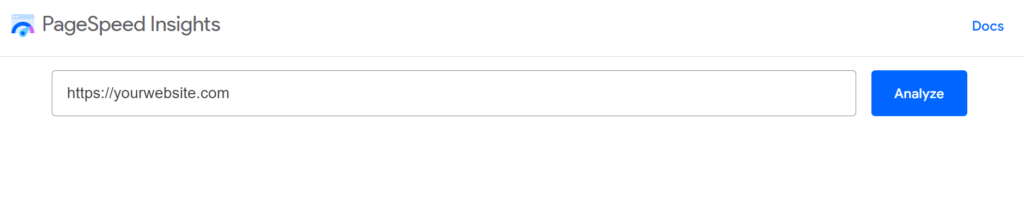
To begin, visit the Google PageSpeed Insights website.
Here, you can enter your website’s URL and start the analysis, then wait for the report after a short time analyzing.
STEP 2: ANALYZE THE RESULTS
Once you enter your website’s URL, Google PageSpeed Insights will provide you with a score out of 100 for both desktop and mobile versions.
The score represents the performance of your website, with higher scores indicating better performance.
The tool also offers suggestions for improvement in two categories: Opportunities and Diagnostics.
- Opportunities are areas where you can significantly improve your website’s speed. Google PageSpeed Insights provides specific recommendations for each opportunity, such as optimizing images, minifying CSS, and prioritizing visible content.
- Diagnostics are less critical issues that may affect your website’s performance. While they don’t directly impact your score, addressing them can further enhance your website’s speed and stability. Google PageSpeed Insights guides how to resolve each diagnostic issue.
2.1. Understand the scoring system
Google PageSpeed Insights provides two scores – one for performance and another for accessibility.
Both scores range from 0 to 100, with higher scores indicating better performance and accessibility.
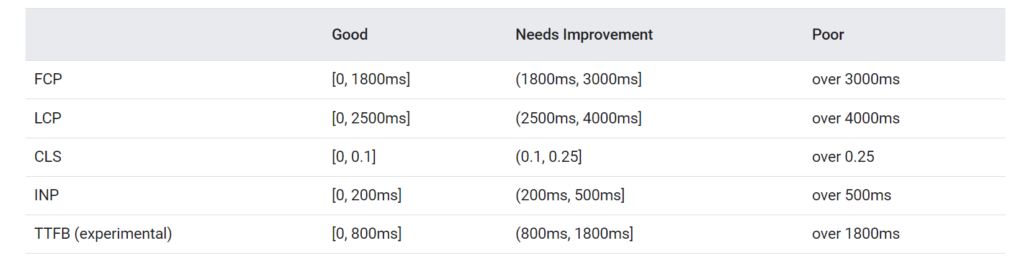
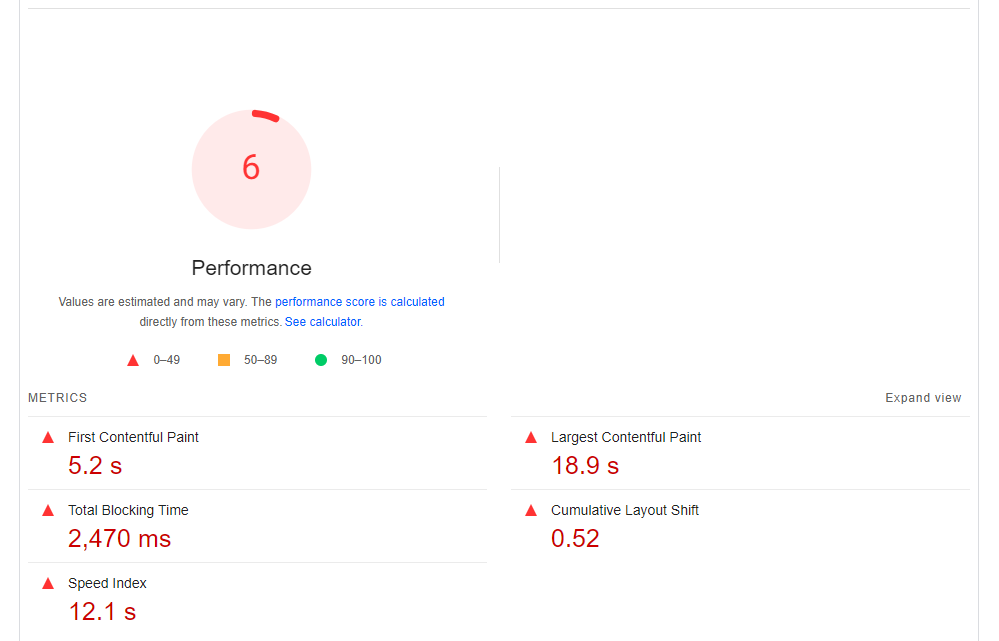
It provides suggestions to improve the site’s speed and user experience. The metrics scores and the perf score are colored according to these ranges:
- 0 to 49 (red): Poor
- 50 to 89 (orange): Needs Improvement
- 90 to 100 (green): Good
PSI sets the following thresholds in alignment with the Web Vitals initiative:
2.2. Performance score
This score is based on factors like loading speed, time to interact, and speed index.
To improve the performance score, focus on optimizing images, minifying and compressing resources, leveraging browser caching, and reducing server response time.
2.3. Accessibility score
This score evaluates your website’s adherence to web content accessibility guidelines (WCAG).
To improve accessibility, ensure proper use of alt tags for images, provide clear focus states, and make sure the website is compatible with assistive technologies.

2.4. Audit categories
Lighthouse provides specific categories for improvement, including:
- Performance: This includes opportunities to improve loading speed, reduce time to interact, and enhance the speed index.
- Accessibility: This includes suggestions for better keyboard navigation, color contrast, and semantic HTML.
- Best Practices: This includes recommendations for search engine optimization (SEO), HTTPS usage, and other best practices.
- SEO: This includes suggestions for improving title and description tags, structured data, and other on-page SEO factors.
- PWA: This category is specifically for Progressive Web App features and improvements.
2.5. Review the audit results
For each category, you can find a list of specific opportunities to improve your website’s performance, accessibility, and other factors.
Click on each issue to get more details and guidance on how to fix them.
STEP 3: MONITOR AND REPEAT
After implementing the recommended changes, we should revisit Google PageSpeed Insights and analyze the results again.
Continue addressing opportunities and diagnostics until you achieve the desired score and performance.
Regular monitoring ensures that your website maintains optimal speed and user experience.
CONCLUSION
Google PageSpeed Insights is a valuable tool for improving your website’s speed and overall performance.
By following these steps, you can optimize your website and provide a better user experience, ultimately benefiting your search engine rankings.
Remember, website speed is an ongoing process, so keep monitoring and making improvements to stay ahead in the competitive digital landscape.