



What is GitLab Runner
GitLab Runner is nothing but its a ‘Machine’ which is used to execute the tasks and commands (Stage & Jobs) of the pipeline.
Just like we use our own Laptop to execute the Linux, Pwsh commands.
What is Docker Executor
The Docker executor is an executor option that allows GitLab Runners to use Docker containers as the execution environment for running CI/CD jobs.
When you configure a GitLab Runner to use the Docker executor, each CI/CD job is run within a Docker container, which is isolated from the host system. This can provide various benefits, including consistency in the execution environment, dependency isolation, and easy scaling.
Installation Guide for Runner
Now we will see a step by step process that how we can setup the GitLab Runner with docker executor.
Step 1:
First of all install Docker on the system where you want to install GitLab runner. Here is the reference : https://docs.docker.com/engine/install/ubuntu/ (It is for ubuntu Operating System you can explore Docker Docs for installation guide for other OS).
Step 2:
After installation of Docker now you can install GitLab runner for Docker Executor.
Note 1: Docker installation is required only when we are going to use Docker Executor.
Note 2: Below commands is only For Linux- Debian/Ubuntu/Mint families. If you have other Operating System then refer this URL to follow same steps for your OS.
URL for installation- https://docs.gitlab.com/runner/install/linux-repository.html
URL for register the runner- https://docs.gitlab.com/runner/register/index.html
– Execute these commands step by step:
1. Add the official GitLab repository:
curl -L “https://packages.gitlab.com/install/repositories/runner/gitlab-runner/script.deb.sh” | sudo bash
2. Install the latest version of GitLab Runner:
sudo apt-get install gitlab-runner
Register your runner in GitLab Project
After installing the GitLab Runner, now we have to register the runner for our GitLab Project. Follow next steps to register the Runner for GitLab Project.
3. Run the register command:
sudo gitlab-runner register
4. Enter your GitLab URL:
https://gitlab.com
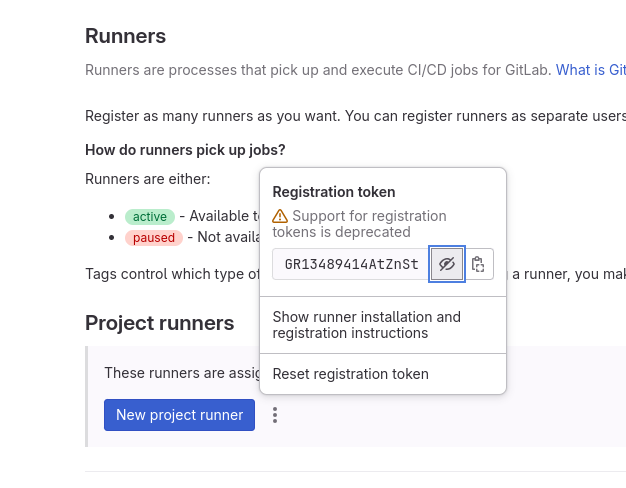
5. Enter the runner registration token:
You will found registration token here – Settings > CICD > Runners > Project Runners.
6. Enter a description for the runner.
7. Enter the job tags, separated by commas:
For example: “runner”. Tags will be used to declare the runner to execute the jobs in the pipeline.
8. Enter an optional maintenance note for the runner:
9. Enter the type of executor:
Enter docker
Now the runner is ready to get used in the Pipeline. All the available runners will be shown to Assigned Project Runners.
